Live transcription on Speak AI

Turn spoken words
into a live transcript.

Speak AI turns any call, meeting, or recording into a live transcript as people speak, then adds speaker labels, structured fields, and a searchable record behind it. Not just captions on a screen. We build it with you.

★★★★★ 4.9 on G2 250,000+ teams Since 2018
yourteam.speakai.co
00:13 / 07:08
PN
Priya N. 00:08
We’re recording live for the compliance team, so let’s keep this precise.
PN
Priya N. 00:47
Renewal risk sits at twelve percent this quarter. Flag: renewal risk · needs follow-up
Runs on the models and connects to the tools you already use
Claude ChatGPT Gemini Zoom Teams Meet Slack Zapier and hundreds more
95%+
Transcription accuracy
100+
Supported languages
100+
MCP tools for your AI
6
Ways to capture
Proof

The wins teams ship.

Time to a live product, hours saved per file, and dollars saved. Same platform, very different applications.

$100K+
saved · 8 months faster

Legal tech company builds a white-label deposition platform, 8 months faster.

Legal · White-label platform
$100K+
saved · 983 hours

Global research agency launches a white-label qualitative research platform.

Research · White-label platform
$700K+
saved · 5,100+ hours

Legal intelligence firm processes 5,100+ hours of carrier calls, 95% faster.

Legal · Intelligence at scale
$190K+
saved · 10,000+ hours

Healthcare consulting firm cut session processing from 8 hours to 0.3.

Healthcare · Consulting
$185K+
saved · 3,700+ hours

E-commerce manufacturer centralizes call review and cuts it by 85%.

E-Commerce · Manufacturing
96%
faster · 1,100+ hours

Recruiting firm cuts candidate report time from 5 hours to 10 minutes.

Recruiting · Reporting
The free consult

Bring one live conversation. Leave with a transcript.

A working session, not a sales pitch. No obligation.

Step 1

You bring a real recording

A webinar, a lecture, a live interview, a meeting in progress. Whatever your team currently captions or transcribes by hand.

Step 2

We map your workflow

The fields you already track, the terms your team uses, the outputs you need. Your words, your structure. Not a template.

Step 3

You see it transcribed, live

Your own audio, turned into a real-time transcript with speakers and fields, plus a rollout plan for the whole team.

One engine, every team

Live transcription for every kind of team.

The same engine, pointed at the audio your team already captures.

Journalism & media

Interviews & broadcasts

Live interviews, press calls, and broadcasts transcribed as they happen, ready to quote and file.

Education

Lecture & classroom capture

Lectures and seminars turned into a live transcript, so notes are captured even when attention is not.

Webinars & events

Webinars & virtual events

Every session transcribed live, with a searchable recap ready the moment the call ends.

Legal & compliance

Compliance & intake calls

Live calls transcribed with speakers and timestamps, into a record your team can trust.

Accessibility

Accessibility & captioning

Real-time captions for meetings and events, plus a transcript and recording kept afterward.

Agencies

Agencies & white label

Run live transcription for clients on a branded workspace, with exports and the API.

A different approach to live transcription.

Live transcription apps use speech recognition to turn spoken audio into text as it is being said, so a lecture, an interview, or a meeting becomes readable words on screen in near real time instead of an audio file to review later. Reporters, students, and event teams have relied on this category for years to keep up with a conversation without stopping it to take notes.

Why live transcription apps stall

Most of these apps do one thing well and stop there. Freemium cloud tools like the ones built for meeting platforms will stream a decent transcript into Zoom, Meet, or Teams and store it in Drive or Dropbox, but the text is the whole product. Apps built for journalists and podcasters add editing and sharing on top of the transcript. Hybrid AI-plus-human services trade speed for a cleaner file you wait longer for. General note-taking apps bolt transcription onto notes as one more field. In every case the output is a wall of text: no sense of which speaker said what with confidence, which parts of the recording matter, and nothing you can ask questions of once the call ends.

Reading it live, not just capturing it

Speak AI treats a live conversation the way a good notetaker would, at machine speed. Words appear in your language, with 100+ supported, as people speak, with each speaker identified and timestamped. Speak AI picks the right model and speech engine, Claude, ChatGPT, or Gemini, for the task and the accent, rather than locking every recording to one vendor. Names, topics, decisions, and follow-ups are extracted into structured fields alongside the raw transcript, not left for someone to dig out afterward.

Then the questions start. Ask across your entire library of live-captured recordings with AI chat, the same way teams once combed through transcripts by hand, now running natively over every session with ChatGPT, Claude, and Gemini built in.

What teams ask their live transcripts

  • “What did we agree to on this call, and who owns each follow-up?”
  • “Which speaker raised the pricing objection, and what exactly did they say?”
  • “Show me every session this month where a customer mentioned a competitor.”
  • “Summarize this lecture into the five points most students will be tested on.”
  • “Which webinars had the most questions, and what were they about?”

From a scrolling transcript to a searchable record

The result is a transcript that keeps working after the recording stops. Speakers and fields are captured live, follow-ups land in your systems through automations instead of a copy-pasted note, and dashboards you can customize and white-label track themes and volume over time, so this month’s sessions are measured against last month’s. One legal intelligence firm put its call volume through this workflow and processed 5,100+ hours and saved $700K, without adding headcount.

And because live sessions rarely stand alone, the same engine scores calls and coaches teams on the same criteria, connecting the live transcript to call scoring and your knowledge base across every conversation your team has.

Your fields, auto-extracted
Primary painManual review time
Switching trigger6 hrs / interview
SentimentPositive
Close score8.4 / 10
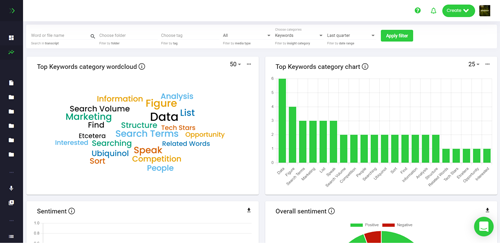
Theme frequency across 42 interviews
Engineered with you

Engineered with you, accurate from day one.

A generic AI tool starts from zero. We shape the fields, speaker setup, and prompts around how your team captures live audio today, then prime the application on your existing recordings so it is useful from the first session. You get structured data back, not just a transcript.

  • We design the context, fields, and scoring around your live-capture workflow, not a template.
  • Your historical recordings and transcripts prime the knowledge base before go-live.
  • Structured data on every session, queryable from Claude, ChatGPT, and Cursor through the MCP server.
MCP, API & integrations

Bring your applications into Claude, ChatGPT, and Cursor.

No terminal. No npm. No config. Speak AI's MCP server gives any assistant 100+ tools to search, analyze, and act on your knowledge base in about 60 seconds. It is the same layer your applications run on, wired into the hundreds of apps in your stack through an integrations layer and a full developer API.

100+
Tools across 10 categories
7+
AI assistants supported
60s
Setup, one URL
Claude
Ask across every recording, transcript, and field from inside Claude.
ChatGPT
Bring transcripts, themes, and structured data into ChatGPT.
Cursor
Pull conversation data straight into your dev environment.
MCP Server
100+ tools, one endpoint. Works with 7+ assistants and counting.
Your data lives in your Speak AI workspace, and you control what each assistant can access.
Unified capture

One system of record for everything your team says.

In-person and virtual, in one place. No stitching together a meeting tool, a voice recorder, and three other apps. Speak AI captures it all into one searchable knowledge base your applications are built on.

Meeting Assistant
Auto-joins Zoom, Microsoft Teams, Google Meet, and Webex.
Embeddable Recorder
Drop a branded recorder into any site, portal, or intake form.
iOS & Android apps
Record in the field, on the go, anywhere you meet. White-label available.
Upload, phone & voice agents
Drag in audio or video, transcribe inbound calls, or let an agent run the conversation.
Meeting Bot
virtual
Recorder
in-person
Mobile App
field
Embed
web
Upload
files
Voice Agent
calls
One Speak AI library
Transcribed, structured, searchable, shareable
★★★★★  4.9 on G2

Teams build on Speak AI.

Real feedback from teams using Speak AI for research, transcription, meetings, and client work.

"We went from weeks of qualitative analysis to one day. Easy to use, easy to implement, and the support has been incredible."
C
Connor H.
Data & Impact Analyst
★★★★★ Verified G2 review
"High accuracy, multilingual support, and insightful analysis. Integrations with Google and Zapier make it easy to streamline everything."
V
Volker B.
COO, Small Business
★★★★★ Verified G2 review
"I use Speak AI in French and English for meetings up to two hours. It saves time and increases the precision of my reports."
F
Francois L.
Financial Advisor
★★★★★ Verified G2 review
"I used to spend 45 minutes transcribing notes. Now it is done in seconds, and I am writing in minutes."
T
Ted H.
Owner, Small Business
★★★★★ Verified G2 review
"Simple to use for meetings. Makes it easy to take minutes and turn them into a clean, shareable report."
N
Naison S.
Project Manager
★★★★★ Verified G2 review
"It is easy to use, and I can actually get in contact with the team behind the product. Valuable to speak to a real human."
M
Markus B.
Medical Director
★★★★★ Verified G2 review

Questions we get

Your first setup runs on a real recording during the consult. Team rollout takes days, not months, because we build it with you and prime it on your existing recordings.

Pooled usage, not per-seat, with no volume minimums. Pilots are credited in full. We scope pricing for your exact workflow on the call.

Speak AI handles 100+ languages, including conversations that switch language mid-sentence, and can translate in and out.

Yes. White-label deployments run on your own domain with your logo, including client platforms agencies resell, plus branded iOS and Android apps.

It depends on what you need after the transcript. Most live transcription apps stop at text on a screen. Speak AI adds speaker identification, structured fields, and AI chat over your entire recording library, so the transcript is a starting point, not the whole product.

Speak AI runs at 95%+ transcription accuracy across 100+ supported languages, with the engine chosen per recording for the accent and audio quality involved.

Enterprise builds support BAAs, custom data processing agreements, SSO, and data residency options. We share security documentation on request and scope each build to your requirements.

From live audio to a working transcript.

Book a free consult, bring a real recording, and watch it transcribed live with speakers and fields before the meeting ends. Consults include early access to new features, an extended trial, and implementation credits.

No obligation. · Prefer to explore on your own? Try Speak free