
Introduction to Transcribing Kiswahili
Transcribing Kiswahili, a rich and widely spoken language across East Africa, is increasingly significant in the global village. From academic research to market analysis, and from enhancing sales strategies to ensuring quality assurance, the conversion of Kiswahili audio to text plays a pivotal role. This post explores the seamless benefits of using advanced Kiswahili AI to text technology provided by Speak AI, a front-runner in integrating Natural Language Processing (NLP), large language models, data visualization, and Generative AI into transcription software. With a 4.9 rating on G2 and over 150K users, Speak AI is your go-to solution for Kiswahili transcription.
Popularity of Kiswahili: Locations, Populations, and Interesting Statistics
Kiswahili, or Swahili, is more than just a language; it’s a linguistic bridge across numerous African countries. It is a national or official language in countries such as Tanzania, Kenya, Uganda, the Democratic Republic of the Congo, and Rwanda. Additionally, it is spoken widely in Burundi, Mozambique, the Comoros Islands, and parts of Malawi, Zambia, and Somalia. With over 100 million speakers, Kiswahili is one of the most spoken languages on the African continent. Its widespread use not only fosters communication and trade within these regions but also offers a rich cultural exchange that has evolved over centuries.
Fun Facts About Kiswahili
- Roots in History: Kiswahili has its roots in the Bantu languages, infused with Arabic due to centuries of trade along the East African coast. This blend gives Kiswahili a unique linguistic texture and historical significance.
- Language of Unity: Kiswahili serves as a lingua franca in East Africa, promoting unity among nations with diverse ethnic languages.
- Global Influence: Kiswahili words have made their way into the English language and popular culture, terms like “safari” (journey) and “simba” (lion), thanks to the global reach of African wildlife documentaries and films.
- Adaptive Language: Kiswahili is known for its adaptability, easily incorporating words from other languages, thereby continuously evolving.
Benefits of Automatic Kiswahili Transcription
Automatic transcription of Kiswahili audio and video files into text is a game-changer for professionals across various sectors. Here are some key benefits:
Poursuivez la lecture du guide complet (cliquer pour agrandir)
- Accessibility and Inclusivity: Converting Kiswahili to text makes content accessible to a wider audience, including those who are deaf or hard of hearing, thereby fostering inclusivity.
- Analyse approfondie : Textual data can be easily analyzed for insights using NLP and large language models, which is invaluable for academic and market researchers.
- Efficacité en termes de coûts et de délais : Automated tools significantly reduce the resources needed for manual transcription, leading to cost and time savings.
- Précision : With advancements in AI technology, the accuracy of transcriptions is constantly improving, even with dialectal variations within Kiswahili.
Use Cases across Industries
Automatic Kiswahili transcription has tangible impacts across various fields:
Recherche universitaire
Researchers can transcribe interviews, oral histories, and lectures for qualitative analysis, preserving indigenous knowledge and facilitating cross-language academic collaboration.
Étude de marché
Understanding consumer behavior through sentiment analysis of focus group discussions and customer interviews in Kiswahili can provide invaluable local insights for businesses aiming to enter or expand in the East African market.
Sales and Customer Service
Sales strategies can be fine-tuned and customer service improved by analyzing customer call transcriptions, identifying pain points, and customer needs effectively.
Quality Assurance
Businesses can ensure the quality of their Kiswahili-speaking customer support by transcribing and analyzing interactions, maintaining service standards.
Création de contenu et marketing
Transcribing Kiswahili content to create text-based marketing materials helps in reaching a broader audience, including those who prefer reading over watching videos or listening to audio.
Why Choose Speak AI for Kiswahili Transcription?
Speak AI stands out in the transcription domain for several reasons:
- Integration with Leading Platforms: Our AI Meeting Assistant seamlessly integrates with popular platforms like Microsoft Teams, Zoom, Google Meet, and Webex, ensuring efficient transcription of Kiswahili meetings and discussions.
- Advanced NLP Capabilities: With our advanced NLP, we offer not just transcription but deep insights and analysis, turning your Kiswahili audio and video data into actionable intelligence.
- Accuracy and Speed: Speak AI is committed to providing highly accurate transcriptions promptly, leveraging the best of AI technology.
- Interface conviviale : Our platform is designed to be intuitive and user-friendly, making it easy for anyone to convert Kiswahili audio and video to text effortlessly.
Conclusion
In an increasingly digital world, the need to transcribe and analyze Kiswahili content efficiently cannot be overstated. Whether for academic research, market analysis, improving sales strategies, or ensuring quality customer service, the benefits of using an advanced tool like Speak AI are vast. Embrace the future of transcription and unlock the full potential of your Kiswahili audio and video content today.
Contact Speak AI to explore how our Kiswahili video to text converter and audio to text solutions can transform your operations and decision-making processes.
How To Transcribe Kiswahili Using Speak
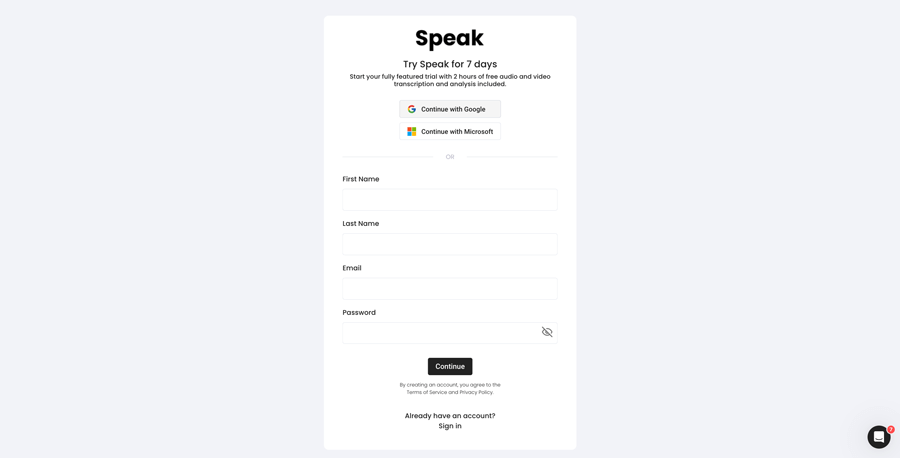
Étape 1 : Créer un compte Speak
To start your Kiswahili transcription, you first need to créer un compte Speak. Pas d'inquiétude, c'est très facile à faire !
Our team is happy to give you a 7-day trial with 30 minutes of free Kiswahili audio and video transcription included.
To sign up for Speak and start your Kiswahili transcription, visit the Speak app register page here.

Step 2: Upload your Kiswahili file(s) for Transcription
Nous recommandons généralement les fichiers MP4 pour la vidéo et les fichiers MP3 pour l'audio, mais nous acceptons également toute une série de types de fichiers audio et vidéo.
Once you upload your file all you have to do is select “Kiswahili” from the language dropdown menu to automatically transcribe in Kiswahili.
You can upload your Kiswahili file for transcription in several ways using Speak:
Accepted Kiswahili Audio File Types
- Kiswahili MP3
- Kiswahili M4A
- Kiswahili WAV
- Kiswahili OGG
- Kiswahili WEBM
- Kiswahili M4P
Accepted Kiswahili Video File Types
- Kiswahili MP4
- Kiswahili M4V
- Kiswahili WMV
- Kiswahili AVI
- Kiswahili MOV
- Kiswahili FLV
Publicly Available Kiswahili URLs
Vous pouvez également télécharger des médias sur Speak par le biais d'une adresse URL publique.
Tant que l'extension du type de fichier est disponible à la fin de l'URL, vous n'aurez aucun problème pour importer votre enregistrement en vue d'une transcription et d'une analyse automatiques.
Kiswahili YouTube URLs
Speak est compatible avec les vidéos YouTube. Il suffit de copier l'URL de la vidéo YouTube (par exemple, https://www.youtube.com/watch?v=qKfcLcHeivc).
Speak trouvera automatiquement le fichier, calculera la longueur et importera la vidéo.
Veillez à utiliser le lien complet et non l'extrait abrégé de YouTube. En outre, veillez à supprimer le nom de la chaîne de l'URL.
Intégrations Speak
Comme indiqué, Speak contient également une série d'intégrations pour Zoom, ZapierVimeo et d'autres encore qui vous aideront à transcrire automatiquement vos médias.
Cette bibliothèque d'intégrations continue de s'enrichir ! Vous avez une demande ? N'hésitez pas à nous envoyer un message.
Étape 3 : Calculer et payer le total automatiquement
Once you have your Kiswahili audio or video file ready and have loaded it into Speak, it will automatically calculate the total cost (you get 30 minutes free in the trial – take advantage of it!).
Vous pouvez payer en souscrivant un plan personnalisé à l'aide de notre calculateur en temps réel avec minutes incluses.
Vous pouvez également ajouter un solde ou payer pour des téléchargements sans plan en utilisant votre carte de crédit.
Step 4: Wait for Speak to transcribe your Kiswahili audio or Kiswahili video
Notre logiciel de transcription automatique préparera votre transcription en quelques minutes seulement. En général, Speak prend environ la moitié de la durée de l'audio ou de la vidéo pour produire la transcription et les aperçus.
Une fois la transcription terminée, vous recevrez un courriel vous informant que votre transcription est complète. Cet e-mail contiendra un lien vers le fichier afin que vous puissiez accéder au lecteur multimédia interactif avec la transcription, l'analyse et les formats d'exportation prêts à l'emploi.

Étape 5 : Consultez et modifiez votre relevé de notes automatisé
Vous voulez vous attaquer vous-même à l'édition des transcriptions ? C'est très bien ! Une fois que vous avez reçu votre relevé de notes automatisé, vous avez la possibilité de le modifier à tout moment.
Mettez facilement à jour les noms des orateurs, recherchez et remplacez, et faites en sorte que votre transcription automatique soit parfaitement exacte grâce à notre système d'édition de transcription intuitif.
Étape 6 : Exporter votre transcription et partager les lecteurs multimédias interactifs
Vous pouvez exporter votre transcription au format PDF, Word, TXT, HTML et même dans des formats plus avancés comme CSV ou JSON, en fonction de votre plan.
Un moyen plus efficace de partager les transcriptions est d'utiliser un site web. médiathèque partageable qui comprend le fichier média, des informations sur l'intelligence artificielle et une transcription interactive.
Vous pouvez faire beaucoup plus avec Speak pour enrichir la valeur de vos médias et de vos transcriptions.
N'hésitez pas à nous envoyer un message sur le chat en direct - nous sommes toujours là pour vous aider !
We talked about Kiswahili transcription here, but you may be interested in how to transcribe in other languages instantly and easily with Speak’s intuitive transcription and natural language processing software. We’ve shared resources below on all the languages Speak can help you transcribe!
Join 300,000+ users finding radical efficiencies with their audio, video and text data to drive value.

How Much Does It Cost To Transcribe Kiswahili?
Speak offers highly competitive pricing for Kiswahili transcription compared to other transcription solutions. For a starting user, Speak offers automated Kiswahili transcription for only $0.025 USD per minute. That is only $1.50 USD per hour!
Nous avons également offres spéciales pour obtenir des prix qui regroupent la transcription, les membres de l'équipe d'analyse, la traduction et plus encore, avec une réduction incroyable !
We also scale our pricing based on media volume and can offer even bigger discounts to large customers. So, if you have over 100 hours of Kiswahili transcription per month, please contact us through live chat, and we will set you up with a customized price per minute to make Kiswahili transcription even more affordable!
You can learn more about how to transcribe Kiswahili with Speak and the relevant pricing on the page de tarification du site web et le page de tarification in-app.
What Can You Transcribe In Kiswahili?
- Transcribe Kiswahili interviews
- Transcribe Kiswahili videos
- Transcribe Kiswahili audio
- Transcribe Kiswahili earnings calls
- Transcribe Kiswahili focus groups
- Transcribe Kiswahili meetings
- Transcribe Kiswahili phone calls
- Transcribe Kiswahili YouTube videos
- Transcribe Kiswahili Vimeo videos
- Transcribe Kiswahili Zoom recordings
- Transcribe Kiswahili Google Meet recordings
- Transcrire les enregistrements de Microsoft Teams
- Transcribe Kiswahili podcasts
Et bien plus encore !
How To Export Kiswahili Transcripts
With Speak, you can easily export Kiswahili transcriptions to many formats.
Below is a list of options for exporting your Kiswahili transcripts in Speak:
- Export Kiswahili transcripts to Word Docs
- Export Kiswahili transcripts to PDFs
- Export Kiswahili transcripts to CSVs
- Export Kiswahili transcripts to TXT files
- Export Kiswahili transcripts to HTML
- Export Kiswahili transcripts to SRTs
- Export Kiswahili transcripts to VTTs
- Export Kiswahili transcripts to JSON
How To Generate Kiswahili Captions
If you are looking to subtitle in Kiswahili or caption in Kiswahili, Speak is a powerful solution. Speak’s automatic transcription software automatically generated Kiswahili transcripts with timestamps that enable Speak to quickly create SRT and VTT files necessary for Kiswahili captions and Kiswahili subtitles.
Quelles sont les autres langues que Speak peut transcrire ?
Speak compte déjà des utilisateurs dans plus de 90 pays et nous recevons continuellement des demandes de transcription et d'analyse dans différentes langues.
C'est pourquoi nous ajoutons continuellement de nouvelles langues à Speak ! Voici quelques-unes des langues qui s'ajoutent à la liste des langues proposées par Speak :
- Comment transcrire l'abkhaze
- Comment transcrire l'albanais
- Comment transcrire l'amharique
- Comment transcrire l'arabe (Égypte)
- Comment transcrire l'arabe (Irak)
- Comment transcrire l'arabe (Israël)
- Comment transcrire l'arabe (Jordanie)
- Comment transcrire l'arabe (Koweït)
- Comment transcrire l'arabe (Liban)
- Comment transcrire l'arabe standard moderne (Bahreïn)
- Comment transcrire l'arabe (Oman)
- Comment transcrire l'arabe (Autorité palestinienne)
- Comment transcrire l'arabe (Qatar)
- Comment transcrire l'arabe (Arabie saoudite)
- Comment transcrire l'arabe (République arabe syrienne)
- Comment transcrire l'arabe (EAU)
- Comment transcrire l'arménien
- Comment transcrire l'assamais
- Comment transcrire l'asturien
- Comment transcrire l'azerbaïdjanais
- Comment transcrire le bachkir
- Comment transcrire le basque
- Comment transcrire le biélorusse
- Comment transcrire du bengali
- Comment transcrire le bosniaque
- Comment transcrire le bulgare
- Comment transcrire le birman
- Comment transcrire le catalan
- Comment transcrire le chinois (cantonais, traditionnel)
- Comment transcrire le chinois (simplifié)
- Comment transcrire le croate
- Comment transcrire le tchèque
- Comment transcrire le danois
- Comment transcrire le néerlandais
- Comment transcrire l'anglais (Australie)
- Comment transcrire l'anglais (britannique)
- Comment transcrire l'anglais (Royaume-Uni)
- Comment transcrire l'anglais (États-Unis)
- Comment transcrire l'estonien
- Comment transcrire le farsi
- Comment transcrire en finnois
- Comment transcrire du philippin
- Comment transcrire le flamand
- Comment transcrire le français
- Comment transcrire le français (Canada)
- Comment transcrire le galicien
- Comment transcrire le géorgien
- Comment transcrire l'allemand
- Comment transcrire l'allemand (suisse)
- Comment transcrire le grec
- Comment transcrire le gujarati
- Comment transcrire le haoussa
- Comment transcrire l'hébreu
- Comment transcrire l'hindi
- Comment transcrire le hongrois
- Comment transcrire l'islandais
- Comment transcrire en indonésien
- Comment transcrire l'irlandais
- Comment transcrire l'italien
- Comment transcrire le japonais
- Comment transcrire le javanais
- Comment transcrire le kabyle
- Comment transcrire en Kannada
- Comment transcrire le kazakh
- Comment transcrire le khmer
- Comment transcrire le kinyarwanda
- Comment transcrire le swahili
- Comment transcrire en coréen
- Comment transcrire le kurde
- Comment transcrire le kirghize
- Comment transcrire le laotien
- Comment transcrire le letton
- Comment transcrire le lituanien
- Comment transcrire le luganda
- Comment transcrire le macédonien
- Comment transcrire le malais
- Comment transcrire le malayalam
- Comment transcrire le maltais
- Comment transcrire le marathi
- Comment transcrire Meadow Mari
- Comment transcrire le mongol
- Comment transcrire le népalais
- Comment transcrire le norvégien
- Comment transcrire l'Odia
- Comment transcrire l'oriya
- Comment transcrire le pachto
- Comment transcrire le persan
- Comment transcrire le polonais
- Comment transcrire le portugais
- Comment transcrire du portugais (brésilien)
- Comment transcrire du portugais (Portugal)
- Comment transcrire le punjabi
- Comment transcrire en roumain
- Comment transcrire le russe
- Comment transcrire le serbe
- Comment transcrire le cinghalais
- Comment transcrire le slovaque
- Comment transcrire le slovène
- Comment transcrire le somali
- Comment transcrire l'espagnol
- Comment transcrire l'espagnol (Mexique)
- Comment transcrire le sundanais
- Comment transcrire le swahili
- Comment transcrire le suédois
- Comment transcrire le tagalog
- Comment transcrire le tamoul
- Comment transcrire le tatar
- Comment transcrire le télougou
- Comment transcrire le thaïlandais
- Comment transcrire le turc
- Comment transcrire l'ukrainien
- Comment transcrire le vietnamien
- Comment transcrire l'ourdou
- Comment transcrire l'ouïghour
- Comment transcrire en ouzbek
- Comment transcrire le gallois
- Comment transcrire le wolof
- Comment transcrire le zoulou
Il y en a maintenant beaucoup plus !
Vous pouvez voir la liste complète des langues prises en charge par Speak par le biais du logiciel et des API.
Transcrivez avec Speak AI — Plus de 100 langues supportées
Speak AI supports transcription in 100+ languages including Kiswahili. Upload your audio or video files and get accurate, AI-powered transcriptions with built-in NLP analytics, sentiment analysis, and keyword extraction. Available for individuals, researchers, and enterprise teams.
Logiciel de transcription automatisée
Assistant de réunion AI
Agents vocaux IA
Conseil et mise en œuvre de l'IA
Convertisseur audio vers texte
Analyseur de transcription
 English
  Español
  Français
  Italiano
  العربية
  Português do Brasil
  Nederlands
  Deutsch
  עִבְרִית
  Русский
  日本語
日本語  Polski
  Čeština
  Українська
  Slovenščina
  Svenska
  Ελληνικά
  Norsk bokmål
  简体中文
简体中文  Türkçe
  Català
  Magyar
  한국어
한국어  Slovenčina
  Suomi
Suomi