
Introduction to Transcribing Kiswahili
Transcribing Kiswahili, a rich and widely spoken language across East Africa, is increasingly significant in the global village. From academic research to market analysis, and from enhancing sales strategies to ensuring quality assurance, the conversion of Kiswahili audio to text plays a pivotal role. This post explores the seamless benefits of using advanced Kiswahili AI to text technology provided by Speak AI, a front-runner in integrating Natural Language Processing (NLP), large language models, data visualization, and Generative AI into transcription software. With a 4.9 rating on G2 and over 150K users, Speak AI is your go-to solution for Kiswahili transcription.
Popularity of Kiswahili: Locations, Populations, and Interesting Statistics
Kiswahili, or Swahili, is more than just a language; it’s a linguistic bridge across numerous African countries. It is a national or official language in countries such as Tanzania, Kenya, Uganda, the Democratic Republic of the Congo, and Rwanda. Additionally, it is spoken widely in Burundi, Mozambique, the Comoros Islands, and parts of Malawi, Zambia, and Somalia. With over 100 million speakers, Kiswahili is one of the most spoken languages on the African continent. Its widespread use not only fosters communication and trade within these regions but also offers a rich cultural exchange that has evolved over centuries.
Fun Facts About Kiswahili
- Roots in History: Kiswahili has its roots in the Bantu languages, infused with Arabic due to centuries of trade along the East African coast. This blend gives Kiswahili a unique linguistic texture and historical significance.
- Language of Unity: Kiswahili serves as a lingua franca in East Africa, promoting unity among nations with diverse ethnic languages.
- Global Influence: Kiswahili words have made their way into the English language and popular culture, terms like “safari” (journey) and “simba” (lion), thanks to the global reach of African wildlife documentaries and films.
- Adaptive Language: Kiswahili is known for its adaptability, easily incorporating words from other languages, thereby continuously evolving.
Benefits of Automatic Kiswahili Transcription
Automatic transcription of Kiswahili audio and video files into text is a game-changer for professionals across various sectors. Here are some key benefits:
继续阅读完整指南 (点击展开)
- Accessibility and Inclusivity: Converting Kiswahili to text makes content accessible to a wider audience, including those who are deaf or hard of hearing, thereby fostering inclusivity.
- 增强分析: Textual data can be easily analyzed for insights using NLP and large language models, which is invaluable for academic and market researchers.
- Cost and Time Efficiency: Automated tools significantly reduce the resources needed for manual transcription, leading to cost and time savings.
- 准确性: With advancements in AI technology, the accuracy of transcriptions is constantly improving, even with dialectal variations within Kiswahili.
Use Cases across Industries
Automatic Kiswahili transcription has tangible impacts across various fields:
学术研究
Researchers can transcribe interviews, oral histories, and lectures for qualitative analysis, preserving indigenous knowledge and facilitating cross-language academic collaboration.
市场研究
Understanding consumer behavior through sentiment analysis of focus group discussions and customer interviews in Kiswahili can provide invaluable local insights for businesses aiming to enter or expand in the East African market.
Sales and Customer Service
Sales strategies can be fine-tuned and customer service improved by analyzing customer call transcriptions, identifying pain points, and customer needs effectively.
Quality Assurance
Businesses can ensure the quality of their Kiswahili-speaking customer support by transcribing and analyzing interactions, maintaining service standards.
市场营销与内容创作
Transcribing Kiswahili content to create text-based marketing materials helps in reaching a broader audience, including those who prefer reading over watching videos or listening to audio.
Why Choose Speak AI for Kiswahili Transcription?
Speak AI stands out in the transcription domain for several reasons:
- Integration with Leading Platforms: Our AI Meeting Assistant seamlessly integrates with popular platforms like Microsoft Teams, Zoom, Google Meet, and Webex, ensuring efficient transcription of Kiswahili meetings and discussions.
- Advanced NLP Capabilities: With our advanced NLP, we offer not just transcription but deep insights and analysis, turning your Kiswahili audio and video data into actionable intelligence.
- Accuracy and Speed: Speak AI is committed to providing highly accurate transcriptions promptly, leveraging the best of AI technology.
- 用户友好界面: Our platform is designed to be intuitive and user-friendly, making it easy for anyone to convert Kiswahili audio and video to text effortlessly.
结论
In an increasingly digital world, the need to transcribe and analyze Kiswahili content efficiently cannot be overstated. Whether for academic research, market analysis, improving sales strategies, or ensuring quality customer service, the benefits of using an advanced tool like Speak AI are vast. Embrace the future of transcription and unlock the full potential of your Kiswahili audio and video content today.
Contact Speak AI to explore how our Kiswahili video to text converter and audio to text solutions can transform your operations and decision-making processes.
How To Transcribe Kiswahili Using Speak
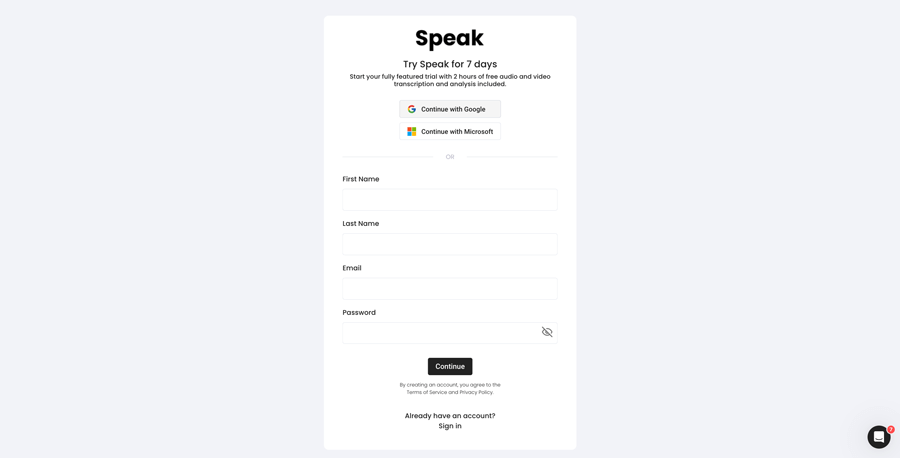
步骤 1:创建 Speak 账户
To start your Kiswahili transcription, you first need to 创建 Speak 帐户.不用担心,这非常容易做到!
Our team is happy to give you a 7-day trial with 30 minutes of free Kiswahili audio and video transcription included.
To sign up for Speak and start your Kiswahili transcription, visit the Speak app register page here.

Step 2: Upload your Kiswahili file(s) for Transcription
不过,我们也接受各种音频和视频文件类型。
Once you upload your file all you have to do is select “Kiswahili” from the language dropdown menu to automatically transcribe in Kiswahili.
You can upload your Kiswahili file for transcription in several ways using Speak:
Accepted Kiswahili Audio File Types
- Kiswahili MP3
- Kiswahili M4A
- Kiswahili WAV
- Kiswahili OGG
- Kiswahili WEBM
- Kiswahili M4P
Accepted Kiswahili Video File Types
- Kiswahili MP4
- Kiswahili M4V
- Kiswahili WMV
- Kiswahili AVI
- Kiswahili MOV
- Kiswahili FLV
Publicly Available Kiswahili URLs
您还可以通过公开的 URL 将媒体上传到 Speak。
只要 URL 末尾有文件类型扩展名,就可以顺利导入录音,进行自动转录和分析。
Kiswahili YouTube URLs
Speak 与 YouTube 视频兼容。您只需复制 YouTube 视频的 URL(例如、 https://www.youtube.com/watch?v=qKfcLcHeivc).
Speak 会自动查找文件、计算长度并导入视频。
请确保使用完整链接,而不是缩短的 YouTube 片段。此外,请确保删除 URL 中的频道名称。
发言集成
如前所述,Speak 还包含一系列集成功能,用于 放大, Zapier、Vimeo 等,帮助你自动转录媒体。
集成库还在不断扩大!有要求吗?请随时给我们留言。
第 3 步:自动计算并支付总额
Once you have your Kiswahili audio or video file ready and have loaded it into Speak, it will automatically calculate the total cost (you get 30 minutes free in the trial – take advantage of it!).
您可以使用我们的实时计算器订购个性化计划,并包含分钟数。
Step 4: Wait for Speak to transcribe your Kiswahili audio or Kiswahili video
我们的自动转录软件可在几分钟内完成转录。一般来说,Speak 需要大约音频或视频长度一半的时间来制作转录稿和见解。
完成后,您将收到一封电子邮件通知,说明您的记录誊本已完成。该电子邮件将包含一个指向文件的链接,这样您就可以访问交互式媒体播放器,该播放器已为您准备好成绩单、分析和导出格式。

第 5 步:查看和编辑自动成绩单
想自己解决文字编辑问题?没问题!收到自动成绩单后,您可以随时编辑成绩单。
使用我们直观的录音誊本编辑系统,轻松更新发言人姓名、查找和替换,并使自动录音誊本达到完全准确。
第 6 步:导出您的记录誊本并共享交互式媒体播放器
您可以将成绩单导出为 PDF、Word、TXT、HTML 甚至 CSV 或 JSON 等更高级的格式,具体取决于您的计划。
分享记录誊本的更有效方法是通过 可共享媒体库 其中包括媒体文件、人工智能见解和交互式文字稿。
您还可以使用 Speak 来丰富媒体和文字记录的价值。
请随时通过在线聊天向我们发送信息,我们随时准备为您提供帮助!
We talked about Kiswahili transcription here, but you may be interested in how to transcribe in other languages instantly and easily with Speak’s intuitive transcription and natural language processing software. We’ve shared resources below on all the languages Speak can help you transcribe!
加入 200,000 多名用户的行列,利用音频、视频和文本数据提高效率,实现价值。

How Much Does It Cost To Transcribe Kiswahili?
Speak offers highly competitive pricing for Kiswahili transcription compared to other transcription solutions. For a starting user, Speak offers automated Kiswahili transcription for only $0.025 USD per minute. That is only $1.50 USD per hour!
我们还有 特别优惠 以难以置信的折扣价购买转录、分析团队成员、翻译等服务!
We also scale our pricing based on media volume and can offer even bigger discounts to large customers. So, if you have over 100 hours of Kiswahili transcription per month, please contact us through live chat, and we will set you up with a customized price per minute to make Kiswahili transcription even more affordable!
You can learn more about how to transcribe Kiswahili with Speak and the relevant pricing on the 网站定价页面 和 应用内定价页面.
What Can You Transcribe In Kiswahili?
- Transcribe Kiswahili interviews
- Transcribe Kiswahili videos
- Transcribe Kiswahili audio
- Transcribe Kiswahili earnings calls
- Transcribe Kiswahili focus groups
- Transcribe Kiswahili meetings
- Transcribe Kiswahili phone calls
- Transcribe Kiswahili YouTube videos
- Transcribe Kiswahili Vimeo videos
- Transcribe Kiswahili Zoom recordings
- Transcribe Kiswahili Google Meet recordings
- 转录 Microsoft Teams 录音
- Transcribe Kiswahili podcasts
还有更多!
How To Export Kiswahili Transcripts
With Speak, you can easily export Kiswahili transcriptions to many formats.
Below is a list of options for exporting your Kiswahili transcripts in Speak:
- Export Kiswahili transcripts to Word Docs
- Export Kiswahili transcripts to PDFs
- Export Kiswahili transcripts to CSVs
- Export Kiswahili transcripts to TXT files
- Export Kiswahili transcripts to HTML
- Export Kiswahili transcripts to SRTs
- Export Kiswahili transcripts to VTTs
- Export Kiswahili transcripts to JSON
How To Generate Kiswahili Captions
If you are looking to subtitle in Kiswahili or caption in Kiswahili, Speak is a powerful solution. Speak’s automatic transcription software automatically generated Kiswahili transcripts with timestamps that enable Speak to quickly create SRT and VTT files necessary for Kiswahili captions and Kiswahili subtitles.
Speak 还能转录哪些语言?
Speak 已经拥有来自 90 多个国家的用户,我们不断收到用不同语言进行转录和分析的请求。
因此,我们不断为 Speak 添加更多语言!以下是 Speak 不断增加的语言中的一部分:
- 如何转录阿布哈兹语
- 如何转录阿尔巴尼亚语
- 如何转录阿姆哈拉语
- 如何转录阿拉伯语(埃及)
- 如何转录阿拉伯语(伊拉克)
- 如何转录阿拉伯语(以色列)
- 如何转录阿拉伯语(约旦)
- 如何转录阿拉伯语(科威特)
- 如何转录阿拉伯语(黎巴嫩)
- 如何转录现代标准阿拉伯语(巴林)
- 如何转录阿拉伯语(阿曼)
- 如何转录阿拉伯语(巴勒斯坦权力机构)
- 如何转录阿拉伯语(卡塔尔)
- 如何转录阿拉伯语(沙特阿拉伯)
- 如何转录阿拉伯语(阿拉伯叙利亚共和国)
- 如何转录阿拉伯语(阿联酋)
- 如何转录亚美尼亚语
- 如何转录阿萨姆语
- 如何转录阿斯图里亚语
- 如何转录阿塞拜疆语
- 如何转录巴什基尔语
- 如何转录巴斯克语
- 如何转录白俄罗斯语
- 如何转录孟加拉语
- 如何转录波斯尼亚语
- 如何转录保加利亚语
- 如何转录缅甸语
- 如何转写加泰罗尼亚语
- 如何抄写中文(粤语、繁体)
- 如何抄写中文(简体)
- 如何转录克罗地亚语
- 如何转录捷克语
- 如何转录丹麦语
- 如何转录荷兰语
- 如何转录英语(澳大利亚)
- 如何转录英语(英国)
- 如何转录英语(英国)
- 如何转录英语(美国)
- 如何转录爱沙尼亚语
- 如何转录波斯语
- 如何转录芬兰语
- 如何转录菲律宾语
- 如何转录佛兰芒语
- 如何转录法语
- 如何转录法语(加拿大)
- 如何转录加利西亚语
- 如何转录格鲁吉亚语
- 如何转录德语
- 如何转录德语(瑞士语)
- 如何抄写希腊文
- 如何转录古吉拉特语
- 如何转录豪萨语
- 如何转录希伯来语
- 如何转录印地语
- 如何转录匈牙利语
- 如何转录冰岛语
- 如何转录印尼语
- 如何转录爱尔兰语
- 如何转录意大利语
- 如何抄写日语
- 如何转录爪哇语
- 如何转录卡比尔语
- 如何转录卡纳达语
- 如何转录哈萨克语
- 如何转录高棉语
- 如何转录卢旺达语
- 如何转录斯瓦希里语
- 如何转录韩语
- 如何转录库尔德语
- 如何转录吉尔吉斯语
- 如何转录老挝语
- 如何转录拉脱维亚语
- 如何转录立陶宛语
- 如何转录卢干达语
- 如何转录马其顿语
- 如何转录马来语
- 如何转录马拉雅拉姆语
- 如何转录马耳他语
- 如何转录马拉地语
- 如何转录 Meadow Mari
- 如何转录蒙古语
- 如何转录尼泊尔语
- 如何转录挪威语
- 如何转录奥里亚语
- 如何转录奥里亚语
- 如何转录普什图语
- 如何转录波斯语
- 如何转录波兰语
- 如何转录葡萄牙语
- 如何转录葡萄牙语(巴西)
- 如何转录葡萄牙语(葡萄牙)
- 如何转录旁遮普语
- 如何转录罗马尼亚语
- 如何转录俄语
- 如何转录塞尔维亚语
- 如何转录僧伽罗语
- 如何转录斯洛伐克语
- 如何转录斯洛文尼亚语
- 如何转录索马里语
- 如何转录西班牙语
- 如何转录西班牙语(墨西哥)
- 如何翻译巽他语
- 如何转录斯瓦希里语
- 如何转录瑞典语
- 如何抄写他加禄语
- 如何转录泰米尔语
- 如何转写塔塔尔文
- 如何转录泰卢固语
- 如何转录泰语
- 如何转录土耳其语
- 如何转录乌克兰语
- 如何转录越南语
- 如何转录乌尔都语
- 如何翻译维吾尔语
- 如何转录乌兹别克语
- 如何转录威尔士语
- 如何转录沃洛夫语
- 如何转录祖鲁语
现在又增加了许多!
您可以看到 Speak 支持的全部语言列表 通过软件和应用程序接口。
使用 Speak AI 进行转录——支持 100 多种语言
Speak AI supports transcription in 100+ languages including Kiswahili. Upload your audio or video files and get accurate, AI-powered transcriptions with built-in NLP analytics, sentiment analysis, and keyword extraction. Available for individuals, researchers, and enterprise teams.
 English
  Español
  Français
  Italiano
  العربية
  Português do Brasil
  Nederlands
  Deutsch
  עִבְרִית
  Русский
  日本語
日本語  Polski
  Čeština
  Українська
  Slovenščina
  Svenska
  Ελληνικά
  Norsk bokmål
  简体中文
简体中文  Türkçe
  Català
  Magyar
  한국어
한국어  Slovenčina
  Suomi
Suomi