
ChatGPT peut-il analyser l'audio et les appels ? Pas seul. Avec Speak AI, oui.
ChatGPT peut-il analyser l'audio ? Not on its own for your saved recordings. ChatGPT can take one audio file at a time inside a single conversation. With the Speak AI plugin installed, ChatGPT can search and analyze all of them, including transcripts, tone and call scores.
Speak AI is an official plugin in ChatGPT. Install it in about two minutes and ask questions across every call, meeting and recording, not just the one file in the chat.
Gratuit Essai de 7 joursAucune carte de crédit requise. Open the plugin in ChatGPT
- 190+ outils
- 70+ langues
- Connects in about 2 minutes
- 4.9 sur G2
Fiable par plus de 300 000 personnes et équipes





Ce que vous pouvez faire
Install the Speak AI plugin and turn ChatGPT into a transcription, search, and analysis workspace. No switching tabs, no file exports, no copy-pasting.
Transcrivez audio et vidéo
Oui, ChatGPT peut analyser l'audio files when Speak AI is installed. Upload any recording and get transcripts, sentiment analysis, themes, and action items in 70+ languages, with automatic speaker detection. MP3, MP4, WAV, M4A, and dozens of other formats.
Recherchez dans les enregistrements
Find quotes, topics, or moments across your whole media library from ChatGPT. Ask “What did the customer say about pricing?” and get results from every relevant recording, with timestamps and speaker labels.
Analyser les modèles
Compare themes across interviews, track sentiment over time, and spot trends in customer feedback. Speak AI runs NLP on every file, so ChatGPT can pull keywords, entities, and topics without reprocessing. Associé : ChatGPT pour Safari.
Automatiser les workflows
Schedule meeting bots to join your Zoom, Google Meet, or Teams calls. Organize recordings into folders. Export transcripts as PDF, DOCX, SRT, or plain text, all through conversation.
Install the Speak AI plugin in ChatGPT
Four steps, about two minutes. No coding and no URL to paste.
- 1
Créez votre compte Speak AI
Inscrivez-vous sur app.speakai.co with a free 7-day trial. You get free credits, access to all 190+ tools, and full NLP analytics. No credit card needed. No account yet? You can also sign up from the sign-in page that opens during step 3.
- 2
Install the plugin
While signed in to ChatGPT, open Speak AI in ChatGPT et cliquez Install plugin.
- 3
Authorize Speak AI
ChatGPT opens a new tab to Speak AI. Sign in, or click Confirm if you are already logged in, to authorize. Return to ChatGPT: Speak AI is now in your apps list.
- 4
Turn it on in a chat and ask
Open a chat, click the + menu and enable Speak AI for that chat. Then try “Upload this recording and summarize it”, “What themes appear across my interviews?”, “Search my transcripts for competitor mentions” or “Export yesterday’s meeting as a PDF”.
Cannot install plugins?Your ChatGPT workspace admin may need to allow Speak AI. Developers calling the Responses API can follow the ChatGPT API guide. The same connection also works over MCP in other tools, see the MCP server page.
Ways to work with audio in ChatGPT
ChatGPT has its own audio features. Speak AI adds a library you can search from any chat.
| Attach an audio file to a chat | ChatGPT Record | Speak AI plugin | |
|---|---|---|---|
| Idéal pour | One file in one conversation | Summaries of a meeting or voice note | Every recording in a library, from any chat |
| Where the result lives | In that conversation | As a canvas in your chat history | In your Speak AI library, searchable later |
| How recordings get in | You attach each file yourself | You record inside ChatGPT | Uploads, links, the meeting assistant, recorders and apps feed one library |
| Scores and structured insights | You ask for them each time | Summary focused | Themes, sentiment, tone and call scores on your own criteria |
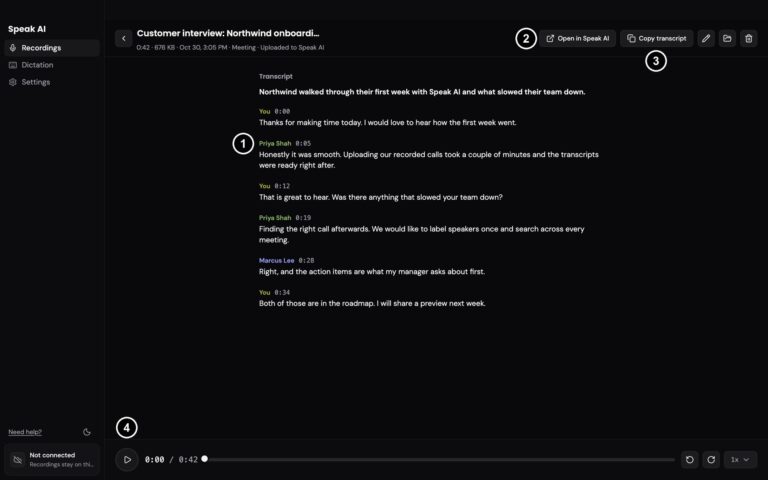
A transcript ChatGPT can quote from
Speak AI returns the transcript with named speakers and timestamps. ChatGPT reads it and answers with the quote and the moment it was said, so every answer points back to the recording.
Cas d’usage ChatGPT + Speak AI
Interviews, meetings, lectures, or customer calls: ChatGPT is more useful when it can reach your recordings.
Transcrire et coder les données d’entretien
Researchers. Upload qualitative interviews and let ChatGPT transcribe them through Speak AI. Then find themes across dozens of recordings, pull direct quotes by topic, or compare responses between participant groups.
Analysez les appels clients pour obtenir des perspectives de messaging
Content and media teams. Connect your customer call library and track brand sentiment over time, find the language customers use to describe their problems, and write landing pages, emails and ads that sound like your audience.
Transcrivez des cours et recherchez vos notes
Students. Record lectures, upload them to Speak AI, then search a semester of recordings. Ask “What did my professor say about mitochondrial DNA?” and get the answer with a timestamp.
Obtenez des résumés de réunions et suivez les éléments d’action
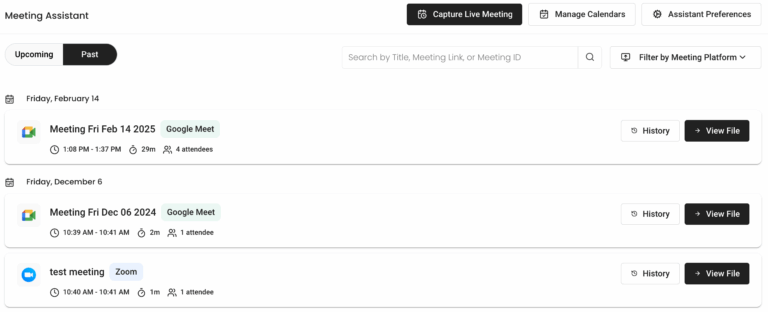
Business owners. Schedule the Speak AI meeting bot to join your calls. Afterwards ask ChatGPT for decisions and action items, and search past meetings for what was said about a project, a client, or a deadline.
Using ChatGPT on a team?
Connect Speak AI to ChatGPT and a sales, research or support team can ask questions across every call and meeting. The next step is seeing it on your own calls. In a demo, bring one real call. We build a scorecard around your criteria and score it live, with the quote behind every score. Research teams can see their interviews analyzed for themes instead.
Teams already run their calls this way
Numbers from customer accounts. Bring your own calls to a demo and see the same analysis on your recordings.

Comment un cabinet juridique d'études examine chaque appel avec l'IA
Read the case study →

How a Consulting Firm Scores Every Coaching Session With AI
Read the case study →

How a Care-Management Team Captures Every Meeting With AI
Read the case study →
ChatGPT peut-il analyser des fichiers audio ?
Yes, when it is connected to a transcription tool like Speak AI, through the Speak AI plugin or MCP (Model Context Protocol). On its own, ChatGPT has limited audio capabilities. It can handle short voice messages and some basic audio input, but it cannot transcribe long recordings, identify different speakers, run sentiment analysis, or search across a library of files. Install Speak AI and all of that becomes available inside ChatGPT.
MCP is an open protocol that lets AI assistants like ChatGPT connect to external tools and data. Instead of copying transcripts into the chat window, ChatGPT can call Speak AI’s 190+ tools directly: upload a file, get the transcript, pull NLP analytics, search across recordings, and export results.
Télécharger de l’audio dans ChatGPT directement vs. utiliser Speak AI
When you upload an audio file to ChatGPT by itself, you get a basic transcript of that one file, with no speaker identification, no persistent storage, and no way to search across recordings later. If you close the conversation, the transcript is gone.
Through Speak AI, every file is stored in your library with automatic transcription in 70+ languages, speaker diarization (who said what), sentiment analysis, keyword extraction, topic detection, and named entity recognition. That data stays in your account and is searchable from any future ChatGPT conversation. The advantage shows once you have more than a handful of recordings: a researcher with 50 interviews can find every mention of a theme, and a sales manager can track how sentiment changed quarter over quarter.
Ce que ChatGPT peut faire avec Speak AI connecté
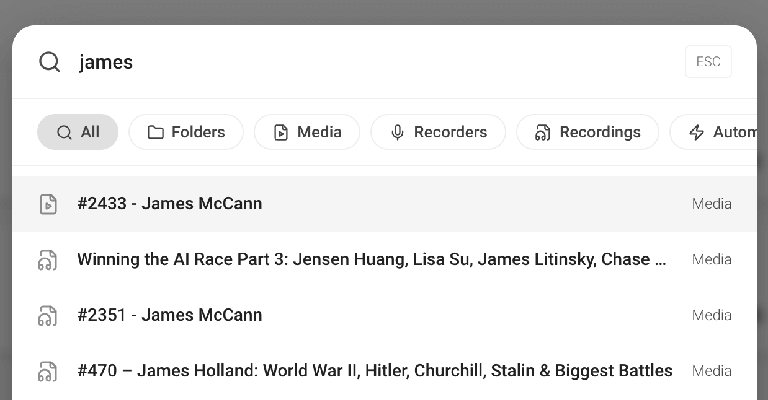
Ask ChatGPT to transcribe audio or video in over 70 languages, identify speakers, and answer follow-ups such as “What were the action items?” or “What topics came up most often?” You can search your whole library, for example “Find all mentions of the new pricing model across last month’s customer calls”, and results come back with timestamps, speaker labels, and context.
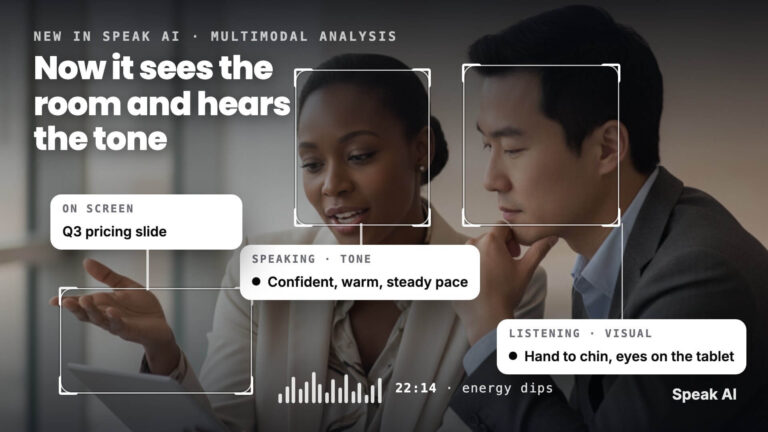
Speak AI lit aussi comment l'appel a sonné et ce qui était à l'écran. IA multimodale couvre les paroles, la voix et les visuels. Il détecte tone and emotion in callset évaluation des appels grades each call on your own scorecard, with the quote behind each score. Audio and visual analysis is included on every plan. Schedule the Assistant de réunion IA to join Zoom, Google Meet, or Microsoft Teams calls, create highlight clips, and export transcripts as PDF, DOCX, SRT, or plain text, all without leaving ChatGPT.
Formats et langues pris en charge
Speak AI supports all major audio and video formats: MP3, MP4, WAV, M4A, OGG, FLAC, WEBM, AVI, MOV, and more. Upload files directly or provide a URL from YouTube, Vimeo, SoundCloud, or other platforms. Transcription is available in over 70 languages with automatic language detection.
Bien démarrer selon vos cas d’usage
Researchers can start with our guide to utiliser ChatGPT pour les fichiers audio. Podcast producers can see ChatGPT pour les épisodes de podcast. Teams that also use Claude can read the Intégration Claude, which works the same way and shares the same Speak AI account and media library. All connections are on the hub d’intégrations.
ChatGPT peut-il analyser les fichiers MP3, les mémos vocaux et les enregistrements ?
ChatGPT can work with an audio file you add to a conversation, one file at a time and only within that conversation. It is not a searchable library of your recordings, so you cannot ask one question across hundreds of calls. Install the Speak AI plugin and any MP3, M4A, WAV or MP4 you have recorded, including voice memos and call recordings, is transcribed once and stays searchable. Associé : ChatGPT for phone calls.
ChatGPT peut-il comprendre ce qui est dit sur de nombreux enregistrements ?
Yes, once the recordings are in Speak AI. ChatGPT asks Speak AI for the transcripts and insights, so you can ask which calls mentioned a competitor, what customers said about pricing, or what action items came out of last week.
ChatGPT peut-il analyser les enregistrements d'écran et les vidéos ?
Speak AI transcrit l'audio dans un enregistrement d'écran ou une vidéo et peut aussi lire le texte à l'écran, ChatGPT peut donc répondre à des questions sur ce qui a été dit et ce qui a été montré. Ajoutez l'enregistrement à Speak AI une fois, puis posez des questions à partir de ChatGPT aussi souvent que vous le souhaitez.
Can ChatGPT analyze music, sounds and your voice?
ChatGPT can write and run code to measure things like pitch or loudness in a file, and people use it for feedback on music. Speak AI is built for spoken recordings: calls, meetings, interviews and lectures. It reads what was said, how it was said and what was on screen. It is not a music production or mixing tool.
Prefer to stay inside Speak AI?
Speak AI has its own AI chat, Magic Prompt. Ask questions about one recording, a folder, or your whole workspace without leaving Speak AI, and share the results with your team.
Les équipes font confiance à Speak AI pour leurs conversations les plus importantes.
★★★★★ 4,9 sur G2
“Speak AI a été déterminant dans la transformation de notre façon de gérer les données qualitatives. La précision de la transcription est impressionnante, et les insights NLP nous font gagner des heures d’analyse manuelle.”
“La capacité à rechercher dans tous nos enregistrements d’entretiens et à extraire des moments spécifiques est un véritable atout pour notre équipe de recherche utilisateur.”
Foire aux questions
ChatGPT peut-il analyser les fichiers MP3 et les mémos vocaux ?+
ChatGPT peut travailler avec un seul fichier audio dans une conversation, mais il ne conserve pas de bibliothèque de vos enregistrements. Connectez Speak AI et vos enregistrements MP3, M4A, WAV et MP4, y compris les mémos vocaux et les appels, sont transcrits une seule fois et ChatGPT peut répondre aux questions sur tous.
ChatGPT peut-il analyser des fichiers audio ?+
ChatGPT a un support audio intégré limité. Lorsque vous connectez Speak AI via MCP, ChatGPT gagne des capacités d'analyse audio complètes : transcription en plus de 70 langues, identification des locuteurs, analyse des sentiments, extraction de mots-clés et la capacité de rechercher dans toute votre bibliothèque d'enregistrements. Téléchargez n'importe quel fichier audio ou vidéo et ChatGPT peut le transcrire, le résumer et répondre à des questions à ce sujet.
Comment connecter Speak AI à ChatGPT ?+
Créer un compte gratuit Speak AI sur app.speakai.co. Then, while signed in to ChatGPT, open Speak AI in ChatGPT and click Install plugin. ChatGPT opens a new tab to Speak AI: sign in, or click Confirm if you are already logged in, to authorize. Back in ChatGPT, Speak AI appears in your apps list. In a chat, open the + menu and enable Speak AI for that chat. The setup guide in the Speak AI docs has the same steps.
Quels formats audio et vidéo sont supportés ?+
Speak AI prend en charge tous les formats majeurs, notamment MP3, MP4, WAV, M4A, OGG, FLAC, WEBM, AVI et MOV. Vous pouvez également fournir des URLs à partir de YouTube, Vimeo, SoundCloud et d’autres plateformes. Aucune conversion de fichier n’est nécessaire avant le téléchargement.
Speak AI est-il gratuit avec ChatGPT ?+
Speak AI offers a free 7-day trial with credits for transcription, full access to all 190+ tools, and NLP analytics. No credit card required. After the trial, Pro is US$20 per team member per month billed annually, or US$25 billed monthly. The ChatGPT connection itself is free on all plans.
Quelle est la différence entre charger dans ChatGPT par rapport à l’utilisation de Speak AI ?+
Le téléchargement d'audio directement vers ChatGPT vous donne une transcription basique d'un seul fichier sans étiquettes de locuteur, sans analyses et sans stockage persistant. Speak AI ajoute la prise en charge de 70+ langues, la diarisation automatique des locuteurs, l'analyse des sentiments, l'extraction de mots-clés et de sujets, une bibliothèque permanente consultable et la possibilité de rechercher et d'analyser tous vos enregistrements de n'importe quelle conversation.
Supporte-t-il plusieurs langues ?+
Oui. Speak AI supporte la transcription dans plus de 70 langues avec détection automatique de la langue. La diarisation des locuteurs, les horodatages et les analyses NLP sont disponibles dans toutes les langues supportées. Vous pouvez même mélanger les langues dans un seul enregistrement.
ChatGPT peut-il noter les appels de vente ?+
Avec Speak AI connecté, ChatGPT peut récupérer les notes que Speak AI calcule sur votre propre scorecard, avec la citation derrière chaque note.
ChatGPT peut-il entendre le ton de la voix ?+
Pas par lui-même. Via Speak AI, qui lit le ton, l'émotion et l'énergie, ChatGPT peut répondre à des questions sur le son d'un appel. L'analyse audio et visuelle est incluse sur chaque plan.
Can I ask questions about my recordings inside Speak AI instead of ChatGPT?+
Yes. Speak AI has its own AI chat, Magic Prompt, so you can ask questions about one recording, a folder, or your whole workspace without leaving Speak AI. The ChatGPT connection is for when you want to work from ChatGPT.
Is Speak AI an official ChatGPT plugin?+
Yes. Speak AI is listed as a plugin in ChatGPT. Open Speak AI in ChatGPT, click Install plugin and sign in to Speak AI to approve access. You do not need to paste a URL or an API key.
What if I cannot install plugins in ChatGPT?+
Your ChatGPT workspace admin may need to allow Speak AI first. Ask them to enable it, then install it as above. If you are calling the Responses API from code, follow the ChatGPT API guide au lieu de cela.
Can ChatGPT analyze my voice, music or sounds?+
ChatGPT can write and run code to measure things like pitch or loudness in a file, and people use it for feedback on music. Speak AI is built for spoken recordings such as calls, meetings, interviews and lectures. It reads what was said, how it was said and what was on screen. It is not a music production or mixing tool.
Can ChatGPT transcribe a video?+
Direct video uploads to ChatGPT depend on your plan and app, so many people extract the audio first. With Speak AI connected, add the video to Speak AI once and ChatGPT can read the transcript, and on-screen text where Speak AI picked it up, as often as you ask.
Is there an AI that can analyze audio recordings?+
Yes. Speak AI transcribes audio and video in 70+ languages, labels speakers, and analyzes themes, sentiment and tone. With the plugin installed you can ask ChatGPT about any of it, across every recording in your library. See Outils d'IA pour les fichiers audio.
Is Speak AI the same as the Speak language-learning app?+
No. Speak AI at speakai.co is a transcription and conversation-analysis platform for calls, meetings and interviews, and it has its own plugin in ChatGPT. It is a different product from the language-learning app Speak.
Start using Speak AI from ChatGPT today
Turn ChatGPT into a transcription, search, and analysis workspace. Free trial, no credit card, set up in two minutes. The ChatGPT connection is free on all plans, with no extra fees to use Speak AI in ChatGPT.
 English
 Español
 Français
 Italiano
 العربية
 Português do Brasil
 Nederlands
 Deutsch
 עִבְרִית
 Русский
 日本語
 Polski
 Čeština
 Українська
 Slovenščina
 Svenska
 Ελληνικά
 Norsk bokmål
 简体中文
 Türkçe
 Català
 Magyar
 한국어
 Slovenčina
 Suomi