
Introducción
Transcribing Sundanese- a language with rich cultural heritage and spoken by millions- can now be effortless, thanks to advances in AI and NLP (Natural Language Processing) technologies. In this article, we explore the significance of Sundanese, its popularity across different locations, and dive deep into how modern technology is revolutionizing Sundanese transcription processes for various user groups including academic researchers, market researchers, sales professionals, quality assurance teams, and businesses.
Why Is Sundanese Significant?
Sundanese is the second most spoken language in Indonesia, a country known for its vast archipelago and cultural diversity. It has an estimated 42 million speakers, predominantly located in the western part of Java island. The Sundanese language boasts a rich history, unique alphabets, and a significant presence in both oral and written forms of communication in the region.
Locations Where Sundanese Is Popular
While Sundanese is mainly spoken in Indonesia, especially in the West Java and Banten provinces, its speakers are also found in parts of Central Java and the capital city, Jakarta. The Sundanese-speaking population contributes significantly to Indonesia’s cultural and linguistic diversity, influencing the country’s arts, music, and literature.
Interesting Stats and Fun Facts About Sundanese
Sundanese language has a unique set of alphabets known as the Aksara Sunda, which dates back to the 14th century. The language and its dialects reflect the region’s social hierarchies, with different levels of speech used depending on the social status of the people communicating. Furthermore, Sundanese is known for its distinctive musical genres, traditional dances, and a rich culinary heritage that further enriches Indonesia’s cultural mosaic.
Continúa leyendo la guía completa (haga clic para expandir)
The Evolution of Sundanese Transcription
Traditionally, transcribing Sundanese, especially from audio and video sources, has been challenging due to its linguistic intricacies and regional dialects. However, advancements in technology, particularly the integration of AI and NLP capabilities, have transformed this process, making it faster, more accurate, and cost-effective.
How AI and NLP Technology Is Changing the Game
AI-powered Sundanese audio to text converters and video to text converters have significantly lowered the barriers for those needing to transcribe Sundanese. By leveraging NLP and large language models, these tools can accurately decode and convert Sundanese spoken word into text, facilitating a wide range of applications from academic research to market analysis and beyond.
Applications and Benefits of Sundanese Transcription
Automated Sundanese transcription services are not just about converting speech to text; they open a world of possibilities for data analysis, content creation, and global communication.
Investigación académica y de mercado
For researchers studying the Sundanese culture, language, or societal trends, AI-enhanced transcription services can turn hours of interviews and field recordings into manageable texts for qualitative analysis. This not only speeds up the research process but also enhances the accuracy of cultural insights and findings.
Ventas y garantía de calidad
Businesses operating in Sundanese-speaking regions can leverage transcription to analyze customer calls, ensuring quality assurance and honing in on customer satisfaction. Sales teams can better understand client needs by analyzing meeting transcriptions, leading to more effective sales strategies.
Marketing and Global Reach
Marketing teams can use Sundanese transcription to create more engaging and culturally relevant content. By understanding the nuances of the language, businesses can tailor their messaging to resonate with the Sundanese-speaking audience, fundamentally improving their market presence.
Ahorro de tiempo y costes
Implementing Sundanese AI to text technology significantly cuts down on the time and costs traditionally associated with manual transcription. It eliminates the need for extensive human labor while ensuring higher accuracy levels and faster turnaround times. This efficiency can be particularly transformative for projects with tight deadlines or limited budgets.
Why Choose Speak AI for Your Sundanese Transcription Needs?
Speak AI stands at the forefront of this technological revolution, offering a Sundanese video to text converter and audio to text converter enabled by advanced AI. Our platform guarantees high accuracy levels, ease of use, and seamless integration into your workflow, providing the following benefits:
- Automatic analysis through large language models and data visualization,
- An AI meeting assistant that joins and transcribes Microsoft Teams, Zoom, Google Meet, and Webex calls,
- A user-friendly interface with a 4.9 rating on G2 and over 150K users,
- Customizable features tailored to your specific transcription needs,
- Time and cost efficiency by automating the transcription process.
In an era where language and technology intersect more than ever, Speak AI is dedicated to ensuring that your transcriptions are not just text but a bridge to deeper understanding and connection with the Sundanese-speaking world.
Conclusión
The ability to accurately transcribe Sundanese opens a plethora of opportunities for researchers, businesses, and professionals looking to connect with and understand this vibrant community. With the advent of AI and NLP-powered tools like Speak AI, the process has never been more accessible, accurate, and efficient. Embrace the future of transcription and harness the power of Sundanese language with Speak AI.
How To Transcribe Sundanese Using Speak
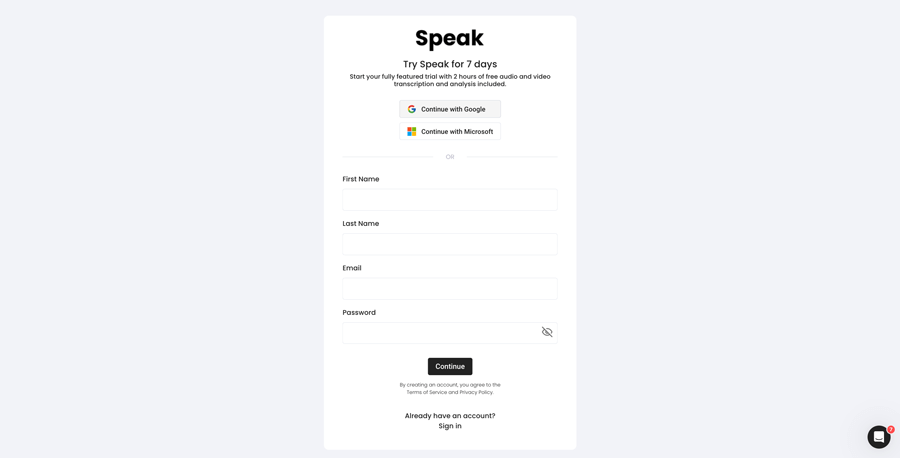
Paso 1: Crear una cuenta Speak
To start your Sundanese transcription, you first need to crear una cuenta Speak. No te preocupes, es muy fácil de hacer.
Our team is happy to give you a 7-day trial with 30 minutes of free Sundanese audio and video transcription included.
To sign up for Speak and start your Sundanese transcription, visit the Speak app register page here.

Step 2: Upload your Sundanese file(s) for Transcription
Aunque normalmente recomendamos MP4 para vídeo y MP3 para audio, aceptamos una amplia gama de tipos de archivos de audio y vídeo.
Once you upload your file all you have to do is select “Sundanese” from the language dropdown menu to automatically transcribe in Sundanese.
You can upload your Sundanese file for transcription in several ways using Speak:
Accepted Sundanese Audio File Types
- Sundanese MP3
- Sundanese M4A
- Sundanese WAV
- Sundanese OGG
- Sundanese WEBM
- Sundanese M4P
Accepted Sundanese Video File Types
- Sundanese MP4
- Sundanese M4V
- Sundanese WMV
- Sundanese AVI
- Sundanese MOV
- Sundanese FLV
Publicly Available Sundanese URLs
También puedes subir archivos multimedia a Speak a través de una URL pública.
Siempre que la extensión del tipo de archivo esté disponible al final de la URL, no tendrás ningún problema para importar tu grabación para su transcripción y análisis automáticos.
Sundanese YouTube URLs
Speak es compatible con vídeos de YouTube. Todo lo que tienes que hacer es copiar la URL del vídeo de YouTube (por ejemplo, https://www.youtube.com/watch?v=qKfcLcHeivc).
Speak encontrará automáticamente el archivo, calculará la duración e importará el vídeo.
Asegúrate de utilizar el enlace completo y no el fragmento acortado de YouTube. Además, asegúrate de eliminar el nombre del canal de la URL.
Integraciones Speak
Como ya se ha mencionado, Speak también contiene una serie de integraciones para Zoom, ZapierVimeo y otros que te ayudarán a transcribir automáticamente tus archivos multimedia.
Esta biblioteca de integraciones sigue creciendo. ¿Tiene alguna petición? No dude en enviarnos un mensaje.
Paso 3: Calcular y pagar el total automáticamente
Once you have your Sundanese audio or video file ready and have loaded it into Speak, it will automatically calculate the total cost (you get 30 minutes free in the trial – take advantage of it!).
Puede pagar suscribiéndose a un plan personalizado utilizando nuestra calculadora en tiempo real con minutos incluidos.
También puede añadir un saldo o pagar por las cargas sin plan utilizando su tarjeta de crédito.
Step 4: Wait for Speak to transcribe your Sundanese audio or Sundanese video
Nuestro software de transcripción automática preparará su transcripción en tan sólo unos minutos. Por lo general, Speak tarda aproximadamente la mitad de la duración del audio o vídeo en producir la transcripción y los comentarios.
Una vez completado, recibirá una notificación por correo electrónico de que su transcripción está completa. Ese correo electrónico contendrá un enlace al archivo para que pueda acceder al reproductor multimedia interactivo con la transcripción, el análisis y los formatos de exportación listos para usted.

Paso 5: Ver y editar su expediente automatizado
¿Quieres encargarte tú mismo de las transcripciones? No hay problema. Una vez que recibas tu expediente automatizado, tienes la opción de editarlo en cualquier momento.
Actualice fácilmente los nombres de los oradores, busque y reemplace, y consiga que su transcripción automática sea totalmente precisa con nuestro intuitivo sistema de edición de transcripciones.
Paso 6: Exporte su transcripción y comparta reproductores multimedia interactivos
Puedes exportar tu transcripción en PDF, Word, TXT, HTML e incluso formatos más avanzados como CSV o JSON, según tu plan.
Una forma más eficaz de compartir las transcripciones es a través de un mediateca para compartir que incluye el archivo multimedia, las perspectivas de la IA y una transcripción interactiva.
Hay mucho más que puedes hacer con Speak para enriquecer el valor de tus medios y transcripciones.
No dude en enviarnos un mensaje al chat en directo: ¡siempre estamos aquí para ayudarle!
We talked about Sundanese transcription here, but you may be interested in how to transcribe in other languages instantly and easily with Speak’s intuitive transcription and natural language processing software. We’ve shared resources below on all the languages Speak can help you transcribe!
Únase a los más de 200.000 usuarios que han encontrado eficiencias radicales con sus datos de audio, vídeo y texto para generar valor.

How Much Does It Cost To Transcribe Sundanese?
Speak offers highly competitive pricing for Sundanese transcription compared to other transcription solutions. For a starting user, Speak offers automated Sundanese transcription for only $0.025 USD per minute. That is only $1.50 USD per hour!
También tenemos ofertas especiales para obtener precios que incluyen transcripción, miembros del equipo de análisis, traducción y mucho más con un descuento increíble.
We also scale our pricing based on media volume and can offer even bigger discounts to large customers. So, if you have over 100 hours of Sundanese transcription per month, please contact us through live chat, and we will set you up with a customized price per minute to make Sundanese transcription even more affordable!
You can learn more about how to transcribe Sundanese with Speak and the relevant pricing on the página de precios del sitio web y el página de precios de la aplicación.
What Can You Transcribe In Sundanese?
- Transcribe Sundanese interviews
- Transcribe Sundanese videos
- Transcribe Sundanese audio
- Transcribe Sundanese earnings calls
- Transcribe Sundanese focus groups
- Transcribe Sundanese meetings
- Transcribe Sundanese phone calls
- Transcribe Sundanese YouTube videos
- Transcribe Sundanese Vimeo videos
- Transcribe Sundanese Zoom recordings
- Transcribe Sundanese Google Meet recordings
- Transcribir grabaciones de Microsoft Teams
- Transcribe Sundanese podcasts
Y mucho más.
How To Export Sundanese Transcripts
With Speak, you can easily export Sundanese transcriptions to many formats.
Below is a list of options for exporting your Sundanese transcripts in Speak:
- Export Sundanese transcripts to Word Docs
- Export Sundanese transcripts to PDFs
- Export Sundanese transcripts to CSVs
- Export Sundanese transcripts to TXT files
- Export Sundanese transcripts to HTML
- Export Sundanese transcripts to SRTs
- Export Sundanese transcripts to VTTs
- Export Sundanese transcripts to JSON
How To Generate Sundanese Captions
If you are looking to subtitle in Sundanese or caption in Sundanese, Speak is a powerful solution. Speak’s automatic transcription software automatically generated Sundanese transcripts with timestamps that enable Speak to quickly create SRT and VTT files necessary for Sundanese captions and Sundanese subtitles.
¿Qué otros idiomas puede transcribir Speak?
Speak ya tiene usuarios de más de 90 países y continuamente recibimos peticiones para transcribir y analizar en distintos idiomas.
Por eso, ¡continuamente añadimos más idiomas a Speak! Estos son algunos de los idiomas que Speak ofrece:
- Cómo transcribir el abjasio
- Cómo transcribir albanés
- Cómo transcribir el amárico
- Cómo transcribir árabe (Egipto)
- Cómo transcribir árabe (Irak)
- Cómo transcribir árabe (Israel)
- Cómo transcribir árabe (Jordania)
- Cómo transcribir árabe (Kuwait)
- Cómo transcribir árabe (Líbano)
- Cómo transcribir el árabe moderno estándar (Bahréin)
- Cómo transcribir árabe (Omán)
- Cómo transcribir árabe (Autoridad Palestina)
- Cómo transcribir árabe (Qatar)
- Cómo transcribir árabe (Arabia Saudita)
- Cómo transcribir árabe (República Árabe Siria)
- Cómo transcribir árabe (EAU)
- Cómo transcribir armenio
- Cómo transcribir asamés
- Cómo transcribir el asturiano
- Cómo transcribir azerbaiyano
- Cómo transcribir bashkir
- Cómo transcribir el euskera
- Cómo transcribir bielorruso
- Cómo transcribir bengalí
- Cómo transcribir el bosnio
- Cómo transcribir búlgaro
- Cómo transcribir el birmano
- Cómo transcribir catalán
- Cómo transcribir chino (cantonés, tradicional)
- Cómo transcribir chino (simplificado)
- Cómo transcribir croata
- Cómo transcribir el checo
- Cómo transcribir danés
- Cómo transcribir holandés
- Cómo transcribir inglés (Australia)
- Cómo transcribir inglés (británico)
- Cómo transcribir inglés (Reino Unido)
- Cómo transcribir inglés (Estados Unidos)
- Cómo transcribir estonio
- Cómo transcribir el persa
- Cómo transcribir finés
- Cómo transcribir filipino
- Cómo transcribir flamenco
- Cómo transcribir el francés
- Cómo transcribir francés (Canadá)
- Cómo transcribir el gallego
- Cómo transcribir el georgiano
- Cómo transcribir alemán
- Cómo transcribir alemán (suizo)
- Cómo transcribir el griego
- Cómo transcribir gujarati
- Cómo transcribir el hausa
- Cómo transcribir hebreo
- Cómo transcribir el hindi
- Cómo transcribir húngaro
- Cómo transcribir islandés
- Cómo transcribir indonesio
- Cómo transcribir irlandés
- Cómo transcribir italiano
- Cómo transcribir japonés
- Cómo transcribir javanés
- Cómo transcribir el cabilio
- Cómo transcribir el canarés
- Cómo transcribir kazajo
- Cómo transcribir jemer
- Cómo transcribir kinyarwanda
- Cómo transcribir kiswahili
- Cómo transcribir coreano
- Cómo transcribir el kurdo
- Cómo transcribir el kirguís
- Cómo transcribir lao
- Cómo transcribir letón
- Cómo transcribir lituano
- Cómo transcribir luganda
- Cómo transcribir el macedonio
- Cómo transcribir malayo
- Cómo transcribir malayalam
- Cómo transcribir el maltés
- Cómo transcribir marathi
- Cómo transcribir Meadow Mari
- Cómo transcribir el mongol
- Cómo transcribir nepalí
- Cómo transcribir noruego
- Cómo transcribir odia
- Cómo transcribir oriya
- Cómo transcribir pastún
- Cómo transcribir persa
- Cómo transcribir polaco
- Cómo transcribir portugués
- Cómo transcribir portugués brasileño
- Cómo transcribir portugués (Portugal)
- Cómo transcribir punjabi
- Cómo transcribir rumano
- Cómo transcribir ruso
- Cómo transcribir serbio
- Cómo transcribir cingalés
- Cómo transcribir eslovaco
- Cómo transcribir esloveno
- Cómo transcribir somalí
- Cómo transcribir español
- Cómo transcribir español (México)
- Cómo transcribir el sondanés
- Cómo transcribir swahili
- Cómo transcribir sueco
- Cómo transcribir tagalo
- Cómo transcribir tamil
- Cómo transcribir el tártaro
- Cómo transcribir telugu
- Cómo transcribir tailandés
- Cómo transcribir turco
- Cómo transcribir ucraniano
- Cómo transcribir vietnamita
- Cómo transcribir urdu
- Cómo transcribir el uigur
- Cómo transcribir al uzbeko
- Cómo transcribir el galés
- Cómo transcribir el wolof
- Cómo transcribir el zulú
¡Ahora hay muchos más añadidos!
Puede ver la lista completa de idiomas compatibles con Speak tanto a través del software como de las API.
Transcribe con Speak AI: compatible con más de 100 idiomas.
Speak AI supports transcription in 100+ languages including Sundanese. Upload your audio or video files and get accurate, AI-powered transcriptions with built-in NLP analytics, sentiment analysis, and keyword extraction. Available for individuals, researchers, and enterprise teams.
Software de transcripción automatizada
Asistente de reuniones AI
Agentes de voz con IA
Consultoría e implementación de IA
Conversor de audio a texto
Analizador de transcripciones
 English
  Español
  Français
  Italiano
  العربية
  Português do Brasil
  Nederlands
  Deutsch
  עִבְרִית
  Русский
  日本語
日本語  Polski
  Čeština
  Українська
  Slovenščina
  Svenska
  Ελληνικά
  Norsk bokmål
  简体中文
简体中文  Türkçe
  Català
  Magyar
  한국어
한국어  Slovenčina
  Suomi
Suomi