
Retrieval Augmented Generation For Zoom Meetings
Introducció
Zoom Meetings has become an essential tool for businesses, educators, and individuals alike, especially in the wake of the COVID-19 pandemic. It is a video conferencing platform that allows users to connect and collaborate remotely through virtual meetings. With its user-friendly interface and versatile features, Zoom Meetings has revolutionized the way we communicate and work.
But as with any form of communication, it is crucial to analyze and understand the content of Zoom Meetings to make the most out of it. This is where retrieval augmented generation (RAG) comes in. In this blog, we will explore what RAG is and how it can enhance the experience of Zoom Meetings for researchers, marketers, and organizations.
Què és la Generació Augmentada de Recuperació (RAG)?
RAG is a state-of-the-art technique in natural language processing (NLP) that combines retrieval and generation models to produce high-quality, human-like text. In simpler terms, it is an AI-powered tool that can retrieve relevant information from a large dataset and generate new content based on that information.
This technique has been gaining immense popularity in recent years, especially in the field of NLP, due to its ability to produce coherent and contextually relevant text. RAG models are trained on large language models, such as GPT-3, which gives them a vast knowledge base to draw upon when generating text.
The Benefits of Using RAG for Zoom Meetings
As mentioned earlier, RAG is a powerful tool that can enhance the experience of using Zoom Meetings for researchers, marketers, and organizations. Let’s take a closer look at some of the benefits of using RAG for Zoom Meetings.
Per a Investigadors
Researchers often have to transcribe and analyze hours of Zoom Meetings to extract valuable insights and data. This can be a time-consuming and tedious process. However, with RAG, researchers can analyze large volumes of Zoom Meeting transcripts in a fraction of the time.
RAG models can extract relevant information from the transcripts and generate summaries, keywords, and important points, making it easier for researchers to analyze and draw conclusions. This not only saves time but also ensures that no important information is missed.
Per a màrquetings
Zoom Meetings have become a popular platform for businesses to conduct meetings, webinars, and conferences. Marketers can leverage RAG to analyze the content of these meetings and gain valuable insights into customer preferences, pain points, and feedback.
RAG can also generate summaries of the meetings, which can be used to create marketing materials, such as blog posts, social media posts, and email campaigns. This not only saves time but also ensures that the content is relevant and engaging.
Per a Organitzacions
Organizations can benefit greatly from using RAG for Zoom Meetings. With the help of RAG, they can analyze the content of their meetings and gain insights into employee performance, customer interactions, and overall meeting effectiveness.
RAG can also help organizations identify any gaps or areas for improvement in their meetings. By generating summaries and important points, RAG can highlight key takeaways and help organizations make informed decisions.
How Speak AI Uses RAG for Zoom Meetings
At Speak AI, we have integrated RAG into our NLP and transcription software to provide our users with a comprehensive analysis of their Zoom Meetings. Our RAG models can extract keywords, generate summaries, and provide sentiment analysis of the meeting content.
Moreover, our software uses data visualization techniques to present the analyzed data in an easy-to-understand format, making it easier for users to draw conclusions and make data-driven decisions.
Conclusió
In conclusion, retrieval augmented generation is a powerful technique that can enhance the experience of using Zoom Meetings for researchers, marketers, and organizations. With its ability to retrieve and generate relevant and coherent text, RAG can save time, provide valuable insights, and improve the overall effectiveness of Zoom Meetings. At Speak AI, we have integrated RAG into our software to provide our users with a comprehensive analysis of their Zoom Meetings. Give it a try and experience the power of RAG for yourself!
Relacionat: Retrieval augmented generation for academic textbooks.
How To Use Speak’s Retrieval Augmented Generation For Zoom Meetings
Pas 1: creeu el vostre compte de Speak
Per començar la transcripció i l'anàlisi, primer cal crear un compte de Speak. No et preocupis, això és molt fàcil de fer!
Get a 7-day trial with free credits for audio and video transcription and analysis included when you sign up for Speak.
Per registrar-vos a Speak i començar a utilitzar Speak Magic Prompts amb recuperació augmentada de generació, només cal que visiteu Parleu la pàgina de registre de l'aplicació aquí.

Step 2: Upload Your Zoom Meetings
Normalment recomanem MP4 per a vídeo o MP3 per àudio.
Tanmateix, acceptem una varietat de tipus de fitxers d'àudio, vídeo i text.
Podeu carregar el vostre fitxer per a la transcripció de diverses maneres mitjançant Speak:
Tipus de fitxers d'àudio acceptats
- MP3
- M4A
- WAV
- OGG
- WEBM
- M4P
Tipus de fitxers de vídeo acceptats
- MP4
- M4V
- WMV
- AVI
- MOV
- FLV
Tipus de fitxer de text acceptats
- TXT
- Word Doc
Importacions CSV
També podeu penjar fitxers CSV de fitxers de text o d'àudio i vídeo. Podeu obtenir més informació sobre les càrregues CSV i descarregueu els CSV compatibles amb Speak aquí.
With the CSVs, you can upload anything from dozens of YouTube videos to thousands of Zoom Meetings files.
URL disponibles públicament
També podeu penjar contingut multimèdia a Speak mitjançant un URL disponible públicament.
Mentre l'extensió del tipus de fitxer estigui disponible al final de l'URL, no tindreu cap problema a importar la vostra gravació per a la transcripció i l'anàlisi automàtica.
URL de YouTube
Speak és compatible amb vídeos de YouTube. Tot el que has de fer és copiar l'URL del vídeo de YouTube (per exemple, https://www.youtube.com/watch?v=qKfcLcHeivc).
Speak trobarà automàticament el fitxer, calcularà la durada i importarà el vídeo.
Si utilitzeu vídeos de YouTube, assegureu-vos d'utilitzar l'enllaç complet i no el fragment de YouTube escurçat. A més, assegureu-vos d'eliminar el nom del canal de l'URL.
Parla Integracions
Com s'ha esmentat, Speak també conté una sèrie d'integracions per a Zoom, Zapier, Vimeo i més que us ajudaran a transcriure automàticament els vostres mitjans.
Aquesta biblioteca d'integracions segueix creixent! Tens una petició? Us animeu a enviar-nos un missatge.

Pas 3: calculeu i pagueu el total automàticament
Once you have your file(s) ready and load it into Speak, it will automatically calculate the total cost (free credits are included in the 7-day trial – take advantage of them!).
Si esteu penjant dades de text a Speak, actualment no haureu de pagar cap cost. Només l'anàlisi de Speak Magic Prompts crearà una tarifa que es detallarà a continuació.
Once you use your trial credits or need Speak Magic Prompts, you can top up credits (1 credit = US$1) or subscribe to Pro at US$25 per user per month, or US$20 per user per month billed annually. See the pàgina de preus per a més detalls.
També pots afegir un saldo o pagar per càrregues i anàlisis sense un pla utilitzant el vostre targeta de crèdit.

Step 4: Wait for Speak to Analyze Your Zoom Meetings
Si estàs penjant àudio i vídeo, el nostre programari de transcripció automatitzada prepararà la teva transcripció ràpidament. Un cop completat, rebràs una notificació per correu electrònic que indica que la teva transcripció està completa.
Aquest correu electrònic contindrà un enllaç al fitxer perquè pugueu accedir al reproductor multimèdia interactiu amb els formats de transcripció, anàlisi i exportació preparats per a vosaltres.
Si esteu important fitxers CSV o penjant fitxers de text, Speak generalment analitzarà la informació molt més ràpidament.
Speak will automatically embed your data in a well-architected vector database which allows you to use retrieval augmented generation for Zoom Meetings.
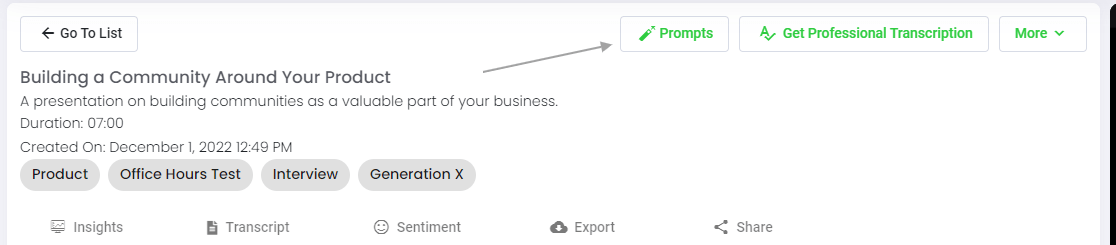
Pas 5: visiteu el vostre fitxer o carpeta
Speak és capaç d'analitzar fitxers individuals i carpetes senceres de dades.
Quan visualitzeu qualsevol fitxer individual a Speak, tot el que heu de fer és fer clic al botó "Indicacions".
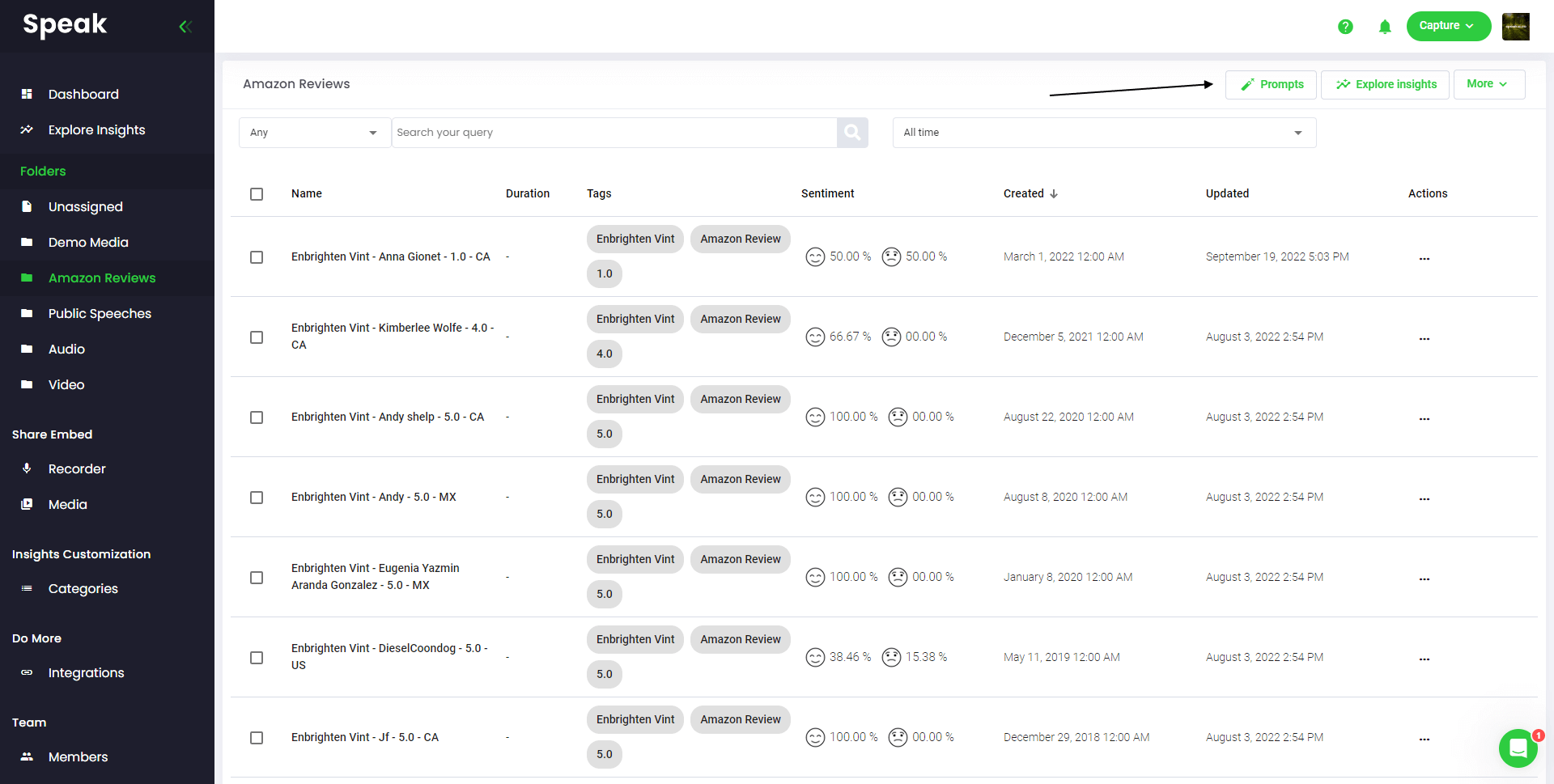
Si voleu analitzar molts fitxers, tot el que heu de fer és afegir els fitxers que voleu analitzar a una carpeta dins de Speak.
Podeu fer-ho afegint fitxers nous a Speak o podeu organitzar els fitxers actuals a la carpeta que vulgueu amb la funcionalitat d'edició senzilla del programari.
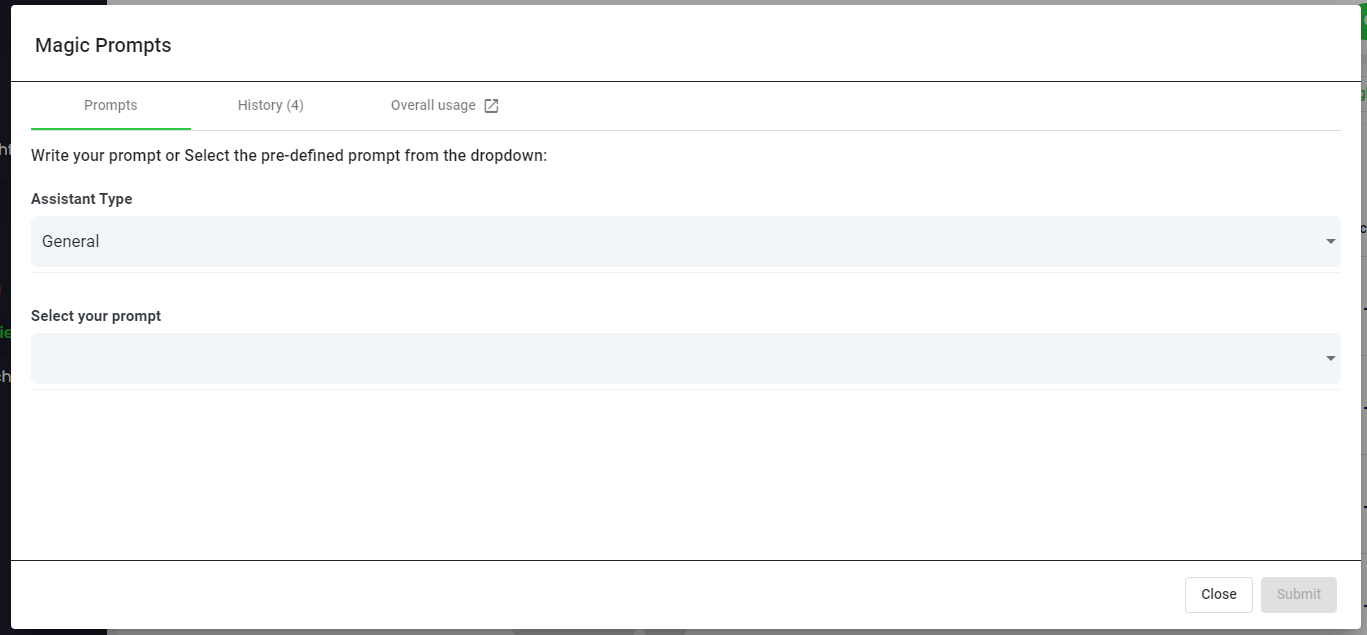
Step 6: Select Speak Magic Prompts To Analyze Your Zoom Meetings
Què són les indicacions màgiques?
Speak Magic Prompts aprofiten la innovació en models d'intel·ligència artificial sovint denominats "IA generativa".
Aquests models han analitzat grans quantitats de dades d'Internet per entendre el llenguatge.
Amb aquesta comprensió, aquests "grans models de llenguatge" són capaços de realitzar tasques al·lucinants!
Amb Speak Magic Prompts, ara podeu realitzar aquestes tasques amb les dades d'àudio, vídeo i text del vostre compte de Speak.
La generació augmentada de recuperació és el que fa que aquestes indicacions màgiques funcionin tan bé.
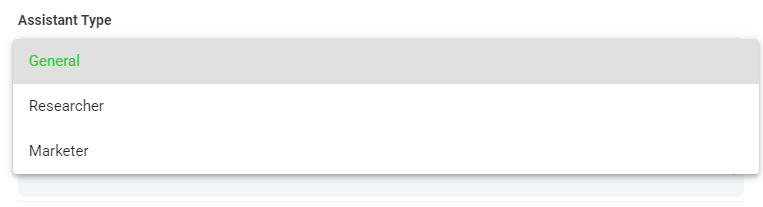
Pas 7: Seleccioneu o creeu el vostre tipus d'assistent
Per ajudar-vos a obtenir millors resultats de les indicacions de Speak Magic, Speak ha introduït "Tipus d'assistent".
Aquests tipus d'assistent es configuren prèviament i proporcionen context al motor d'avís per obtenir sortides més concises i significatives en funció de les vostres necessitats.
Per començar, hem inclòs:
- General
- Investigador
- Comercialitzador
- Vendes
- Reclutador
Trieu el tipus d'assistent més rellevant al menú desplegable.
També podeu crear el vostre propi tipus de plantilla d'assistent personalitzat.
Si visiteu la nova pàgina Preferències del compte, podeu veure que ara hi ha una àrea on podeu crear el vostre propi assistent personalitzat.
Això permet definir el context del motor per obtenir resultats de més qualitat i més consistents.
Per exemple, podríeu dir:
“Som [NOM DE L'EMPRESA]. Estem analitzant [DADES] per entendre com millorar [OBJECTIU]. Volem que totes les respostes siguin concises i en format de taula.”.
Això esdevé una plantilla reutilitzable en qualsevol de les teves propostes màgiques manuals o automatitzades.
Podeu crear diverses plantilles per a diferents casos d'ús.
Per exemple, l'anàlisi que feu en un grup focal pot ser diferent d'una entrevista individual.

Pas 8: creeu o seleccioneu el vostre missatge desitjat
Aquests són alguns exemples de sol·licituds que podeu aplicar a qualsevol fitxer ara mateix:
- Crear una anàlisi DAFO
- Dóna'm els elements d'acció principals
- Creeu un resum de la llista de vinyetes
- Expliqueu-me els problemes clau que van quedar sense resoldre
- Digueu-me quines preguntes es van fer
Apareixerà un modal perquè pugueu utilitzar les indicacions suggerides que hem compartit anteriorment per obtenir les vostres respostes de manera instantània i màgica.
Si teniu les vostres pròpies indicacions que voleu crear, seleccioneu "Solicitud personalitzada" al menú desplegable i s'obrirà un altre quadre de text on podreu demanar qualsevol cosa que vulgueu de les vostres dades.
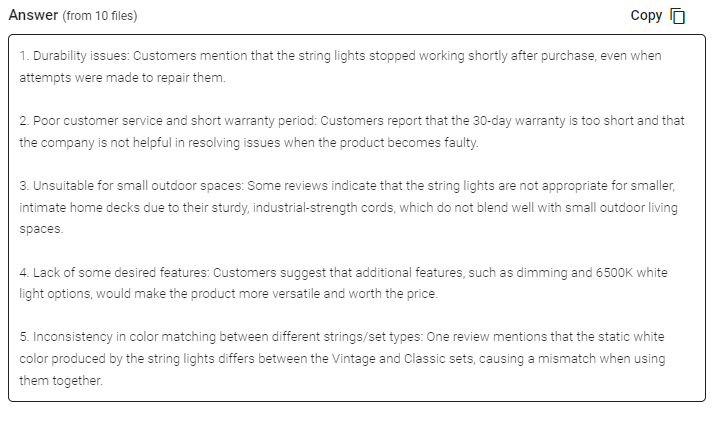
Pas 9: revisa i comparteix les respostes
Speak generarà una resposta concisa en un quadre de text a sota del menú desplegable de selecció de preguntes. Amb el xat habilitat, també podeu continuar consultant aquestes dades per revelar més informació i reformatar la informació segons les vostres necessitats.
In this example, we ask to analyze all the Zoom Meetings in the folder at once for the top product dissatisfiers.
Podeu copiar fàcilment aquesta resposta per a les vostres presentacions, contingut, correus electrònics, membres de l'equip i molt més!
Preus de Speak Magic Prompts
Our team at Speak AI continues to optimize the pricing for Magic Prompts and Speak as a whole.
Ara mateix, qualsevol persona de la prova de 7 dies de Speak té 100.000 caràcters inclosos al seu compte.
Si necessiteu més personatges, podeu incloure fàcilment les indicacions de Speak Magic al vostre pla quan creeu una subscripció.
També podeu actualitzar el nombre de caràcters del vostre compte si ja teniu una subscripció.
Les dues opcions estan disponibles al pàgina de subscripció.
Alternativament, podeu utilitzar Speak Magic Prompts per afegint un saldo al teu compte. El saldo s'utilitzarà mentre analitzeu els personatges.
Personalitza completament el teu pla 📝
Aquí a Speak, hem fet que sigui increïblement fàcil personalitzar la vostra subscripció.
Un cop us hàgiu registrat, només heu de visitar el nostre creador de plans personalitzats i seleccioneu el volum de mitjans, la mida de l'equip i les funcions que voleu obtenir un pla que s'adapti a les vostres necessitats.
No més plans rígids. Actualitza, baixa o cancel·la en qualsevol moment.
Reclama la teva oferta especial 🎁
Quan us subscriviu, també obtindreu un complement premium gratuït durant tres mesos!
Això vol dir que estalvieu fins a $50 USD al mes i $150 USD en total.
Un cop us hàgiu subscrit a un pla, tot el que heu de fer és enviar-nos un xat en directe amb el complement premium seleccionat de la llista següent:
- Opcions d'exportació premium (Word, CSV i més)
- Categories personalitzades i estadístiques
- Personalització de la gravadora (marca, entrada i més)
- Personalització del reproductor multimèdia
- Biblioteques multimèdia compartibles
Posarem el complement en directe al vostre compte de manera gratuïta!
Què estàs esperant?
Fes referència a altres i guanya diners reals 💸
Si tens amics, companys i seguidors interessats a utilitzar la nostra plataforma, pots guanyar diners reals mensuals.
Se us pagarà un percentatge de totes les vendes tant si els clients als quals referiu paguen per un pla, transcriuen automàticament els mitjans o aprofiten els serveis de transcripció professionals.
Utilitzeu aquest enllaç per convertir-se en un afiliat oficial de Speak.
Consulteu els nostres recursos dedicats 📚
- Ajuda Docs
- Documents de l'API
- Speak AI YouTube Channel
- Guia per crear el vostre pla de parla perfecte
Reserveu una sessió d'implementació gratuïta 🤝
Seria un honor participar personalment a una trucada introductòria amb tu per assegurar-te que estàs preparat per tenir èxit.
Només cal que utilitzeu el nostre Enllaç Calendly per trobar un moment que et vagi bé. Esperem conèixer-vos!
From RAG to meeting agents: query your entire Zoom library
Retrieval-augmented generation makes AI answers grounded in your actual meeting data. Speak AI takes this further with AI agents that handle the full pipeline: auto-joining Zoom meetings, transcribing, indexing into a vector-searchable library, and letting you query across every conversation through AI Chat powered by Claude, Gemini, and GPT.
Relacionat: Retrieval augmented generation for powerpoint presentations.
Instead of building your own RAG pipeline, your meeting agent handles ingestion, chunking, and retrieval automatically. Every new Zoom meeting is processed and queryable within minutes. Learn about Speak AI agents.
Preguntes freqüents
What is retrieval augmented generation (RAG)?
RAG is an AI technique that retrieves relevant information from a large body of data, then uses a language model to generate an answer grounded in it. The result is more relevant, human-like text.
How can RAG help with Zoom meetings?
It lets you ask questions about what was said across your Zoom meetings and get answers drawn from the actual conversations. That saves you from rewatching recordings or reading long transcripts.
How do I ask questions across my Zoom recordings?
Upload your Zoom recordings to Speak AI, let it transcribe and analyze them, then use AI chat to ask questions across your library. It works with transcripts in 100+ languages.
How do I analyze Zoom meetings with Speak AI?
Create an account, upload your Zoom recordings, and wait for the analysis. Then open the file or folder, choose a Magic Prompt or write your own, and review and share the responses.
Explora Speak AI
Speak AI és una plataforma de recerca en tecnologia de veu i IA. Transcripció en més de 100 idiomes, anàlisi de PNL, anàlisi de sentiments, agents d'IA i consultoria empresarial.
 English
 Español
 Français
 Italiano
 العربية
 Português do Brasil
 Nederlands
 Deutsch
 עִבְרִית
 Русский
 日本語
 Polski
 Čeština
 Українська
 Slovenščina
 Svenska
 Ελληνικά
 Norsk bokmål
 简体中文
 Türkçe
 Català
 Magyar
 한국어
 Slovenčina
 Suomi