
Retrieval Augmented Generation For Zoom Meetings
導入
Zoom Meetings has become an essential tool for businesses, educators, and individuals alike, especially in the wake of the COVID-19 pandemic. It is a video conferencing platform that allows users to connect and collaborate remotely through virtual meetings. With its user-friendly interface and versatile features, Zoom Meetings has revolutionized the way we communicate and work.
But as with any form of communication, it is crucial to analyze and understand the content of Zoom Meetings to make the most out of it. This is where retrieval augmented generation (RAG) comes in. In this blog, we will explore what RAG is and how it can enhance the experience of Zoom Meetings for researchers, marketers, and organizations.
検索拡張生成 (RAG) とは何ですか?
RAG is a state-of-the-art technique in natural language processing (NLP) that combines retrieval and generation models to produce high-quality, human-like text. In simpler terms, it is an AI-powered tool that can retrieve relevant information from a large dataset and generate new content based on that information.
This technique has been gaining immense popularity in recent years, especially in the field of NLP, due to its ability to produce coherent and contextually relevant text. RAG models are trained on large language models, such as GPT-3, which gives them a vast knowledge base to draw upon when generating text.
The Benefits of Using RAG for Zoom Meetings
As mentioned earlier, RAG is a powerful tool that can enhance the experience of using Zoom Meetings for researchers, marketers, and organizations. Let’s take a closer look at some of the benefits of using RAG for Zoom Meetings.
研究者向け
Researchers often have to transcribe and analyze hours of Zoom Meetings to extract valuable insights and data. This can be a time-consuming and tedious process. However, with RAG, researchers can analyze large volumes of Zoom Meeting transcripts in a fraction of the time.
RAG models can extract relevant information from the transcripts and generate summaries, keywords, and important points, making it easier for researchers to analyze and draw conclusions. This not only saves time but also ensures that no important information is missed.
マーケティング担当者向け
Zoom Meetings have become a popular platform for businesses to conduct meetings, webinars, and conferences. Marketers can leverage RAG to analyze the content of these meetings and gain valuable insights into customer preferences, pain points, and feedback.
RAG can also generate summaries of the meetings, which can be used to create marketing materials, such as blog posts, social media posts, and email campaigns. This not only saves time but also ensures that the content is relevant and engaging.
団体向け
Organizations can benefit greatly from using RAG for Zoom Meetings. With the help of RAG, they can analyze the content of their meetings and gain insights into employee performance, customer interactions, and overall meeting effectiveness.
RAG can also help organizations identify any gaps or areas for improvement in their meetings. By generating summaries and important points, RAG can highlight key takeaways and help organizations make informed decisions.
How Speak AI Uses RAG for Zoom Meetings
At Speak AI, we have integrated RAG into our NLP and transcription software to provide our users with a comprehensive analysis of their Zoom Meetings. Our RAG models can extract keywords, generate summaries, and provide sentiment analysis of the meeting content.
Moreover, our software uses data visualization techniques to present the analyzed data in an easy-to-understand format, making it easier for users to draw conclusions and make data-driven decisions.
結論
In conclusion, retrieval augmented generation is a powerful technique that can enhance the experience of using Zoom Meetings for researchers, marketers, and organizations. With its ability to retrieve and generate relevant and coherent text, RAG can save time, provide valuable insights, and improve the overall effectiveness of Zoom Meetings. At Speak AI, we have integrated RAG into our software to provide our users with a comprehensive analysis of their Zoom Meetings. Give it a try and experience the power of RAG for yourself!
関連: Retrieval augmented generation for academic textbooks.
How To Use Speak’s Retrieval Augmented Generation For Zoom Meetings
ステップ1:スピークアカウントの作成
トランスクリプションと分析を開始するには、まず次のことが必要です。 スピークアカウントを作成する.心配はいらない!
Get a 7-day trial with free credits for audio and video transcription and analysis included when you sign up for Speak.
Speakにサインアップして、検索拡張生成機能を備えたSpeak Magic Promptsを使い始めるには、 スピークアプリ登録ページはこちら.

Step 2: Upload Your Zoom Meetings
通常、ビデオにはMP4、オーディオにはMP3をお勧めします。
ただし、オーディオ、ビデオ、テキストなど、さまざまなファイル形式を受け付けます。
Speakを使用すると、いくつかの方法でファイルをアップロードしてテープ起こしすることができます:
オーディオファイルの種類
- MP3
- M4A
- ウエーブ
- オージー
- ウェブム
- M4P
使用可能なビデオファイルの種類
- MP4
- M4V
- WMV
- AVI
- MOV
- FLV
使用可能なテキストファイルの種類
- TXT
- ワード文書
CSVインポート
テキストファイルや音声・動画ファイルのCSVをアップロードすることもできます。CSVアップロードの詳細については、こちらをご覧ください。 スピーク対応CSVのダウンロードはこちら.
With the CSVs, you can upload anything from dozens of YouTube videos to thousands of Zoom Meetings files.
公開URL
また、一般に公開されているURLからスピークにメディアをアップロードすることもできる。
URLの末尾にファイルタイプの拡張子があれば、自動テープ起こしや分析のために録音をインポートするのに問題はありません。
YouTubeのURL
スピークはYouTube動画に対応しています。YouTube動画のURLをコピーするだけです、 https://www.youtube.com/watch?v=qKfcLcHeivc).
Speakは自動的にファイルを見つけ、長さを計算し、ビデオをインポートします。
YouTubeの動画を使用する場合は、短縮されたYouTubeのスニペットではなく、必ず完全なリンクを使用してください。また、URLからチャンネル名を削除してください。
スピーク・インテグレーション
前述したように、Speakには以下のような統合も含まれている。 ズーム, ザピアVimeoなど、あなたのメディアを自動的に書き写すのに役立ちます。
この統合ライブラリは増え続けています!リクエストをお持ちですか?お気軽にメッセージをお送りください。

ステップ3:自動計算と自動支払い
Once you have your file(s) ready and load it into Speak, it will automatically calculate the total cost (free credits are included in the 7-day trial – take advantage of them!).
Speakにテキストデータをアップロードする場合、現在のところ費用はかかりません。スピーク・マジック・プロンプトの分析のみ料金が発生します。
Once you use your trial credits or need Speak Magic Prompts, you can top up credits (1 credit = US$1) or subscribe to Pro at US$25 per user per month, or US$20 per user per month billed annually. See the 価格ページ 詳細は.
また、次のこともできる。 バランスを取る を使用して、プランなしでアップロードと分析の料金を支払うこともできます。 クレジットカード.

Step 4: Wait for Speak to Analyze Your Zoom Meetings
音声やビデオをアップロードする場合、当社の自動テープ起こしソフトウェアが迅速に原稿を作成します。 完了すると、成績証明書が完成したことを知らせるEメールが届きます。
このEメールにはファイルへのリンクが含まれており、トランスクリプト、分析、エクスポートの各フォーマットが用意されたインタラクティブ・メディア・プレーヤーにアクセスすることができます。
CSVのインポートやテキストファイルのアップロードであれば、スピークは一般的にもっと素早く情報を分析します。
Speak will automatically embed your data in a well-architected vector database which allows you to use retrieval augmented generation for Zoom Meetings.
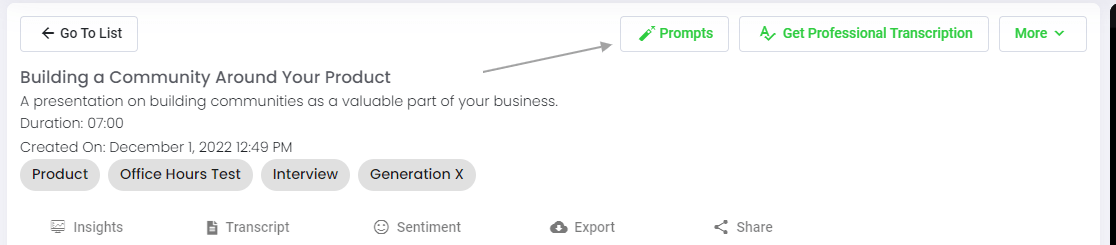
ステップ5:ファイルまたはフォルダを見る
スピークは、個々のファイルとデータのフォルダ全体の両方を分析することができます。
Speakで個々のファイルを表示しているときは、「プロンプト」ボタンをクリックするだけです。
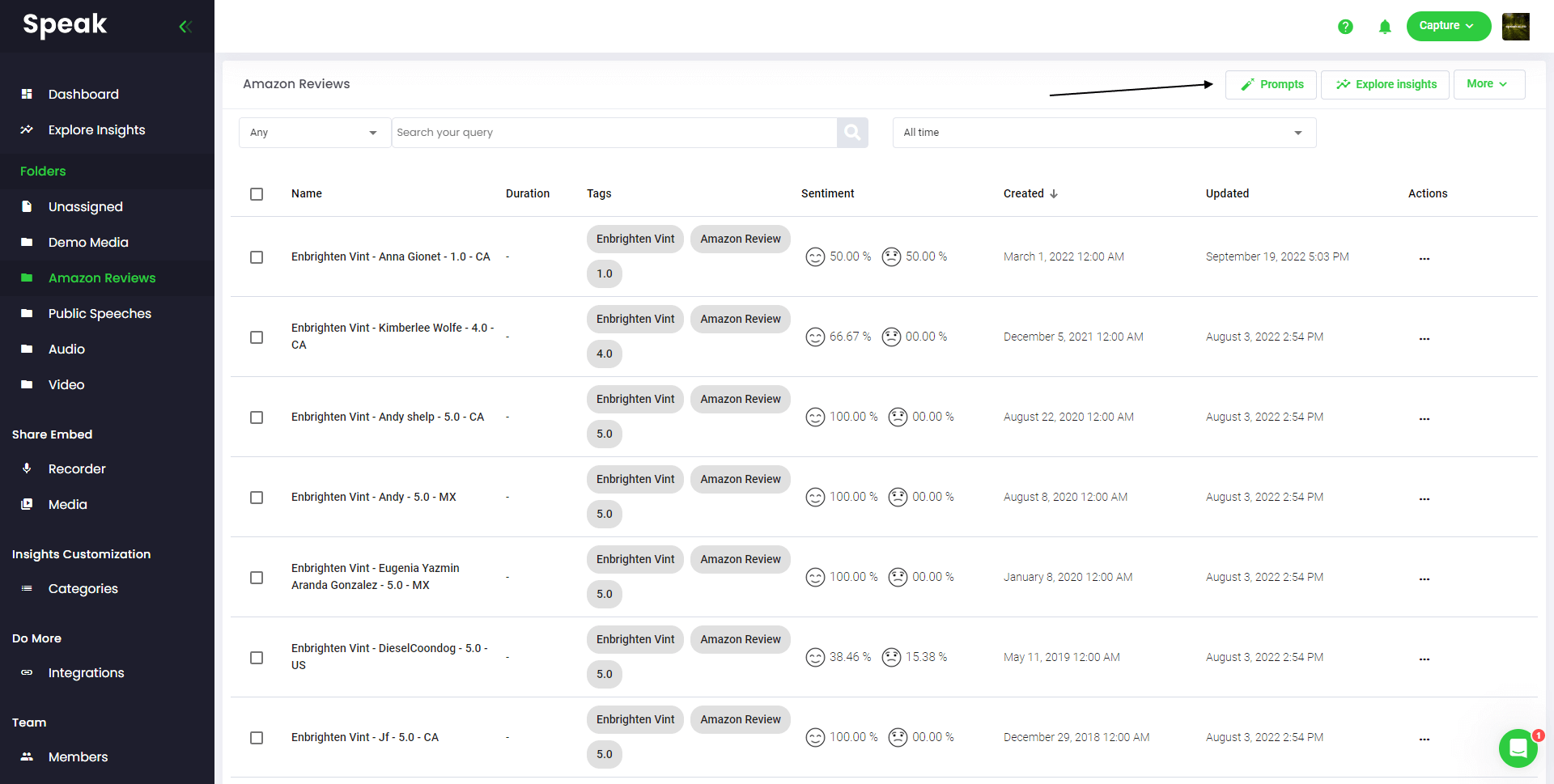
多くのファイルを分析したい場合は、分析したいファイルをSpeak内のフォルダに追加するだけです。
スピークに新しいファイルを追加したり、ソフトウェアの簡単な編集機能を使って、現在のファイルを希望のフォルダに整理することができます。
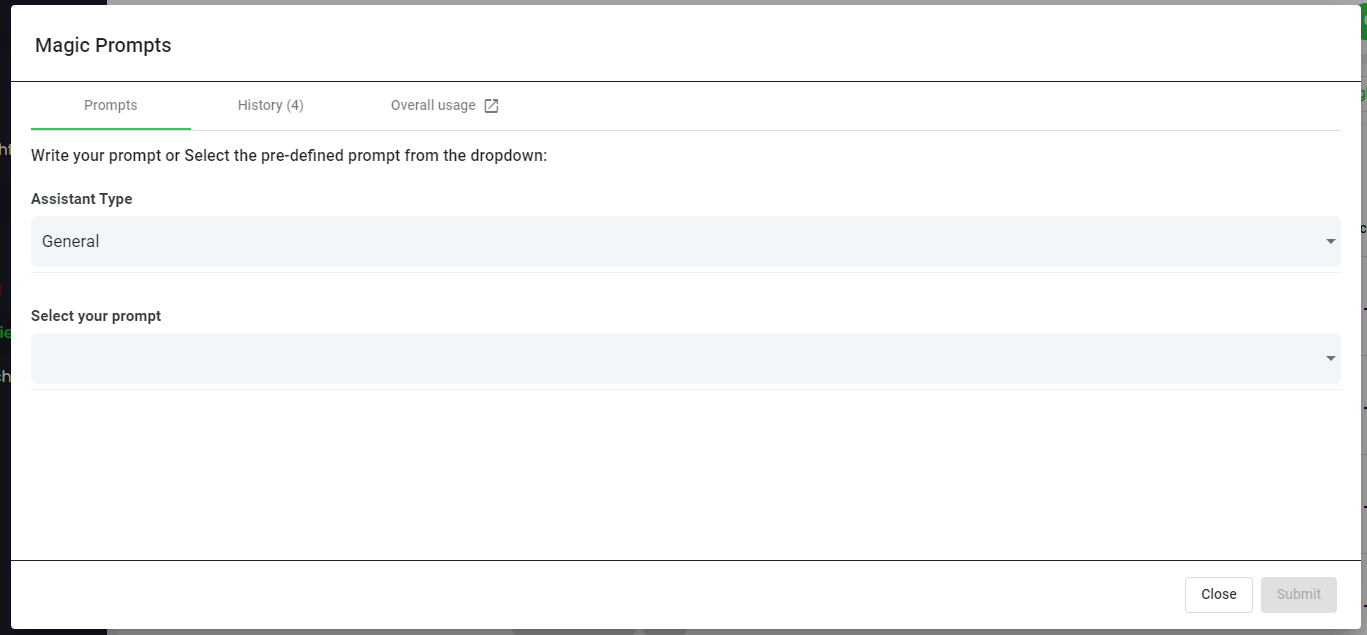
Step 6: Select Speak Magic Prompts To Analyze Your Zoom Meetings
マジック・プロンプトとは何か?
スピーク・マジック・プロンプトは、しばしば「ジェネレーティブAI」と呼ばれる人工知能モデルのイノベーションを活用している。
これらのモデルは、言語を理解するためにインターネット上の膨大な量のデータを分析している。
それを理解した上で、この「大規模言語モデル」は、気の遠くなるようなタスクをこなすことができる!
Speak Magic Promptsを使えば、Speakアカウント内のオーディオ、ビデオ、テキストデータに対してこれらのタスクを実行できます。
検索拡張生成により、これらのマジック プロンプトが非常にうまく機能します。.
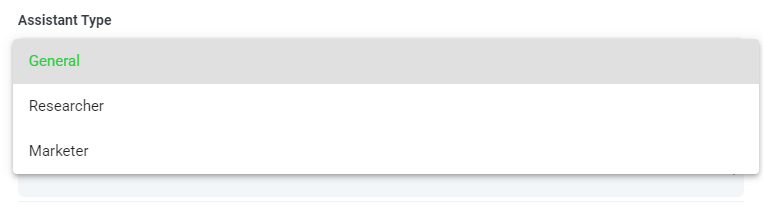
ステップ7: アシスタントの種類を選択または作成する
スピーク・マジック・プロンプトからより良い結果を得るために、スピークは「アシスタントタイプ」を導入しました。
これらのアシスタントタイプはあらかじめ設定されており、プロンプトエンジンにコンテキストを提供することで、ニーズに基づいたより簡潔で有意義な出力を実現します。
手始めに、私たちはこのような記事を掲載した:
- 一般
- 研究員
- マーケター
- 売上高
- リクルーター
ドロップダウンから最も関連性の高いアシスタントタイプを選択します。
独自のカスタム アシスタント テンプレート タイプを作成することもできます。.
新しいページにアクセスすると アカウント設定, では、独自のカスタム アシスタントを作成できる領域があることがわかります。.
これにより、エンジンのコンテキストを設定して、より高品質で一貫性のある出力を実現できます。.
たとえば、次のように言うことができます。
“「[会社名]でございます。[目標]の改善方法を把握するため、[データ]を分析しております。ご回答はすべて簡潔な表形式でお願いいたします。」.
これは、手動または自動の Magic Prompt で再利用可能なテンプレートになります。.
さまざまなユースケースに合わせて複数のテンプレートを作成できます。.
たとえば、フォーカス グループで実行する分析は、1 対 1 のインタビューで実行する分析とは異なる場合があります。.

ステップ8:希望のプロンプトを作成または選択する
今すぐどんなファイルにも適用できるプロンプトの例をいくつか紹介しよう:
- SWOT分析を作成する
- トップ・アクション・アイテムを教えてください
- 箇条書きの要約を作成する
- 未解決の主要問題を教えてください。
- どのような質問をされたか教えてください
モーダルがポップアップ表示されるので、上記で紹介したプロンプト候補を使って、即座に魔法のように答えを導き出すことができます。
独自のプロンプトを作成したい場合は、ドロップダウンから「カスタムプロンプト」を選択します!
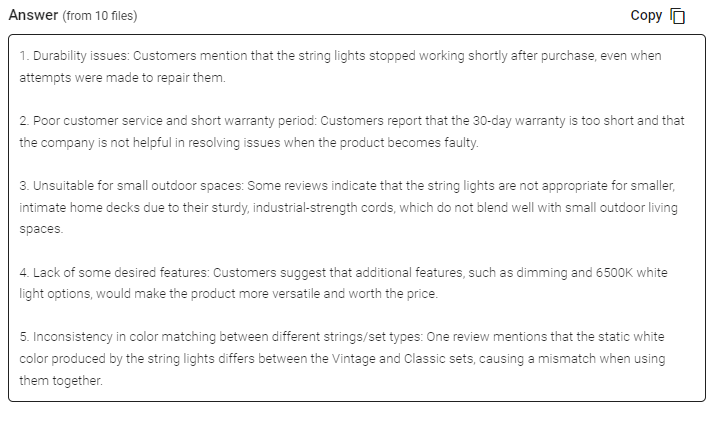
ステップ9:回答の確認と共有
Speakは、プロンプト選択ドロップダウンの下のテキストボックスに簡潔な回答を生成します。Chatを有効にすると、そのデータに対してクエリを実行し、より多くのインサイトを得たり、ニーズに合わせて情報を再フォーマットしたりすることもできます。.
In this example, we ask to analyze all the Zoom Meetings in the folder at once for the top product dissatisfiers.
プレゼンテーション、コンテンツ、Eメール、チームメンバーなどに、その反応を簡単にコピーすることができます!
Speak Magic Promptsの価格
Our team at Speak AI continues to optimize the pricing for Magic Prompts and Speak as a whole.
現在、Speakの7日間トライアルに参加している人には、10万文字がアカウントに含まれている。
より多くの文字が必要な場合は、サブスクリプションを作成するときに簡単にスピークマジックプロンプトをプランに含めることができます。
また、すでにサブスクリプションをお持ちの場合は、アカウントの文字数をアップグレードすることもできます。
どちらのオプションも サブスクリプションページ.
また、スピーク・マジック・プロンプトを使うこともできます。 バランス調整 をアカウントに追加します。残高は、あなたがキャラクターを分析する際に使用されます。
完全にパーソナライズされたプラン
スピークでは、購読のパーソナライズを驚くほど簡単にしています。
登録したら、 カスタムプランビルダー をクリックし、メディア量、チームサイズ、必要な機能を選択して、お客様のニーズに合ったプランをご利用ください。
堅苦しいプランはもう必要ありません。いつでもアップグレード、ダウングレード、キャンセルが可能です。
スペシャル・オファー 🎁 を請求する
購読を申し込むと、3ヶ月間無料のプレミアム・アドオンも手に入る!
つまり、毎月最大$50 USD、合計で$150 USDの節約になる。
プランを購読したら、以下のリストから選択したプレミアムアドオンをライブチャットで送信するだけです:
- プレミアムエクスポートオプション(Word、CSVなど)
- カスタムカテゴリーとインサイト
- レコーダーのカスタマイズ(ブランディング、入力など)
- メディアプレーヤーのカスタマイズ
- 共有可能なメディア・ライブラリ
お客様のアカウントにアドオンを無料でインストールいたします!
何を待っているんだ?
他の人を紹介し、リアルマネーを稼ぐ 💸。
友人や仲間、フォロワーが私たちのプラットフォームを利用することに興味を持っている場合、あなたは本当の毎月のお金を稼ぐことができます。
あなたが紹介したお客様がプランの料金を支払った場合でも、メディアを自動的に書き起こした場合でも、プロのテープ起こしサービスを利用した場合でも、売上の一定割合が報酬として支払われます。
このリンクを使用する をクリックして、スピークの公式アフィリエイトになる。
専用リソースをご覧ください📚。
無料インプリメンテーション・セッションを予約する 🤝。
あなたが成功するための準備が整っていることを確認するために、個人的に入門コールに飛び乗ることができれば光栄です。
をご利用ください。 カレンダーリンク ご都合の良い時間を見つけてください。お会いできるのを楽しみにしています!
From RAG to meeting agents: query your entire Zoom library
Retrieval-augmented generation makes AI answers grounded in your actual meeting data. Speak AI takes this further with AI agents that handle the full pipeline: auto-joining Zoom meetings, transcribing, indexing into a vector-searchable library, and letting you query across every conversation through AI Chat powered by Claude, Gemini, and GPT.
関連: Retrieval augmented generation for powerpoint presentations.
Instead of building your own RAG pipeline, your meeting agent handles ingestion, chunking, and retrieval automatically. Every new Zoom meeting is processed and queryable within minutes. Learn about Speak AI agents.
よくある質問
What is retrieval augmented generation (RAG)?
RAG is an AI technique that retrieves relevant information from a large body of data, then uses a language model to generate an answer grounded in it. The result is more relevant, human-like text.
How can RAG help with Zoom meetings?
It lets you ask questions about what was said across your Zoom meetings and get answers drawn from the actual conversations. That saves you from rewatching recordings or reading long transcripts.
How do I ask questions across my Zoom recordings?
Upload your Zoom recordings to Speak AI, let it transcribe and analyze them, then use AI chat to ask questions across your library. It works with transcripts in 100+ languages.
How do I analyze Zoom meetings with Speak AI?
Create an account, upload your Zoom recordings, and wait for the analysis. Then open the file or folder, choose a Magic Prompt or write your own, and review and share the responses.
Speak AI を探索する
Speak AIは、音声技術とAIの研究プラットフォームです。100以上の言語に対応した文字起こし、自然言語処理(NLP)分析、感情分析、AIエージェント、そして企業向けコンサルティングを提供しています。.
 English
  Español
  Français
  Italiano
  العربية
  Português do Brasil
  Nederlands
  Deutsch
  עִבְרִית
  Русский
  日本語
日本語  Polski
  Čeština
  Українська
  Slovenščina
  Svenska
  Ελληνικά
  Norsk bokmål
  简体中文
简体中文  Türkçe
  Català
  Magyar
  한국어
한국어  Slovenčina
  Suomi
Suomi