
Retrieval Augmented Generation For Zoom Meetings
مقدمة
Zoom Meetings has become an essential tool for businesses, educators, and individuals alike, especially in the wake of the COVID-19 pandemic. It is a video conferencing platform that allows users to connect and collaborate remotely through virtual meetings. With its user-friendly interface and versatile features, Zoom Meetings has revolutionized the way we communicate and work.
But as with any form of communication, it is crucial to analyze and understand the content of Zoom Meetings to make the most out of it. This is where retrieval augmented generation (RAG) comes in. In this blog, we will explore what RAG is and how it can enhance the experience of Zoom Meetings for researchers, marketers, and organizations.
ما هو التوليد المعزز للاسترجاع (RAG)؟
RAG is a state-of-the-art technique in natural language processing (NLP) that combines retrieval and generation models to produce high-quality, human-like text. In simpler terms, it is an AI-powered tool that can retrieve relevant information from a large dataset and generate new content based on that information.
This technique has been gaining immense popularity in recent years, especially in the field of NLP, due to its ability to produce coherent and contextually relevant text. RAG models are trained on large language models, such as GPT-3, which gives them a vast knowledge base to draw upon when generating text.
The Benefits of Using RAG for Zoom Meetings
As mentioned earlier, RAG is a powerful tool that can enhance the experience of using Zoom Meetings for researchers, marketers, and organizations. Let’s take a closer look at some of the benefits of using RAG for Zoom Meetings.
للباحثين
Researchers often have to transcribe and analyze hours of Zoom Meetings to extract valuable insights and data. This can be a time-consuming and tedious process. However, with RAG, researchers can analyze large volumes of Zoom Meeting transcripts in a fraction of the time.
RAG models can extract relevant information from the transcripts and generate summaries, keywords, and important points, making it easier for researchers to analyze and draw conclusions. This not only saves time but also ensures that no important information is missed.
للمسوقين
Zoom Meetings have become a popular platform for businesses to conduct meetings, webinars, and conferences. Marketers can leverage RAG to analyze the content of these meetings and gain valuable insights into customer preferences, pain points, and feedback.
RAG can also generate summaries of the meetings, which can be used to create marketing materials, such as blog posts, social media posts, and email campaigns. This not only saves time but also ensures that the content is relevant and engaging.
للمنظمات
Organizations can benefit greatly from using RAG for Zoom Meetings. With the help of RAG, they can analyze the content of their meetings and gain insights into employee performance, customer interactions, and overall meeting effectiveness.
RAG can also help organizations identify any gaps or areas for improvement in their meetings. By generating summaries and important points, RAG can highlight key takeaways and help organizations make informed decisions.
How Speak AI Uses RAG for Zoom Meetings
At Speak AI, we have integrated RAG into our NLP and transcription software to provide our users with a comprehensive analysis of their Zoom Meetings. Our RAG models can extract keywords, generate summaries, and provide sentiment analysis of the meeting content.
Moreover, our software uses data visualization techniques to present the analyzed data in an easy-to-understand format, making it easier for users to draw conclusions and make data-driven decisions.
خاتمة
In conclusion, retrieval augmented generation is a powerful technique that can enhance the experience of using Zoom Meetings for researchers, marketers, and organizations. With its ability to retrieve and generate relevant and coherent text, RAG can save time, provide valuable insights, and improve the overall effectiveness of Zoom Meetings. At Speak AI, we have integrated RAG into our software to provide our users with a comprehensive analysis of their Zoom Meetings. Give it a try and experience the power of RAG for yourself!
ذات صلة: Retrieval augmented generation for academic textbooks.
How To Use Speak’s Retrieval Augmented Generation For Zoom Meetings
الخطوة 1: قم بإنشاء حساب Speak الخاص بك
لبدء النسخ والتحليل، تحتاج أولاً إلى إنشاء حساب Speakلا تقلق، هذا الأمر سهل للغاية!
Get a 7-day trial with free credits for audio and video transcription and analysis included when you sign up for Speak.
للتسجيل في Speak والبدء في استخدام Speak Magic Prompts مع خاصية استرجاع المعلومات المعززة، ما عليك سوى زيارة الموقع الإلكتروني التالي: صفحة تسجيل تطبيق Speak هنا.

Step 2: Upload Your Zoom Meetings
نحن نوصي عادةً بصيغة MP4 للفيديو أو صيغة MP3 للصوت.
ومع ذلك، فإننا نقبل مجموعة واسعة من أنواع ملفات الصوت والفيديو والنص.
يمكنك تحميل ملفك للنسخ بعدة طرق باستخدام Speak:
أنواع الملفات الصوتية المقبولة
- ام بي 3
- م4أ
- ويف
- أوج
- ويب إم
- م4ب
أنواع ملفات الفيديو المقبولة
- إم بي 4
- إم4في
- دبليو ام في
- أفي
- موف
- فلف
أنواع ملفات النصوص المقبولة
- رسالة قصيرة
- مستند وورد
- بي دي إف
استيراد ملفات CSV
يمكنك أيضًا تحميل ملفات CSV للنصوص أو ملفات الصوت والفيديو. يمكنك معرفة المزيد حول عمليات تحميل ملفات CSV و قم بتنزيل ملفات CSV المتوافقة مع Speak هنا.
With the CSVs, you can upload anything from dozens of YouTube videos to thousands of Zoom Meetings files.
عناوين URL المتاحة للعامة
يمكنك أيضًا تحميل الوسائط إلى Speak من خلال عنوان URL متاح للعامة.
طالما أن امتداد نوع الملف متاح في نهاية عنوان URL، فلن تواجه أي مشكلة في استيراد التسجيل الخاص بك للنسخ والتحليل التلقائي.
عناوين URL على YouTube
يتوافق تطبيق Speak مع مقاطع فيديو YouTube. كل ما عليك فعله هو نسخ عنوان URL لمقطع فيديو YouTube (على سبيل المثال، https://www.youtube.com/watch?v=qKfcLcHeivc).
سيعمل البرنامج تلقائيًا على العثور على الملف وحساب طوله واستيراد الفيديو.
إذا كنت تستخدم مقاطع فيديو على YouTube، فيرجى التأكد من استخدام الرابط الكامل وليس مقطع YouTube المختصر. بالإضافة إلى ذلك، تأكد من إزالة اسم القناة من عنوان URL.
تحدث عن التكاملات
كما ذكرنا، يحتوي Speak أيضًا على مجموعة من التكاملات لـ تكبير, زابير، Vimeo والمزيد مما سيساعدك على نسخ الوسائط الخاصة بك تلقائيًا.
تستمر مكتبة التكاملات هذه في النمو! هل لديك طلب؟ لا تتردد في إرسال رسالة إلينا.

الخطوة 3: احسب المبلغ الإجمالي وتسديده تلقائيًا
Once you have your file(s) ready and load it into Speak, it will automatically calculate the total cost (free credits are included in the 7-day trial – take advantage of them!).
إذا كنت تقوم بتحميل بيانات نصية إلى Speak، فلن تضطر حاليًا إلى دفع أي تكلفة. فقط تحليل Speak Magic Prompts من شأنه أن يفرض رسومًا سيتم تفصيلها أدناه.
Once you use your trial credits or need Speak Magic Prompts, you can top up credits (1 credit = US$1) or subscribe to Pro at US$25 per user per month, or US$20 per user per month billed annually. See the صفحة التسعير للمزيد من التفاصيل.
يمكنك أيضا أضف التوازن أو ادفع مقابل عمليات التحميل والتحليل دون خطة باستخدام بطاقة إئتمان.

Step 4: Wait for Speak to Analyze Your Zoom Meetings
إذا كنت تقوم بتحميل الصوت والفيديو، فسوف يقوم برنامج النسخ الآلي الخاص بنا بإعداد النص الخاص بك بسرعة. بمجرد الانتهاء من ذلك، سوف تتلقى إشعارًا عبر البريد الإلكتروني بأن نسختك قد اكتملت.
سيحتوي هذا البريد الإلكتروني على رابط للعودة إلى الملف حتى تتمكن من الوصول إلى مشغل الوسائط التفاعلي مع تنسيقات النسخ والتحليل والتصدير الجاهزة لك.
إذا كنت تقوم باستيراد ملفات CSV أو تحميل ملفات نصية، فسيقوم Speak عمومًا بتحليل المعلومات بسرعة أكبر بكثير.
Speak will automatically embed your data in a well-architected vector database which allows you to use retrieval augmented generation for Zoom Meetings.
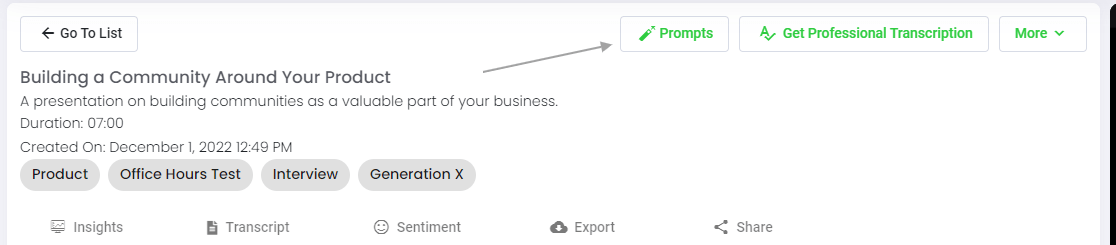
الخطوة 5: قم بزيارة ملفك أو مجلدك
يُعد Speak قادرًا على تحليل كل من الملفات الفردية والمجلدات الكاملة للبيانات.
عند عرض أي ملف فردي في Speak، كل ما عليك فعله هو النقر فوق الزر "المطالبات".
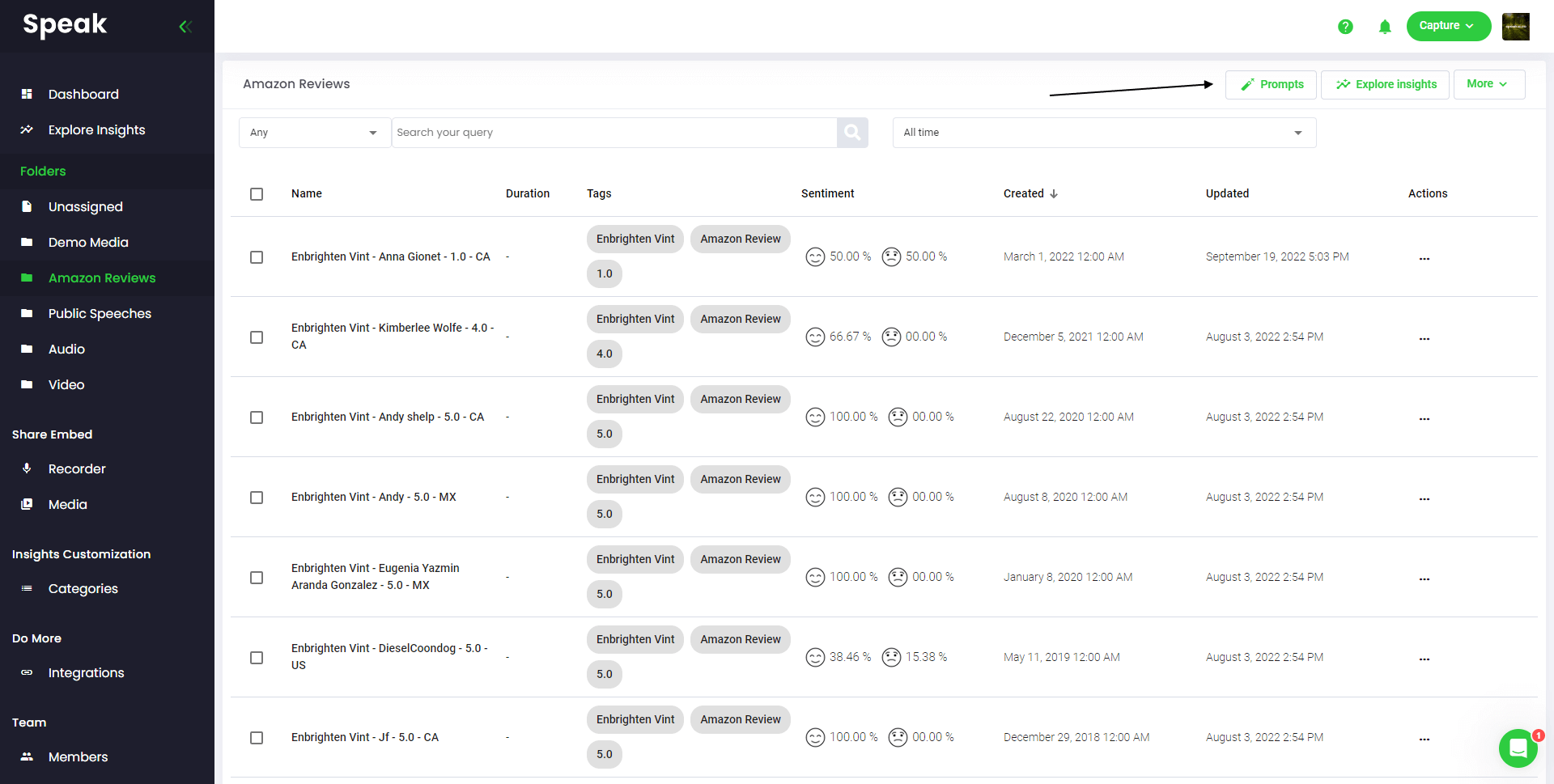
إذا كنت تريد تحليل العديد من الملفات، فكل ما عليك فعله هو إضافة الملفات التي تريد تحليلها إلى مجلد داخل Speak.
يمكنك القيام بذلك عن طريق إضافة ملفات جديدة إلى Speak أو يمكنك تنظيم ملفاتك الحالية في المجلد المطلوب باستخدام وظيفة التحرير السهلة في البرنامج.
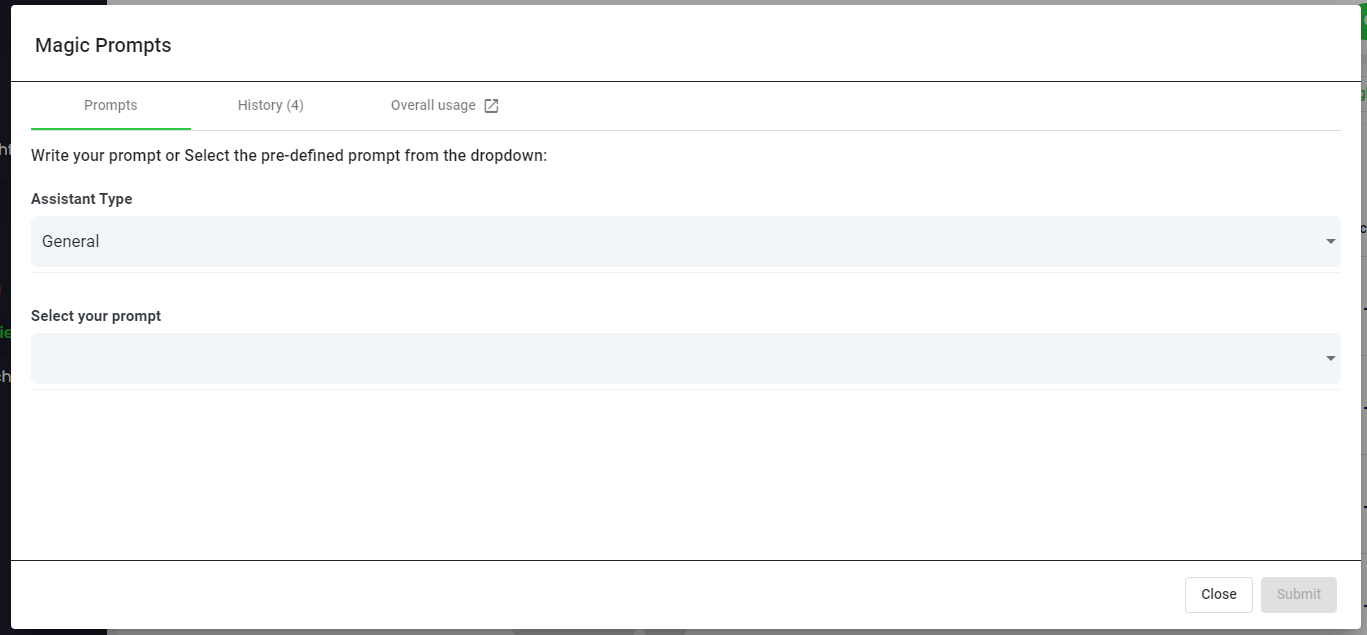
Step 6: Select Speak Magic Prompts To Analyze Your Zoom Meetings
ما هي الإشارات السحرية؟
تستفيد Speak Magic Prompts من الابتكار في نماذج الذكاء الاصطناعي التي يشار إليها غالبًا باسم "الذكاء الاصطناعي التوليدي".
لقد قامت هذه النماذج بتحليل كميات هائلة من البيانات من جميع أنحاء الإنترنت للحصول على فهم أفضل للغة.
وبناءً على هذا الفهم، فإن هذه "النماذج اللغوية الكبيرة" قادرة على أداء مهام معقدة للغاية!
باستخدام Speak Magic Prompts، يمكنك الآن تنفيذ هذه المهام على بيانات الصوت والفيديو والنص في حساب Speak الخاص بك.
إن توليد المعلومات المعزز بالاسترجاع هو ما يجعل هذه المطالبات السحرية تعمل بشكل جيد للغاية.
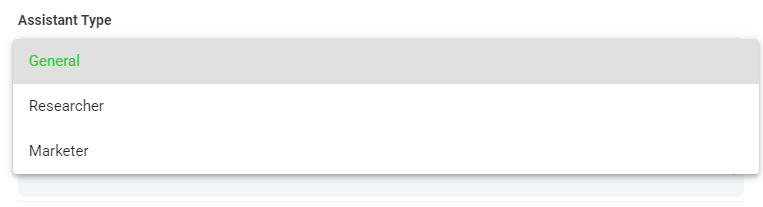
الخطوة 7: حدد نوع المساعد أو أنشئه
لمساعدتك في الحصول على نتائج أفضل من Speak Magic Prompts، قدمت Speak "نوع المساعد".
تعمل أنواع المساعد هذه على إعداد السياق مسبقًا وتوفيره لمحرك المطالبة للحصول على مخرجات أكثر إيجازًا ومعنىً استنادًا إلى احتياجاتك.
وللبدء، قمنا بتضمين:
- عام
- الباحث
- المسوق
- المبيعات
- مسؤول التوظيف
اختر نوع المساعد الأكثر ملاءمة من القائمة المنسدلة.
يمكنك أيضًا إنشاء نوع قالب مساعد مخصص خاص بك.
إذا قمت بزيارة الصفحة الجديدة تفضيلات الحساب, يمكنك أن ترى الآن وجود منطقة يمكنك من خلالها إنشاء مساعدك المخصص.
يتيح لك هذا ضبط سياق المحرك للحصول على جودة أعلى ومخرجات أكثر اتساقًا.
على سبيل المثال، يمكنك أن تقول:
“"نحن [اسم الشركة]. نقوم بتحليل [البيانات] لفهم كيفية تحسين [الهدف]. نريد أن تكون جميع الردود موجزة وفي شكل جدول.".
يصبح هذا قالبًا قابلاً لإعادة الاستخدام في أي من مطالباتك السحرية اليدوية أو الآلية.
يمكنك إنشاء قوالب متعددة لحالات استخدام مختلفة.
على سبيل المثال، قد يختلف التحليل الذي تجريه على مجموعة تركيز عن التحليل الذي تجريه على مقابلة فردية.

الخطوة 8: قم بإنشاء أو تحديد المطالبة المطلوبة
فيما يلي بعض الأمثلة على المطالبات التي يمكنك تطبيقها على أي ملف الآن:
- إنشاء تحليل SWOT
- أعطني أفضل العناصر التي يجب القيام بها
- إنشاء ملخص لقائمة النقاط
- أخبرني عن القضايا الرئيسية التي لم يتم حلها
- أخبرني ما هي الأسئلة التي تم طرحها
ستظهر نافذة منبثقة حتى تتمكن من استخدام الإرشادات المقترحة التي شاركناها أعلاه للحصول على إجاباتك بشكل فوري وسحري.
إذا كان لديك مطالبات خاصة بك تريد إنشاءها، حدد "مطالبة مخصصة" من القائمة المنسدلة وسيتم فتح مربع نص آخر حيث يمكنك أن تسأل عن أي شيء تريده من بياناتك!
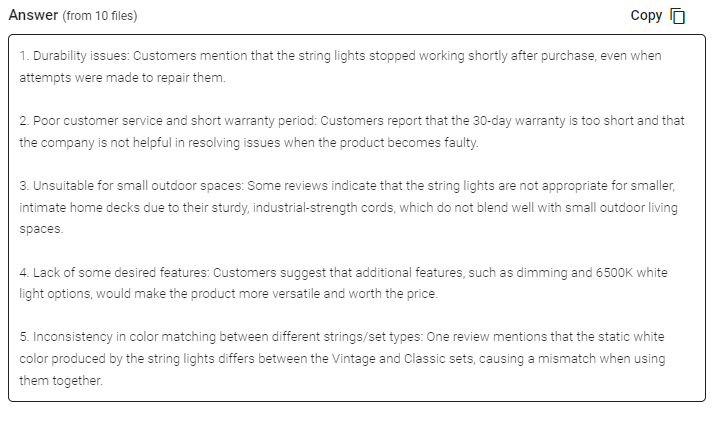
الخطوة 9: مراجعة الردود ومشاركتها
سيُنشئ لك تطبيق "تحدث" ردًا موجزًا في مربع نص أسفل قائمة اختيار السؤال. مع تفعيل خاصية "الدردشة"، يمكنك أيضًا مواصلة الاستعلام عن تلك البيانات للكشف عن المزيد من المعلومات وإعادة تنسيقها وفقًا لاحتياجاتك.
In this example, we ask to analyze all the Zoom Meetings in the folder at once for the top product dissatisfiers.
بإمكانك بسهولة نسخ هذه الاستجابة لعروضك التقديمية ومحتواك ورسائل البريد الإلكتروني وأعضاء فريقك والمزيد!
أسعار عروض "تحدث السحر"
Our team at Speak AI continues to optimize the pricing for Magic Prompts and Speak as a whole.
في الوقت الحالي، يحصل أي شخص في النسخة التجريبية لمدة 7 أيام من Speak على 100000 حرف متضمنة في حسابه.
إذا كنت بحاجة إلى المزيد من الشخصيات، فيمكنك بسهولة تضمين Speak Magic Prompts في خطتك عند إنشاء اشتراك.
يمكنك أيضًا ترقية عدد الأحرف في حسابك إذا كان لديك اشتراك بالفعل.
كلا الخيارين متاحان على صفحة الاشتراك.
بدلاً من ذلك، يمكنك استخدام Speak Magic Prompts من خلال إضافة التوازن إلى حسابك. سيتم استخدام الرصيد أثناء تحليل الشخصيات.
قم بتخصيص خطتك بالكامل 📝
هنا في Speak، جعلنا من السهل للغاية تخصيص اشتراكك.
بمجرد التسجيل، ما عليك سوى زيارة موقعنا منشئ خطة مخصصة واختر حجم الوسائط وحجم الفريق والميزات التي تريدها للحصول على خطة تناسب احتياجاتك.
لا مزيد من الخطط الصارمة. يمكنك الترقية أو تخفيض الإصدار أو الإلغاء في أي وقت.
اطلب عرضك الخاص 🎁
عند الاشتراك، ستحصل أيضًا على إضافة مميزة مجانية لمدة ثلاثة أشهر!
وهذا يعني أنك توفر ما يصل إلى $50 دولارًا أمريكيًا شهريًا و$150 دولارًا أمريكيًا إجمالاً.
بمجرد الاشتراك في خطة ما، كل ما عليك فعله هو إرسال محادثة مباشرة إلينا مع الوظيفة الإضافية المميزة المحددة من القائمة أدناه:
- خيارات التصدير المتميزة (Word وCSV والمزيد)
- الفئات والرؤى المخصصة
- تخصيص المسجل (العلامة التجارية والإدخال والمزيد)
- تخصيص مشغل الوسائط
- مكتبات الوسائط القابلة للمشاركة
سوف نقوم بوضع الوظيفة الإضافية في حسابك مجانًا!
ماذا تنتظر؟
أحِل الآخرين واكسب أموالاً حقيقية 💸
إذا كان لديك أصدقاء أو أقران أو متابعين مهتمين باستخدام منصتنا، فيمكنك كسب أموال شهرية حقيقية.
سوف تحصل على نسبة مئوية من جميع المبيعات سواء قام العملاء الذين تحيلهم بالدفع مقابل خطة أو قاموا بنسخ الوسائط تلقائيًا أو الاستفادة من خدمات النسخ الاحترافية.
استخدم هذا الرابط لتصبح أحد الشركاء الرسميين لشركة Speak.
قم بالاطلاع على مواردنا المخصصة📚
احجز جلسة تنفيذية مجانية 🤝
سيكون شرفًا لي أن أجري مكالمة تعريفية معك شخصيًا للتأكد من أنك مهيأ للنجاح.
فقط استخدمنا رابط التقويم للعثور على الوقت المناسب لك. نحن نتطلع إلى لقائك!
From RAG to meeting agents: query your entire Zoom library
Retrieval-augmented generation makes AI answers grounded in your actual meeting data. Speak AI takes this further with AI agents that handle the full pipeline: auto-joining Zoom meetings, transcribing, indexing into a vector-searchable library, and letting you query across every conversation through AI Chat powered by Claude, Gemini, and GPT.
ذات صلة: Retrieval augmented generation for powerpoint presentations.
Instead of building your own RAG pipeline, your meeting agent handles ingestion, chunking, and retrieval automatically. Every new Zoom meeting is processed and queryable within minutes. Learn about Speak AI agents.
الأسئلة الشائعة
What is retrieval augmented generation (RAG)?
RAG is an AI technique that retrieves relevant information from a large body of data, then uses a language model to generate an answer grounded in it. The result is more relevant, human-like text.
How can RAG help with Zoom meetings?
It lets you ask questions about what was said across your Zoom meetings and get answers drawn from the actual conversations. That saves you from rewatching recordings or reading long transcripts.
How do I ask questions across my Zoom recordings?
Upload your Zoom recordings to Speak AI, let it transcribe and analyze them, then use AI chat to ask questions across your library. It works with transcripts in 100+ languages.
How do I analyze Zoom meetings with Speak AI?
Create an account, upload your Zoom recordings, and wait for the analysis. Then open the file or folder, choose a Magic Prompt or write your own, and review and share the responses.
استكشف تقنية الذكاء الاصطناعي الناطق
سبيك إيه آي هي منصة بحثية متخصصة في تقنيات الصوت والذكاء الاصطناعي. تقدم خدمات النسخ الصوتي بأكثر من 100 لغة، وتحليلات معالجة اللغة الطبيعية، وتحليل المشاعر، ووكلاء الذكاء الاصطناعي، والاستشارات المؤسسية.
 English
 Español
 Français
 Italiano
 العربية
 Português do Brasil
 Nederlands
 Deutsch
 עִבְרִית
 Русский
 日本語
 Polski
 Čeština
 Українська
 Slovenščina
 Svenska
 Ελληνικά
 Norsk bokmål
 简体中文
 Türkçe
 Català
 Magyar
 한국어
 Slovenčina
 Suomi