
Retrieval Augmented Generation For Zoom Meetings
소개
Zoom Meetings has become an essential tool for businesses, educators, and individuals alike, especially in the wake of the COVID-19 pandemic. It is a video conferencing platform that allows users to connect and collaborate remotely through virtual meetings. With its user-friendly interface and versatile features, Zoom Meetings has revolutionized the way we communicate and work.
But as with any form of communication, it is crucial to analyze and understand the content of Zoom Meetings to make the most out of it. This is where retrieval augmented generation (RAG) comes in. In this blog, we will explore what RAG is and how it can enhance the experience of Zoom Meetings for researchers, marketers, and organizations.
검색 증강 생성(RAG)이란 무엇인가요?
RAG is a state-of-the-art technique in natural language processing (NLP) that combines retrieval and generation models to produce high-quality, human-like text. In simpler terms, it is an AI-powered tool that can retrieve relevant information from a large dataset and generate new content based on that information.
This technique has been gaining immense popularity in recent years, especially in the field of NLP, due to its ability to produce coherent and contextually relevant text. RAG models are trained on large language models, such as GPT-3, which gives them a vast knowledge base to draw upon when generating text.
The Benefits of Using RAG for Zoom Meetings
As mentioned earlier, RAG is a powerful tool that can enhance the experience of using Zoom Meetings for researchers, marketers, and organizations. Let’s take a closer look at some of the benefits of using RAG for Zoom Meetings.
연구자용
Researchers often have to transcribe and analyze hours of Zoom Meetings to extract valuable insights and data. This can be a time-consuming and tedious process. However, with RAG, researchers can analyze large volumes of Zoom Meeting transcripts in a fraction of the time.
RAG models can extract relevant information from the transcripts and generate summaries, keywords, and important points, making it easier for researchers to analyze and draw conclusions. This not only saves time but also ensures that no important information is missed.
마케터용
Zoom Meetings have become a popular platform for businesses to conduct meetings, webinars, and conferences. Marketers can leverage RAG to analyze the content of these meetings and gain valuable insights into customer preferences, pain points, and feedback.
RAG can also generate summaries of the meetings, which can be used to create marketing materials, such as blog posts, social media posts, and email campaigns. This not only saves time but also ensures that the content is relevant and engaging.
조직용
Organizations can benefit greatly from using RAG for Zoom Meetings. With the help of RAG, they can analyze the content of their meetings and gain insights into employee performance, customer interactions, and overall meeting effectiveness.
RAG can also help organizations identify any gaps or areas for improvement in their meetings. By generating summaries and important points, RAG can highlight key takeaways and help organizations make informed decisions.
How Speak AI Uses RAG for Zoom Meetings
At Speak AI, we have integrated RAG into our NLP and transcription software to provide our users with a comprehensive analysis of their Zoom Meetings. Our RAG models can extract keywords, generate summaries, and provide sentiment analysis of the meeting content.
Moreover, our software uses data visualization techniques to present the analyzed data in an easy-to-understand format, making it easier for users to draw conclusions and make data-driven decisions.
결론
In conclusion, retrieval augmented generation is a powerful technique that can enhance the experience of using Zoom Meetings for researchers, marketers, and organizations. With its ability to retrieve and generate relevant and coherent text, RAG can save time, provide valuable insights, and improve the overall effectiveness of Zoom Meetings. At Speak AI, we have integrated RAG into our software to provide our users with a comprehensive analysis of their Zoom Meetings. Give it a try and experience the power of RAG for yourself!
관련: Retrieval augmented generation for academic textbooks.
How To Use Speak’s Retrieval Augmented Generation For Zoom Meetings
1단계: Speak 계정 만들기
전사 및 분석을 시작하려면 먼저 다음을 수행해야 합니다. Speak 계정 만들기. 걱정하지 마세요. 매우 간단합니다!
Get a 7-day trial with free credits for audio and video transcription and analysis included when you sign up for Speak.
Speak에 가입하고 검색 증강 생성을 통해 Speak Magic Prompts를 사용하려면 다음을 방문하세요. 여기에서 Speak 앱 등록 페이지.

Step 2: Upload Your Zoom Meetings
일반적으로 동영상은 MP4, 오디오는 MP3를 권장합니다.
하지만 다양한 오디오, 비디오 및 텍스트 파일 유형을 허용합니다.
Speak를 사용하여 여러 가지 방법으로 전사할 파일을 업로드할 수 있습니다:
허용되는 오디오 파일 형식
- MP3
- M4A
- WAV
- OGG
- WEBM
- M4P
허용되는 동영상 파일 형식
- MP4
- M4V
- WMV
- AVI
- MOV
- FLV
허용되는 텍스트 파일 형식
- TXT
- Word 문서
CSV 가져오기
텍스트 파일이나 오디오 및 비디오 파일의 CSV를 업로드할 수도 있습니다. CSV 업로드에 대해 자세히 알아보고 여기에서 Speak 호환 CSV 다운로드.
With the CSVs, you can upload anything from dozens of YouTube videos to thousands of Zoom Meetings files.
공개적으로 사용 가능한 URL
공개적으로 사용 가능한 URL을 통해 Speak에 미디어를 업로드할 수도 있습니다.
URL 끝에 파일 형식 확장자가 있으면 자동 트랜스크립션 및 분석을 위해 녹음을 가져오는 데 아무런 문제가 없습니다.
YouTube URL
Speak는 YouTube 동영상과 호환됩니다. YouTube 동영상의 URL을 복사하기만 하면 됩니다(예, https://www.youtube.com/watch?v=qKfcLcHeivc).
말하기가 자동으로 파일을 찾아서 길이를 계산하고 동영상을 가져옵니다.
YouTube 동영상을 사용하는 경우 단축된 YouTube 스니펫이 아닌 전체 링크를 사용해야 합니다. 또한 URL에서 채널 이름을 제거해야 합니다.
말하기 통합
앞서 언급했듯이 Speak에는 다음과 같은 다양한 통합 기능도 포함되어 있습니다. Zoom, Zapier, 비메오 등 미디어를 자동으로 트랜스크립션하는 데 도움이 되는 다양한 기능을 제공합니다.
이 통합 라이브러리는 계속 성장하고 있습니다! 요청 사항이 있으신가요? 언제든지 메시지를 보내주세요.

3단계: 자동으로 총액 계산 및 결제하기
Once you have your file(s) ready and load it into Speak, it will automatically calculate the total cost (free credits are included in the 7-day trial – take advantage of them!).
Speak에 텍스트 데이터를 업로드하는 경우에는 현재 비용을 지불할 필요가 없습니다. Speak 매직 프롬프트 분석에만 수수료가 발생하며, 이는 아래에 자세히 설명되어 있습니다.
Once you use your trial credits or need Speak Magic Prompts, you can top up credits (1 credit = US$1) or subscribe to Pro at US$25 per user per month, or US$20 per user per month billed annually. See the 가격 페이지 자세한 내용은 다음을 참조하세요.
또한 다음을 수행할 수도 있습니다. 잔액 추가 요금제를 사용하지 않고 업로드 및 분석에 대한 비용을 지불하거나 신용 카드.

Step 4: Wait for Speak to Analyze Your Zoom Meetings
오디오와 비디오를 업로드하는 경우 자동화된 트랜스크립션 소프트웨어가 트랜스크립션을 빠르게 준비합니다. 완료되면 성적표가 완성되었다는 이메일 알림을 받게 됩니다.
이 이메일에는 파일로 돌아가는 링크가 포함되어 있으므로 대화형 미디어 플레이어에 액세스하여 대본, 분석 및 내보내기 형식을 준비할 수 있습니다.
CSV를 가져오거나 텍스트 파일을 업로드하는 경우 일반적으로 Speak는 훨씬 더 빠르게 정보를 분석합니다.
Speak will automatically embed your data in a well-architected vector database which allows you to use retrieval augmented generation for Zoom Meetings.
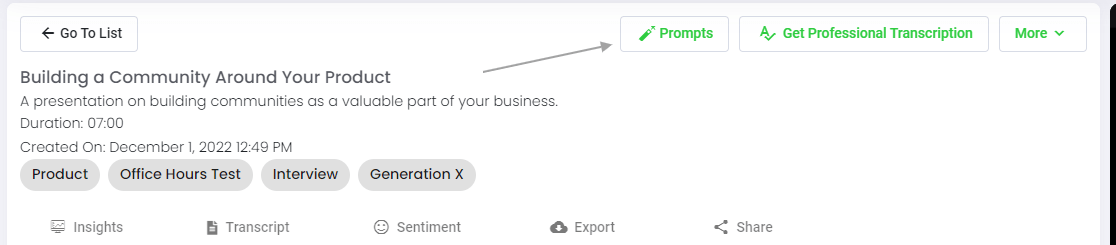
5단계: 파일 또는 폴더 방문
Speak는 개별 파일과 전체 데이터 폴더를 모두 분석할 수 있습니다.
Speak에서 개별 파일을 볼 때는 '프롬프트' 버튼을 클릭하기만 하면 됩니다.
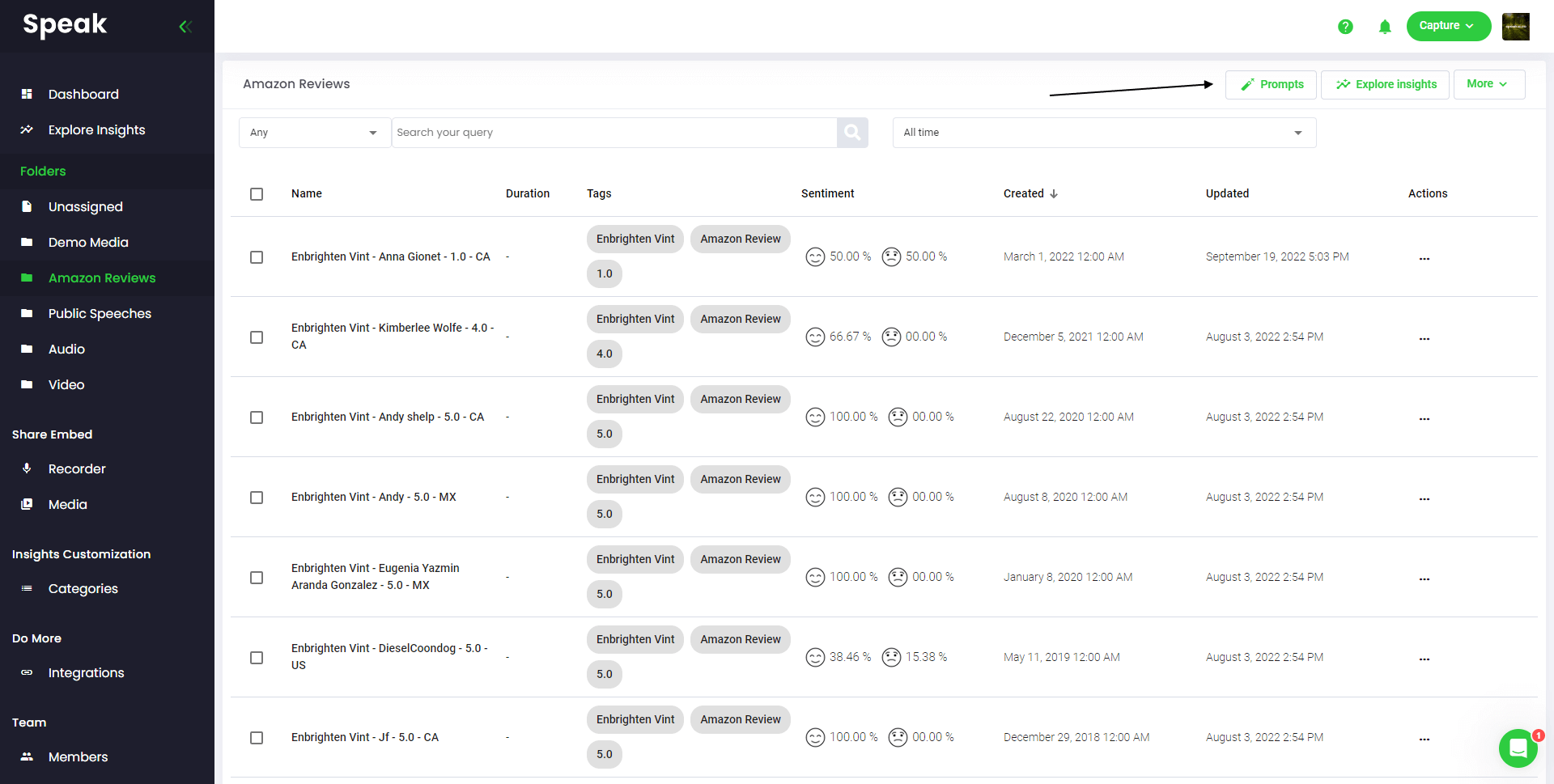
많은 파일을 분석하려면 분석하려는 파일을 Speak 내의 폴더에 추가하기만 하면 됩니다.
Speak에 새 파일을 추가하거나 소프트웨어의 간편한 편집 기능을 사용하여 현재 파일을 원하는 폴더로 정리할 수 있습니다.
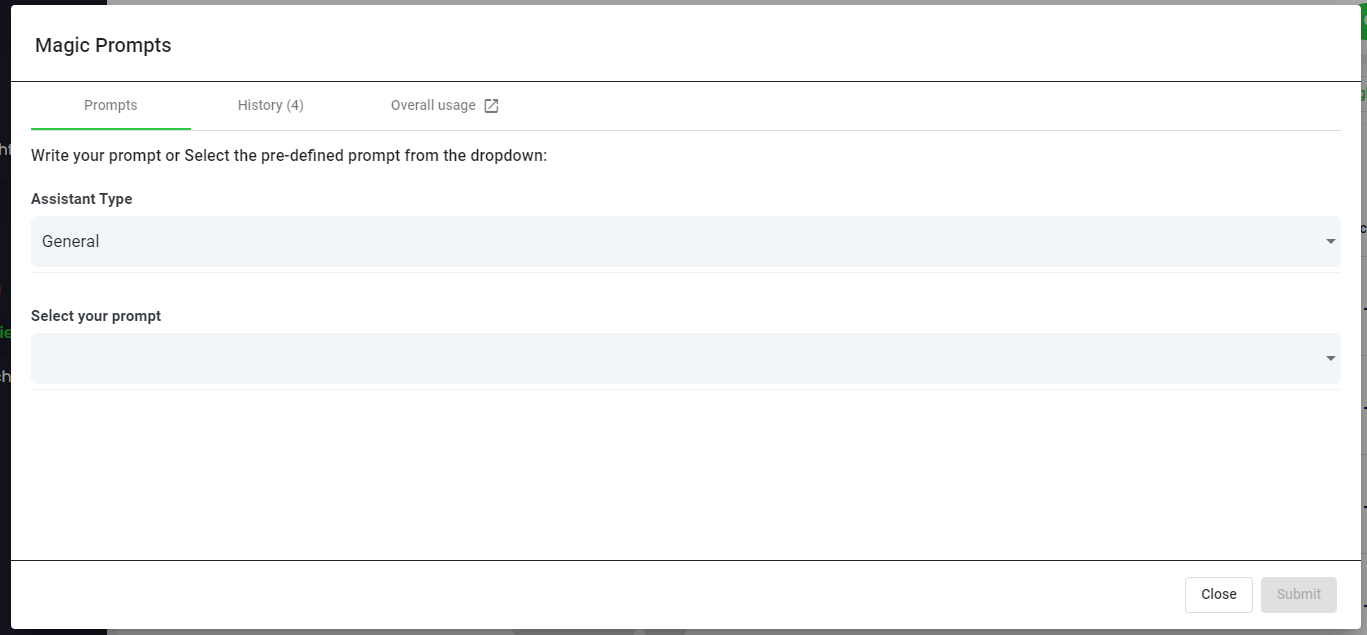
Step 6: Select Speak Magic Prompts To Analyze Your Zoom Meetings
매직 프롬프트란 무엇인가요?
매직 프롬프트는 흔히 '생성형 AI'라고 불리는 인공지능 모델의 혁신을 활용합니다.
이 모델들은 언어에 대한 이해를 얻기 위해 인터넷에서 방대한 양의 데이터를 분석했습니다.
이러한 이해를 바탕으로 이러한 '대규모 언어 모델'은 마음을 뒤흔드는 작업을 수행할 수 있습니다!
이제 Speak 매직 프롬프트를 사용하면 Speak 계정의 오디오, 비디오 및 텍스트 데이터에서 이러한 작업을 수행할 수 있습니다.
이러한 매직 프롬프트가 효과적인 이유는 검색 증강 생성 때문입니다.
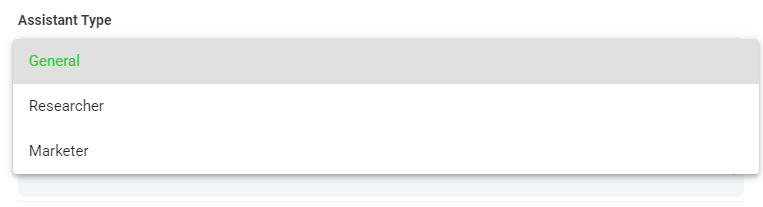
7단계: 보조자 유형 선택 또는 생성
Speak 매직 프롬프트에서 더 나은 결과를 얻을 수 있도록 Speak에서 '어시스턴트 유형'을 도입했습니다.
이러한 어시스턴트 유형은 사용자의 필요에 따라 보다 간결하고 의미 있는 출력을 위해 프롬프트 엔진에 미리 설정되고 컨텍스트를 제공합니다.
우선, 다음과 같이 포함했습니다:
- 일반
- 연구원
- 마케터
- 판매
- 채용 담당자
드롭다운에서 가장 관련성이 높은 어시스턴트 유형을 선택합니다.
사용자 정의 도우미 템플릿 유형을 직접 만들 수도 있습니다.
새로운 페이지를 방문하면 계정 환경 설정, 이제 사용자 정의 도우미를 만들 수 있는 영역이 생긴 것을 볼 수 있습니다.
이를 통해 엔진의 컨텍스트를 설정하여 더 높은 품질과 더 일관된 출력을 얻을 수 있습니다.
예를 들어, 다음과 같이 말할 수 있습니다.
“"저희는 [회사명]입니다. [목표]를 개선하는 방법을 파악하기 위해 [데이터]를 분석하고 있습니다. 모든 답변은 간결하고 표 형식으로 작성해 주시기 바랍니다.".
이는 수동 또는 자동화된 매직 프롬프트에서 재사용 가능한 템플릿이 됩니다.
다양한 사용 사례에 맞게 여러 개의 템플릿을 만들 수 있습니다.
예를 들어, 포커스 그룹에 대한 분석은 일대일 인터뷰와 다를 수 있습니다.

8단계: 원하는 프롬프트 생성 또는 선택
다음은 지금 바로 모든 파일에 적용할 수 있는 몇 가지 예시 프롬프트입니다:
- SWOT 분석 만들기
- 주요 작업 항목을 알려주세요.
- 글머리 기호 목록 요약 만들기
- 해결되지 않은 주요 문제를 알려주세요.
- 어떤 질문이 나왔는지 알려주세요.
모달이 나타나면 위에서 공유한 제안 프롬프트를 사용하여 마법처럼 즉시 답변을 얻을 수 있습니다.
직접 만들고 싶은 프롬프트가 있는 경우 드롭다운에서 '사용자 지정 프롬프트'를 선택하면 데이터에 대해 원하는 것을 물어볼 수 있는 다른 텍스트 상자가 열립니다!
9단계: 응답 검토 및 공유
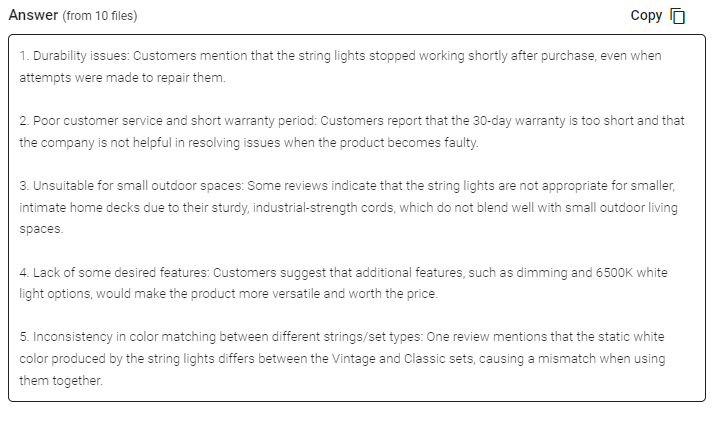
Speak은 프롬프트 선택 드롭다운 아래의 텍스트 상자에 간결한 답변을 생성합니다. 채팅 기능을 활성화하면 해당 데이터를 계속 쿼리하여 더 많은 정보를 얻고 필요에 맞게 정보를 재구성할 수 있습니다.
In this example, we ask to analyze all the Zoom Meetings in the folder at once for the top product dissatisfiers.
프레젠테이션, 콘텐츠, 이메일, 팀원 등을 위해 해당 응답을 쉽게 복사할 수 있습니다!
Speak Magic Prompts 가격
Our team at Speak AI continues to optimize the pricing for Magic Prompts and Speak as a whole.
현재 Speak 7일 평가판을 사용하는 모든 사용자에게는 계정에 100,000자가 포함되어 있습니다.
더 많은 문자가 필요한 경우, 요금제를 만들 때 간편하게 말하기 마법 프롬프트를 요금제에 포함할 수 있습니다.
이미 구독 중인 경우 계정의 글자 수를 업그레이드할 수도 있습니다.
두 옵션 모두 구독 페이지.
또는 다음과 같이 마법 프롬프트 말하기를 사용할 수 있습니다. 잔액 추가 를 계정에 추가합니다. 잔액은 캐릭터를 분석할 때 사용됩니다.
완전히 맞춤화된 요금제 📝
Speak에서는 구독을 매우 쉽게 맞춤 설정할 수 있도록 했습니다.
가입하신 후 저희를 방문하세요 맞춤 요금제 빌더 를 클릭하고 미디어 용량, 팀 규모, 원하는 기능을 선택하여 필요에 맞는 요금제를 선택하세요.
더 이상 딱딱한 요금제는 없습니다. 언제든지 업그레이드, 다운그레이드 또는 취소할 수 있습니다.
특별 혜택 신청하기 🎁
구독하면 3개월 동안 프리미엄 애드온을 무료로 이용할 수 있습니다!
즉, 한 달에 최대 $50달러, 총 $150달러를 절약할 수 있습니다.
요금제에 가입한 후에는 아래 목록에서 선택한 프리미엄 부가 기능으로 실시간 채팅을 보내기만 하면 됩니다:
- 프리미엄 내보내기 옵션(Word, CSV 등)
- 사용자 지정 카테고리 및 인사이트
- 레코더 사용자 지정(브랜딩, 입력 등)
- 미디어 플레이어 사용자 지정
- 공유 가능한 미디어 라이브러리
계정에 애드온을 무료로 설치해드립니다!
무엇을 기다리고 계십니까?
다른 사람 추천 & 실제 현금 적립 💸
저희 플랫폼 사용에 관심이 있는 친구, 동료, 팔로워가 있다면 매월 실제 수익을 얻을 수 있습니다.
추천한 고객이 요금제를 결제하든, 미디어를 자동으로 트랜스크립션하든, 전문 트랜스크립션 서비스를 활용하든 모든 매출의 일정 비율을 지급받게 됩니다.
이 링크 사용 를 클릭하여 공식 Speak 제휴사가 되세요.
전용 리소스 확인📚
무료 구현 세션 예약하기 🤝
여러분과 직접 소개 통화를 통해 성공할 수 있도록 도와드리게 되어 영광입니다.
저희의 캘린더 링크 를 클릭해 자신에게 적합한 시간을 찾아보세요. 여러분을 만나 뵙기를 고대합니다!
From RAG to meeting agents: query your entire Zoom library
Retrieval-augmented generation makes AI answers grounded in your actual meeting data. Speak AI takes this further with AI agents that handle the full pipeline: auto-joining Zoom meetings, transcribing, indexing into a vector-searchable library, and letting you query across every conversation through AI Chat powered by Claude, Gemini, and GPT.
관련: Retrieval augmented generation for powerpoint presentations.
Instead of building your own RAG pipeline, your meeting agent handles ingestion, chunking, and retrieval automatically. Every new Zoom meeting is processed and queryable within minutes. Learn about Speak AI agents.
자주 묻는 질문
What is retrieval augmented generation (RAG)?
RAG is an AI technique that retrieves relevant information from a large body of data, then uses a language model to generate an answer grounded in it. The result is more relevant, human-like text.
How can RAG help with Zoom meetings?
It lets you ask questions about what was said across your Zoom meetings and get answers drawn from the actual conversations. That saves you from rewatching recordings or reading long transcripts.
How do I ask questions across my Zoom recordings?
Upload your Zoom recordings to Speak AI, let it transcribe and analyze them, then use AI chat to ask questions across your library. It works with transcripts in 100+ languages.
How do I analyze Zoom meetings with Speak AI?
Create an account, upload your Zoom recordings, and wait for the analysis. Then open the file or folder, choose a Magic Prompt or write your own, and review and share the responses.
Speak AI 살펴보기
Speak AI는 음성 기술 및 AI 연구 플랫폼입니다. 100개 이상의 언어로 전사, NLP 분석, 감성 분석을 제공합니다.
 English
 Español
 Français
 Italiano
 العربية
 Português do Brasil
 Nederlands
 Deutsch
 עִבְרִית
 Русский
 日本語
 Polski
 Čeština
 Українська
 Slovenščina
 Svenska
 Ελληνικά
 Norsk bokmål
 简体中文
 Türkçe
 Català
 Magyar
 한국어
 Slovenčina
 Suomi