
Retrieval Augmented Generation For PowerPoint Presentations
PowerPoint presentations have become a staple in the business and academic world. They are used to convey information, present data, and make persuasive arguments. As a researcher, marketer, or organization, analyzing PowerPoint presentations can provide valuable insights and help improve communication and engagement. In this article, we will explore the concept of retrieval augmented generation and how it can enhance the effectiveness of PowerPoint presentations.
What are PowerPoint Presentations?
PowerPoint presentations are visual aids that are used to accompany a spoken presentation. They consist of slides that contain text, images, charts, and other media to convey information in a visually appealing manner. PowerPoint was first introduced by Microsoft in 1987 and has since become the most widely used presentation software.
PowerPoint presentations are commonly used in business meetings, educational settings, and conferences. They offer a structured and organized way to present information and can be easily customized to suit the needs of the presenter.
The Benefits of Analyzing PowerPoint Presentations
As a researcher, marketer, or organization, analyzing PowerPoint presentations can provide valuable insights and benefits.
研究者向け
As a researcher, PowerPoint presentations can be a rich source of data. By analyzing the content, design, and delivery of presentations, researchers can gain a deeper understanding of how information is communicated and perceived by audiences. This can be particularly useful in fields such as communication studies, psychology, and marketing.
PowerPoint presentations can also be used as a research tool. Researchers can create their own presentations and use them to gather data, conduct experiments, or conduct surveys. This can provide a more interactive and engaging way to collect data compared to traditional methods.
マーケティング担当者向け
For marketers, analyzing PowerPoint presentations can offer valuable insights into the effectiveness of their marketing efforts. By analyzing the design, messaging, and engagement of presentations, marketers can identify what resonates with their target audience and adjust their strategies accordingly.
PowerPoint presentations can also be used as a marketing tool. By creating visually appealing and informative presentations, marketers can use them to showcase their products or services, educate potential customers, or present data and statistics to support their claims.
団体向け
For organizations, analyzing PowerPoint presentations can provide valuable feedback on their communication and training efforts. By analyzing the design and delivery of presentations, organizations can identify areas for improvement and enhance their internal communication and training programs.
PowerPoint presentations can also be used to enhance external communication. By creating professional and visually appealing presentations, organizations can effectively communicate their mission, goals, and achievements to stakeholders and the public.
Introducing Retrieval Augmented Generation
Retrieval augmented generation (RAG) is a technique that combines the power of large language models with structured data to generate text that is both factually accurate and relevant to a given context. This approach has been successfully applied in various natural language processing (NLP) tasks, including question-answering and text summarization.
In the context of PowerPoint presentations, RAG can be used to enhance the effectiveness of presentations by generating relevant and engaging content. This can be particularly useful for presenters who may struggle with creating visually appealing slides or coming up with compelling content.
The Benefits of Retrieval Augmented Generation for PowerPoint Presentations
RAG can offer several benefits for PowerPoint presentations, including:
Enhanced Content
By using RAG, presenters can generate relevant and engaging content for their presentations. This can help keep the audience interested and improve overall engagement.
Time-saving
Creating PowerPoint presentations can be time-consuming, especially when it comes to researching and writing content. RAG can significantly reduce the time and effort required to create presentations, allowing presenters to focus on other aspects of their work.
Improved Customization
RAG allows presenters to customize the generated content to suit their needs. This means that presenters can control the tone, style, and level of detail in the generated text, ensuring that it aligns with their goals and objectives.
Increased Accuracy
RAG uses structured data to generate text, which means that the content is factually accurate. This can be especially useful for presentations that require a high level of accuracy, such as scientific or technical presentations.
In Conclusion
PowerPoint presentations are a valuable tool for researchers, marketers, and organizations. By analyzing presentations and incorporating techniques such as retrieval augmented generation, we can enhance the effectiveness and impact of presentations. Whether it’s creating engaging content or improving communication and training, RAG can offer many benefits for PowerPoint presentations. As technology continues to advance, we can expect to see even more innovative approaches to enhance the way we use presentations in the future.
How To Use Speak’s Retrieval Augmented Generation For PowerPoint Presentations
ステップ1:スピークアカウントの作成
トランスクリプションと分析を開始するには、まず次のことが必要です。 スピークアカウントを作成する.心配はいらない!
Get a 7-day trial with free credits for audio and video transcription and analysis included when you sign up for Speak.
Speakにサインアップして、検索拡張生成機能を備えたSpeak Magic Promptsを使い始めるには、 スピークアプリ登録ページはこちら.
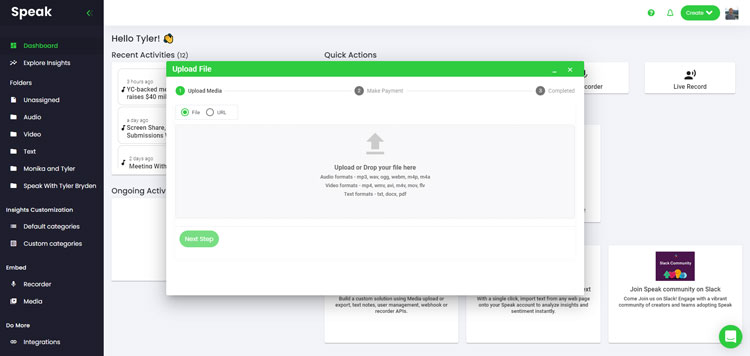
ステップ2:PowerPointプレゼンテーションをアップロードする
通常、ビデオにはMP4、オーディオにはMP3をお勧めします。
ただし、オーディオ、ビデオ、テキストなど、さまざまなファイル形式を受け付けます。
Speakを使用すると、いくつかの方法でファイルをアップロードしてテープ起こしすることができます:
オーディオファイルの種類
- MP3
- M4A
- ウエーブ
- オージー
- ウェブム
- M4P
使用可能なビデオファイルの種類
- MP4
- M4V
- WMV
- AVI
- MOV
- FLV
使用可能なテキストファイルの種類
- TXT
- ワード文書
CSVインポート
テキストファイルや音声・動画ファイルのCSVをアップロードすることもできます。CSVアップロードの詳細については、こちらをご覧ください。 スピーク対応CSVのダウンロードはこちら.
With the CSVs, you can upload anything from dozens of YouTube videos to thousands of PowerPoint Presentations files.
公開URL
また、一般に公開されているURLからスピークにメディアをアップロードすることもできる。
URLの末尾にファイルタイプの拡張子があれば、自動テープ起こしや分析のために録音をインポートするのに問題はありません。
YouTubeのURL
スピークはYouTube動画に対応しています。YouTube動画のURLをコピーするだけです、 https://www.youtube.com/watch?v=qKfcLcHeivc).
Speakは自動的にファイルを見つけ、長さを計算し、ビデオをインポートします。
YouTubeの動画を使用する場合は、短縮されたYouTubeのスニペットではなく、必ず完全なリンクを使用してください。また、URLからチャンネル名を削除してください。
スピーク・インテグレーション
前述したように、Speakには以下のような統合も含まれている。 ズーム, ザピアVimeoなど、あなたのメディアを自動的に書き写すのに役立ちます。
この統合ライブラリは増え続けています!リクエストをお持ちですか?お気軽にメッセージをお送りください。
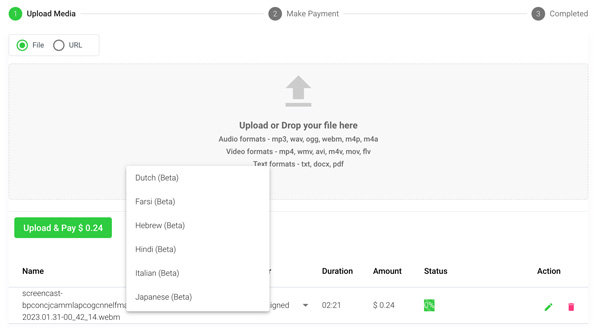
ステップ3:自動計算と自動支払い
Once you have your file(s) ready and load it into Speak, it will automatically calculate the total cost (free credits are included in the 7-day trial – take advantage of them!).
Speakにテキストデータをアップロードする場合、現在のところ費用はかかりません。スピーク・マジック・プロンプトの分析のみ料金が発生します。
Once you use your trial credits or need Speak Magic Prompts, you can top up credits (1 credit = US$1) or subscribe to Pro at US$25 per user per month, or US$20 per user per month billed annually. See the 価格ページ 詳細は.
また、次のこともできる。 バランスを取る を使用して、プランなしでアップロードと分析の料金を支払うこともできます。 クレジットカード.
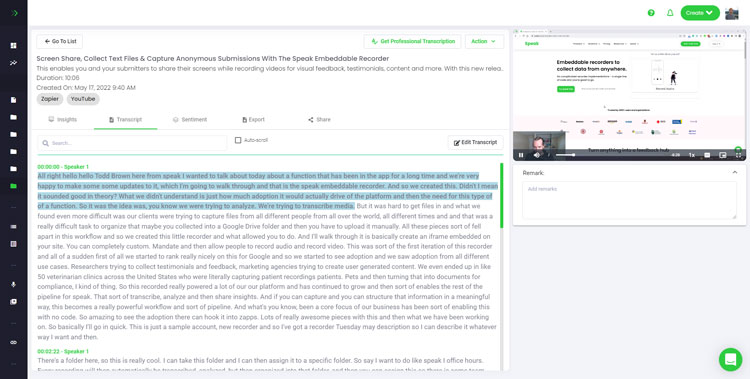
ステップ4:PowerPointプレゼンテーションを分析するためにスピークを待つ
音声やビデオをアップロードする場合、当社の自動テープ起こしソフトウェアが迅速に原稿を作成します。 完了すると、成績証明書が完成したことを知らせるEメールが届きます。
このEメールにはファイルへのリンクが含まれており、トランスクリプト、分析、エクスポートの各フォーマットが用意されたインタラクティブ・メディア・プレーヤーにアクセスすることができます。
CSVのインポートやテキストファイルのアップロードであれば、スピークは一般的にもっと素早く情報を分析します。
Speak will automatically embed your data in a well-architected vector database which allows you to use retrieval augmented generation for PowerPoint Presentations.
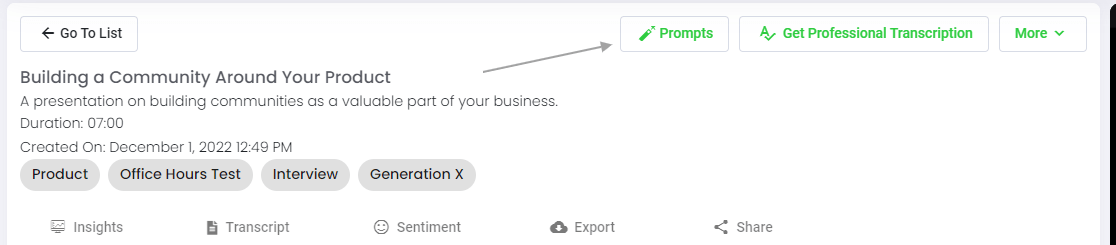
ステップ5:ファイルまたはフォルダを見る
スピークは、個々のファイルとデータのフォルダ全体の両方を分析することができます。
Speakで個々のファイルを表示しているときは、「プロンプト」ボタンをクリックするだけです。
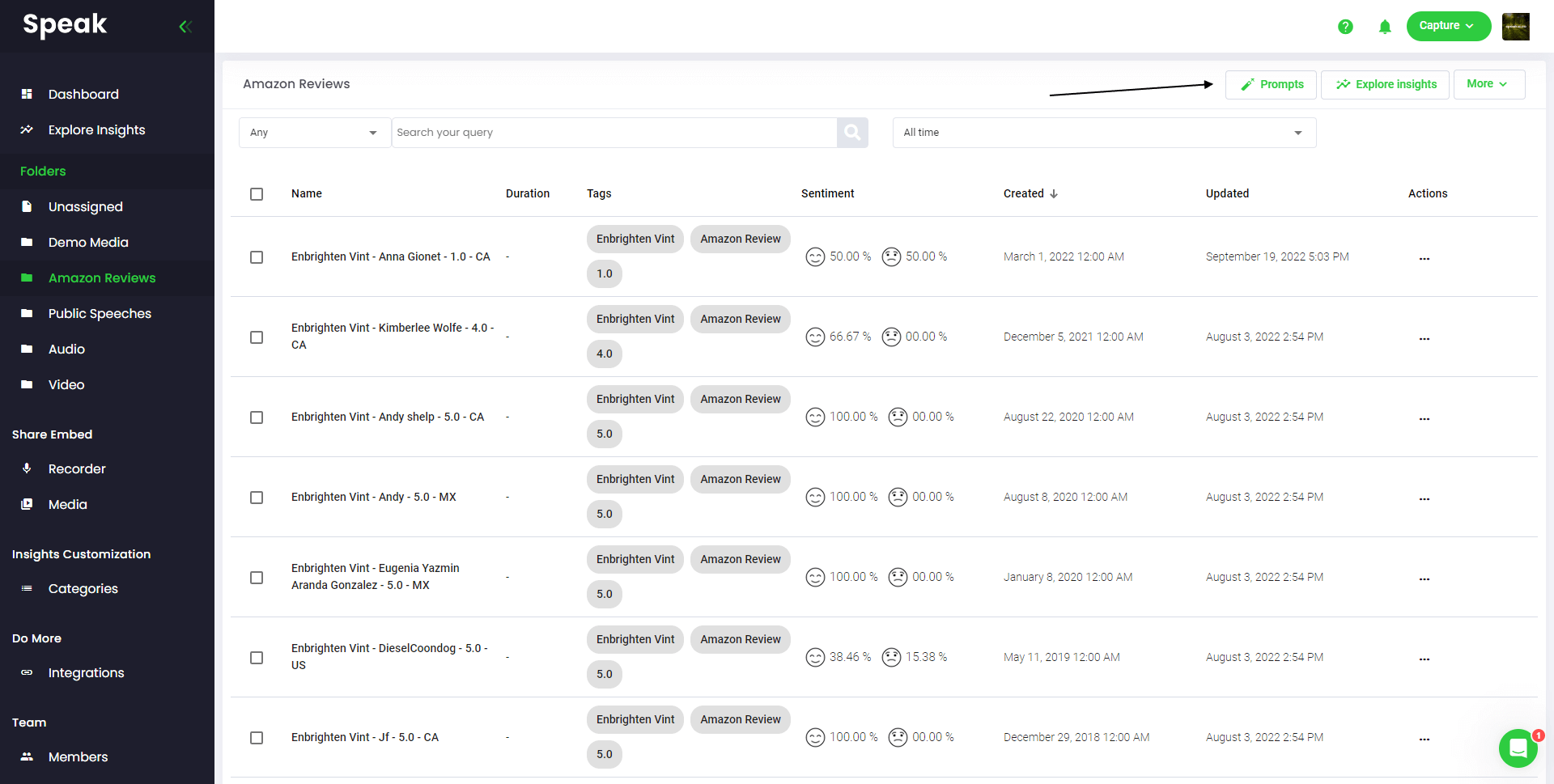
多くのファイルを分析したい場合は、分析したいファイルをSpeak内のフォルダに追加するだけです。
スピークに新しいファイルを追加したり、ソフトウェアの簡単な編集機能を使って、現在のファイルを希望のフォルダに整理することができます。
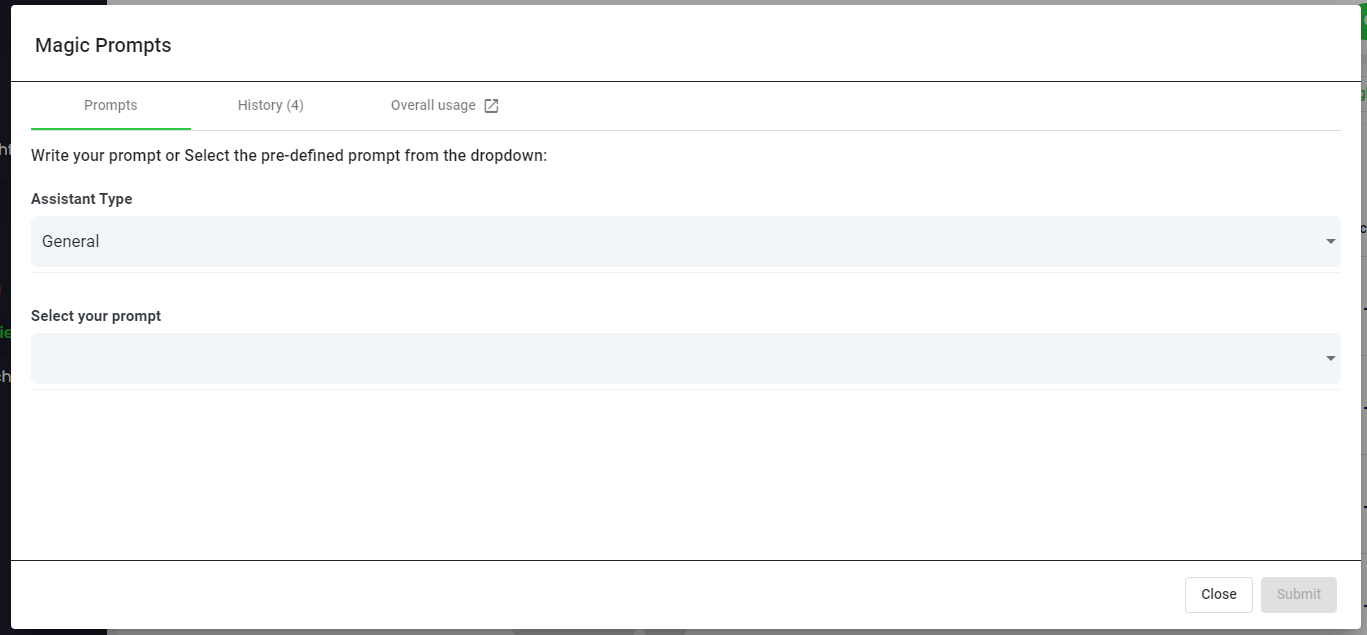
Step 6: Select Speak Magic Prompts To Analyze Your PowerPoint Presentations
マジック・プロンプトとは何か?
スピーク・マジック・プロンプトは、しばしば「ジェネレーティブAI」と呼ばれる人工知能モデルのイノベーションを活用している。
これらのモデルは、言語を理解するためにインターネット上の膨大な量のデータを分析している。
それを理解した上で、この「大規模言語モデル」は、気の遠くなるようなタスクをこなすことができる!
Speak Magic Promptsを使えば、Speakアカウント内のオーディオ、ビデオ、テキストデータに対してこれらのタスクを実行できます。
検索拡張生成により、これらのマジック プロンプトが非常にうまく機能します。.
ステップ7: アシスタントの種類を選択または作成する
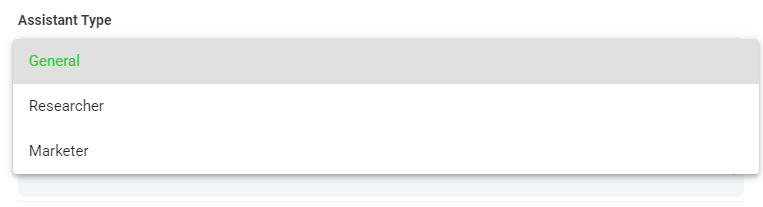
スピーク・マジック・プロンプトからより良い結果を得るために、スピークは「アシスタントタイプ」を導入しました。
これらのアシスタントタイプはあらかじめ設定されており、プロンプトエンジンにコンテキストを提供することで、ニーズに基づいたより簡潔で有意義な出力を実現します。
手始めに、私たちはこのような記事を掲載した:
- 一般
- 研究員
- マーケター
- 売上高
- リクルーター
ドロップダウンから最も関連性の高いアシスタントタイプを選択します。
独自のカスタム アシスタント テンプレート タイプを作成することもできます。.
新しいページにアクセスすると アカウント設定, では、独自のカスタム アシスタントを作成できる領域があることがわかります。.
これにより、エンジンのコンテキストを設定して、より高品質で一貫性のある出力を実現できます。.
たとえば、次のように言うことができます。
“「[会社名]でございます。[目標]の改善方法を把握するため、[データ]を分析しております。ご回答はすべて簡潔な表形式でお願いいたします。」.
これは、手動または自動の Magic Prompt で再利用可能なテンプレートになります。.
さまざまなユースケースに合わせて複数のテンプレートを作成できます。.
たとえば、フォーカス グループで実行する分析は、1 対 1 のインタビューで実行する分析とは異なる場合があります。.

ステップ8:希望のプロンプトを作成または選択する
今すぐどんなファイルにも適用できるプロンプトの例をいくつか紹介しよう:
- SWOT分析を作成する
- トップ・アクション・アイテムを教えてください
- 箇条書きの要約を作成する
- 未解決の主要問題を教えてください。
- どのような質問をされたか教えてください
モーダルがポップアップ表示されるので、上記で紹介したプロンプト候補を使って、即座に魔法のように答えを導き出すことができます。
独自のプロンプトを作成したい場合は、ドロップダウンから「カスタムプロンプト」を選択します!
ステップ9:回答の確認と共有
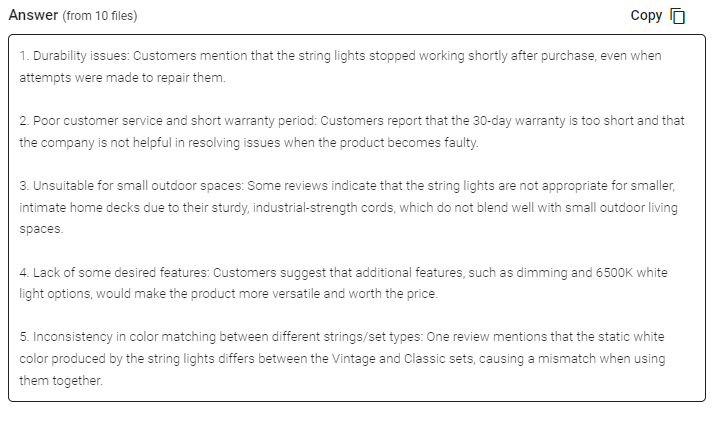
Speakは、プロンプト選択ドロップダウンの下のテキストボックスに簡潔な回答を生成します。Chatを有効にすると、そのデータに対してクエリを実行し、より多くのインサイトを得たり、ニーズに合わせて情報を再フォーマットしたりすることもできます。.
この例では、フォルダー内のすべてのPowerPointプレゼンテーションを一度に分析し、上位の製品不満足者を探すよう依頼します。
プレゼンテーション、コンテンツ、Eメール、チームメンバーなどに、その反応を簡単にコピーすることができます!
Speak Magic Promptsの価格
Our team at Speak AI continues to optimize the pricing for Magic Prompts and Speak as a whole.
現在、Speakの7日間トライアルに参加している人には、10万文字がアカウントに含まれている。
より多くの文字が必要な場合は、サブスクリプションを作成するときに簡単にスピークマジックプロンプトをプランに含めることができます。
また、すでにサブスクリプションをお持ちの場合は、アカウントの文字数をアップグレードすることもできます。
どちらのオプションも サブスクリプションページ.
また、スピーク・マジック・プロンプトを使うこともできます。 バランス調整 をアカウントに追加します。残高は、あなたがキャラクターを分析する際に使用されます。
完全にパーソナライズされたプラン
スピークでは、購読のパーソナライズを驚くほど簡単にしています。
登録したら、 カスタムプランビルダー をクリックし、メディア量、チームサイズ、必要な機能を選択して、お客様のニーズに合ったプランをご利用ください。
堅苦しいプランはもう必要ありません。いつでもアップグレード、ダウングレード、キャンセルが可能です。
スペシャル・オファー 🎁 を請求する
購読を申し込むと、3ヶ月間無料のプレミアム・アドオンも手に入る!
つまり、毎月最大$50 USD、合計で$150 USDの節約になる。
プランを購読したら、以下のリストから選択したプレミアムアドオンをライブチャットで送信するだけです:
- プレミアムエクスポートオプション(Word、CSVなど)
- カスタムカテゴリーとインサイト
- レコーダーのカスタマイズ(ブランディング、入力など)
- メディアプレーヤーのカスタマイズ
- 共有可能なメディア・ライブラリ
お客様のアカウントにアドオンを無料でインストールいたします!
何を待っているんだ?
他の人を紹介し、リアルマネーを稼ぐ 💸。
友人や仲間、フォロワーが私たちのプラットフォームを利用することに興味を持っている場合、あなたは本当の毎月のお金を稼ぐことができます。
あなたが紹介したお客様がプランの料金を支払った場合でも、メディアを自動的に書き起こした場合でも、プロのテープ起こしサービスを利用した場合でも、売上の一定割合が報酬として支払われます。
このリンクを使用する をクリックして、スピークの公式アフィリエイトになる。
専用リソースをご覧ください📚。
無料インプリメンテーション・セッションを予約する 🤝。
あなたが成功するための準備が整っていることを確認するために、個人的に入門コールに飛び乗ることができれば光栄です。
をご利用ください。 カレンダーリンク ご都合の良い時間を見つけてください。お会いできるのを楽しみにしています!
よくある質問
What is retrieval augmented generation for PowerPoint presentations?
Retrieval augmented generation (RAG) lets an AI look up relevant passages from your own documents before it answers. Applied to PowerPoint decks, it means answers are grounded in what your slides actually say.
What are the benefits of RAG for presentations?
RAG helps researchers, marketers and teams get answers tied to the actual slide content, which makes summaries and insights easier to check. It also saves time compared with reading every deck by hand.
Can I ask questions across many PowerPoint decks at once?
Yes. Put the files in one folder and use AI chat across that library to ask questions, instead of opening each deck. Speak AI supports chat across a whole library of files.
Speak AI を探索する
Speak AIは、音声技術とAIの研究プラットフォームです。100以上の言語に対応した文字起こし、自然言語処理(NLP)分析、感情分析、AIエージェント、そして企業向けコンサルティングを提供しています。.
 English
 Español
 Français
 Italiano
 العربية
 Português do Brasil
 Nederlands
 Deutsch
 עִבְרִית
 Русский
 日本語
 Polski
 Čeština
 Українська
 Slovenščina
 Svenska
 Ελληνικά
 Norsk bokmål
 简体中文
 Türkçe
 Català
 Magyar
 한국어
 Slovenčina
 Suomi