
Retrieval Augmented Generation For PowerPoint Presentations
PowerPoint presentations have become a staple in the business and academic world. They are used to convey information, present data, and make persuasive arguments. As a researcher, marketer, or organization, analyzing PowerPoint presentations can provide valuable insights and help improve communication and engagement. In this article, we will explore the concept of retrieval augmented generation and how it can enhance the effectiveness of PowerPoint presentations.
What are PowerPoint Presentations?
PowerPoint presentations are visual aids that are used to accompany a spoken presentation. They consist of slides that contain text, images, charts, and other media to convey information in a visually appealing manner. PowerPoint was first introduced by Microsoft in 1987 and has since become the most widely used presentation software.
PowerPoint presentations are commonly used in business meetings, educational settings, and conferences. They offer a structured and organized way to present information and can be easily customized to suit the needs of the presenter.
The Benefits of Analyzing PowerPoint Presentations
As a researcher, marketer, or organization, analyzing PowerPoint presentations can provide valuable insights and benefits.
研究人员
As a researcher, PowerPoint presentations can be a rich source of data. By analyzing the content, design, and delivery of presentations, researchers can gain a deeper understanding of how information is communicated and perceived by audiences. This can be particularly useful in fields such as communication studies, psychology, and marketing.
PowerPoint presentations can also be used as a research tool. Researchers can create their own presentations and use them to gather data, conduct experiments, or conduct surveys. This can provide a more interactive and engaging way to collect data compared to traditional methods.
营销人员
For marketers, analyzing PowerPoint presentations can offer valuable insights into the effectiveness of their marketing efforts. By analyzing the design, messaging, and engagement of presentations, marketers can identify what resonates with their target audience and adjust their strategies accordingly.
PowerPoint presentations can also be used as a marketing tool. By creating visually appealing and informative presentations, marketers can use them to showcase their products or services, educate potential customers, or present data and statistics to support their claims.
针对组织
For organizations, analyzing PowerPoint presentations can provide valuable feedback on their communication and training efforts. By analyzing the design and delivery of presentations, organizations can identify areas for improvement and enhance their internal communication and training programs.
PowerPoint presentations can also be used to enhance external communication. By creating professional and visually appealing presentations, organizations can effectively communicate their mission, goals, and achievements to stakeholders and the public.
Introducing Retrieval Augmented Generation
Retrieval augmented generation (RAG) is a technique that combines the power of large language models with structured data to generate text that is both factually accurate and relevant to a given context. This approach has been successfully applied in various natural language processing (NLP) tasks, including question-answering and text summarization.
In the context of PowerPoint presentations, RAG can be used to enhance the effectiveness of presentations by generating relevant and engaging content. This can be particularly useful for presenters who may struggle with creating visually appealing slides or coming up with compelling content.
The Benefits of Retrieval Augmented Generation for PowerPoint Presentations
RAG can offer several benefits for PowerPoint presentations, including:
Enhanced Content
By using RAG, presenters can generate relevant and engaging content for their presentations. This can help keep the audience interested and improve overall engagement.
Time-saving
Creating PowerPoint presentations can be time-consuming, especially when it comes to researching and writing content. RAG can significantly reduce the time and effort required to create presentations, allowing presenters to focus on other aspects of their work.
Improved Customization
RAG allows presenters to customize the generated content to suit their needs. This means that presenters can control the tone, style, and level of detail in the generated text, ensuring that it aligns with their goals and objectives.
Increased Accuracy
RAG uses structured data to generate text, which means that the content is factually accurate. This can be especially useful for presentations that require a high level of accuracy, such as scientific or technical presentations.
In Conclusion
PowerPoint presentations are a valuable tool for researchers, marketers, and organizations. By analyzing presentations and incorporating techniques such as retrieval augmented generation, we can enhance the effectiveness and impact of presentations. Whether it’s creating engaging content or improving communication and training, RAG can offer many benefits for PowerPoint presentations. As technology continues to advance, we can expect to see even more innovative approaches to enhance the way we use presentations in the future.
How To Use Speak’s Retrieval Augmented Generation For PowerPoint Presentations
步骤 1:创建您的 Speak 账户
要开始转录和分析,您首先需要 创建 Speak 帐户.不用担心,这非常容易做到!
Get a 7-day trial with free credits for audio and video transcription and analysis included when you sign up for Speak.
要注册 Speak 并开始使用 Speak Magic Prompts 的检索增强生成功能,只需访问以下网址: 在此注册应用程序.
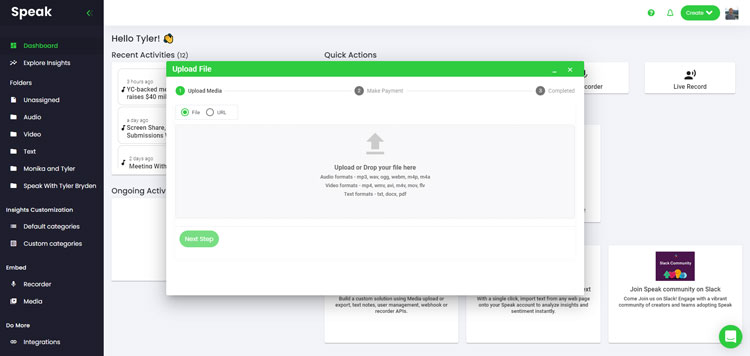
第 2 步:上传 PowerPoint 演示文稿
我们通常推荐 MP4 视频或 MP3 音频。
不过,我们接受各种音频、视频和文本文件类型。
您可以使用 Speak 通过多种方式上传文件以供转录:
接受的音频文件类型
- MP3
- M4A
- WAV
- OGG
- WEBM
- M4P
接受的视频文件类型
- MP4
- M4V
- WMV
- AVI
- MOV
- FLV
接受的文本文件类型
- TXT
- Word 文档
CSV 导入
您还可以上传 CSV 文本文件或音频和视频文件。您可以了解有关 CSV 上传和 在此下载与 Speak 兼容的 CSV.
With the CSVs, you can upload anything from dozens of YouTube videos to thousands of PowerPoint Presentations files.
公开可用的 URL
您还可以通过公开的 URL 将媒体上传到 Speak。
只要 URL 末尾有文件类型扩展名,就可以顺利导入录音,进行自动转录和分析。
YouTube URL
Speak 与 YouTube 视频兼容。您只需复制 YouTube 视频的 URL(例如、 https://www.youtube.com/watch?v=qKfcLcHeivc).
Speak 会自动查找文件、计算长度并导入视频。
如果使用 YouTube 视频,请确保使用完整链接,而不是缩短的 YouTube 视频片段。此外,请确保从 URL 中删除频道名称。
发言集成
如前所述,Speak 还包含一系列集成功能,用于 放大, Zapier、Vimeo 等,帮助你自动转录媒体。
集成库还在不断扩大!有要求吗?请给我们留言。
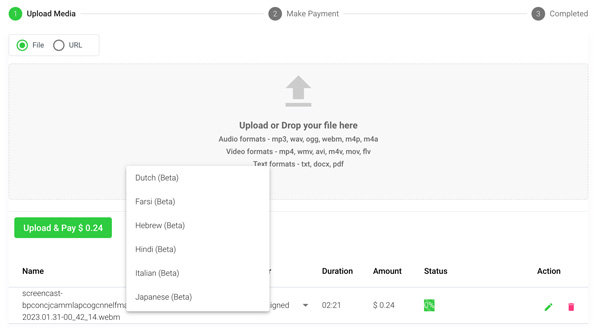
第 3 步:自动计算和支付总额
Once you have your file(s) ready and load it into Speak, it will automatically calculate the total cost (free credits are included in the 7-day trial – take advantage of them!).
如果您将文本数据上传到 Speak,目前无需支付任何费用。只有 Speak Magic Prompts 分析会产生费用,详情如下。
Once you use your trial credits or need Speak Magic Prompts, you can top up credits (1 credit = US$1) or subscribe to Pro at US$25 per user per month, or US$20 per user per month billed annually. See the 定价页 详情请见下文。.
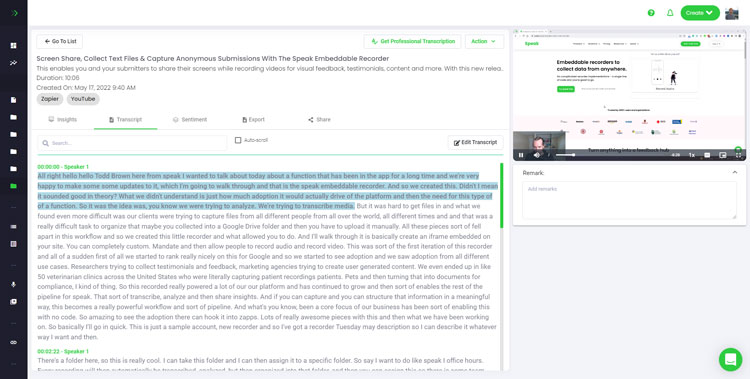
第 4 步:等待 Speak 分析您的 PowerPoint 演示文稿
如果您上传的是音频和视频,我们的自动转录软件将迅速为您准备好转录稿。 完成后,您将收到一封电子邮件,通知您成绩单已完成。
该电子邮件将包含一个指向文件的链接,这样您就可以访问交互式媒体播放器,该播放器已为您准备好誊本、分析和导出格式。
如果您导入的是 CSV 或上传的是文本文件,Speak 通常会更快地分析信息。
Speak will automatically embed your data in a well-architected vector database which allows you to use retrieval augmented generation for PowerPoint Presentations.
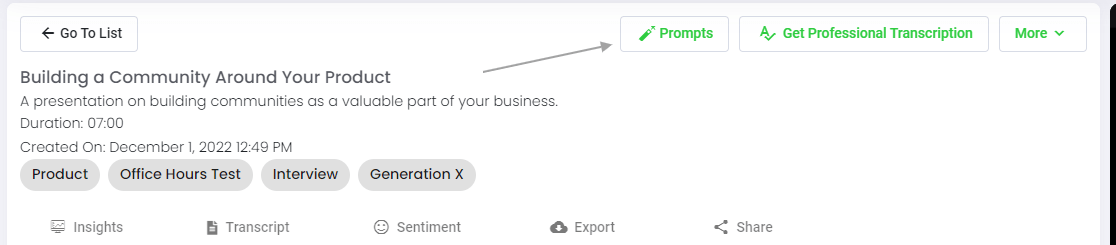
步骤 5:访问您的文件或文件夹
Speak 既能分析单个文件,也能分析整个文件夹的数据。
在 Speak 中查看任何单个文件时,只需点击 "提示 "按钮即可。
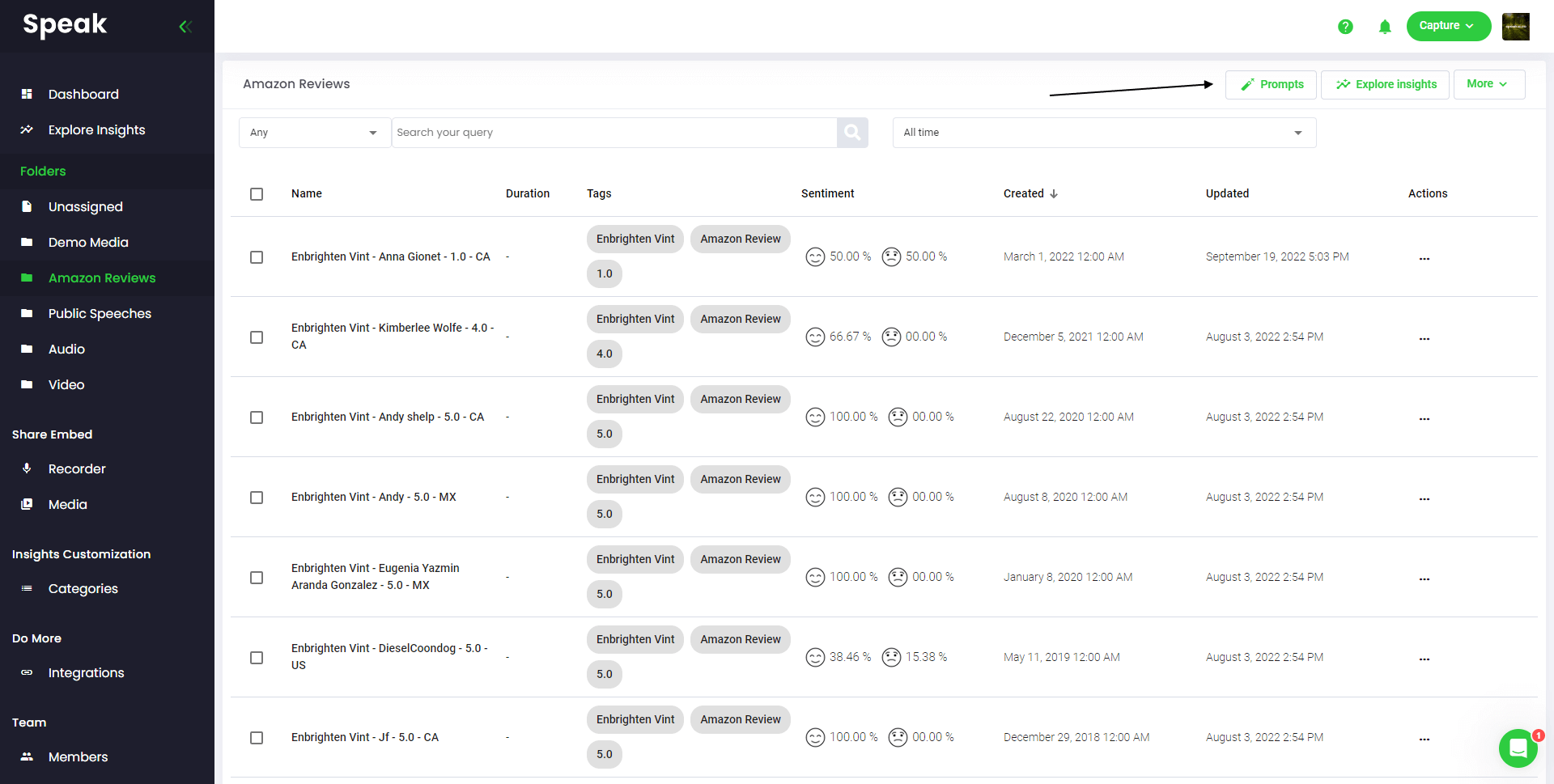
如果要分析多个文件,只需将要分析的文件添加到 Speak 中的文件夹即可。
您可以将新文件添加到 Speak 中,也可以利用软件的简易编辑功能将现有文件整理到所需的文件夹中。
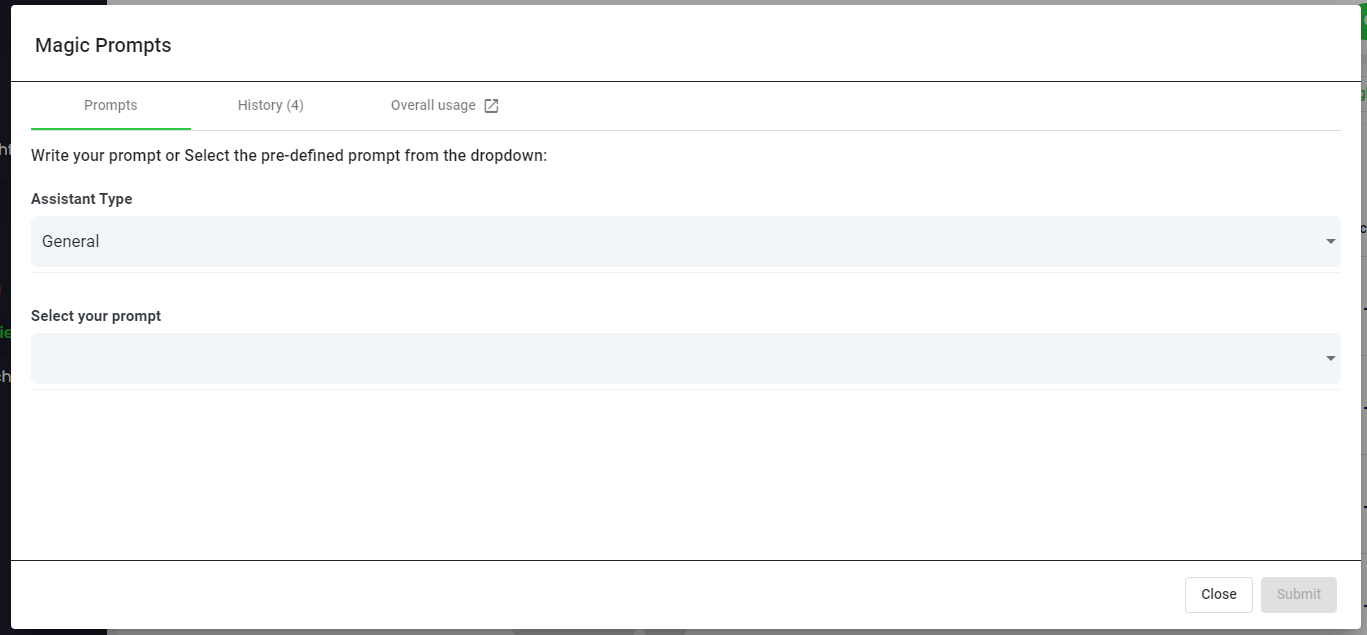
Step 6: Select Speak Magic Prompts To Analyze Your PowerPoint Presentations
什么是魔法提示?
Speak Magic Prompts 利用人工智能模型的创新,通常被称为 "生成式人工智能"。
这些模型分析了互联网上的大量数据,从而获得对语言的理解。
有了这种理解,这些 "大型语言模型 "就能完成令人费解的任务!
有了 Speak Magic Prompts,您现在可以对 Speak 账户中的音频、视频和文本数据执行这些任务。
检索增强生成功能正是这些神奇提示能够如此有效的原因。.
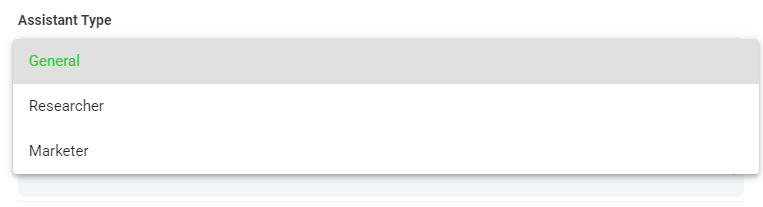
步骤 7:选择或创建您的助理类型
为了帮助您从 Speak Magic Prompts 中获得更好的效果,Speak 推出了 "助手类型"。
这些助手类型可根据您的需求进行预设,并为提示引擎提供上下文,以实现更简洁、更有意义的输出。
首先,我们将其包括在内:
- 一般情况
- 研究员
- 营销人员
- 销售
- 招聘人员
从下拉菜单中选择最相关的助手类型。
您还可以创建自己的自定义助手模板类型。.
如果您访问新页面 账户偏好设置, 您可以看到,现在有一个区域可以创建您自己的自定义助手。.
这样可以设置引擎的上下文,从而获得更高质量和更一致的输出。.
例如,你可以说:
“我们是[公司名称]。我们正在分析[数据],以了解如何改进[目标]。我们希望所有回复都简洁明了,并以表格形式呈现。.
这将成为您任何手动或自动魔法提示中可重复使用的模板。.
您可以为不同的使用场景创建多个模板。.
例如,你对焦点小组进行的分析可能与一对一访谈的分析不同。.

步骤 8:创建或选择所需的提示
以下是一些提示示例,您现在就可以将它们应用到任何文件中:
- 创建 SWOT 分析
- 给我最重要的行动项目
- 创建要点列表摘要
- 告诉我哪些关键问题没有得到解决
- 告诉我提出了哪些问题
这时会弹出一个模态,您可以使用我们上面分享的建议提示,立即神奇地获得答案。
如果您想创建自己的提示,请从下拉菜单中选择 "自定义提示",然后会打开另一个文本框,您可以在其中对数据提出任何要求!
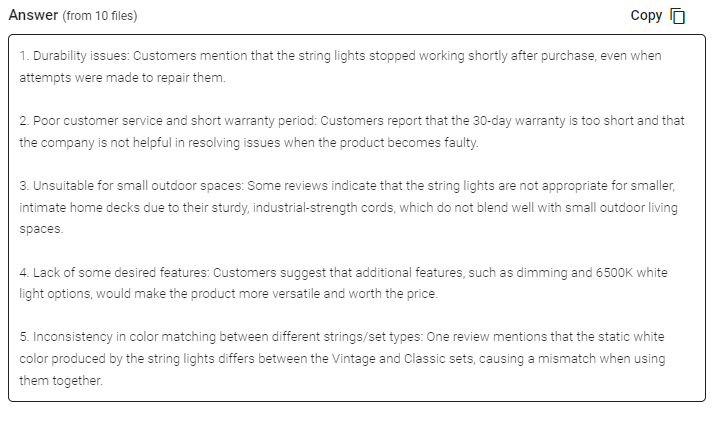
步骤 9:审核和分享回复
“语音输入”功能会在提示选择下拉菜单下方的文本框中生成简洁的回复。启用“聊天”功能后,您还可以继续查询这些数据,以获得更多洞察,并根据需要重新格式化信息。.
在此示例中,我们要求一次性分析文件夹中的所有 PowerPoint 演示文稿,找出最不满意的产品。
您可以轻松复制该回复,用于演示、内容、电子邮件、团队成员等!
Speak Magic Prompts 定价
Our team at Speak AI continues to optimize the pricing for Magic Prompts and Speak as a whole.
现在,凡是参加 Speak 7 天试用版的用户,其账户中都会包含 100,000 个字符。
如果您需要更多字符,您可以在创建订阅时轻松将 "Speak Magic Prompts "纳入计划。
如果您已经订阅,还可以升级账户中的字符数。
这两个选项都可在 订阅页面.
或者,您也可以通过以下方法使用 "说话魔法提示": 1. 余额 到您的账户。余额将在您分析字符时使用。
完全个性化您的计划 📝
在 Speak,我们让个性化订阅变得异常简单。
注册后,只需访问我们的 定制计划生成器 并选择所需的媒体数量、团队规模和功能,以获得适合您需求的计划。
不再有死板的计划。随时升级、降级或取消。
申请您的特别优惠 🎁
订阅后,您还将获得为期三个月的免费高级插件!
这意味着您每月最多可节省 $50 美元,总共可节省 $150 美元。
订购计划后,您只需给我们发送一个即时聊天,并从下面的列表中选择您的高级附加组件:
- 高级导出选项(Word、CSV 等)
- 自定义类别和洞察
- 录音机定制(品牌、输入等)
- 媒体播放器定制
- 可共享媒体库
我们将免费在您的账户中启用该插件!
你还在等什么?
推荐他人并赚取真钱 💸
如果您的朋友、同行和追随者对使用我们的平台感兴趣,您就可以每月赚取真金白银。
无论您推荐的客户是付费购买计划、自动转录媒体还是利用专业转录服务,您都可以从所有销售额中获得一定比例的报酬。
使用此链接 成为 Speak 的正式会员。
查看我们的专用资源📚
预订免费实施课程 🤝
我很荣幸能亲自与您进行介绍性通话,以确保您的成功。
只需使用我们的 Calendly 链接 找到适合您的时间。我们期待与您见面!
常见问题解答
What is retrieval augmented generation for PowerPoint presentations?
Retrieval augmented generation (RAG) lets an AI look up relevant passages from your own documents before it answers. Applied to PowerPoint decks, it means answers are grounded in what your slides actually say.
What are the benefits of RAG for presentations?
RAG helps researchers, marketers and teams get answers tied to the actual slide content, which makes summaries and insights easier to check. It also saves time compared with reading every deck by hand.
Can I ask questions across many PowerPoint decks at once?
Yes. Put the files in one folder and use AI chat across that library to ask questions, instead of opening each deck. Speak AI supports chat across a whole library of files.
探索 Speak AI
Speak AI是一个语音技术和人工智能研究平台,提供100多种语言的转录、自然语言处理分析、情感分析、人工智能代理和企业咨询服务。.
 English
 Español
 Français
 Italiano
 العربية
 Português do Brasil
 Nederlands
 Deutsch
 עִבְרִית
 Русский
 日本語
 Polski
 Čeština
 Українська
 Slovenščina
 Svenska
 Ελληνικά
 Norsk bokmål
 简体中文
 Türkçe
 Català
 Magyar
 한국어
 Slovenčina
 Suomi