
Retrieval Augmented Generation For PowerPoint Presentations
PowerPoint presentations have become a staple in the business and academic world. They are used to convey information, present data, and make persuasive arguments. As a researcher, marketer, or organization, analyzing PowerPoint presentations can provide valuable insights and help improve communication and engagement. In this article, we will explore the concept of retrieval augmented generation and how it can enhance the effectiveness of PowerPoint presentations.
What are PowerPoint Presentations?
PowerPoint presentations are visual aids that are used to accompany a spoken presentation. They consist of slides that contain text, images, charts, and other media to convey information in a visually appealing manner. PowerPoint was first introduced by Microsoft in 1987 and has since become the most widely used presentation software.
PowerPoint presentations are commonly used in business meetings, educational settings, and conferences. They offer a structured and organized way to present information and can be easily customized to suit the needs of the presenter.
The Benefits of Analyzing PowerPoint Presentations
As a researcher, marketer, or organization, analyzing PowerPoint presentations can provide valuable insights and benefits.
לחוקרים
As a researcher, PowerPoint presentations can be a rich source of data. By analyzing the content, design, and delivery of presentations, researchers can gain a deeper understanding of how information is communicated and perceived by audiences. This can be particularly useful in fields such as communication studies, psychology, and marketing.
PowerPoint presentations can also be used as a research tool. Researchers can create their own presentations and use them to gather data, conduct experiments, or conduct surveys. This can provide a more interactive and engaging way to collect data compared to traditional methods.
למשווקים
For marketers, analyzing PowerPoint presentations can offer valuable insights into the effectiveness of their marketing efforts. By analyzing the design, messaging, and engagement of presentations, marketers can identify what resonates with their target audience and adjust their strategies accordingly.
PowerPoint presentations can also be used as a marketing tool. By creating visually appealing and informative presentations, marketers can use them to showcase their products or services, educate potential customers, or present data and statistics to support their claims.
עבור ארגונים
For organizations, analyzing PowerPoint presentations can provide valuable feedback on their communication and training efforts. By analyzing the design and delivery of presentations, organizations can identify areas for improvement and enhance their internal communication and training programs.
PowerPoint presentations can also be used to enhance external communication. By creating professional and visually appealing presentations, organizations can effectively communicate their mission, goals, and achievements to stakeholders and the public.
Introducing Retrieval Augmented Generation
Retrieval augmented generation (RAG) is a technique that combines the power of large language models with structured data to generate text that is both factually accurate and relevant to a given context. This approach has been successfully applied in various natural language processing (NLP) tasks, including question-answering and text summarization.
In the context of PowerPoint presentations, RAG can be used to enhance the effectiveness of presentations by generating relevant and engaging content. This can be particularly useful for presenters who may struggle with creating visually appealing slides or coming up with compelling content.
The Benefits of Retrieval Augmented Generation for PowerPoint Presentations
RAG can offer several benefits for PowerPoint presentations, including:
Enhanced Content
By using RAG, presenters can generate relevant and engaging content for their presentations. This can help keep the audience interested and improve overall engagement.
Time-saving
Creating PowerPoint presentations can be time-consuming, especially when it comes to researching and writing content. RAG can significantly reduce the time and effort required to create presentations, allowing presenters to focus on other aspects of their work.
Improved Customization
RAG allows presenters to customize the generated content to suit their needs. This means that presenters can control the tone, style, and level of detail in the generated text, ensuring that it aligns with their goals and objectives.
Increased Accuracy
RAG uses structured data to generate text, which means that the content is factually accurate. This can be especially useful for presentations that require a high level of accuracy, such as scientific or technical presentations.
In Conclusion
PowerPoint presentations are a valuable tool for researchers, marketers, and organizations. By analyzing presentations and incorporating techniques such as retrieval augmented generation, we can enhance the effectiveness and impact of presentations. Whether it’s creating engaging content or improving communication and training, RAG can offer many benefits for PowerPoint presentations. As technology continues to advance, we can expect to see even more innovative approaches to enhance the way we use presentations in the future.
How To Use Speak’s Retrieval Augmented Generation For PowerPoint Presentations
שלב 1: צור את חשבון Speak שלך
כדי להתחיל את התמלול והניתוח שלך, תחילה עליך לעשות זאת צור חשבון Speak. אל דאגה, זה סופר קל לעשות!
Get a 7-day trial with free credits for audio and video transcription and analysis included when you sign up for Speak.
כדי להירשם ל-Speak ולהתחיל להשתמש ב-Speak Magic Prompts עם יצירת יישומים משופרת לאחזור, פשוט בקרו באתר דבר דף הרשמה לאפליקציה כאן.
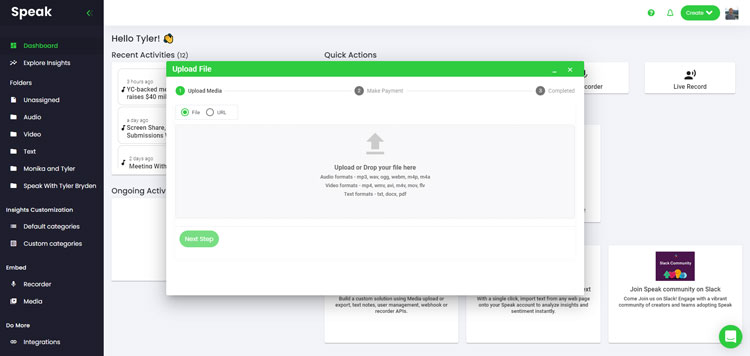
שלב 2: העלה את מצגות PowerPoint שלך
בדרך כלל אנו ממליצים על MP4 עבור וידאו או MP3 עבור אודיו.
עם זאת, אנו מקבלים מגוון סוגי קבצי אודיו, וידאו וטקסט.
אתה יכול להעלות את הקובץ שלך לתמלול בכמה דרכים באמצעות Speak:
סוגי קבצי אודיו מקובלים
- MP3
- M4A
- WAV
- OGG
- WEBM
- M4P
סוגי קבצי וידאו מקובלים
- MP4
- M4V
- WMV
- AVI
- MOV
- FLV
סוגי קבצי טקסט מקובלים
- TXT
- Word Doc
יבוא CSV
אתה יכול גם להעלות קובצי CSV של קבצי טקסט או קובצי אודיו ווידאו. תוכל ללמוד עוד על העלאות CSV ו הורד כאן קובצי CSV תואמי Speak.
With the CSVs, you can upload anything from dozens of YouTube videos to thousands of PowerPoint Presentations files.
כתובות URL זמינות לציבור
אתה יכול גם להעלות מדיה ל-Speak דרך כתובת אתר זמינה לציבור.
כל עוד סיומת סוג הקובץ זמינה בסוף כתובת האתר לא תהיה לך בעיה לייבא את ההקלטה שלך לתמלול וניתוח אוטומטי.
כתובות אתרים של YouTube
Speak תואם לסרטוני YouTube. כל שעליך לעשות הוא להעתיק את כתובת האתר של סרטון YouTube (לדוגמה, https://www.youtube.com/watch?v=qKfcLcHeivc).
Speak ימצא אוטומטית את הקובץ, יחשב את האורך וייבא את הסרטון.
אם אתה משתמש בסרטוני YouTube, אנא ודא שאתה משתמש בקישור המלא ולא בקטע YouTube המקוצר. בנוסף, הקפד להסיר את שם הערוץ מכתובת האתר.
דבר אינטגרציות
כאמור, Speak מכיל גם מגוון אינטגרציות עבור זום, זאפייר, Vimeo ועוד שיעזרו לך לתמלל את המדיה שלך באופן אוטומטי.
ספריית האינטגרציות הזו ממשיכה לגדול! יש לך בקשה? תרגישו מעודדים לשלוח לנו הודעה.
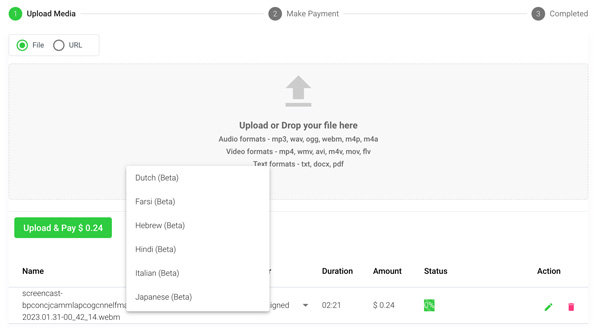
שלב 3: חשב ושלם את הסכום באופן אוטומטי
Once you have your file(s) ready and load it into Speak, it will automatically calculate the total cost (free credits are included in the 7-day trial – take advantage of them!).
אם אתה מעלה נתוני טקסט ל-Speak, אינך צריך כרגע לשלם כל עלות. רק הניתוח של Speak Magic Prompts ייצור עמלה שתפורט להלן.
Once you use your trial credits or need Speak Magic Prompts, you can top up credits (1 credit = US$1) or subscribe to Pro at US$25 per user per month, or US$20 per user per month billed annually. See the עמוד תמחור לפרטים.
אתה יכול גם להוסיף איזון או לשלם עבור העלאות וניתוח ללא תוכנית באמצעות שלך כרטיס אשראי.
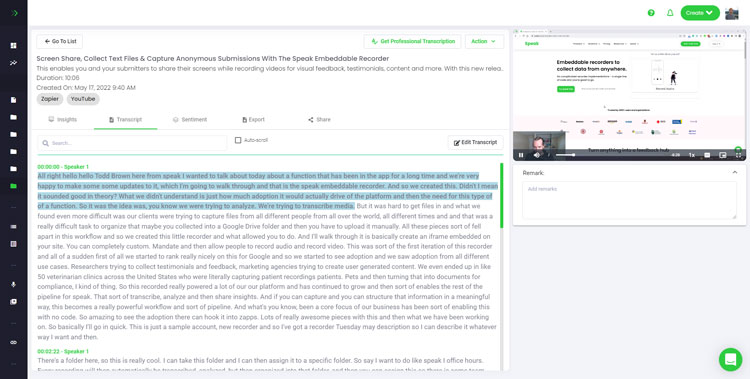
שלב 4: המתן ל-Speak כדי לנתח את מצגות ה-PowerPoint שלך
אם אתה מעלה אודיו ווידאו, תוכנת התמלול האוטומטית שלנו תכין את התמליל שלך במהירות. לאחר השלמתו, תקבל הודעת דוא"ל שהתמליל שלך הושלם.
האימייל הזה יכיל קישור חזרה לקובץ כדי שתוכל לגשת לנגן המדיה האינטראקטיבי עם פורמטי התמלול, הניתוח והייצוא מוכנים עבורך.
אם אתה מייבא קובצי CSV או מעלה קבצי טקסט, Speak בדרך כלל ינתח את המידע הרבה יותר מהר.
Speak will automatically embed your data in a well-architected vector database which allows you to use retrieval augmented generation for PowerPoint Presentations.
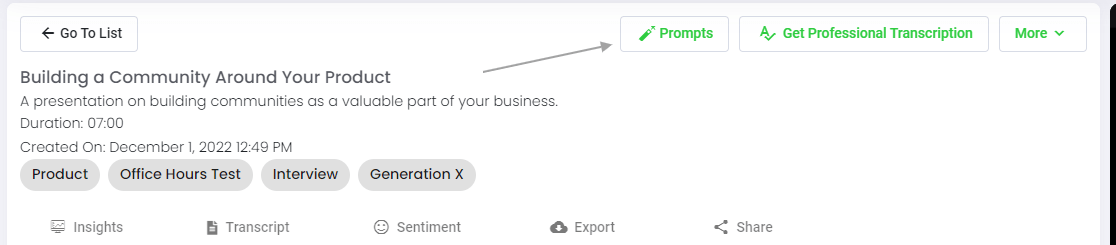
שלב 5: בקר בקובץ או בתיקייה שלך
Speak מסוגל לנתח גם קבצים בודדים וגם תיקיות נתונים שלמות.
כאשר אתה צופה בכל קובץ בודד ב-Speak, כל מה שאתה צריך לעשות הוא ללחוץ על כפתור "הנחיות".
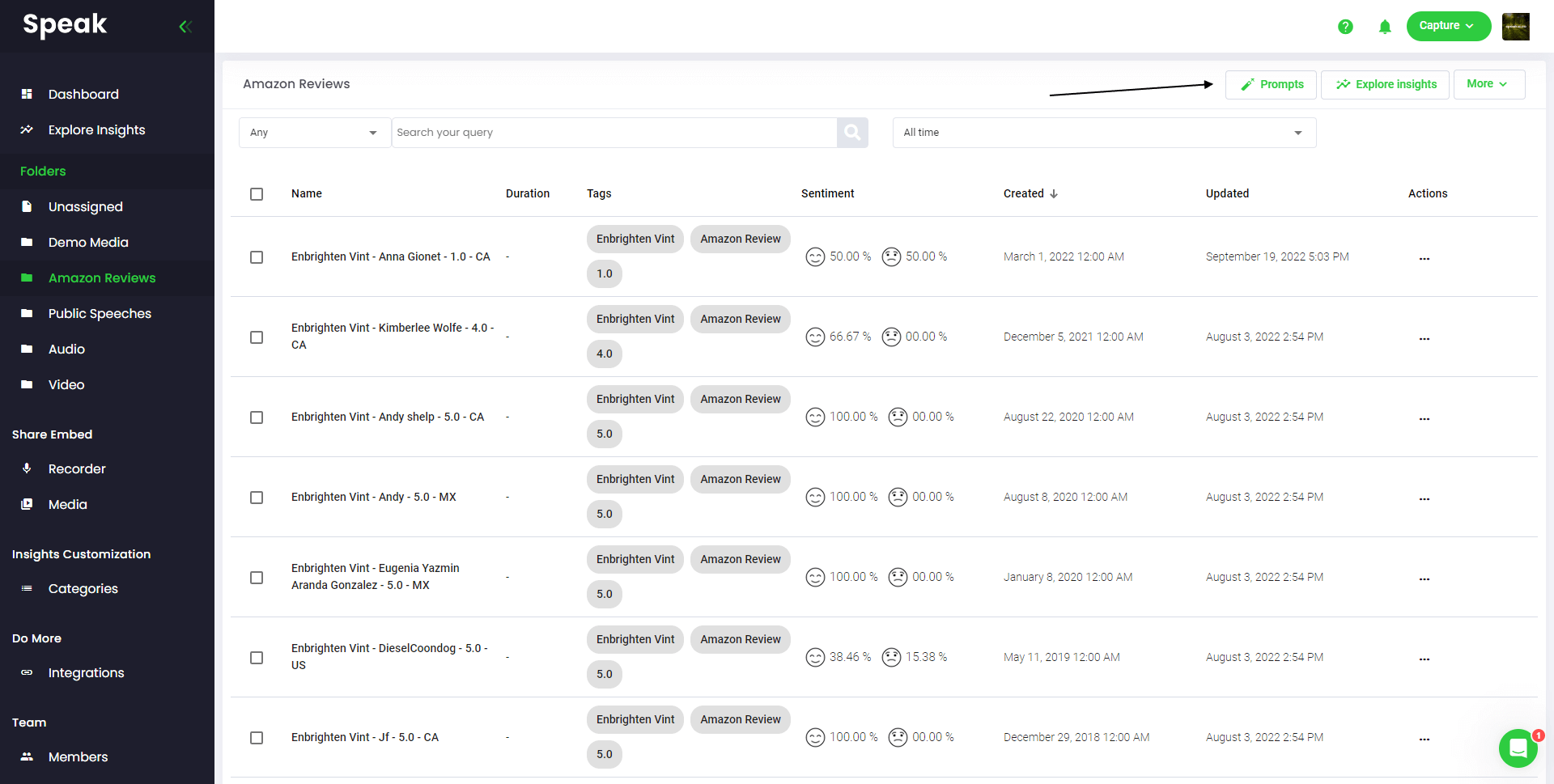
אם אתה רוצה לנתח קבצים רבים, כל מה שאתה צריך לעשות הוא להוסיף את הקבצים שאתה רוצה לנתח לתיקיה בתוך Speak.
אתה יכול לעשות זאת על ידי הוספת קבצים חדשים לתוך Speak או שאתה יכול לארגן את הקבצים הנוכחיים שלך בתיקייה הרצויה שלך עם פונקציונליות העריכה הקלה של התוכנה.
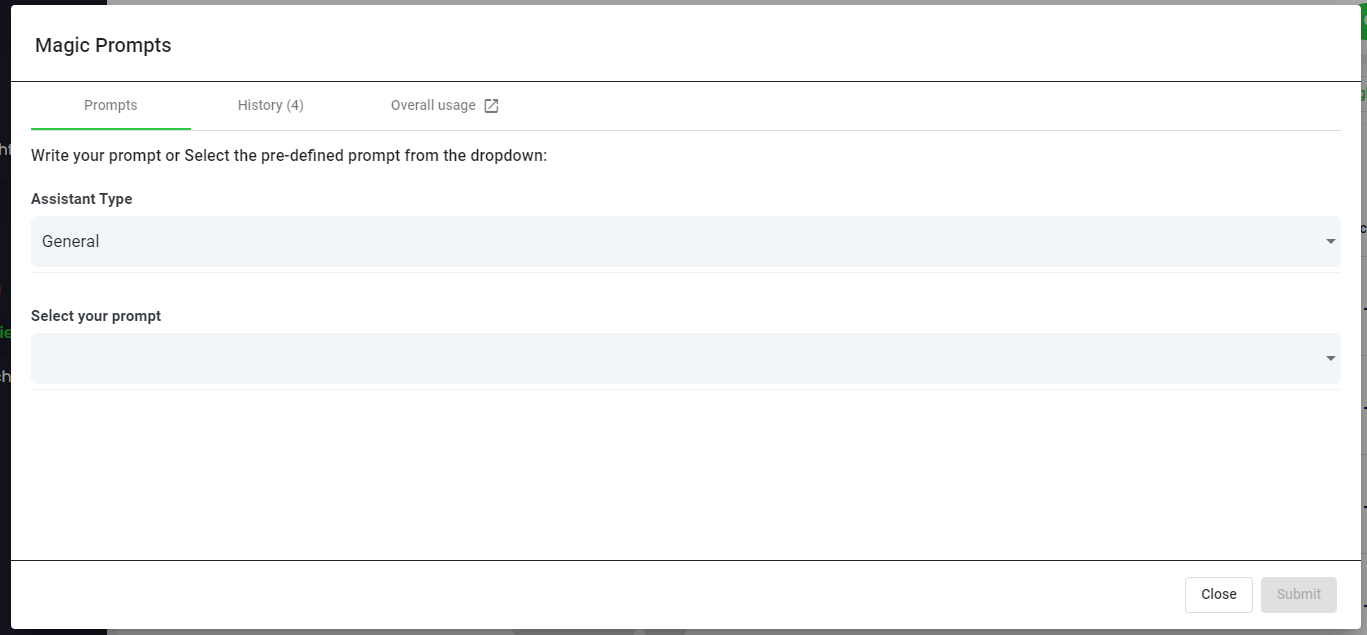
Step 6: Select Speak Magic Prompts To Analyze Your PowerPoint Presentations
מהן הנחיות קסם?
Speak Magic Prompts ממנפים חדשנות במודלים של בינה מלאכותית המכונים לעתים קרובות "AI מחולל".
מודלים אלה ניתחו כמויות אדירות של נתונים מרחבי האינטרנט כדי להבין את השפה.
עם ההבנה הזו, "דגמי השפה הגדולים" הללו מסוגלים לבצע משימות מכופפות תודעה!
עם Speak Magic Prompts, כעת תוכל לבצע את המשימות הללו בנתוני השמע, הווידאו והטקסט בחשבון Speak שלך.
יצירת מודעות משופרת באמצעות אחזור היא מה שגורם להנחיות הקסם הללו לעבוד כל כך טוב.
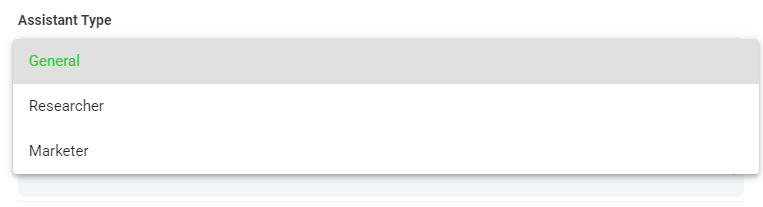
שלב 7: בחירה או יצירת סוג העוזר שלך
כדי לעזור לך לקבל תוצאות טובות יותר מ-Speak Magic Prompts, Speak הציגה את "סוג עוזר".
סוגי עוזרים אלו מוגדרים מראש ומספקים הקשר למנוע המהיר לקבלת תפוקות תמציתית ומשמעותית יותר בהתבסס על הצרכים שלך.
כדי להתחיל, כללנו:
- כְּלָלִי
- חוֹקֵר
- משווק
- מכירות
- מגייס
בחר את סוג העוזר הרלוונטי ביותר מהתפריט הנפתח.
ניתן גם ליצור סוג תבנית עוזר מותאם אישית משלך.
אם תבקרו בדף החדש העדפות חשבון, אתם יכולים לראות שעכשיו יש אזור שבו אתם יכולים ליצור עוזר מותאם אישית משלכם.
זה מאפשר לך להגדיר את ההקשר של המנוע לקבלת תפוקות איכותיות ועקביות יותר.
לדוגמה, אפשר לומר:
“"אנחנו [שם החברה]. אנו מנתחים את [נתונים] כדי להבין כיצד לשפר את [מטרה]. אנו רוצים שכל התשובות יהיו תמציתיות ובפורמט טבלה.".
זה הופך לתבנית לשימוש חוזר בכל אחת מהנחיות הקסם הידניות או האוטומטיות שלך.
ניתן ליצור מספר תבניות עבור מקרי שימוש שונים.
לדוגמה, הניתוח שתבצעו על קבוצת מיקוד עשוי להיות שונה מראיון אישי.

שלב 8: צור או בחר את ההנחיה הרצויה שלך
להלן כמה דוגמאות להנחיות שתוכל להחיל על כל קובץ כעת:
- צור ניתוח SWOT
- תן לי את פריטי הפעולה המובילים
- צור סיכום רשימת תבליטים
- ספר לי את הבעיות המרכזיות שנותרו ללא פתרון
- ספר לי אילו שאלות נשאלו
מודאל יופיע כך שתוכל להשתמש בהנחיות המוצעות שחלקנו למעלה כדי לקבל באופן מיידי ובקסם את התשובות שלך.
אם יש לך הנחיות משלך שברצונך ליצור, בחר "בקשה מותאמת אישית" מהתפריט הנפתח ותיבת טקסט נוספת תיפתח בה תוכל לשאול כל דבר שתרצה מהנתונים שלך!
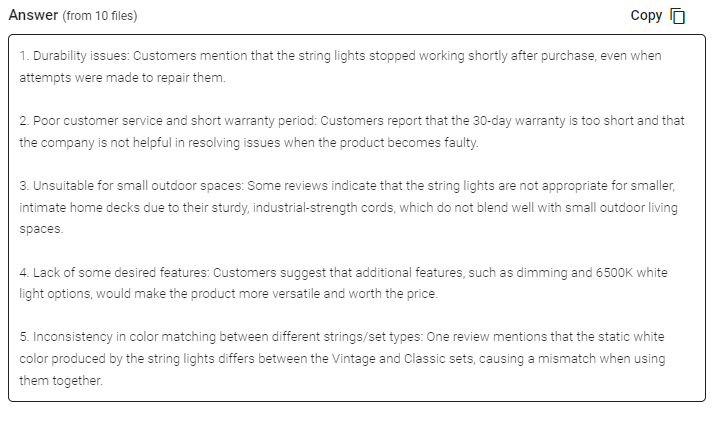
שלב 9: סקור ושתף תגובות
Speak יפיק עבורך תגובה תמציתית בתיבת טקסט מתחת לתפריט הנפתח של בחירת האפשרויות. כאשר הצ'אט מופעל, תוכל גם להמשיך לבצע שאילתות על הנתונים כדי לחשוף תובנות נוספות ולעצב מחדש את המידע בהתאם לצרכים שלך.
בדוגמה זו, אנו מבקשים לנתח את כל מצגות ה-PowerPoint בתיקייה בבת אחת עבור הגורמים המובילים שלא מספקים את רצונם.
אתה יכול בקלות להעתיק את התגובה הזו למצגות, לתוכן, למיילים, לחברי צוות ועוד!
תמחור של הנחיות קסם
Our team at Speak AI continues to optimize the pricing for Magic Prompts and Speak as a whole.
כרגע, כל מי שנמצא ב-7 ימי הניסיון של Speak מקבל 100,000 תווים כלולים בחשבון שלו.
אם אתה צריך עוד דמויות, אתה יכול בקלות לכלול Speak Magic Prompts בתוכנית שלך כשאתה יוצר מנוי.
אתה יכול גם לשדרג את מספר התווים בחשבון שלך אם כבר יש לך מנוי.
שתי האפשרויות זמינות ב- עמוד מנוי.
לחלופין, אתה יכול להשתמש ב-Speak Magic Prompts by הוספת איזון לחשבון שלך. היתרה תשמש בעת ניתוח דמויות.
התאמה אישית לחלוטין של התוכנית שלך 📝
כאן ב-Speak, הפכנו את זה קל להפליא להתאים אישית את המנוי שלך.
לאחר ההרשמה, פשוט בקרו באתר שלנו בונה תוכניות בהתאמה אישית ובחר את נפח המדיה, גודל הצוות והתכונות שאתה רוצה כדי לקבל תוכנית שמתאימה לצרכים שלך.
אין יותר תוכניות נוקשות. שדרג, שדרג לאחור או בטל בכל עת.
קבל את ההצעה המיוחדת שלך 🎁
כשתירשמו, תקבלו גם תוספת פרימיום בחינם למשך שלושה חודשים!
זה אומר שאתה חוסך עד $50 דולר לחודש ו-$150 דולר בסך הכל.
לאחר שתירשם לתוכנית, כל מה שאתה צריך לעשות הוא לשלוח לנו צ'אט חי עם תוסף הפרימיום שבחרת מהרשימה למטה:
- אפשרויות ייצוא פרימיום (Word, CSV ועוד)
- קטגוריות ותובנות מותאמות אישית
- התאמה אישית של מקליט (מיתוג, קלט ועוד)
- התאמה אישית של נגן מדיה
- ספריות מדיה שניתנות לשיתוף
אנו נכניס את התוסף לפעיל בחשבונך ללא תשלום!
למה אתה מחכה?
הפנה אחרים והרוויח כסף אמיתי 💸
אם יש לך חברים, עמיתים ועוקבים המעוניינים להשתמש בפלטפורמה שלנו, אתה יכול להרוויח כסף חודשי אמיתי.
תקבלו תשלום באחוז מכלל המכירות בין אם הלקוחות שאליהם אתם מפנים משלמים עבור תוכנית, מתמללים מדיה אוטומטית או ממנפים שירותי תמלול מקצועיים.
השתמש בקישור הזה להפוך לשותף רשמי של Speak.
בדוק את המשאבים הייעודיים שלנו📚
הזמינו פגישת יישום בחינם 🤝
יהיה זה כבוד לקפוץ איתך באופן אישי לשיחת היכרות כדי לוודא שאתה מוכן להצלחה.
פשוט תשתמש שלנו קישור קלנדלי כדי למצוא זמן שמתאים לך. נשמח לפגוש אותך!
שאלות נפוצות
What is retrieval augmented generation for PowerPoint presentations?
Retrieval augmented generation (RAG) lets an AI look up relevant passages from your own documents before it answers. Applied to PowerPoint decks, it means answers are grounded in what your slides actually say.
What are the benefits of RAG for presentations?
RAG helps researchers, marketers and teams get answers tied to the actual slide content, which makes summaries and insights easier to check. It also saves time compared with reading every deck by hand.
Can I ask questions across many PowerPoint decks at once?
Yes. Put the files in one folder and use AI chat across that library to ask questions, instead of opening each deck. Speak AI supports chat across a whole library of files.
גלו את Speak AI
Speak AI היא פלטפורמת טכנולוגיית קול ומחקר AI. תמלול ביותר מ-100 שפות, ניתוח NLP, ניתוח סנטימנט ו-AI Chat רב-מודלי.
 English
 Español
 Français
 Italiano
 العربية
 Português do Brasil
 Nederlands
 Deutsch
 עִבְרִית
 Русский
 日本語
 Polski
 Čeština
 Українська
 Slovenščina
 Svenska
 Ελληνικά
 Norsk bokmål
 简体中文
 Türkçe
 Català
 Magyar
 한국어
 Slovenčina
 Suomi