
Retrieval Augmented Generation For PowerPoint Presentations
PowerPoint presentations have become a staple in the business and academic world. They are used to convey information, present data, and make persuasive arguments. As a researcher, marketer, or organization, analyzing PowerPoint presentations can provide valuable insights and help improve communication and engagement. In this article, we will explore the concept of retrieval augmented generation and how it can enhance the effectiveness of PowerPoint presentations.
What are PowerPoint Presentations?
PowerPoint presentations are visual aids that are used to accompany a spoken presentation. They consist of slides that contain text, images, charts, and other media to convey information in a visually appealing manner. PowerPoint was first introduced by Microsoft in 1987 and has since become the most widely used presentation software.
PowerPoint presentations are commonly used in business meetings, educational settings, and conferences. They offer a structured and organized way to present information and can be easily customized to suit the needs of the presenter.
The Benefits of Analyzing PowerPoint Presentations
As a researcher, marketer, or organization, analyzing PowerPoint presentations can provide valuable insights and benefits.
Per a Investigadors
As a researcher, PowerPoint presentations can be a rich source of data. By analyzing the content, design, and delivery of presentations, researchers can gain a deeper understanding of how information is communicated and perceived by audiences. This can be particularly useful in fields such as communication studies, psychology, and marketing.
PowerPoint presentations can also be used as a research tool. Researchers can create their own presentations and use them to gather data, conduct experiments, or conduct surveys. This can provide a more interactive and engaging way to collect data compared to traditional methods.
Per a màrquetings
For marketers, analyzing PowerPoint presentations can offer valuable insights into the effectiveness of their marketing efforts. By analyzing the design, messaging, and engagement of presentations, marketers can identify what resonates with their target audience and adjust their strategies accordingly.
PowerPoint presentations can also be used as a marketing tool. By creating visually appealing and informative presentations, marketers can use them to showcase their products or services, educate potential customers, or present data and statistics to support their claims.
Per a Organitzacions
For organizations, analyzing PowerPoint presentations can provide valuable feedback on their communication and training efforts. By analyzing the design and delivery of presentations, organizations can identify areas for improvement and enhance their internal communication and training programs.
PowerPoint presentations can also be used to enhance external communication. By creating professional and visually appealing presentations, organizations can effectively communicate their mission, goals, and achievements to stakeholders and the public.
Introducing Retrieval Augmented Generation
Retrieval augmented generation (RAG) is a technique that combines the power of large language models with structured data to generate text that is both factually accurate and relevant to a given context. This approach has been successfully applied in various natural language processing (NLP) tasks, including question-answering and text summarization.
In the context of PowerPoint presentations, RAG can be used to enhance the effectiveness of presentations by generating relevant and engaging content. This can be particularly useful for presenters who may struggle with creating visually appealing slides or coming up with compelling content.
The Benefits of Retrieval Augmented Generation for PowerPoint Presentations
RAG can offer several benefits for PowerPoint presentations, including:
Enhanced Content
By using RAG, presenters can generate relevant and engaging content for their presentations. This can help keep the audience interested and improve overall engagement.
Time-saving
Creating PowerPoint presentations can be time-consuming, especially when it comes to researching and writing content. RAG can significantly reduce the time and effort required to create presentations, allowing presenters to focus on other aspects of their work.
Improved Customization
RAG allows presenters to customize the generated content to suit their needs. This means that presenters can control the tone, style, and level of detail in the generated text, ensuring that it aligns with their goals and objectives.
Increased Accuracy
RAG uses structured data to generate text, which means that the content is factually accurate. This can be especially useful for presentations that require a high level of accuracy, such as scientific or technical presentations.
In Conclusion
PowerPoint presentations are a valuable tool for researchers, marketers, and organizations. By analyzing presentations and incorporating techniques such as retrieval augmented generation, we can enhance the effectiveness and impact of presentations. Whether it’s creating engaging content or improving communication and training, RAG can offer many benefits for PowerPoint presentations. As technology continues to advance, we can expect to see even more innovative approaches to enhance the way we use presentations in the future.
How To Use Speak’s Retrieval Augmented Generation For PowerPoint Presentations
Pas 1: creeu el vostre compte de Speak
Per començar la transcripció i l'anàlisi, primer cal crear un compte de Speak. No et preocupis, això és molt fàcil de fer!
Get a 7-day trial with free credits for audio and video transcription and analysis included when you sign up for Speak.
Per registrar-vos a Speak i començar a utilitzar Speak Magic Prompts amb recuperació augmentada de generació, només cal que visiteu Parleu la pàgina de registre de l'aplicació aquí.
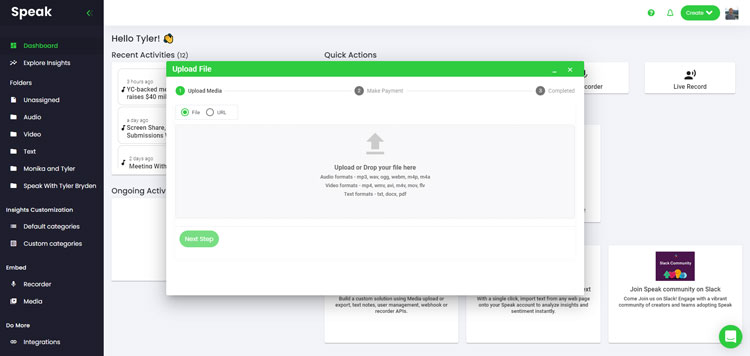
Pas 2: Carregueu les vostres presentacions de PowerPoint
Normalment recomanem MP4 per a vídeo o MP3 per àudio.
Tanmateix, acceptem una varietat de tipus de fitxers d'àudio, vídeo i text.
Podeu carregar el vostre fitxer per a la transcripció de diverses maneres mitjançant Speak:
Tipus de fitxers d'àudio acceptats
- MP3
- M4A
- WAV
- OGG
- WEBM
- M4P
Tipus de fitxers de vídeo acceptats
- MP4
- M4V
- WMV
- AVI
- MOV
- FLV
Tipus de fitxer de text acceptats
- TXT
- Word Doc
Importacions CSV
També podeu penjar fitxers CSV de fitxers de text o d'àudio i vídeo. Podeu obtenir més informació sobre les càrregues CSV i descarregueu els CSV compatibles amb Speak aquí.
With the CSVs, you can upload anything from dozens of YouTube videos to thousands of PowerPoint Presentations files.
URL disponibles públicament
També podeu penjar contingut multimèdia a Speak mitjançant un URL disponible públicament.
Mentre l'extensió del tipus de fitxer estigui disponible al final de l'URL, no tindreu cap problema a importar la vostra gravació per a la transcripció i l'anàlisi automàtica.
URL de YouTube
Speak és compatible amb vídeos de YouTube. Tot el que has de fer és copiar l'URL del vídeo de YouTube (per exemple, https://www.youtube.com/watch?v=qKfcLcHeivc).
Speak trobarà automàticament el fitxer, calcularà la durada i importarà el vídeo.
Si utilitzeu vídeos de YouTube, assegureu-vos d'utilitzar l'enllaç complet i no el fragment de YouTube escurçat. A més, assegureu-vos d'eliminar el nom del canal de l'URL.
Parla Integracions
Com s'ha esmentat, Speak també conté una sèrie d'integracions per a Zoom, Zapier, Vimeo i més que us ajudaran a transcriure automàticament els vostres mitjans.
Aquesta biblioteca d'integracions segueix creixent! Tens una petició? Us animeu a enviar-nos un missatge.
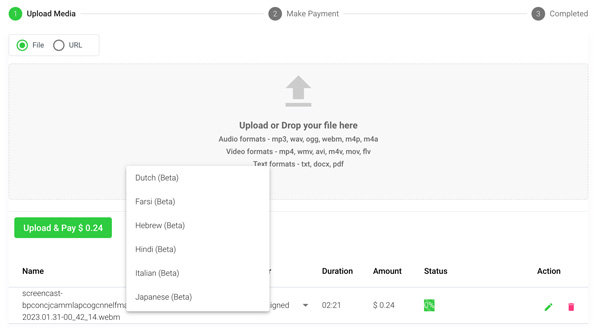
Pas 3: calculeu i pagueu el total automàticament
Once you have your file(s) ready and load it into Speak, it will automatically calculate the total cost (free credits are included in the 7-day trial – take advantage of them!).
Si esteu penjant dades de text a Speak, actualment no haureu de pagar cap cost. Només l'anàlisi de Speak Magic Prompts crearà una tarifa que es detallarà a continuació.
Once you use your trial credits or need Speak Magic Prompts, you can top up credits (1 credit = US$1) or subscribe to Pro at US$25 per user per month, or US$20 per user per month billed annually. See the pàgina de preus per a més detalls.
També pots afegir un saldo o pagar per càrregues i anàlisis sense un pla utilitzant el vostre targeta de crèdit.
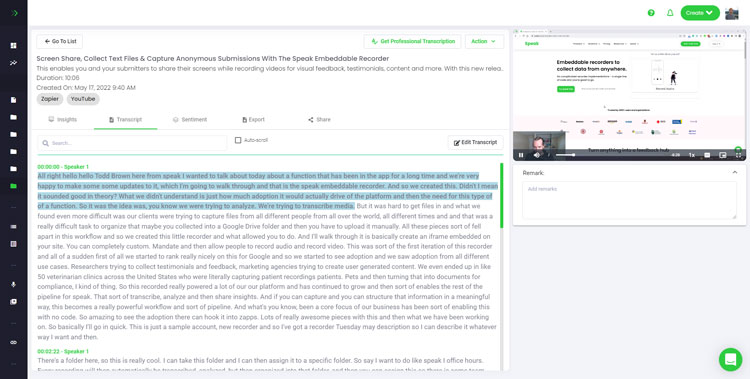
Pas 4: espereu a Speak per analitzar les vostres presentacions de PowerPoint
Si estàs penjant àudio i vídeo, el nostre programari de transcripció automatitzada prepararà la teva transcripció ràpidament. Un cop completat, rebràs una notificació per correu electrònic que indica que la teva transcripció està completa.
Aquest correu electrònic contindrà un enllaç al fitxer perquè pugueu accedir al reproductor multimèdia interactiu amb els formats de transcripció, anàlisi i exportació preparats per a vosaltres.
Si esteu important fitxers CSV o penjant fitxers de text, Speak generalment analitzarà la informació molt més ràpidament.
Speak will automatically embed your data in a well-architected vector database which allows you to use retrieval augmented generation for PowerPoint Presentations.
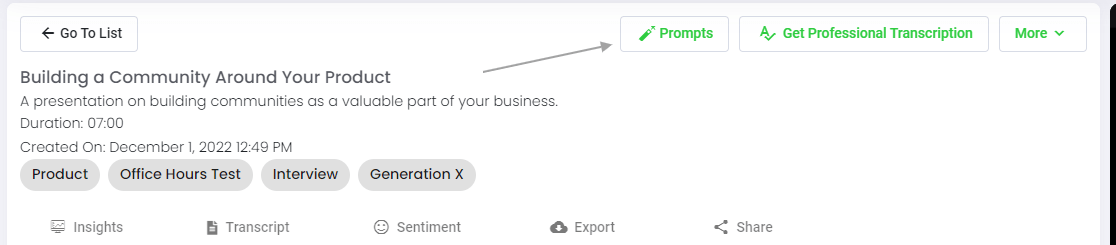
Pas 5: visiteu el vostre fitxer o carpeta
Speak és capaç d'analitzar fitxers individuals i carpetes senceres de dades.
Quan visualitzeu qualsevol fitxer individual a Speak, tot el que heu de fer és fer clic al botó "Indicacions".
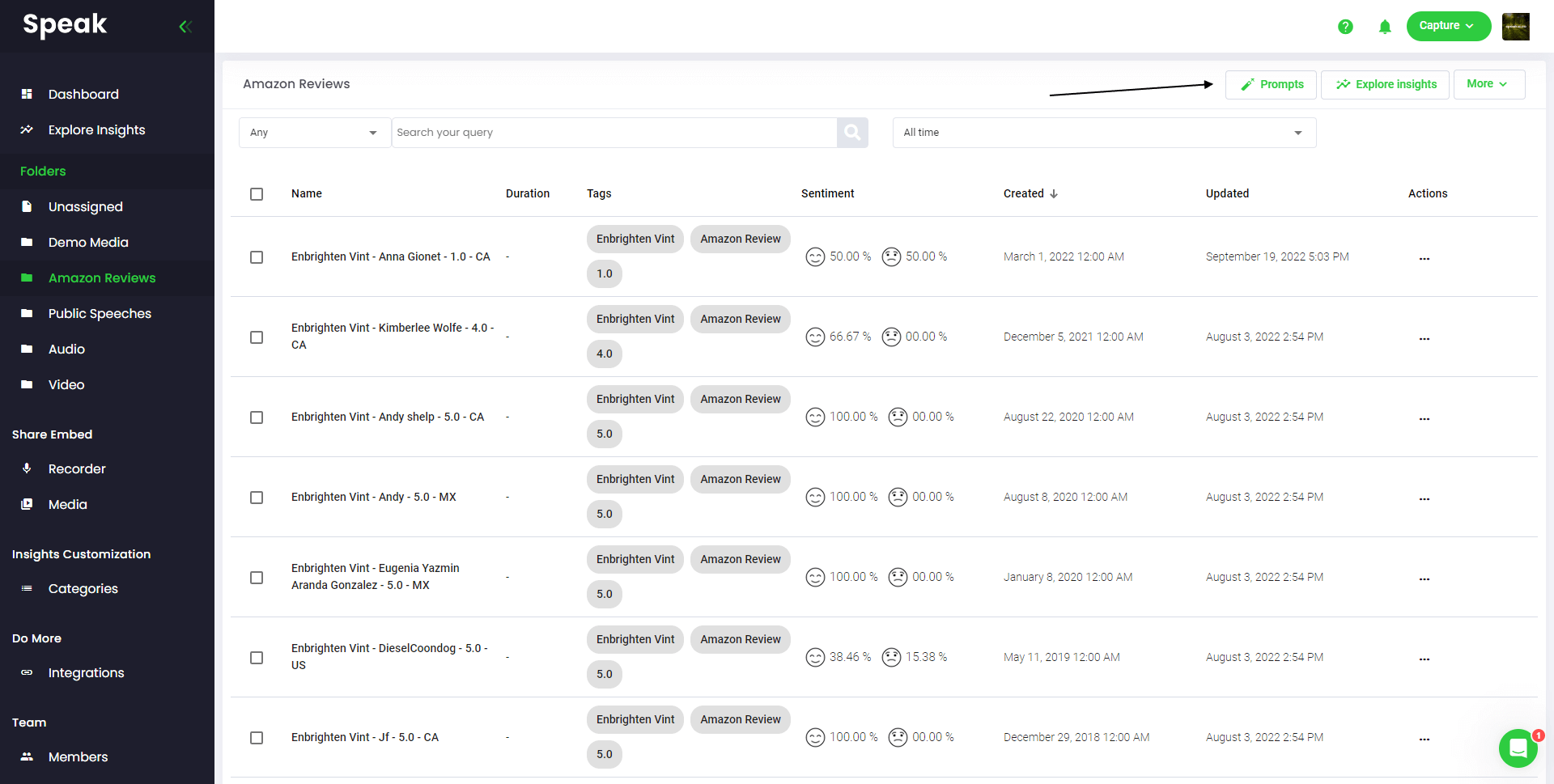
Si voleu analitzar molts fitxers, tot el que heu de fer és afegir els fitxers que voleu analitzar a una carpeta dins de Speak.
Podeu fer-ho afegint fitxers nous a Speak o podeu organitzar els fitxers actuals a la carpeta que vulgueu amb la funcionalitat d'edició senzilla del programari.
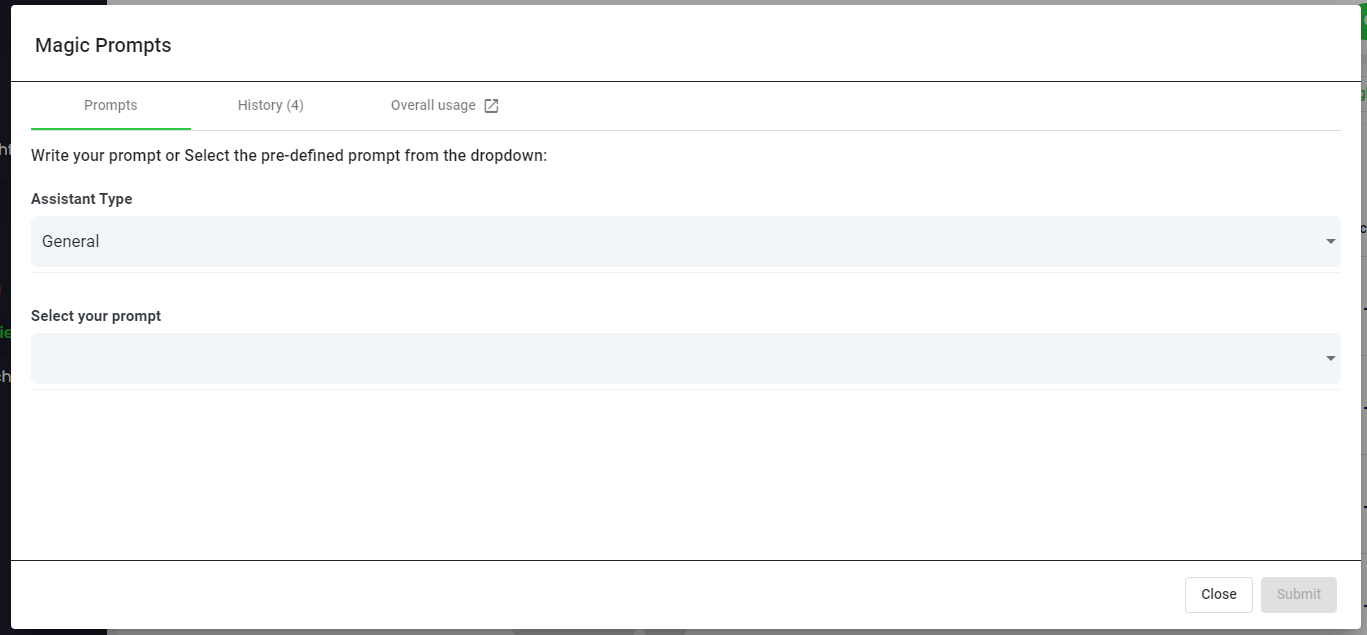
Step 6: Select Speak Magic Prompts To Analyze Your PowerPoint Presentations
Què són les indicacions màgiques?
Speak Magic Prompts aprofiten la innovació en models d'intel·ligència artificial sovint denominats "IA generativa".
Aquests models han analitzat grans quantitats de dades d'Internet per entendre el llenguatge.
Amb aquesta comprensió, aquests "grans models de llenguatge" són capaços de realitzar tasques al·lucinants!
Amb Speak Magic Prompts, ara podeu realitzar aquestes tasques amb les dades d'àudio, vídeo i text del vostre compte de Speak.
La generació augmentada de recuperació és el que fa que aquestes indicacions màgiques funcionin tan bé.
Pas 7: Seleccioneu o creeu el vostre tipus d'assistent
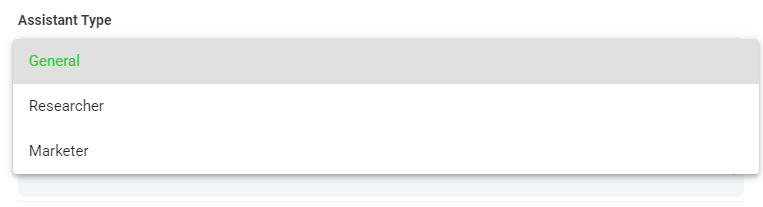
Per ajudar-vos a obtenir millors resultats de les indicacions de Speak Magic, Speak ha introduït "Tipus d'assistent".
Aquests tipus d'assistent es configuren prèviament i proporcionen context al motor d'avís per obtenir sortides més concises i significatives en funció de les vostres necessitats.
Per començar, hem inclòs:
- General
- Investigador
- Comercialitzador
- Vendes
- Reclutador
Trieu el tipus d'assistent més rellevant al menú desplegable.
També podeu crear el vostre propi tipus de plantilla d'assistent personalitzat.
Si visiteu la nova pàgina Preferències del compte, podeu veure que ara hi ha una àrea on podeu crear el vostre propi assistent personalitzat.
Això permet definir el context del motor per obtenir resultats de més qualitat i més consistents.
Per exemple, podríeu dir:
“Som [NOM DE L'EMPRESA]. Estem analitzant [DADES] per entendre com millorar [OBJECTIU]. Volem que totes les respostes siguin concises i en format de taula.”.
Això esdevé una plantilla reutilitzable en qualsevol de les teves propostes màgiques manuals o automatitzades.
Podeu crear diverses plantilles per a diferents casos d'ús.
Per exemple, l'anàlisi que feu en un grup focal pot ser diferent d'una entrevista individual.

Pas 8: creeu o seleccioneu el vostre missatge desitjat
Aquests són alguns exemples de sol·licituds que podeu aplicar a qualsevol fitxer ara mateix:
- Crear una anàlisi DAFO
- Dóna'm els elements d'acció principals
- Creeu un resum de la llista de vinyetes
- Expliqueu-me els problemes clau que van quedar sense resoldre
- Digueu-me quines preguntes es van fer
Apareixerà un modal perquè pugueu utilitzar les indicacions suggerides que hem compartit anteriorment per obtenir les vostres respostes de manera instantània i màgica.
Si teniu les vostres pròpies indicacions que voleu crear, seleccioneu "Solicitud personalitzada" al menú desplegable i s'obrirà un altre quadre de text on podreu demanar qualsevol cosa que vulgueu de les vostres dades.
Pas 9: revisa i comparteix les respostes
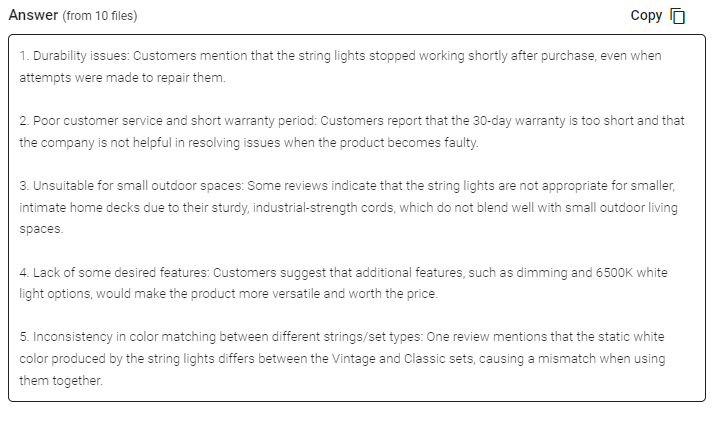
Speak generarà una resposta concisa en un quadre de text a sota del menú desplegable de selecció de preguntes. Amb el xat habilitat, també podeu continuar consultant aquestes dades per revelar més informació i reformatar la informació segons les vostres necessitats.
En aquest exemple, demanem que s'analitzin totes les presentacions de PowerPoint de la carpeta alhora per trobar els principals insatisfets del producte.
Podeu copiar fàcilment aquesta resposta per a les vostres presentacions, contingut, correus electrònics, membres de l'equip i molt més!
Preus de Speak Magic Prompts
Our team at Speak AI continues to optimize the pricing for Magic Prompts and Speak as a whole.
Ara mateix, qualsevol persona de la prova de 7 dies de Speak té 100.000 caràcters inclosos al seu compte.
Si necessiteu més personatges, podeu incloure fàcilment les indicacions de Speak Magic al vostre pla quan creeu una subscripció.
També podeu actualitzar el nombre de caràcters del vostre compte si ja teniu una subscripció.
Les dues opcions estan disponibles al pàgina de subscripció.
Alternativament, podeu utilitzar Speak Magic Prompts per afegint un saldo al teu compte. El saldo s'utilitzarà mentre analitzeu els personatges.
Personalitza completament el teu pla 📝
Aquí a Speak, hem fet que sigui increïblement fàcil personalitzar la vostra subscripció.
Un cop us hàgiu registrat, només heu de visitar el nostre creador de plans personalitzats i seleccioneu el volum de mitjans, la mida de l'equip i les funcions que voleu obtenir un pla que s'adapti a les vostres necessitats.
No més plans rígids. Actualitza, baixa o cancel·la en qualsevol moment.
Reclama la teva oferta especial 🎁
Quan us subscriviu, també obtindreu un complement premium gratuït durant tres mesos!
Això vol dir que estalvieu fins a $50 USD al mes i $150 USD en total.
Un cop us hàgiu subscrit a un pla, tot el que heu de fer és enviar-nos un xat en directe amb el complement premium seleccionat de la llista següent:
- Opcions d'exportació premium (Word, CSV i més)
- Categories personalitzades i estadístiques
- Personalització de la gravadora (marca, entrada i més)
- Personalització del reproductor multimèdia
- Biblioteques multimèdia compartibles
Posarem el complement en directe al vostre compte de manera gratuïta!
Què estàs esperant?
Fes referència a altres i guanya diners reals 💸
Si tens amics, companys i seguidors interessats a utilitzar la nostra plataforma, pots guanyar diners reals mensuals.
Se us pagarà un percentatge de totes les vendes tant si els clients als quals referiu paguen per un pla, transcriuen automàticament els mitjans o aprofiten els serveis de transcripció professionals.
Utilitzeu aquest enllaç per convertir-se en un afiliat oficial de Speak.
Consulteu els nostres recursos dedicats 📚
- Ajuda Docs
- Documents de l'API
- Speak AI YouTube Channel
- Guia per crear el vostre pla de parla perfecte
Reserveu una sessió d'implementació gratuïta 🤝
Seria un honor participar personalment a una trucada introductòria amb tu per assegurar-te que estàs preparat per tenir èxit.
Només cal que utilitzeu el nostre Enllaç Calendly per trobar un moment que et vagi bé. Esperem conèixer-vos!
Preguntes freqüents
What is retrieval augmented generation for PowerPoint presentations?
Retrieval augmented generation (RAG) lets an AI look up relevant passages from your own documents before it answers. Applied to PowerPoint decks, it means answers are grounded in what your slides actually say.
What are the benefits of RAG for presentations?
RAG helps researchers, marketers and teams get answers tied to the actual slide content, which makes summaries and insights easier to check. It also saves time compared with reading every deck by hand.
Can I ask questions across many PowerPoint decks at once?
Yes. Put the files in one folder and use AI chat across that library to ask questions, instead of opening each deck. Speak AI supports chat across a whole library of files.
Explora Speak AI
Speak AI és una plataforma de recerca en tecnologia de veu i IA. Transcripció en més de 100 idiomes, anàlisi de PNL, anàlisi de sentiments, agents d'IA i consultoria empresarial.
 English
 Español
 Français
 Italiano
 العربية
 Português do Brasil
 Nederlands
 Deutsch
 עִבְרִית
 Русский
 日本語
 Polski
 Čeština
 Українська
 Slovenščina
 Svenska
 Ελληνικά
 Norsk bokmål
 简体中文
 Türkçe
 Català
 Magyar
 한국어
 Slovenčina
 Suomi