
How To Translate Hebrew to English
Translating Hebrew to English is super simple!
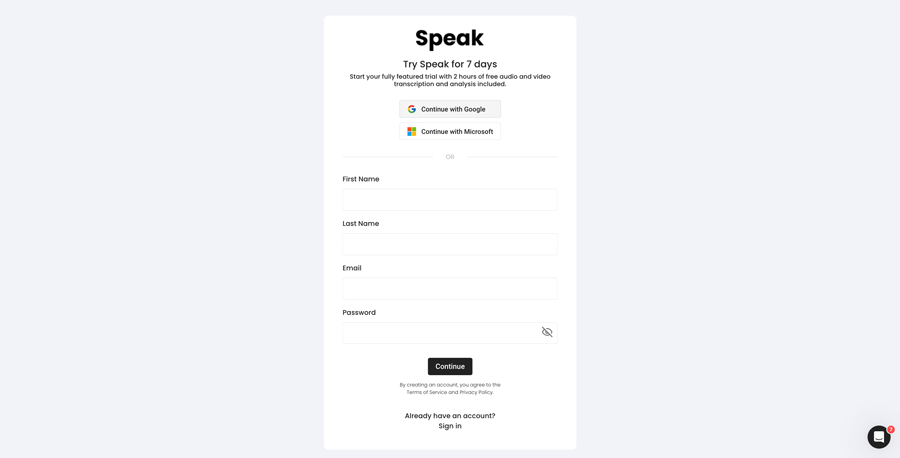
Étape 1 : S'inscrire à Speak
S'inscrire à Speak en utilisant ce lien.
Once you register, you can instantly begin translating your Hebrew to English file(s).
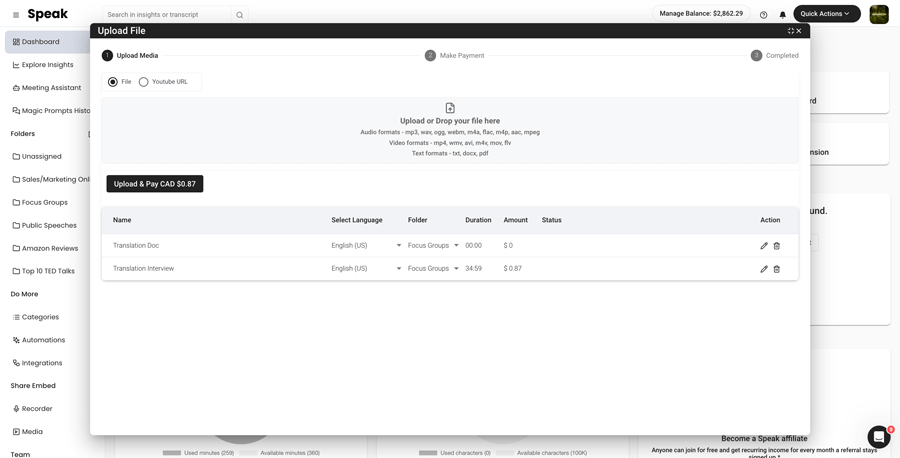
Étape 2 : Télécharger vos fichier(s) en hébreu
Dès que vous vous connectez, vous êtes redirigé vers le tableau de bord.
Une fois sur place, vous pouvez sélectionner l'action rapide "Nouveau téléchargement".
Dans Speak, vous pouvez télécharger, transcrire et traduire des fichiers audio, vidéo et texte en une seule fois ! Si vous avez une vidéo, vous pouvez utiliser notre Convertisseur vidéo-texte AI pour convertir la vidéo en texte ; si vous avez de l'audio, vous pouvez utiliser notre Convertisseur audio/texte AI pour convertir de l'audio en texte. Vous pouvez également transcrire des vidéos YouTube et utiliser l'IA pour analyser le texte.
Formats audio et vidéo pris en charge
- Convertir MP4 en texte
- Convertir M4A en texte
- Convertir un fichier MP3 en texte
- Convertir OGG en texte
- Convertir MPEG en texte
- Convertir WEBM en texte
- Convertir MOV en texte
- Convertir M4P en texte
- Convertir WMV en texte
- Convertir WAV en texte
- Convertir M4V en texte
- Audio Video to Text
- Convertir AVI en texte
- Convertir une vidéo en article
Langues de transcription prises en charge
- Comment transcrire l'afrikaans
- Comment transcrire l'arabe égyptien
- Comment transcrire l'arabe en Irak
- Comment transcrire l'arabe d'Israël
- Comment transcrire l'arabe jordanien
- Comment transcrire l'arabe au Koweït
- Comment transcrire l'arabe au Liban
- Comment transcrire l'arabe moderne standard Bahreïn
- Comment transcrire l'arabe moderne standard
- Comment transcrire l'arabe Oman
- Comment transcrire l'arabe Autorité palestinienne
- Comment transcrire l'arabe du Qatar
- Comment transcrire l'arabe en Arabie Saoudite
- Comment transcrire l'arabe République arabe syrienne
- Comment transcrire l'arabe E.A.U.
- Comment transcrire l'arménien
- Comment transcrire le bulgare
- Comment transcrire le catalan
- Comment transcrire le chinois cantonais traditionnel
- Comment transcrire le chinois simplifié
- Comment transcrire le croate
- Comment transcrire le tchèque
- Comment transcrire le danois
- Comment transcrire le néerlandais
- Comment transcrire l'anglais en Australie
- Comment transcrire l'anglais britannique
- Comment transcrire l'anglais indien
- Comment transcrire l'anglais irlandais
- Comment transcrire l'anglais en Nouvelle-Zélande
- Comment transcrire l'anglais écossais
- Comment transcrire l'anglais en Afrique du Sud
- Comment transcrire l'anglais Royaume-Uni
- Comment transcrire l'anglais États-Unis
- Comment transcrire l'estonien
- Comment transcrire le farsi
- Comment transcrire le finnois
- Comment transcrire le français au Canada
- Comment transcrire le suisse allemand
- Comment transcrire l'allemand
- Comment transcrire le grec
- Comment transcrire le gujarati
- Comment transcrire l'hébreu
- Comment transcrire l'hindi
- Comment transcrire le hongrois
- Comment transcrire l'islandais
- Comment transcrire l'indonésien
- Comment transcrire des entretiens
- Comment transcrire l'irlandais
- Comment transcrire l'italien
- Comment transcrire le japonais
- Comment transcrire en Kannada
- Comment transcrire le coréen
- Comment transcrire le letton
- Comment transcrire le lituanien
- Comment transcrire le malais
- Comment transcrire le malayalam
- Comment transcrire le norvégien
- Comment transcrire le persan
- Comment transcrire le polonais
- Comment transcrire le portugais brésilien
- Comment transcrire le portugais Portugal
- Comment transcrire le portugais
- Comment transcrire le roumain
- Comment transcrire le russe
- Comment transcrire le slovaque
- Comment transcrire le slovène
- Comment transcrire l'espagnol au Mexique
- Comment transcrire le suédois
- Comment transcrire le tamoul
- Comment transcrire le télougou
- Comment transcrire le thaïlandais
- Comment transcrire le turc
- Comment transcrire l'ukrainien
- Comment transcrire le vietnamien
- Transcrire le danois
- Transcrire l'anglais
- Transcrire le français
- Transcrire l'allemand
- Transcrire le portugais
- Transcrire l'espagnol
Nous disposons également d'un Assistant de réunion AI et Notetaker AI pour capturer automatiquement les réunions ainsi qu'un enregistreur vocal, enregistreur audio et vidéo intégrableet enregistreur d'écran.
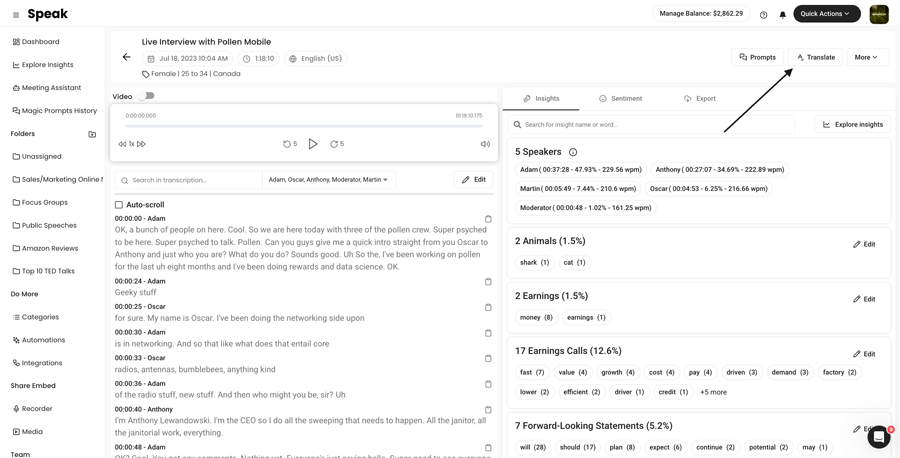
Step 3: Translate Your Hebrew file(s) to English
Une fois le fichier téléchargé, il vous suffit d'accéder à votre fichier et de sélectionner "Traduire".
S'il s'agit d'un fichier audio et vidéo, Speak vous demandera si vous souhaitez conserver les noms des locuteurs et les horodatages dans la traduction.
Vous souhaitez traduire plusieurs fichiers à la fois ? Pas de problème !
You can view the files you want to automatically translate from Hebrew to English from the folder level and instantly translate as many files as you need with our artificial intelligence translation in just a few clicks.
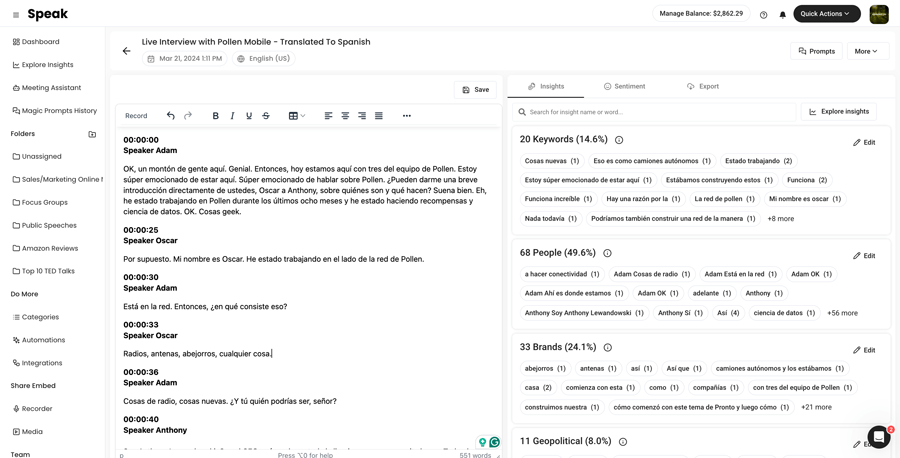
Étape 4 : C'est tout ! Visualisez, analysez, modifiez et exportez votre (vos) nouveau(x) fichier(s) en anglais.
Une fois la traduction effectuée, vous serez alerté et vous verrez un nouveau document dans le même dossier que le fichier original.
Le fichier portera le même nom, mais un tiret indiquera qu'il s'agit de la version traduite.
Besoin d’aide pour votre traduction hébraïque?
Nous sommes toujours là et heureux de vous aider à Speak !
Il vous suffit de nous envoyer un message sur le chat en direct dans le coin inférieur droit et nous nous assurerons que vous êtes prêt à réussir.
Interested in translating Hebrew or other languages to different languages? View our entire list of supported translation langues ici.
Automatic, accurate, instant AI translation from Hebrew to English is here for you.
S'inscrire à Speak en utilisant ce lien and begin translating Hebrew to English today.
The Essential Guide to Translating Hebrew to English: Unleashing Opportunities and Growth
In today’s interconnected world, the power of language translation is undeniable. With a growing demand for seamless communication across different languages, translating Hebrew to English has emerged as a crucial necessity for both individuals and businesses alike. As Speak AI demonstrates through its advanced AI technology and NLP capabilities, the transition from Hebrew to English doesn’t just break down linguistic barriers but opens doors to immense opportunities, insights, and advancements.
Unlocking the Potential of AI Translation
The evolution of automatic translation technology, especially from Hebrew to English, serves as a bridge between cultures, facilitating not just understanding but the flourishing of global connections. Speak AI’s integration of NLP, large language models, and generative AI into our software enhances the accuracy and contextuality of translations, making it an indispensable tool for researchers and businesses striving to excel on the global stage.
The Value of Accurate Translation in Research and Business
-
Researchers rely on accurate translations to access and cite work from diverse sources, broadening the scope and impact of their findings.
-
Businesses expanding into new markets can communicate effectively with their target audience, fostering trust and building relationships.
Transform Your Meetings with AI Meeting Assistant
Imagine having an AI Meeting Assistant that not only joins your Microsoft Teams, Zoom, Google Meet, and Webex calls but also automatically transcribes and analyzes these meetings in real-time. Speak AI provides this revolutionary tool, reducing the time spent on meeting follow-ups and ensuring no detail is lost in translation. With a Note de 4,9 sur G2 and over 150K users, Speak AI’s solutions are designed to propel your operations and communication to new heights, saving time and costs while enhancing productivity.
Enhanced Productivity and Cost Savings
The automation of Hebrew to English translation for audio, video, and text content empowers businesses and researchers with the ability to digest massive amounts of information quickly and accurately. This not only saves significant time but also cuts down on the costs associated with manual translations, enabling more efficient allocation of resources towards growth and innovation.
Relevance to Researchers and Businesses
Whether it’s understanding a pivotal Hebrew research paper or localizing marketing materials for English-speaking markets, the implications of seamless translation are far-reaching. Speak AI’s sophisticated analysis through large language models further enriches the translation by offering nuanced understanding and context – an asset for researchers and businesses requiring in-depth insights into their translated materials.
Driving Sign-Ups and Revenue Growth
As businesses and researchers recognize the efficiency, accuracy, and depth of analysis provided by Speak AI, the path to increased sign-ups and revenue growth becomes more evident. In leveraging Speak AI for Hebrew to English translation, users unlock a treasure trove of opportunities that transcends language barriers, fostering global collaboration and innovation.
Exploring the Cultural Tapestry: Hebrew and English Across the Globe
Hebrew and English, each with its unique origins, have woven a rich cultural tapestry that spans across continents. Hebrew, an ancient language reborn in the modern era, is primarily spoken in Israel, a country with a population of approximately 9 million. English, a global lingua franca, is the official language of 67 countries and is spoken by over 1.5 billion people worldwide. The historical journey of these languages is a testament to their resilience and adaptability, influencing countless aspects of culture, science, and commerce globally.
Delving Into the Characteristics of Hebrew and English
The linguistic intricacies of Hebrew and English reveal both fascinating similarities and stark differences. Hebrew’s right-to-left script and root-based morphology contrast sharply with English’s left-to-right writing and vast vocabulary derived from various languages. Yet, both languages share the ability to evolve and incorporate new terms, reflecting changes in technology, culture, and society. This adaptability is key to their survival and continued relevance.
Fun Facts: Bridging Histories and Cultures
-
Hebrew is one of the oldest languages, with written records dating back over 3,000 years, while English has shaped modern communication on a global scale.
-
English has adopted several Hebrew words, such as “hallelujah” and “Sabbath,” showcasing the interplay between these languages.
Conclusion: The Path Forward with Speak AI
As we navigate the complexities of global communication, the role of sophisticated translation tools like Speak AI becomes ever more crucial. Translating Hebrew to English is not just about converting words but about understanding context, culture, and subtleties. By harnessing the power of advanced AI, NLP, and large language models, Speak AI stands at the forefront of bridging linguistic divides, driving innovation, and facilitating global collaboration. Begin your journey today towards clearer, more effective communication across borders.
Passez à l'étape suivante
Join over 150,000 users who have leveraged the capabilities of Speak AI to enhance their communication and research endeavors. With Speak AI, the promise of accurate, efficient, and insightful Hebrew to English translation is not just a possibility but a reality. Embrace the future of translation and unlock the full potential of your meetings, research, and global business strategies. Inscrivez-vous maintenant and experience the transformative power of Speak AI.
Traduire l’hébreu dans ces autres langues supportées :
Foire aux questions
How do I translate Hebrew to English?
Register for Speak, choose New Upload, and add your Hebrew audio, video or text. Select English as the target language, then view, edit and export the translated file. The whole process takes a few steps.
Can I translate Hebrew audio or video to English?
Yes. Upload an MP3, MP4, WAV or other audio or video file and Speak transcribes the Hebrew speech, then translates the transcript into English. You can also upload text files in the same workflow.
Can I edit the English translation after it is generated?
Yes. Once the translation is ready you can view it, analyze it, modify it and export it. Reviewing the text yourself is a good habit for names, idioms and technical terms before you share it.
How accurate is AI translation from Hebrew to English?
AI translation handles most everyday content well, but accuracy depends on the source audio or text, idioms and specialist vocabulary. Review important material before you publish it, and use the editor in Speak to correct anything awkward.
Traduire & Transcrire avec Speak AI
Speak AI prend en charge la transcription et l’analyse en plus de 100 langues. Téléchargez votre audio ou vidéo et obtenez une transcription alimentée par IA, une aide à la traduction et des analyses NLP instantanées.
 English
 Español
 Français
 Italiano
 العربية
 Português do Brasil
 Nederlands
 Deutsch
 עִבְרִית
 Русский
 日本語
 Polski
 Čeština
 Українська
 Slovenščina
 Svenska
 Ελληνικά
 Norsk bokmål
 简体中文
 Türkçe
 Català
 Magyar
 한국어
 Slovenčina
 Suomi