
Kuinka luoda telugunkielisiä tekstityksiä
Subtitles are an important feature for audio and video media. They allow people to understand the content of a video without having to listen to the audio, making them accessible to a wider audience. Subtitles can also provide additional information about the video that may not be provided in the audio. Creating subtitles in Telugu can be beneficial for a variety of reasons and with the right tools and techniques, it can be done quickly and easily.
An Overview Of The Telugu Language
Telugu is an Indian language spoken by over 80 million people primarily in the southern Indian states of Andhra Pradesh and Telangana. It is also used in parts of Karnataka, Tamil Nadu, and Odisha. Telugu is the third most spoken language in India and the fourteenth most spoken language in the world. It is one of the official languages of India and is used in various domains such as education, media, government, and commerce.
The Benefits Of Transcription And Subtitles
Transcribing audio and video content into text is an important step in creating subtitles. Transcription can help to improve the accuracy of subtitles, as well as make them more accessible to a wider audience. In addition, transcription and subtitles can be used to make content more searchable, which can help to improve its visibility online.
Subtitles can also help to reduce the cognitive load of viewers, as they can quickly and easily understand the content of a video without having to listen to the audio. This can be especially helpful for viewers who are hard of hearing or have difficulty understanding spoken language. In addition, subtitles can be used to provide additional information about the video that may not be provided in the audio.
Jatka koko oppaan lukemista (napsauta laajentaaksesi)
Kuinka luoda telugunkielisiä tekstityksiä
Creating Telugu subtitles is a relatively simple process with the right tools and techniques. One of the most efficient and cost-effective ways to create subtitles is to use a speech recognition and natural language platform like Speak AI. Speak AI offers over 70,000 users the ability to transcribe audio and video content into text and then create subtitles in any language, including Telugu.
The platform makes it easy to create subtitles with its intuitive user interface. All you need to do is upload your audio or video file, select Telugu as the language, and the platform will begin transcribing the content into text. Once the transcription is complete, you can then edit the subtitles, making them more accurate and adding additional information if necessary.
Päätelmä
Creating subtitles in Telugu can be a great way to make audio and video content more accessible to a wider audience. With the right tools and techniques, it can be done quickly and easily. Speak AI is a great platform for creating Telugu subtitles, as it offers a user-friendly interface and the ability to transcribe audio and video content into text. The platform can also be used to create subtitles in other languages, making it a great option for businesses and researchers looking to expand their reach.
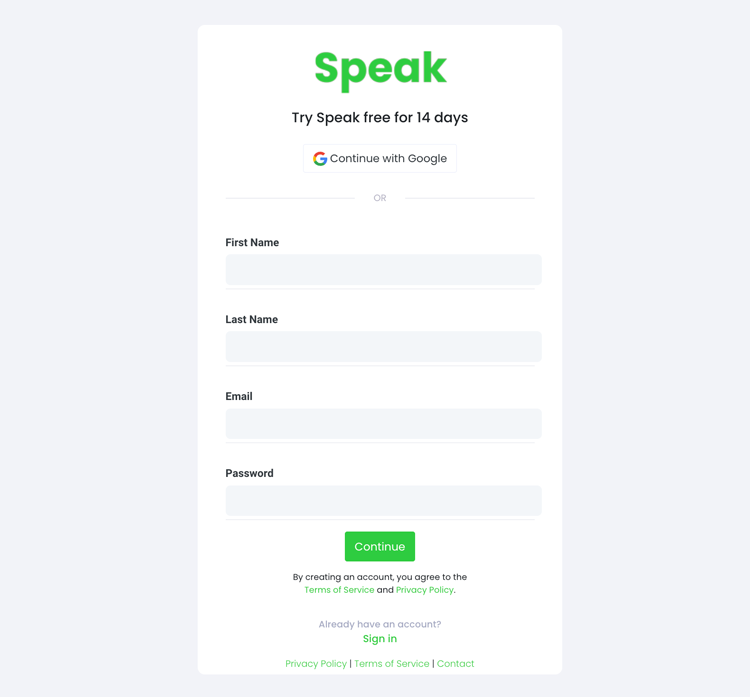
Vaihe 1: Luo Speak-tili
To start your Telugu subtitling, you first need to luo Speak-tili. Ei hätää, tämä on erittäin helppoa!
Our team is happy to give you a 7-day trial with 30 minutes of free Telugu audio and video subtitling included.
To sign up for Speak and start your Telugu subtitling, visit the Speak app register page täällä.
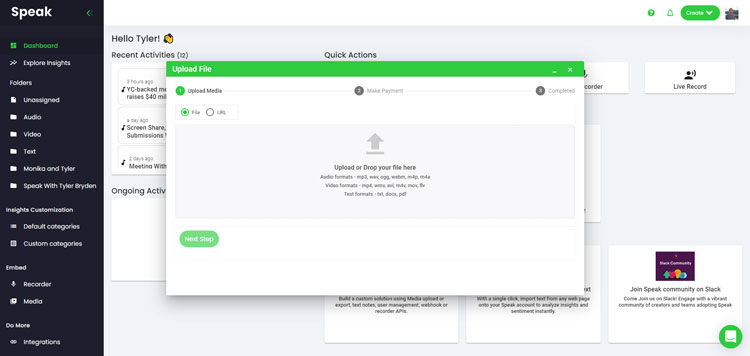
Step 2: Upload your Telugu file(s) for subtitling
Suosittelemme yleensä MP4-tiedostoja videolle tai MP3-tiedostoja äänelle.
However, we accept a range of audio and video file types. Once you upload your file all you have to do is select “Telugu” from the language dropdown menu to automatically subtitle in Telugu.
You can upload your Telugu file for subtitling in several ways using Speak:
Hyväksytyt Telugu äänitiedostotyypit
- Telugu MP3
- Telugu M4A
- Telugu WAV
- Telugu OGG
- Telugu WEBM
- Telugu M4P
Hyväksytyt Telugu videotiedostotyypit
- Telugu MP4
- Telugu M4V
- Telugu WMV
- Telugu AVI
- Telugu MOV
- Telugu FLV
Julkisesti saatavilla olevat Telugu URL-osoitteet
Voit myös ladata Speakiin mediaa julkisesti saatavilla olevan URL-osoitteen kautta.
As long as the file type extension is available at the end of the URL you will have no problem importing your recording for automatic Telugu subtitling and analysis.
Telugu YouTube URL-osoitteet
Speak on yhteensopiva YouTube-videoiden kanssa. Sinun tarvitsee vain kopioida YouTube-videon URL-osoite (esim, https://www.youtube.com/watch?v=qKfcLcHeivc).
Speak etsii tiedoston automaattisesti, laskee pituuden ja tuo videon.
Varmista, että käytät koko linkkiä etkä lyhennettyä YouTube-pätkää. Lisäksi varmista, että poistat kanavan nimen URL-osoitteesta.
Puhu integraatiot
Kuten mainittiin, Speak sisältää myös useita integraatioita seuraaviin tarkoituksiin Zoomaus, Zapier, Vimeo ja muita, jotka auttavat sinua tekstittämään mediasi automaattisesti.
Tämä integraatioiden kirjasto kasvaa jatkuvasti! Onko sinulla pyyntöä? Lähetä meille viesti.
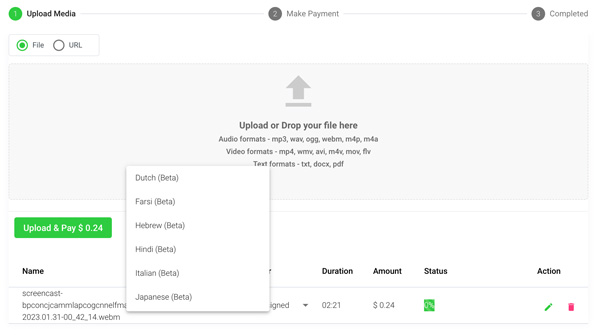
Vaihe 3: Laske ja maksa loppusumma automaattisesti.
Kun sinulla on Telugu ääni- tai videotiedosto valmiina ja lataat sen Speakiin, se laskee automaattisesti kokonaiskustannukset (saat 30 minuuttia ilmaiseksi kokeilujakson aikana - hyödynnä se!).
Voit maksaa tilaamalla henkilökohtaisen suunnitelman käyttämällä reaaliaikaista laskuria, johon sisältyvät minuutit.
Voit myös lisätä saldoa tai maksat latauksista ilman suunnitelmaa käyttämällä sinun luottokortti.
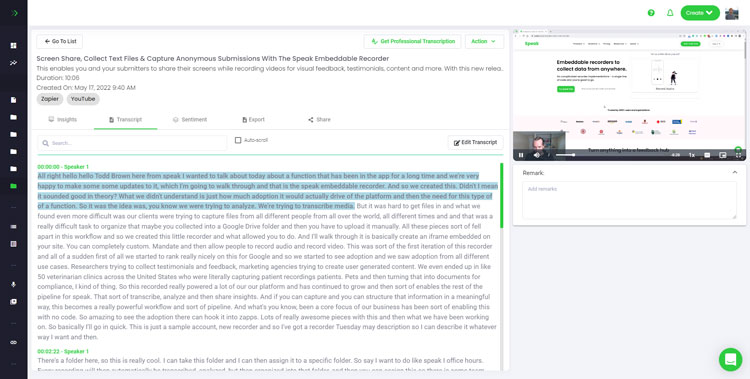
Step 4: Wait for Speak to subtitle your Telugu audio or Telugu video
Our automated subtitling software will prepare your Telugu subtitles in as little as a few minutes. Generally, Speak takes about half the audio or video length to produce the subtitles and insights.
Once completed, you will get an email notification that your Telugu subtitles is complete. That email will contain a link back to the file so you can access the interactive media player with the Telugu subtitles, analysis, and export formats ready for you.
Step 5: View and edit your automated Telugu subtitles
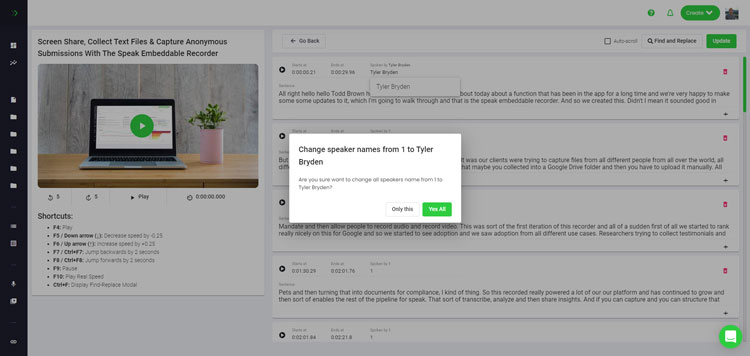
Haluatko muokata tekstityksiä itse? Selvä! Kun olet vastaanottanut automaattiset tekstityksesi, voit muokata niitä milloin tahansa.
Easily update speaker names, find and replace, and get your automatic Telugu subtitles up to full accuracy with our intuitive subtitles editing system.
Step 6: Export your Telugu subtitles and share interactive media players
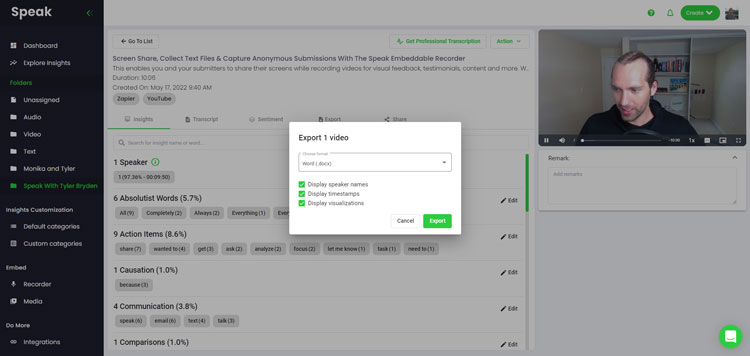
With Speak, you can easily export Telugu subtitles to many formats.
Below is a list of options for exporting your Telugu subtitles in Speak:
- Export Telugu subtitles to SRTs
- Export Telugu subtitles to VTTs
Tehokkaampi tapa jakaa tekstityksiä on jaettava mediakirjasto joka sisältää mediatiedoston, tekoälyn tiedot ja interaktiiviset tekstitykset.
Speakilla on paljon muutakin tekemistä, jolla voit rikastuttaa mediasisältöäsi ja tekstityksiäsi.
Älä koskaan epäröi lähettää meille viestiä live-chatissa - olemme aina valmiita auttamaan!
We talked about Telugu subtitling here, but you may be interested in how to subtitle in other languages instantly and easily with Speak’s intuitive subtitling and natural language processing software.
Olemme jakaneet alla resursseja kaikista kielistä, joilla Speak voi auttaa tekstityksissä!
Liity yli 50 000 käyttäjän joukkoon, jotka löytävät radikaalisti tehokkuutta ääni-, video- ja tekstidatallaan ja luovat siten lisäarvoa.
How Much Does It Cost To Subtitle Telugu?
Speak offers highly competitive pricing for Telugu subtitling compared to other subtitling solutions. For a starting user, Speak offers automated Telugu subtitling for only $0.025 USD per minute. That is only $1.50 USD per hour!
Hinnoittelumme skaalautuu myös mediamäärän mukaan, ja voimme tarjota vielä suurempia alennuksia suurille asiakkaille.
So, if you have over 100 hours of Telugu subtitling per month please contact us through live chat and we will set you up with a customized price per minute to make Telugu subtitling even more affordable!
You can learn more about how to subtitle Telugu with Speak and the relevant pricing on the verkkosivuston hinnoittelusivu ja sovelluksen sisäinen hinnoittelusivu.
What Can You Subtitle In Telugu?
- Subtitle Telugu interviews
- Subtitle Telugu videos
- Subtitle Telugu audio
- Subtitle Telugu earnings calls
- Subtitle Telugu focus groups
- Subtitle Telugu meetings
- Subtitle Telugu phone calls
- Subtitle Telugu YouTube videos
- Subtitle Telugu Vimeo videos
- Subtitle Telugu Zoom recordings
- Subtitle Telugu Google Meet recordings
- Microsoft Teams -tallenteiden tekstitykset
- Subtitle Telugu podcasts
Ja paljon muuta!
Millä muilla kielillä voi puhua tekstityksiä?
Speakilla on jo käyttäjiä yli 90 maasta, ja saamme jatkuvasti pyyntöjä tekstittää ja analysoida sitä eri kielillä.
Lisäämme siis jatkuvasti uusia kieliä Speakiin! Seuraavassa on vain muutamia kieliä, joita Speak tarjoaa:
- Kuinka luoda afrikaansinkielisiä tekstityksiä
- Kuinka luoda arabiankielisiä (Egypti) tekstityksiä
- Kuinka luoda arabiankielisiä (Irak) tekstityksiä
- Kuinka luoda arabiankielisiä (israelilaisia) tekstityksiä
- Kuinka luoda arabialaisia (Jordanian) tekstityksiä
- Kuinka luoda arabiankielisiä (Kuwait) tekstityksiä
- Kuinka luoda arabiankielisiä (libanonilaisia) tekstityksiä
- Kuinka luoda arabiankielisiä (Oman) tekstityksiä
- Kuinka luoda arabialaisia (Palestiinan itsehallintoalueen) tekstityksiä
- Kuinka luoda arabiankielisiä (Qatarinkielisiä) tekstityksiä
- Kuinka luoda arabiankielisiä (Saudi-Arabia) tekstityksiä
- Kuinka luoda arabiankielisiä (Syyrian arabitasavalta) tekstityksiä
- Kuinka luoda arabiankielisiä (Yhdistyneet arabiemiirikunnat) tekstityksiä
- Kuinka luoda arabialaisia modernin standardin (Bahrain) tekstityksiä
- Kuinka luoda armenialaisia tekstityksiä
- Kuinka luoda bulgarialaisia tekstityksiä
- Kuinka luoda katalaaninkielisiä tekstityksiä
- Kiinalaisten (kantoninkiinalaisten, perinteisten) tekstitysten luominen
- Kiinalaisten (yksinkertaistettujen) tekstitysten luominen
- Kuinka luoda kiinalaisia (perinteisiä) tekstityksiä
- Kuinka luoda kroatialaisia tekstityksiä
- Kuinka luoda tšekkiläiset tekstitykset
- Kuinka luoda tanskalaisia tekstityksiä
- Kuinka luoda hollantilaisia tekstityksiä
- Kuinka luoda englanninkielisiä tekstityksiä
- Kuinka luoda englanninkielisiä (australialaisia) tekstityksiä
- Kuinka luoda englanninkielisiä (intialaisia) tekstityksiä
- Kuinka luoda englanninkielisiä (iirinkielisiä) tekstityksiä
- Kuinka luoda englanninkielisiä (uusiseelantilaisia) tekstityksiä
- Kuinka luoda englanninkielisiä (skotlanninkielisiä) tekstityksiä
- Kuinka luoda englanninkielisiä (eteläafrikkalaisia) tekstityksiä
- Kuinka luoda englanninkielisiä (Yhdistynyt kuningaskunta) tekstityksiä
- Kuinka luoda englanninkielisiä (Yhdysvallat) tekstityksiä
- Kuinka luoda virolaisia tekstityksiä
- Kuinka luoda farsinkielisiä tekstityksiä
- Kuinka luoda suomenkielisiä tekstityksiä
- Kuinka luoda ranskalaisia tekstityksiä
- Kuinka luoda ranskalaisia (Kanada) tekstityksiä
- Kuinka luoda saksalaisia tekstityksiä
- Kuinka luoda saksalaisia (sveitsiläisiä) tekstityksiä
- Kuinka luoda kreikkalaisia tekstityksiä
- Kuinka luoda gudžaratinkielisiä tekstityksiä
- Kuinka luoda heprealaisia tekstityksiä
- Kuinka luoda hindinkielisiä tekstityksiä
- Kuinka luoda unkarilaisia tekstityksiä
- Kuinka luoda islantilaisia tekstityksiä
- Kuinka luoda indonesialaisia tekstityksiä
- Kuinka luoda irlantilaisia tekstityksiä
- Kuinka luoda italialaisia tekstityksiä
- Kuinka luoda japanilaisia tekstityksiä
- Kuinka luoda kannadankielisiä tekstityksiä
- Kuinka luoda korealaisia tekstityksiä
- Kuinka luoda latvialaisia tekstityksiä
- Kuinka luoda liettualaisia tekstityksiä
- Kuinka luoda malaijinkielisiä tekstityksiä
- Kuinka luoda malajalaminkielisiä tekstityksiä
- Norjalaisten tekstitysten luominen
- Kuinka luoda persialaisia tekstityksiä
- Kuinka luoda puolalaisia tekstityksiä
- Kuinka luoda portugalinkielisiä tekstityksiä
- Kuinka luoda portugalinkielisiä (brasilialaisia) tekstityksiä
- Kuinka luoda portugalinkielisiä tekstityksiä
- Kuinka luoda romanialaisia tekstityksiä
- Kuinka luoda venäläisiä tekstityksiä
- Kuinka luoda slovakilaisia tekstityksiä
- Kuinka luoda slovenialaisia tekstityksiä
- Kuinka luoda espanjankielisiä tekstityksiä
- Kuinka luoda espanjankielisiä (meksikolaisia) tekstityksiä
- Kuinka luoda ruotsinkielisiä tekstityksiä
- Kuinka luoda tamilikielisiä tekstityksiä
- Kuinka luoda telugunkielisiä tekstityksiä
- Kuinka luoda thaimaalaisia tekstityksiä
- Kuinka luoda turkkilaisia tekstityksiä
- Kuinka luoda ukrainankielisiä tekstityksiä
- Kuinka luoda vietnamilaisia tekstityksiä
Niitä on nyt lisätty paljon lisää!
Voit nähdä koko luettelo kielistä, joita Speak tukee sekä ohjelmiston että sovellusliittymien kautta.
Tutustu Speak AI:hin
Speak AI on ääniteknologiaan ja tekoälytutkimukseen keskittyvä alusta. Litterointia yli sadalla kielellä, NLP-analytiikkaa, mielipideanalyysiä, tekoälyagentteja ja yrityskonsultointia.
Automatisoitu transkriptio
AI-puheagentit
Tekoälykonsultointi ja -toteutus
Tekstianalyysityökalu
AI Meeting Assistant
 English
  Español
  Français
  Italiano
  العربية
  Português do Brasil
  Nederlands
  Deutsch
  עִבְרִית
  Русский
  日本語
日本語  Polski
  Čeština
  Українська
  Slovenščina
  Svenska
  Ελληνικά
  Norsk bokmål
  简体中文
简体中文  Türkçe
  Català
  Magyar
  한국어
한국어  Slovenčina
  Suomi
Suomi