
Unlock the World of Bashkir: An Introduction
Bashkir is a language that resonates with history, culture, and a unique linguistic identity. Spoken primarily in the Republic of Bashkortostan, Russia, it is also heard in various parts of the Urals, Tatarstan, and Siberia. A Turkic language, Bashkir boasts approximately 1.2 million speakers, playing a crucial role in the cultural and social dynamics of the region. With a rich heritage, Bashkir is not just a means of communication but a testament to the enduring legacy of its people.
The Significance of Transcribing Bashkir
Transcribing Bashkir extends beyond converting spoken words into text; it’s about preserving a linguistic heritage, enhancing accessibility, and opening new doors for research, education, and business. For academic researchers, Bashkir transcripts can provide invaluable data for linguistic, anthropological, or historical studies. Market researchers and businesses looking into the Bashkortostan region can gain insights into local consumer behavior and cultural nuances. For sales and marketing professionals, understanding local dialects and phrases can significantly impact the effectiveness of communication strategies.
Revolutionizing Communication with Bashkir Transcription
With the advent of Bashkir audio to text converter tools and Bashkir video to text converter technologies, the process of transcription has become more accessible and efficient. These tools, powered by advanced AI, enable users to convert their Bashkir recordings into text accurately and swiftly, opening up opportunities for data analysis, content creation, and more.
Bashkir in the Global Arena: Locations and Stats
Bashkir is predominantly spoken in the Republic of Bashkortostan, nestled between the Volga River and the Ural Mountains in Russia. However, its speakers are scattered across various regions, contributing to its presence on a global scale. Interesting statistics reveal that Bashkir is the third most spoken Turkic language in Russia, highlighting its significance in the linguistic landscape of the country.
Exploring the Uniqueness of Bashkir: Fun Facts
Bashkir culture is a fascinating blend of the ancient and the modern. Here are some fun facts that highlight its uniqueness:
- Musical Heritage: Bashkir folk music and the art of storytelling through song is a significant part of its cultural identity, with traditional instruments like the kurai (a type of flute) playing a central role.
- Roteiro histórico: The Bashkir language has undergone several script changes over the years, moving from the Arabic to the Latin, and finally to the Cyrillic alphabet in the 20th century.
- Rich Literature: Bashkir literature, dating back to the 18th century, is a treasure trove of folklore, poetry, and prose, reflecting the soul of the Bashkir people.
Why Choose Automatic Bashkir Transcription?
The benefits of automatically transcribing Bashkir content are manifold. From time and cost savings to increased accuracy and efficiency, the impact of utilizing tools like Bashkir AI to text converters is profound.
Economia de tempo e custos
Manually transcribing Bashkir recordings is time-consuming and prone to errors. Automatic transcription services significantly reduce the time and financial investment required, allowing individuals and organizations to focus on analyzing the data and deriving valuable insights.
Enhanced Accuracy
Thanks to advancements in AI and machine learning, automatic Bashkir transcription tools can achieve high levels of accuracy, even with complex dialects and regional accents. This precision is invaluable for researchers, businesses, and professionals relying on accurate data for their work.
Ampliar o acesso e a compreensão
Transcribed Bashkir text can be easily shared, translated, and analyzed, breaking down language barriers and fostering a deeper understanding of Bashkir culture and society. This accessibility is crucial for academic research, market analysis, and global communication.
Speak AI: Your Partner in Bashkir Transcription
At Speak AI, we understand the importance of accurate and efficient transcription. Our state-of-the-art Bashkir audio to text converter technology, combined with our AI Meeting Assistant, ensures that your Bashkir recordings are transcribed with the highest accuracy and speed. With a 4.9 rating on G2 and over 150,000 users, our tools are designed to facilitate seamless transcription, analysis, and visualization of your Bashkir content.
Whether you’re an academic researching the Turkic languages, a market researcher exploring Bashkortostan, or a business looking to engage with the Bashkir-speaking population, Speak AI has the tools and expertise you need to succeed. Embrace the power of automatic Bashkir transcription and unlock the potential of your audio and video content today.
Conclusão
Transcribing Bashkir has never been easier or more accessible, thanks to advancements in AI transcription technologies. From preserving cultural heritage to enhancing business strategies and academic research, the benefits of Bashkir transcription are vast and varied. With Speak AI at your side, you’re equipped to navigate the complexities of the Bashkir language, ensuring that no nuance is lost in translation. Unlock the full potential of your Bashkir content with Speak AI and step into a world of opportunity.
Ready to explore what Speak AI can do for you? Contact us today and take the first step towards transforming your Bashkir audio and video content into actionable insights.
How To Transcribe Bashkir Using Speak
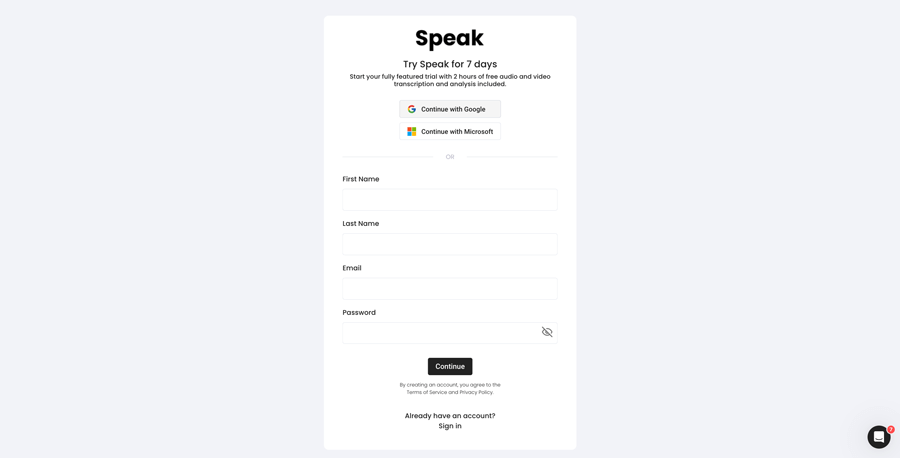
Etapa 1: Criar uma conta no Speak
To start your Bashkir transcription, you first need to criar uma conta Speak. Não se preocupe, isso é muito fácil de fazer!
Our team is happy to give you a 7-day trial with trial credits for Bashkir audio and video transcription included.
To sign up for Speak and start your Bashkir transcription, visit the Speak app register page here.

Step 2: Upload your Bashkir file(s) for Transcription
Normalmente, recomendamos MP4s para vídeo ou MP3s para áudio, mas aceitamos uma variedade de tipos de arquivos de áudio e vídeo.
Once you upload your file all you have to do is select “Bashkir” from the language dropdown menu to automatically transcribe in Bashkir.
You can upload your Bashkir file for transcription in several ways using Speak:
Accepted Bashkir Audio File Types
- Bashkir MP3
- Bashkir M4A
- Bashkir WAV
- Bashkir OGG
- Bashkir WEBM
- Bashkir M4P
Accepted Bashkir Video File Types
- Bashkir MP4
- Bashkir M4V
- Bashkir WMV
- Bashkir AVI
- Bashkir MOV
- Bashkir FLV
Publicly Available Bashkir URLs
Você também pode fazer upload de mídia para o Speak por meio de um URL disponível publicamente.
Desde que a extensão do tipo de arquivo esteja disponível no final do URL, você não terá problemas para importar sua gravação para transcrição e análise automáticas.
Bashkir YouTube URLs
O Speak é compatível com vídeos do YouTube. Tudo o que você precisa fazer é copiar o URL do vídeo do YouTube (por exemplo, https://www.youtube.com/watch?v=qKfcLcHeivc).
O Speak localizará automaticamente o arquivo, calculará a duração e importará o vídeo.
Certifique-se de usar o link completo e não o trecho encurtado do YouTube. Além disso, certifique-se de remover o nome do canal do URL.
Integrações do Speak
Conforme mencionado, o Speak também contém uma série de integrações para Zoom, ZapierVimeo e outros que o ajudarão a transcrever automaticamente sua mídia.
Essa biblioteca de integrações continua crescendo! Tem alguma solicitação? Sinta-se à vontade para nos enviar uma mensagem.
Etapa 3: Calcular e pagar o total automaticamente
Once you have your Bashkir audio or video file ready and have loaded it into Speak, it will automatically calculate the total cost (trial credits are included in the trial – take advantage of it!).
Você pode pagar assinando um plano personalizado usando nossa calculadora em tempo real com minutos incluídos.
Você também pode adicionar um saldo ou pagar por uploads sem um plano usando seu cartão de crédito.
Step 4: Wait for Speak to transcribe your Bashkir audio or Bashkir video
Nosso software de transcrição automatizada preparará sua transcrição em apenas alguns minutos. Em geral, o Speak leva cerca de metade da duração do áudio ou do vídeo para produzir a transcrição e os insights.
Depois de concluída, você receberá uma notificação por e-mail informando que a transcrição foi concluída. Esse e-mail conterá um link para o arquivo, para que você possa acessar o reprodutor de mídia interativo com a transcrição, a análise e os formatos de exportação prontos para você.

Etapa 5: Visualize e edite sua transcrição automática
Quer fazer você mesmo as edições da transcrição? Tudo bem! Depois de receber sua transcrição automática, você tem a opção de editá-la a qualquer momento.
Atualize facilmente os nomes dos oradores, localize e substitua, e faça com que sua transcrição automática atinja a precisão total com nosso sistema intuitivo de edição de transcrições.
Etapa 6: Exporte sua transcrição e compartilhe players de mídia interativos
Você pode exportar sua transcrição em PDF, Word, TXT, HTML e até mesmo em formatos mais avançados, como CSV ou JSON, dependendo do seu plano.
Uma maneira mais eficaz de compartilhar transcrições é por meio de um biblioteca de mídia compartilhável que inclui o arquivo de mídia, insights de IA e uma transcrição interativa.
Há muito mais que você pode fazer com o Speak para enriquecer o valor de sua mídia e transcrições.
Não hesite em nos enviar uma mensagem no bate-papo ao vivo - estamos sempre aqui para ajudar!
We talked about Bashkir transcription here, but you may be interested in how to transcribe in other languages instantly and easily with Speak’s intuitive transcription and natural language processing software. We’ve shared resources below on all the languages Speak can help you transcribe!
Join 300,000+ users finding radical efficiencies with their audio, video and text data to drive value.

How Much Does It Cost To Transcribe Bashkir?
Speak offers highly competitive pricing for Bashkir transcription compared to other transcription solutions. For a starting user, Speak offers automated Bashkir transcription from 2 credits per hour of audio on pay as you go (1 credit = US$1). Pro includes 25 credits per user per month.
Também temos ofertas especiais para obter preços que incluem transcrição, membros da equipe de análise, tradução e muito mais com um desconto incrível!
We also scale our pricing based on media volume and can offer even bigger discounts to large customers. So, if you have over 100 hours of Bashkir transcription per month, please contact us through live chat, and we will set you up with a customized price per minute to make Bashkir transcription even more affordable!
You can learn more about how to transcribe Bashkir with Speak and the relevant pricing on the página de preços do site e o página de preços no aplicativo.
What Can You Transcribe In Bashkir?
- Transcribe Bashkir interviews
- Transcribe Bashkir videos
- Transcribe Bashkir audio
- Transcribe Bashkir earnings calls
- Transcribe Bashkir focus groups
- Transcribe Bashkir meetings
- Transcribe Bashkir phone calls
- Transcribe Bashkir YouTube videos
- Transcribe Bashkir Vimeo videos
- Transcribe Bashkir Zoom recordings
- Transcribe Bashkir Google Meet recordings
- Transcrever gravações do Microsoft Teams
- Transcribe Bashkir podcasts
E muito mais!
How To Export Bashkir Transcripts
With Speak, you can easily export Bashkir transcriptions to many formats.
Below is a list of options for exporting your Bashkir transcripts in Speak:
- Export Bashkir transcripts to Word Docs
- Export Bashkir transcripts to PDFs
- Export Bashkir transcripts to CSVs
- Export Bashkir transcripts to TXT files
- Export Bashkir transcripts to HTML
- Export Bashkir transcripts to SRTs
- Export Bashkir transcripts to VTTs
- Export Bashkir transcripts to JSON
How To Generate Bashkir Captions
If you are looking to subtitle in Bashkir or caption in Bashkir, Speak is a powerful solution. Speak’s automatic transcription software automatically generated Bashkir transcripts with timestamps that enable Speak to quickly create SRT and VTT files necessary for Bashkir captions and Bashkir subtitles.
Que outros idiomas o Speak pode transcrever?
O Speak já tem usuários de mais de 90 países e continuamente recebemos solicitações para transcrever e analisar em diferentes idiomas.
Por isso, estamos sempre adicionando mais idiomas ao Speak! Aqui estão apenas alguns da lista crescente de idiomas que o Speak oferece:
- Como transcrever o abkhaz
- Como transcrever o albanês
- Como transcrever amárico
- Como transcrever o árabe (Egito)
- Como transcrever o árabe (Iraque)
- Como transcrever o árabe (Israel)
- Como transcrever o árabe (Jordânia)
- Como transcrever o árabe (Kuwait)
- Como transcrever o árabe (Líbano)
- Como transcrever o árabe moderno padrão (Bahrein)
- Como transcrever o árabe (Omã)
- Como transcrever o árabe (Autoridade Palestina)
- Como transcrever o árabe (Catar)
- Como transcrever o árabe (Arábia Saudita)
- Como transcrever o árabe (República Árabe Síria)
- Como transcrever o árabe (EAU)
- Como transcrever em armênio
- Como transcrever assamês
- Como transcrever o asturiano
- Como transcrever o azerbaijano
- Como transcrever Bashkir
- Como transcrever o basco
- Como transcrever o bielorrusso
- Como transcrever o bengali
- Como transcrever o bósnio
- Como transcrever em búlgaro
- Como transcrever o birmanês
- Como transcrever o catalão
- Como transcrever chinês (cantonês, tradicional)
- Como transcrever chinês (simplificado)
- Como transcrever em croata
- Como transcrever o tcheco
- Como transcrever o dinamarquês
- Como transcrever holandês
- Como transcrever inglês (Austrália)
- Como transcrever inglês (britânico)
- Como transcrever inglês (Reino Unido)
- Como transcrever inglês (Estados Unidos)
- Como transcrever em estoniano
- Como transcrever Farsi
- Como transcrever em finlandês
- Como transcrever o filipino
- Como transcrever o flamengo
- Como transcrever em francês
- Como transcrever francês (Canadá)
- Como transcrever o galego
- Como transcrever o georgiano
- Como transcrever alemão
- Como transcrever alemão (suíço)
- Como transcrever grego
- Como transcrever Gujarati
- Como transcrever hausa
- Como transcrever hebraico
- Como transcrever em hindi
- Como transcrever o húngaro
- Como transcrever islandês
- Como transcrever em indonésio
- Como transcrever irlandês
- Como transcrever italiano
- Como transcrever em japonês
- Como transcrever javanês
- Como transcrever o cabila
- Como transcrever Kannada
- Como transcrever o cazaque
- Como transcrever Khmer
- Como transcrever Kinyarwanda
- Como transcrever o kiswahili
- Como transcrever coreano
- Como transcrever o curdo
- Como transcrever o quirguiz
- Como transcrever laosiano
- Como transcrever o letão
- Como transcrever em lituano
- Como Transcrever Luganda
- Como transcrever o macedônio
- Como transcrever o malaio
- Como transcrever Malayalam
- Como transcrever o maltês
- Como transcrever marata
- Como transcrever Meadow Mari
- Como transcrever o mongol
- Como transcrever o nepalês
- Como transcrever norueguês
- Como Transcrever Odia
- Como transcrever Oriya
- Como transcrever pashto
- Como transcrever persa
- Como transcrever polonês
- Como transcrever em português
- Como transcrever o português (brasileiro)
- Como Transcrever Português (Portugal)
- Como transcrever o Punjabi
- Como transcrever em romeno
- Como transcrever russo
- Como transcrever o sérvio
- Como transcrever cingalês
- Como transcrever o eslovaco
- Como transcrever em esloveno
- Como transcrever somali
- Como transcrever em espanhol
- Como transcrever espanhol (México)
- Como transcrever o Sundanese
- Como transcrever Swahili
- Como transcrever sueco
- Como transcrever Tagalog
- Como transcrever em tâmil
- Como transcrever tártaro
- Como transcrever telugu
- Como transcrever em tailandês
- Como transcrever em turco
- Como transcrever Ukrainian
- Como transcrever em vietnamita
- Como transcrever urdu
- Como transcrever uyghur
- Como transcrever em uzbeque
- Como transcrever Welsh
- Como transcrever Wolof
- Como transcrever Zulu
Agora há muitos outros adicionados!
Você pode ver a lista completa de idiomas suportados pelo Speak por meio do software e das APIs.
Transcrever com Speak AI — Mais de 100 Idiomas Suportados
Speak AI supports transcription in 100+ languages including Bashkir. Upload your audio or video files and get accurate, AI-powered transcriptions with built-in NLP analytics, sentiment analysis, and keyword extraction. Available for individuals, researchers, and enterprise teams.
 English
  Español
  Français
  Italiano
  العربية
  Português do Brasil
  Nederlands
  Deutsch
  עִבְרִית
  Русский
  日本語
日本語  Polski
  Čeština
  Українська
  Slovenščina
  Svenska
  Ελληνικά
  Norsk bokmål
  简体中文
简体中文  Türkçe
  Català
  Magyar
  한국어
한국어  Slovenčina
  Suomi
Suomi