
Como criar legendas em tailandês
Are you looking to create effective subtitles for your audio and video content in the Thai language? Subtitles are a great way to engage and connect with your audience, and when done correctly, they can effectively help to spread your message.
What Are Subtitles and How Are They Different Than Captions?
Subtitles are text versions of the spoken dialogue in an audio or video file. They provide translations of the spoken language and are a great way to help viewers understand the content. Captions are different, as they provide additional information regarding the content. This can include sound effects, music, or other audio elements that are not spoken dialogue.
Where Is the Thai Language Used?
The Thai language is spoken by over 20 million people, primarily in Thailand, but it is also used in Laos, Myanmar, Cambodia, Vietnam, and China. It is one of the official languages of the Association of Southeast Asian Nations (ASEAN).
Transcription and Subtitles: Benefits and Use Cases
Transcribing audio and video content in the Thai language provides many benefits, including:
- Increased accessibility for those with hearing impairments
- Improved search engine rankings due to improved SEO
- Better engagement with a global audience
- Ability to repurpose content into other formats
Transcription and subtitles are great for businesses, researchers, and marketers. They can help to spread a message more effectively, drive more traffic to websites, and increase engagement with a global audience.
How To Create Thai Subtitles with Speak AI
Speak AI is the perfect solution for creating subtitles in the Thai language. With over 70,000 users, Speak AI’s speech recognition and natural language platform is the most reliable and accurate way to transcribe audio and video content.
Speak AI provides a powerful set of features that make creating subtitles for audio and video content in the Thai language easy and efficient. It can detect speech in multiple languages, including Thai, and provide accurate translations. It also offers an array of tools that can help to optimize subtitles, including automated text formatting, timed text editing, and style customization.
Conclusão
Creating subtitles in the Thai language can help to increase engagement with a global audience and drive more traffic to your website. Speak AI’s speech recognition and natural language platform is the most reliable and accurate way to create subtitles in the Thai language. With its powerful set of features, Speak AI makes creating subtitles for audio and video content easy and efficient. Sign up for Speak AI today and start creating subtitles in Thai!
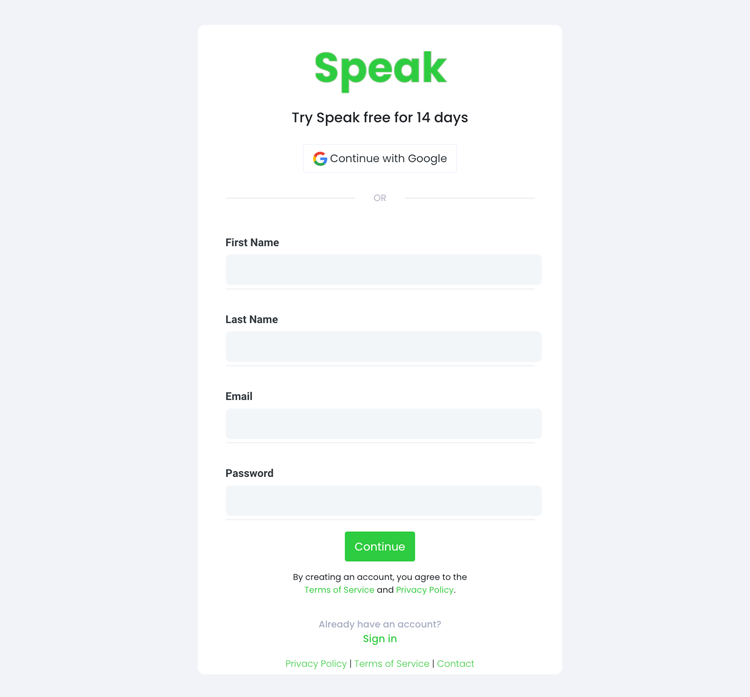
Etapa 1: Criar uma conta no Speak
To start your Thai subtitling, you first need to criar uma conta Speak. Não se preocupe, isso é muito fácil de fazer!
Our team is happy to give you a 7-day trial with trial credits for Thai audio and video subtitling included.
To sign up for Speak and start your Thai subtitling, visit the Speak app register page aqui.

Step 2: Upload your Thai file(s) for subtitling
Normalmente, recomendamos MP4s para vídeo ou MP3s para áudio.
However, we accept a range of audio and video file types. Once you upload your file all you have to do is select “Thai” from the language dropdown menu to automatically subtitle in Thai.
You can upload your Thai file for subtitling in several ways using Speak:
Tipos de arquivos de áudio tailandeses aceitos
- MP3 tailandês
- Tailandês M4A
- WAV tailandês
- Thai OGG
- WEBM tailandês
- Thai M4P
Tipos de arquivos de vídeo tailandeses aceitos
- MP4 tailandês
- Tailandês M4V
- WMV tailandês
- AVI tailandês
- MOV tailandês
- FLV tailandês
URLs tailandeses disponíveis publicamente
Você também pode fazer upload de mídia para o Speak por meio de um URL disponível publicamente.
As long as the file type extension is available at the end of the URL you will have no problem importing your recording for automatic Thai subtitling and analysis.
URLs tailandeses do YouTube
O Speak é compatível com vídeos do YouTube. Tudo o que você precisa fazer é copiar o URL do vídeo do YouTube (por exemplo, https://www.youtube.com/watch?v=qKfcLcHeivc).
O Speak localizará automaticamente o arquivo, calculará a duração e importará o vídeo.
Certifique-se de usar o link completo e não o trecho encurtado do YouTube. Além disso, certifique-se de remover o nome do canal do URL.
Integrações do Speak
Conforme mencionado, o Speak também contém uma série de integrações para Zoom, Zapier, Vimeo e muito mais que ajudarão você a legendar automaticamente sua mídia.
Essa biblioteca de integrações continua crescendo! Tem alguma solicitação? Sinta-se à vontade para nos enviar uma mensagem.

Etapa 3: Calcular e pagar o total automaticamente
Once you have your Thai audio or video file ready and load it into Speak, it will automatically calculate the total cost (trial credits are included in the trial – take advantage of it!).
Você pode pagar assinando um plano personalizado usando nossa calculadora em tempo real com minutos incluídos.
Você também pode adicionar um saldo ou pagar por uploads sem um plano usando seu cartão de crédito.

Step 4: Wait for Speak to subtitle your Thai audio or Thai video
Our automated subtitling software will prepare your Thai subtitles in as little as a few minutes. Generally, Speak takes about half the audio or video length to produce the subtitles and insights.
Once completed, you will get an email notification that your Thai subtitles is complete. That email will contain a link back to the file so you can access the interactive media player with the Thai subtitles, analysis, and export formats ready for you.
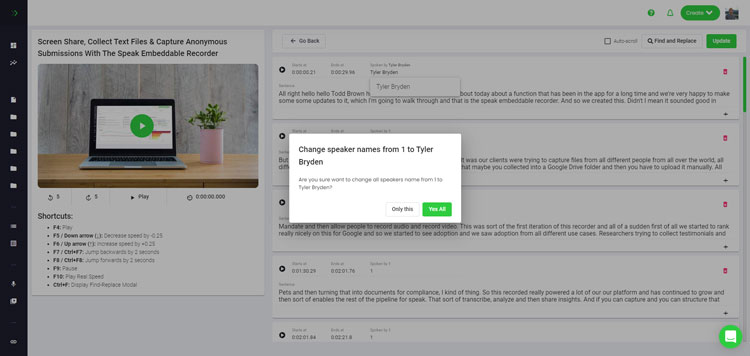
Step 5: View and edit your automated Thai subtitles
Quer lidar com a edição das legendas você mesmo? Tudo bem! Depois de receber suas legendas automatizadas, você terá a opção de editá-las a qualquer momento.
Easily update speaker names, find and replace, and get your automatic Thai subtitles up to full accuracy with our intuitive subtitles editing system.
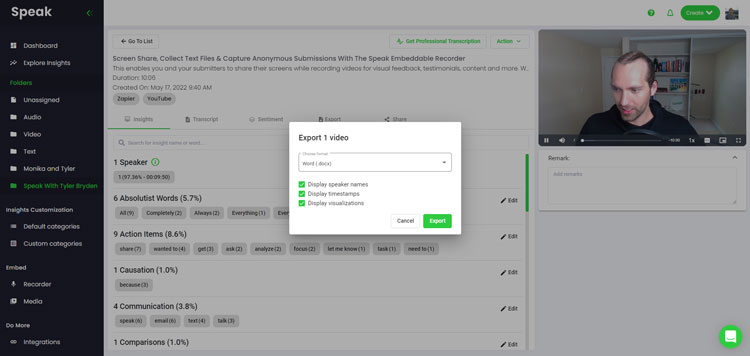
Step 6: Export your Thai subtitles and share interactive media players
With Speak, you can easily export Thai subtitles to many formats.
Below is a list of options for exporting your Thai subtitles in Speak:
- Export Thai subtitles to SRTs
- Export Thai subtitles to VTTs
Uma maneira mais eficaz de compartilhar legendas é por meio de um biblioteca de mídia compartilhável que inclui o arquivo de mídia, insights de IA e legendas interativas.
Há muito mais que você pode fazer com o Speak para enriquecer o valor de sua mídia e legendas.
Não hesite em nos enviar uma mensagem no bate-papo ao vivo - estamos sempre aqui para ajudar!
We talked about Thai subtitling here, but you may be interested in how to subtitle in other languages instantly and easily with Speak’s intuitive subtitling and natural language processing software.
Compartilhamos abaixo recursos sobre todos os idiomas em que o Speak pode ajudar você a legendar!
Join 300,000+ users finding radical efficiencies with their audio, video and text data to drive value.
How Much Does It Cost To Subtitle Thai?
Speak offers highly competitive pricing for Thai subtitling compared to other subtitling solutions. For a starting user, Speak offers automated Thai subtitling from 2 credits per hour of audio on pay as you go (1 credit = US$1). Pro includes 25 credits per user per month.
Também dimensionamos nossos preços com base no volume de mídia e podemos oferecer descontos ainda maiores para grandes clientes.
So, if you have over 100 hours of Thai subtitling per month please contact us through live chat and we will set you up with a customized price per minute to make Thai subtitling even more affordable!
You can learn more about how to subtitle Thai with Speak and the relevant pricing on the página de preços do site e o página de preços no aplicativo.
What Can You Subtitle In Thai?
- Subtitle Thai interviews
- Subtitle Thai videos
- Subtitle Thai audio
- Subtitle Thai earnings calls
- Subtitle Thai focus groups
- Subtitle Thai meetings
- Subtitle Thai phone calls
- Subtitle Thai YouTube videos
- Subtitle Thai Vimeo videos
- Subtitle Thai Zoom recordings
- Subtitle Thai Google Meet recordings
- Legendas de gravações do Microsoft Teams
- Subtitle Thai podcasts
E muito mais!
Quais outros idiomas podem falar legendas?
O Speak já tem usuários de mais de 90 países e recebemos continuamente solicitações para legendar e analisar em diferentes idiomas.
Por isso, estamos sempre adicionando mais idiomas ao Speak! Aqui estão apenas alguns da lista crescente de idiomas que o Speak oferece:
- Como criar legendas em africâner
- Como criar legendas em árabe (Egito)
- Como criar legendas em árabe (Iraque)
- Como criar legendas em árabe (Israel)
- Como criar legendas em árabe (Jordânia)
- Como criar legendas em árabe (Kuwait)
- Como criar legendas em árabe (Líbano)
- Como criar legendas em árabe (Omã)
- Como criar legendas em árabe (Autoridade Palestina)
- Como criar legendas em árabe (Catar)
- Como criar legendas em árabe (Arábia Saudita)
- Como criar legendas em árabe (República Árabe Síria)
- Como criar legendas em árabe (Emirados Árabes Unidos)
- Como criar legendas em árabe moderno padrão (Bahrein)
- Como criar legendas em armênio
- Como criar legendas em búlgaro
- Como criar legendas em catalão
- Como criar legendas em chinês (cantonês, tradicional)
- Como criar legendas em chinês (simplificado)
- Como criar legendas em chinês (tradicional)
- Como criar legendas em croata
- Como criar legendas em tcheco
- Como criar legendas em dinamarquês
- Como criar legendas em holandês
- Como criar legendas em inglês
- Como criar legendas em inglês (Austrália)
- Como criar legendas em inglês (indiano)
- Como criar legendas em inglês (irlandês)
- Como criar legendas em inglês (Nova Zelândia)
- Como criar legendas em inglês (escocês)
- Como criar legendas em inglês (sul-africano)
- Como criar legendas em inglês (Reino Unido)
- Como criar legendas em inglês (Estados Unidos)
- Como criar legendas em estoniano
- Como criar legendas em farsi
- Como criar legendas em finlandês
- Como criar legendas em francês
- Como criar legendas em francês (Canadá)
- Como criar legendas em alemão
- Como criar legendas em alemão (suíço)
- Como criar legendas em grego
- Como criar legendas em Gujarati
- Como criar legendas em hebraico
- Como criar legendas em hindi
- Como criar legendas em húngaro
- Como criar legendas em islandês
- Como criar legendas em indonésio
- Como criar legendas em irlandês
- Como criar legendas em italiano
- Como criar legendas em japonês
- Como criar legendas em Kannada
- Como criar legendas em coreano
- Como criar legendas em letão
- Como criar legendas em lituano
- Como criar legendas em malaio
- Como criar legendas em malaiala
- Como criar legendas em norueguês
- Como criar legendas em persa
- Como criar legendas em polonês
- Como criar legendas em português
- Como criar legendas em português (brasileiro)
- Como criar legendas em português (Portugal)
- Como criar legendas em romeno
- Como criar legendas em russo
- Como criar legendas em eslovaco
- Como criar legendas em esloveno
- Como criar legendas em espanhol
- Como criar legendas em espanhol (México)
- Como criar legendas em sueco
- Como criar legendas em tâmil
- Como criar legendas em télugo
- Como criar legendas em tailandês
- Como criar legendas em turco
- Como criar legendas em ucraniano
- Como criar legendas em vietnamita
Agora há muitos outros adicionados!
Você pode ver a lista completa de idiomas suportados pelo Speak por meio do software e das APIs.
Explore a IA de fala
A Speak AI é uma plataforma de pesquisa em tecnologia de voz e IA. Oferecemos transcrição em mais de 100 idiomas, análise de PNL (Processamento de Linguagem Natural), análise de sentimentos, agentes de IA e consultoria empresarial.
 English
 Español
 Français
 Italiano
 العربية
 Português do Brasil
 Nederlands
 Deutsch
 עִבְרִית
 Русский
 日本語
 Polski
 Čeština
 Українська
 Slovenščina
 Svenska
 Ελληνικά
 Norsk bokmål
 简体中文
 Türkçe
 Català
 Magyar
 한국어
 Slovenčina
 Suomi