
Claude 能转录音频和视频吗? 单独使用不行。使用 Speak AI,可以。
Claude 能转录音频和视频吗? No, not on its own. Claude cannot natively transcribe audio or video files. It is a text-based model. Connect it to Speak AI via MCP, and Claude can transcribe, search, and analyze every recording, including what is on screen, in seconds.
Connect your Speak AI workspace to Claude and turn hours of transcript review into a two-minute conversation. No coding required.
自由的 7 天试用。无需信用卡。 查看 MCP 服务器
- 190+ 工具
- 70+ 语言
- Connects in about 2 minutes
- 4.9 G2
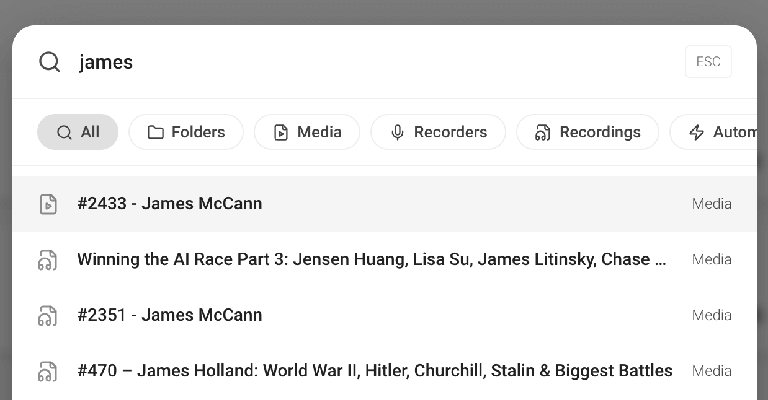
值得信赖 by 300,000+ people and teams





你可以做什么
Once Speak AI is connected to Claude, you can talk to your recordings the way you talk to a colleague. Ask questions, get answers, and take action without switching apps.
从 Claude 转录
Upload a recording and get a transcript with speaker labels, key topics, and action items. Drop in a file or paste a URL and ask for a transcript.
搜索您的媒体库
Ask Claude to find specific moments, topics, or quotes across hundreds of recordings. Describe what you are looking for and get results in seconds.
分析会议和访谈
Get sentiment analysis, themes, and insights from any conversation. Compare patterns across recordings: what customers keep saying, which topics come up most, how tone shifts over time.
管理您的工作区
Create folders, organize media, schedule meeting bots, and export transcripts as PDF, DOCX, SRT, or plain text, all by conversation.
Claude 能听取音频文件吗?
Not on its own. Claude reads and writes text. It does not transcribe or listen to audio and video files, so a voice memo, a call recording or a webinar has to become text before Claude can work with it. Speak AI does that step. Connect the Speak AI MCP connector to Claude and Claude can work with your recordings, your transcripts and the insights from them, all in plain conversation.
What about Claude voice mode and dictation?
Claude voice mode and Claude Code voice dictation let you talk to Claude. They turn what you say right now into a prompt. They do not transcribe a recording you already have, so a saved call, interview or webinar still needs a transcription step.
If Claude is pointed at an audio file it cannot read, for example through a file-reading tool in Claude Code, treat any answer about the content with suspicion and check it against a real transcript. Sending the file through Speak AI gives Claude a transcript with timestamps to quote from.
What Claude can do with your recordings once Speak AI is connected
- Send a recording. Give Claude a link to an audio or video file, or a link from a video site, and it sends the file to Speak AI. With Claude Desktop or Claude Code you can also upload a file from your computer.
- Read the transcript. Claude gets the transcript back with speaker labels and timestamps, in 70+ languages.
- Pull the insights. Ask for themes, sentiment, keywords, action items or exact quotes from one recording or from many.
- Search your whole library. Ask what customers said about pricing across every call you have recorded, and Claude answers from your own recordings.
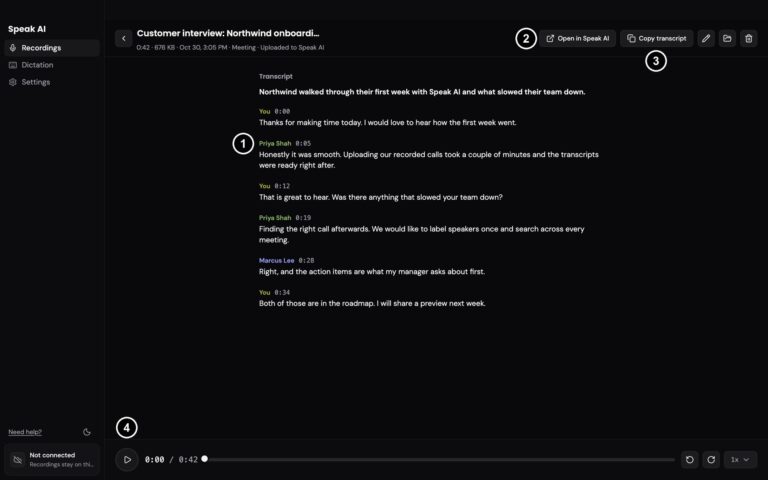
A transcript Claude can quote from
Speak AI returns the transcript with named speakers and timestamps. Claude reads it and answers with the quote and the moment it was said, so every answer points back to the recording.
Ways to get a recording into Claude
Claude does the analysis once the words are text. The question is how the words get there.
| Paste a transcript | Script your own speech-to-text | Speak AI connected through MCP | |
|---|---|---|---|
| 设置 | None, but you need a transcript from somewhere first | You write and maintain the code and an account with a speech-to-text service | Add the connector once, about two minutes |
| 音频和视频文件 | Claude cannot read them | Your script handles them | Claude sends a link or file to Speak AI |
| 扬声器标签和时间戳 | Only if your transcript has them | Depends on the service you call | Included in the transcript |
| Searching many recordings | One transcript per chat | You build it | Ask across your whole library |
| Insights and scores | You prompt for them each time | You build them | Themes, sentiment and call scores come from Speak AI |
3 步设置
No technical background needed. Pick the version of Claude you use.
- 1
注册 Speak AI
在此创建免费账户 app.speakai.co. You get a 7-day free trial with full access and no credit card. You can also create the account from the sign-in page that opens when you connect.
- 2
连接到 Claude
Claude.ai (网页版)打开
claude.ai/settings/connectors并点击 Add custom connector. Name it Speak AI, pastehttps://api.speakai.co/v1/mcp,点击 添加, then sign in to Speak AI and click Allow.Claude Desktop转到 Settings, Connectors,点击 Add custom connector, paste
https://api.speakai.co/v1/mcp, then sign in to Speak AI and click Allow. Prefer a local install with an API key? Runnpx @speakai/mcp-server init.Claude CodeAdd the connector with
claude mcp add --transport http speakai https://api.speakai.co/v1/mcp,然后运行claude mcp login speakai并点击 Allow in your browser.Or install the official plugin:
/plugin install speakai@claude-plugins-official, then/reload-plugins. Type/mcp, pick speakai and sign in to Speak AI.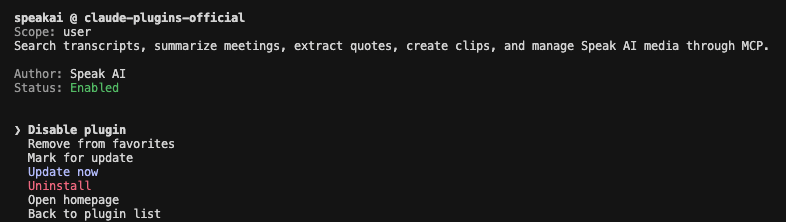
Speak AI enabled in the Claude Code official plugin marketplace. - 3
开始提问
Try “Transcribe this file”, “Search my recordings for pricing feedback”, “Summarize last week’s meetings” or “What action items came out of today’s call?”
真实工作流,真实成果
How different teams use Speak AI with Claude every day.
定性研究员
“Upload these 12 interview recordings, pull themes across all of them, and show me coding patterns.” Claude transcribes each file, runs the analysis, and synthesizes findings across the full set.
销售团队
“Get my Zoom call transcript, find the objections raised, and list the action items.” Claude pulls the transcript from your workspace and organizes the follow-ups by owner. To grade every call on your own criteria, see 通话评分.
内容创作者
“Transcribe my YouTube video, generate a blog outline from the key points, and pull out quotable moments for social media.” One recording becomes ready-to-publish content.
Using Claude on a team?
Connect Speak AI to Claude and a sales, research or support team can ask questions across every call and meeting. The next step is seeing it on your own calls. In a demo, bring one real call. We build a scorecard around your criteria and score it live, with the quote behind every score. Research teams can see their interviews analyzed for themes instead.
为什么选择 Speak AI + Claude
Claude is powerful on its own. Speak AI adds professional transcription, deep language analysis and your whole media library, grounded in your own data instead of the open web.
190+ tools at your fingertips
Upload, transcribe, search, analyze, create clips, export, manage folders, schedule meeting bots, and more, all through natural conversation with Claude.
70+ 种语言
Transcribe audio and video in over 70 languages with automatic language detection and speaker identification. English, French, Spanish, German, Portuguese, Japanese, Arabic, Hindi, and dozens more.
完整的 NLP 分析,而非仅仅文字记录
Every recording gets sentiment analysis, keyword extraction, topic detection, theme identification, and entity recognition. Claude can query these structured insights to compare patterns or pull specific data points.
Your data stays in your workspace
Data is encrypted at rest and in transit. The MCP server connects through your own Speak AI sign-in (or personal API key) and only reaches data in your workspace. It is 开源,所以您可以自己查看代码。
Teams already run their calls this way
Numbers from customer accounts. Bring your own calls to a demo and see the same analysis on your recordings.

How a Legal Research Firm Reviews Every Call With AI
Read the case study →

How a Consulting Firm Scores Every Coaching Session With AI
Read the case study →

How a Care-Management Team Captures Every Meeting With AI
Read the case study →
团队信任 Speak AI 处理他们最重要的对话
★★★★★ G2 上获得 4.9 分
“Speak AI 在改变我们处理定性数据的方式方面发挥了重要作用。转录准确度令人印象深刻,NLP 见解为我们节省了数小时的手动分析。”
“能够搜索我们所有的访谈录音并提取特定时刻的能力对我们的用户研究团队来说改变了游戏规则。”
如何将 Speak AI 与 Claude 结合使用进行转录和音频分析
Claude is one of the most capable AI assistants available, built by Anthropic. It can write, reason, analyze data, and hold long conversations. But on its own, Claude cannot transcribe audio files, analyze video recordings, or reach your media library. That is where Speak AI 就派上用场了。
When you connect Speak AI to Claude, you give it access to 190+ professional transcription and analysis tools. Upload a recording, get a transcript with speaker labels, pull sentiment analysis, search your whole library of past recordings, create highlight clips, and export results in any format. You type a request, Claude does the work.
什么是 MCP,为什么它很重要?
MCP stands for Model Context Protocol, a secure bridge between AI assistants and external tools. Before MCP, you had to download a transcript, paste it into the chat, and hope it fit the context window. MCP gives Claude direct access to your Speak AI workspace so it can pull data, run analysis, and take actions for you. Claude supports MCP connectors, so you add the Speak AI server in your Claude settings and every conversation can reach your recordings, transcripts, and analysis. No browser extensions or workarounds.
Speak AI 为 Claude 增添的功能
Speak AI’s 转录引擎 supports over 70 languages with automatic speaker identification. Every recording also gets NLP analysis: sentiment scoring, keyword extraction, topic detection, and entity recognition. These are structured data points Claude can query, compare, and build on.
The media library is the other major piece. Instead of one file at a time, ask Claude to search across hundreds of recordings: “What did customers say about pricing in the last quarter?” or “Which interviews mentioned onboarding challenges?” Claude pulls the relevant transcripts and answers with specific references.
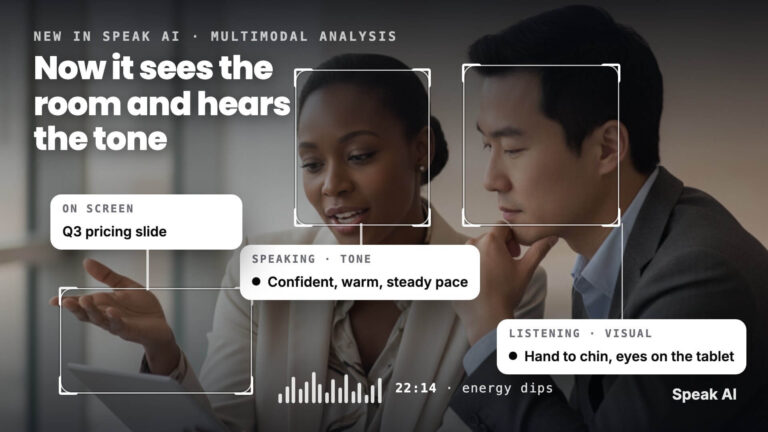
Speak AI also reads the voice itself, tone, energy, and background audio, and picks up what is visible on screen in video recordings. Claude can ask about any of these signals, not only the transcript. See 多模态分析.
Claude 与 ChatGPT 用于音频分析的对比
Both Claude and ChatGPT work with Speak AI, with the same 190+ tools for transcription, analysis, search, and media management. On Claude the connection works on Claude.ai, Claude Desktop, and Claude Code. If you use ChatGPT instead, the ChatGPT 集成 gives you the same access through the official Speak AI plugin. Either way, Speak AI is the analysis engine behind the scenes.
Claude 能转录音频和视频文件吗?
Claude cannot transcribe audio or video on its own. With Speak AI connected via MCP, Claude can send audio and video files to Speak AI for transcription and return the results in your conversation. It handles MP3, MP4, WAV, M4A, WebM, and dozens of other formats. You can also paste a URL from YouTube, Vimeo, Loom, or other platforms.
按角色划分的用例
研究人员 transcribe interviews, run thematic analysis across dozens of recordings, and find coding patterns, all in conversation.
销售和客户成功团队 pull meeting transcripts, find objections or commitments, and generate follow-up summaries. See how 对话智能 works.
营销人员和内容创作者 turn recordings into blog outlines, social quotes, or newsletter highlights. The 文本分析工具 show which topics resonate most.
企业主和顾问 stay on top of meetings without attending all of them. Schedule the Speak AI meeting bot to join calls, then ask Claude for a summary, key decisions, and next steps.
为研究团队、媒体运营和数据驱动型企业而构建
Speak AI was built for one job: turning recorded conversations into usable output without manual work. Claude makes that workflow conversational.
- 跨数据集分析。 Ask what themes came up across all 12 interviews, what customers said about pricing, or which calls mentioned a competitor.
- 报价和剪辑提取。 Pull exact quotes with speaker labels and timestamps for research reports, content, or sales and ops teams.
- 应用您自己的结构。 Define your codes, categories, or questions in plain language and Claude tags instances across your dataset, or surfaces patterns you did not expect.
- 研究就绪和发布就绪的输出。 Executive summaries for stakeholders, raw findings for researchers, clips and transcripts for media teams.
使用 Claude 分析您的销售电话
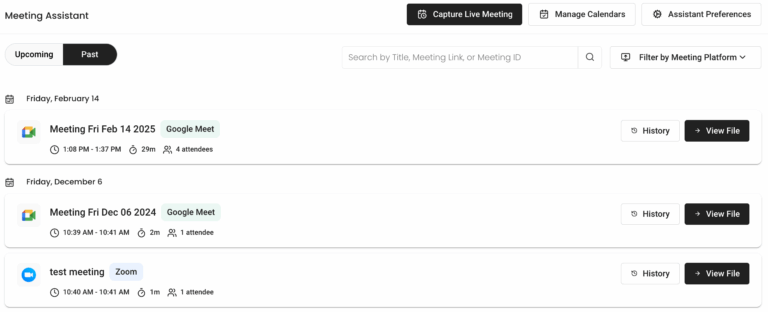
Record calls into Speak AI (Zoom, Meet, Teams, or phone), then query the transcripts from Claude in plain language.
Claude can answer questions across your calls once Speak AI is connected. For a sales team, the next step is scoring: Speak AI scores every call on your own scorecard, and Claude can then pull the weakest calls, the best examples and the coaching notes. We build the scorecard with you on a call. Read about 通话评分, 销售加速 和 AI sales coaching, or see Speak AI vs Gong 和 定价. Rolling it out to a team? See Speak AI for 销售团队.
Try this prompt in Claude
Prerequisite: a Speak AI account (free 7-day trial or Pro) with Claude connected as above. Then ask:
列出我的“Pipeline Q2”文件夹中最后 20 个销售电话中的每个价格异议。按发言人名称分组并显示交易名称。An answer looks like this. The names and numbers below are made up to show the format.
Pricing objections across 20 calls:

* "Per-user pricing scales too fast for our team of 40" (Speaker A, Deal 1, 2 occurrences)
* "Annual commitment feels risky given churn in our space" (Speaker B, Deal 2)
* "We need to see SOC 2 before we sign annual" (Speaker C, Deal 3)
常见问题解答
如何将 Speak AI 连接到 Claude?+
On Claude.ai (web), open claude.ai/settings/connectors, click Add custom connector, name it Speak AI and paste https://api.speakai.co/v1/mcp. Then sign in to Speak AI and click Allow. In Claude Desktop, go to Settings, Connectors and do the same. In Claude Code, run claude mcp add --transport http speakai https://api.speakai.co/v1/mcp and then claude mcp login speakai, or install the official plugin with /plugin install speakai@claude-plugins-official 和 /reload-plugins. No API key is needed for these routes. Setup takes about 2 minutes, and the Speak AI docs have the full steps.
是否适用于 Claude.ai、Claude Desktop 和 Claude Code?+
Yes. Speak AI works with all three. Claude.ai and Claude Desktop use a custom connector, so there is no software to install. Claude Code can use the same hosted connector or the official plugin. You get the same 190+ tools across all three.
我可以在 Claude 中用 Speak AI 做什么?+
You can transcribe audio and video files, search across your entire recording library, get sentiment analysis and NLP insights, create highlight clips, export transcripts in multiple formats (PDF, DOCX, SRT, plain text), schedule meeting bots to join your calls, manage folders, and more. There are 190+ tools in total covering transcription, analysis, media management, and workspace organization.
Is there a free 7-day trial?+
Yes. Speak AI offers a free 7-day trial with full access to all features, including the connection to Claude. No credit card required. Sign up at app.speakai.co, then connect Claude and approve access when the Speak AI sign-in page opens.
Claude 能转录音频和视频文件吗?+
单独使用不行。Claude 是一个基于文本的 AI 模型。但通过 MCP 连接 Speak AI,Claude 可以接受音频和视频文件,将它们发送到 Speak AI 进行 70 多种语言的专业转录(包括说话人识别),并直接在您的对话中返回结果。您也可以粘贴来自 YouTube、Vimeo、Loom 和其他平台的 URL。
这与直接向 Claude 上传文件有什么不同?+
Claude 可以读取你上传的文本文件,但无法处理音频或视频。即使是文本,Claude 也只能处理你粘贴到聊天中的内容。使用 Speak AI,Claude 可以访问你的持久媒体库,其中包含所有录音、文字记录和 NLP 分析。它可以跨文件搜索、比较模式,以及引用你几周前上传的录音中的数据。你的数据是有组织的、可搜索的、经过分析的,而不仅仅是在单个聊天会话中临时可用。
Claude 能转录音频吗?+
不是。Claude AI 是一个基于文本的模型,本身无法原生转录音频文件。通过 MCP 连接到 Speak AI,Claude 可以接受音频文件、将其发送进行转录,并在对话中返回转录文本。
为什么Claude无法转录音频?+
Claude 是为读取和生成文本而构建的,而不是处理音频信号。它没有内置的语音到文本引擎。Speak AI 通过 MCP 添加缺失的层,首先转录音频,然后将文本交给 Claude 处理。
Claude 能进行语音转文本吗?+
不能直接。Claude 无法自行将语音录音转换为文本。连接 Speak AI MCP 服务器后,你向 Claude 发送音频或视频文件,它会返回完整的文字记录,包括说话者标签。
Claude 适合转录吗?+
Claude 本身无法转录任何内容,它仅支持文本。与 Speak AI 配对时,转录质量来自 Speak AI’s 引擎(70+ 种语言、说话者标签),而 Claude 处理其上的搜索、摘要和分析。
Claude 能听取音频文件吗?+
不可以。Claude无法在Claude.ai、Desktop或Code中收听或播放音频文件。通过MCP连接Speak AI,Claude会阅读Speak AI从录音中提取的词语、语调和主题。
Claude 能将音频转录为文本吗?+
不是原生的。Claude 无法自行将音频转换为文本,因为它只处理文本。通过通过 MCP 连接的 Speak AI,您上传音频,Speak AI 将其转录为 Claude 可以读取和分析的文本。
Claude 能转录视频文件吗?+
不,Claude 无法独立转录视频,它只能读取文本。Speak AI 可以:通过 Speak AI MCP 服务器发送视频文件或 YouTube、Vimeo 或 Loom 链接,并获得完整的转录文本。
Claude 能处理视频文件吗?+
不能。Claude 无法自行打开、播放或处理视频文件,它只读取文本。通过 MCP 连接 Speak AI,Claude 可以请求来自你上传的任何视频的完整转录、情感分析和屏幕上的视觉摘要。
Claude 可以分析视频内容吗?+
Not natively. Claude has no way to watch or analyze video content by itself. With Speak AI connected via MCP, Claude gets the words, the voice (tone, energy, background music), and what’s visible on screen, then reasons over all three, 多模态分析,不仅仅是转录文本。
Claude 能听音频吗?+
不,Claude 无法听到或收听音频,它只处理文本。Speak AI 首先进行转录,同时捕捉语调和能量以及字词,因此 Claude 读取并推理所说的内容和说话方式。
什么是 Claude 转录?+
Claude 转录通常意味着将 Claude 与转录工具结合使用,因为 Claude 本身没有转录引擎。使用 Speak AI’s MCP 服务器,Claude 将您的音频或视频发送到 Speak AI,它转录并返回逐字、演讲者标记的成绩单。
Can Claude read MP3, MP4 and M4A files?+
Not as audio or video on its own, because Claude reads text. Connect Speak AI to Claude and it transcribes the MP3, MP4 or M4A file, then Claude reads the transcript with speaker labels and answers questions about it.
Can Claude analyze audio?+
Not on its own. With Speak AI connected by MCP, Claude can search and analyze your recordings, including transcripts, tone and scorecards, from inside Claude.
Can Claude convert audio to text?+
Not on its own, because Claude works with text. Connect Speak AI through MCP and Claude can send an audio or video file for transcription, then read the speaker-labeled transcript back in your conversation.
Can Claude Code transcribe audio?+
Not on its own. Install the Speak AI plugin in Claude Code with /plugin install speakai@claude-plugins-official, run /reload-plugins, and Claude Code can request transcripts and insights from your Speak AI workspace.
Does Claude have a voice mode?+
Claude has voice features, and Claude Code has voice dictation. They turn what you say right now into a prompt. They do not transcribe a recording you already have, so a saved call, interview or webinar still needs a transcription step. Connect Speak AI to do that inside Claude.
Can Claude summarize a meeting recording?+
Claude cannot read the recording itself, but it can summarize the transcript. With Speak AI connected, ask Claude for the summary, decisions and action items from a meeting, and it pulls the transcript from your Speak AI workspace and answers from it.
Is Claude or ChatGPT better at transcribing audio?+
Neither transcribes a saved recording on its own. ChatGPT can take one audio file you attach to a chat, and Claude cannot. Both can work with the same Speak AI account through MCP, so you get the same transcripts, search and insights in either. See the ChatGPT 集成.
Is there a free way to try AI transcription with Claude?+
Yes. Speak AI has a 7-day free trial with credits and no credit card. Create an account, connect it to Claude, and ask Claude to transcribe a recording.
立即开始在 Claude 中使用 Speak AI
190+ tools for transcription, analysis, and media management. Connect in about two minutes. No coding required.
 English
 Español
 Français
 Italiano
 العربية
 Português do Brasil
 Nederlands
 Deutsch
 עִבְרִית
 Русский
 日本語
 Polski
 Čeština
 Українська
 Slovenščina
 Svenska
 Ελληνικά
 Norsk bokmål
 简体中文
 Türkçe
 Català
 Magyar
 한국어
 Slovenčina
 Suomi