
How to Create Croatian Subtitles: A Step-by-Step Guide With Benefits and Use Cases
Croatian is a well-known South Slavic language that is spoken in several countries, including Croatia, Bosnia and Herzegovina, Serbia, Montenegro, and Macedonia. It is estimated that there are around 6 million native speakers of Croatian.
Subtitles are an important part of the viewing experience, allowing viewers to understand the content more easily. Creating subtitles for audio and video content in the Croatian language can help to make this content more accessible and also improve the user experience for viewers who do not understand Croatian.
什么是字幕?
Subtitles are written text versions of the spoken dialogue in videos and films. They are usually displayed at the bottom of the screen and are used to provide translations of the dialogue or provide important information that is not spoken in the audio. Subtitles are different from captions in that captions also contain sound effects and other non-verbal audio information, while subtitles only contain the spoken dialogue.
Benefits of Transcription and Subtitles in Croatian
There are many benefits to transcription and creating subtitles for audio and video content in the Croatian language. Firstly, it can help to make content more accessible to those who don’t understand Croatian. It can also help to improve the user experience of viewers who do not understand Croatian, as they can follow along with the dialogue more easily.
Transcription and subtitles also have value for businesses and researchers. Subtitles can be used to create searchable transcripts of audio and video content, which can be used for research and analysis. Businesses can use subtitles to improve the discoverability of their content, as they can be indexed by search engines.
How to Create Croatian Subtitles
Creating subtitles for audio and video content in the Croatian language can be done using a speech recognition and natural language platform, such as Speak AI. Speak AI has over 70,000 users and provides a powerful platform for creating accurate subtitles in Croatian.
Step 1: Upload Audio or Video Content
The first step is to upload the audio or video content that you would like to subtitle. Speak AI supports a wide range of popular audio and video file formats, including .mp3, .mp4, and .wav.
Step 2: Choose Croatian as the Language
Once you have uploaded your content, you will need to select Croatian as the language. You can also choose to add subtitles in multiple languages if you would like to make your content more accessible to a wider audience.
Step 3: Generate Subtitles
Speak AI uses advanced speech recognition technology to generate accurate subtitles for audio and video content in Croatian. The subtitles can be edited and refined to ensure the accuracy and quality of the final product.
结论
Creating subtitles for audio and video content in Croatian can help to make this content more accessible and improve the user experience for viewers who do not understand Croatian. Transcription and subtitles also have value for businesses and researchers, as they can be used to create searchable transcripts and improve the discoverability of content. Speak AI provides a powerful platform for creating accurate Croatian subtitles, making it easy for anyone to create subtitles for their audio and video content.
步骤 1:创建 Speak 账户
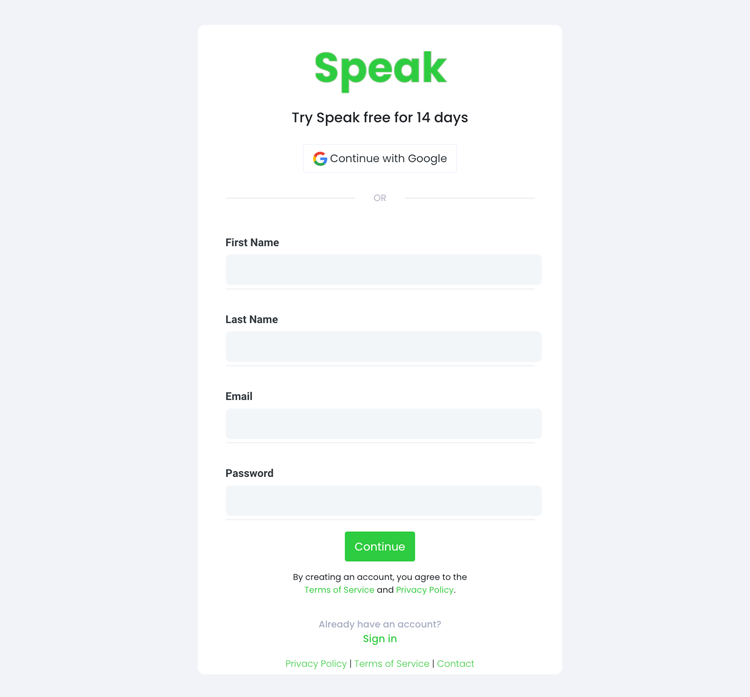
To start your Croatian subtitling, you first need to 创建 Speak 帐户.不用担心,这非常容易做到!
Our team is happy to give you a 7-day trial with trial credits for Croatian audio and video subtitling included.
To sign up for Speak and start your Croatian subtitling, visit the Speak app register page 这里.

Step 2: Upload your Croatian file(s) for subtitling
我们通常推荐 MP4 视频或 MP3 音频。
However, we accept a range of audio and video file types. Once you upload your file all you have to do is select “Croatian” from the language dropdown menu to automatically subtitle in Croatian.
You can upload your Croatian file for subtitling in several ways using Speak:
可接受的克罗地亚语音频文件类型
- 克罗地亚语 MP3
- 克罗地亚语 M4A
- 克罗地亚语 WAV
- 克罗地亚语 OGG
- 克罗地亚语 WEBM
- 克罗地亚语 M4P
接受的克罗地亚视频文件类型
- 克罗地亚语 MP4
- 克罗地亚语 M4V
- 克罗地亚 WMV
- 克罗地亚语 AVI
- 克罗地亚 MOV
- 克罗地亚 FLV
公开的克罗地亚语 URL
您还可以通过公开的 URL 将媒体上传到 Speak。
As long as the file type extension is available at the end of the URL you will have no problem importing your recording for automatic Croatian subtitling and analysis.
克罗地亚语 YouTube 网址
Speak 与 YouTube 视频兼容。您只需复制 YouTube 视频的 URL(例如、 https://www.youtube.com/watch?v=qKfcLcHeivc).
Speak 会自动查找文件、计算长度并导入视频。
请确保使用完整链接,而不是缩短的 YouTube 片段。此外,请确保删除 URL 中的频道名称。
发言集成
如前所述,Speak 还包含一系列集成功能,用于 放大, Zapier、Vimeo 等可帮助您自动为媒体添加字幕。
集成库还在不断扩大!有要求吗?请给我们留言。

第 3 步:自动计算并支付总额
Once you have your Croatian audio or video file ready and load it into Speak, it will automatically calculate the total cost (trial credits are included in the trial – take advantage of it!).
您可以使用我们的实时计算器订购个性化计划,并包含分钟数。

Step 4: Wait for Speak to subtitle your Croatian audio or Croatian video
Our automated subtitling software will prepare your Croatian subtitles in as little as a few minutes. Generally, Speak takes about half the audio or video length to produce the subtitles and insights.
Once completed, you will get an email notification that your Croatian subtitles is complete. That email will contain a link back to the file so you can access the interactive media player with the Croatian subtitles, analysis, and export formats ready for you.
Step 5: View and edit your automated Croatian subtitles
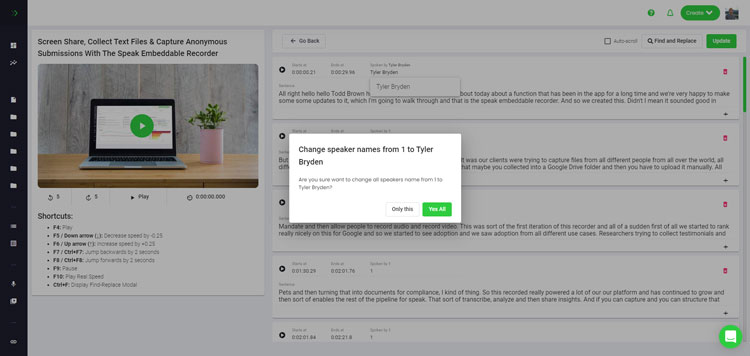
想自己动手编辑字幕吗?没问题!收到自动生成的字幕后,您可以随时编辑。
Easily update speaker names, find and replace, and get your automatic Croatian subtitles up to full accuracy with our intuitive subtitles editing system.
Step 6: Export your Croatian subtitles and share interactive media players
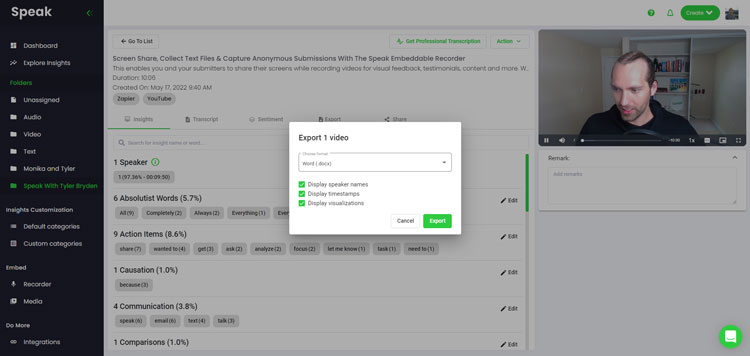
With Speak, you can easily export Croatian subtitles to many formats.
Below is a list of options for exporting your Croatian subtitles in Speak:
- Export Croatian subtitles to SRTs
- Export Croatian subtitles to VTTs
更有效的字幕分享方式是通过 可共享媒体库 其中包括媒体文件、AI 洞察和交互式字幕。
您可以使用 Speak 做更多的事情来丰富媒体和字幕的价值。
请随时通过在线聊天向我们发送信息,我们随时准备为您提供帮助!
We talked about Croatian subtitling here, but you may be interested in how to subtitle in other languages instantly and easily with Speak’s intuitive subtitling and natural language processing software.
我们在下面分享了 Speak 可以帮助您添加字幕的所有语言的资源!
Join 300,000+ users finding radical efficiencies with their audio, video and text data to drive value.
How Much Does It Cost To Subtitle Croatian?
Speak offers highly competitive pricing for Croatian subtitling compared to other subtitling solutions. For a starting user, Speak offers automated Croatian subtitling from 2 credits per hour of audio on pay as you go (1 credit = US$1). Pro includes 25 credits per user per month.
我们还可根据媒体数量进行定价,并为大客户提供更大的折扣。
So, if you have over 100 hours of Croatian subtitling per month please contact us through live chat and we will set you up with a customized price per minute to make Croatian subtitling even more affordable!
You can learn more about how to subtitle Croatian with Speak and the relevant pricing on the 网站定价页面 和 应用内定价页面.
What Can You Subtitle In Croatian?
- Subtitle Croatian interviews
- Subtitle Croatian videos
- Subtitle Croatian audio
- Subtitle Croatian earnings calls
- Subtitle Croatian focus groups
- Subtitle Croatian meetings
- Subtitle Croatian phone calls
- Subtitle Croatian YouTube videos
- Subtitle Croatian Vimeo videos
- Subtitle Croatian Zoom recordings
- Subtitle Croatian Google Meet recordings
- 为 Microsoft Teams 录音添加字幕
- Subtitle Croatian podcasts
还有更多!
还有哪些语言可以讲字幕?
Speak 已经拥有来自 90 多个国家的用户,我们不断收到使用不同语言制作字幕和进行分析的请求。
因此,我们不断为 Speak 添加更多语言!以下是 Speak 不断增加的语言中的一部分:
- 如何创建南非荷兰语字幕
- 如何制作阿拉伯语(埃及)字幕
- 如何制作阿拉伯语(伊拉克)字幕
- 如何制作阿拉伯语(以色列)字幕
- 如何制作阿拉伯语(约旦)字幕
- 如何制作阿拉伯语(科威特)字幕
- 如何制作阿拉伯语(黎巴嫩)字幕
- 如何创建阿拉伯语(阿曼)字幕
- 如何制作阿拉伯语(巴勒斯坦权力机构)字幕
- 如何制作阿拉伯语(卡塔尔)字幕
- 如何制作阿拉伯语(沙特阿拉伯)字幕
- 如何制作阿拉伯语(叙利亚)字幕
- 如何制作阿拉伯语(阿拉伯联合酋长国)字幕
- 如何制作阿拉伯语现代标准(巴林)字幕
- 如何创建亚美尼亚语字幕
- 如何制作保加利亚语字幕
- 如何创建加泰罗尼亚语字幕
- 如何制作中文(粤语,繁体)字幕
- 如何创建简体中文字幕
- 如何制作繁体中文字幕
- 如何创建克罗地亚语字幕
- 如何创建捷克语字幕
- 如何创建丹麦语字幕
- 如何创建荷兰语字幕
- 如何制作英文字幕
- 如何制作英语(澳大利亚)字幕
- 如何创建英语(印度)字幕
- 如何创建英语(爱尔兰语)字幕
- 如何制作英语(新西兰)字幕
- 如何创建英语(苏格兰)字幕
- 如何制作英语(南非语)字幕
- 如何制作英语(英国)字幕
- 如何创建英语(美国)字幕
- 如何创建爱沙尼亚语字幕
- 如何创建波斯语字幕
- 如何制作芬兰语字幕
- 如何制作法语字幕
- 如何制作法语(加拿大)字幕
- 如何制作德语字幕
- 如何制作德语(瑞士语)字幕
- 如何创建希腊语字幕
- 如何创建古吉拉特语字幕
- 如何创建希伯来语字幕
- 如何创建印地语字幕
- 如何制作匈牙利语字幕
- 如何制作冰岛语字幕
- 如何制作印尼语字幕
- 如何制作爱尔兰语字幕
- 如何制作意大利语字幕
- 如何制作日语字幕
- 如何创建卡纳达语字幕
- 如何制作韩语字幕
- 如何制作拉脱维亚语字幕
- 如何制作立陶宛语字幕
- 如何制作马来语字幕
- 如何创建马拉雅拉姆语字幕
- 如何制作挪威语字幕
- 如何制作波斯语字幕
- 如何制作波兰语字幕
- 如何制作葡萄牙语字幕
- 如何创建葡萄牙语(巴西)字幕
- 如何创建葡萄牙语(葡萄牙)字幕
- 如何创建罗马尼亚语字幕
- 如何制作俄语字幕
- 如何创建斯洛伐克语字幕
- 如何创建斯洛文尼亚语字幕
- 如何创建西班牙语字幕
- 如何制作西班牙语(墨西哥)字幕
- 如何制作瑞典语字幕
- 如何创建泰米尔语字幕
- 如何创建泰卢固语字幕
- 如何制作泰语字幕
- 如何制作土耳其语字幕
- 如何制作乌克兰语字幕
- 如何制作越南语字幕
现在又增加了许多!
您可以看到 Speak 支持的全部语言列表 通过软件和应用程序接口。
探索 Speak AI
Speak AI是一个语音技术和人工智能研究平台,提供100多种语言的转录、自然语言处理分析、情感分析、人工智能代理和企业咨询服务。.
 English
 Español
 Français
 Italiano
 العربية
 Português do Brasil
 Nederlands
 Deutsch
 עִבְרִית
 Русский
 日本語
 Polski
 Čeština
 Українська
 Slovenščina
 Svenska
 Ελληνικά
 Norsk bokmål
 简体中文
 Türkçe
 Català
 Magyar
 한국어
 Slovenčina
 Suomi