
Hoe maak je Malayalam-ondertitels?
Malayalam is a language spoken by over 35 million people in India and the Indian diaspora. It is the official language of the Indian state of Kerala and is also spoken in parts of Karnataka, Andhra Pradesh, and Tamil Nadu. Malayalam is also spoken by significant minorities in Bahrain, Fiji, Israel, Malaysia, Qatar, Singapore, and the UAE.
Adding subtitles and captions to Malayalam audio and video is an effective way to reach a wider audience and increase engagement. Subtitles and captions are a valuable resource for the deaf and hard-of-hearing community, as well as for language learners and those who are not native speakers of the language.
What are Subtitles and How Are They Different Than Captions?
Subtitles are the text transcript of an audio or video that is displayed on-screen. They provide additional context that is not communicated through the audio or visuals. Subtitles can be used to clarify the language used in the audio and provide a bridge between languages.
Captions are similar to subtitles but also include information about the sound elements in the audio. This can include sound effects, music, and any other non-verbal sounds that are made. Captions provide a more comprehensive understanding of the audio.
How to Create Malayalam Subtitles
Creating subtitles and captions for Malayalam audio and video is a relatively simple process. The first step is to transcribe the audio into text. This can be done manually or with the help of transcription software. Speak AI is a speech recognition and natural language platform with over 70,000 users that can help you transcribe audio in Malayalam quickly and accurately.
Once the audio has been transcribed, the text can be edited for accuracy and readability. Then, the text can be formatted for subtitles or captions. Subtitles and captions can be manually added to the video or audio file, or the file can be uploaded to a platform that automatically creates subtitles and captions. Speak AI offers an automated solution for creating subtitles and captions for Malayalam audio and video.
Benefits of Subtitles and Captions in Malayalam
Creating subtitles and captions for Malayalam audio and video can be beneficial for a variety of users. Here are some of the potential benefits of adding subtitles and captions in Malayalam:
Verbetert de toegankelijkheid
Subtitles and captions make audio and video content more accessible to those who are deaf or hard-of-hearing as well as those who do not speak the language.
Verhoogt de betrokkenheid
Subtitles and captions can help to increase engagement with audio and video content. Studies show that adding subtitles and captions can help to improve viewer comprehension and engagement.
Promotes Understanding
Subtitles and captions can help to bridge the gap between languages and promote understanding between people who speak different languages.
Boosts SEO Rankings
Adding subtitles and captions can also help to boost SEO rankings and increase traffic to your audio and video content. Search engines are able to crawl subtitles and captions, so adding them can help to improve your rankings.
Conclusie
Adding subtitles and captions to Malayalam audio and video can be beneficial for a variety of users. It can help to improve accessibility, increase engagement, promote understanding, and boost SEO rankings. Speak AI is a speech recognition and natural language platform that can help you quickly and accurately transcribe audio in Malayalam and create subtitles and captions for audio and video files. If you are looking for an automated solution for creating subtitles and captions for Malayalam audio and video, Speak AI is an excellent choice.
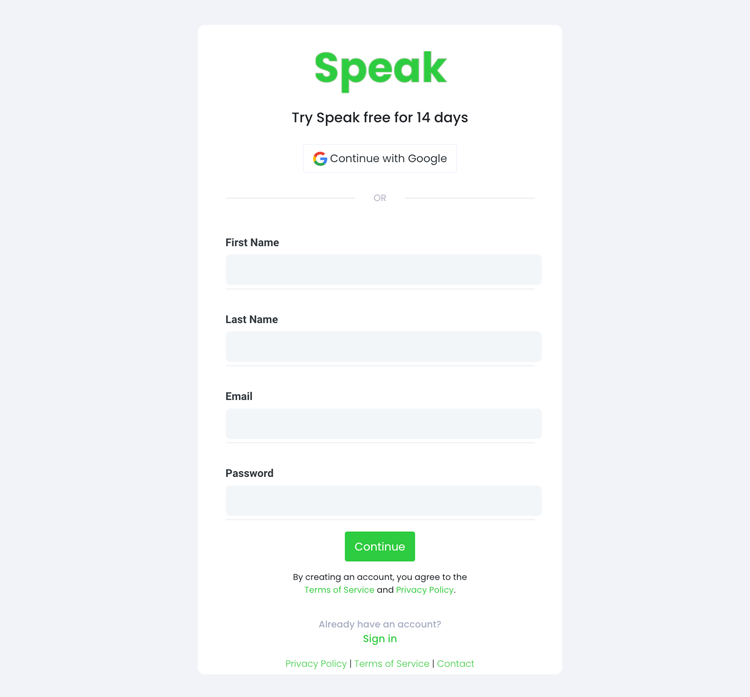
Stap 1: Maak een Speak-account aan
To start your Malayalam subtitling, you first need to een Speak-account aanmaken. Geen zorgen, dit is supermakkelijk om te doen!
Our team is happy to give you a 7-day trial with trial credits for Malayalam audio and video subtitling included.
To sign up for Speak and start your Malayalam subtitling, visit the Speak app register page hier.

Step 2: Upload your Malayalam file(s) for subtitling
We raden meestal MP4's aan voor video of MP3's voor audio.
However, we accept a range of audio and video file types. Once you upload your file all you have to do is select “Malayalam” from the language dropdown menu to automatically subtitle in Malayalam.
You can upload your Malayalam file for subtitling in several ways using Speak:
Geaccepteerde Malayalam audiobestandstypen
- Malayalam MP3
- Malayalam M4A
- Malayalam WAV
- Malayalam OGG
- Malayalam WEBM
- Malayalam M4P
Aanvaarde Malayalam video bestandstypen
- Malayalam MP4
- Malayalam M4V
- Malayalam WMV
- Malayalam AVI
- Malayalam MOV
- Malayalam FLV
Algemeen beschikbare URL's in het Maleis
Je kunt ook media uploaden naar Speak via een publiek beschikbare URL.
As long as the file type extension is available at the end of the URL you will have no problem importing your recording for automatic Malayalam subtitling and analysis.
Malayalam YouTube URLs
Speak is compatibel met YouTube-video's. Je hoeft alleen maar de URL van de YouTube-video te kopiëren (bijvoorbeeld, https://www.youtube.com/watch?v=qKfcLcHeivc).
Speak zal automatisch het bestand vinden, de lengte berekenen en de video importeren.
Zorg ervoor dat je de volledige link gebruikt en niet het verkorte YouTube-fragment. Zorg er ook voor dat je de kanaalnaam uit de URL verwijdert.
Spreek Integraties
Zoals gezegd bevat Speak ook een reeks integraties voor Zoom, Zapier, Vimeo en meer waarmee u automatisch ondertiteling aan uw media kunt toevoegen.
Deze bibliotheek met integraties blijft groeien! Heb je een verzoek? Voel je aangemoedigd om ons een bericht te sturen.

Stap 3: Bereken en betaal het totaal automatisch
Once you have your Malayalam audio or video file ready and load it into Speak, it will automatically calculate the total cost (trial credits are included in the trial – take advantage of it!).
Je kunt betalen door je te abonneren op een persoonlijk plan met behulp van onze realtime calculator met inbegrepen minuten.
U kunt ook een balans toevoegen of betaal voor uploads zonder abonnement met je creditcard.

Step 4: Wait for Speak to subtitle your Malayalam audio or Malayalam video
Our automated subtitling software will prepare your Malayalam subtitles in as little as a few minutes. Generally, Speak takes about half the audio or video length to produce the subtitles and insights.
Once completed, you will get an email notification that your Malayalam subtitles is complete. That email will contain a link back to the file so you can access the interactive media player with the Malayalam subtitles, analysis, and export formats ready for you.
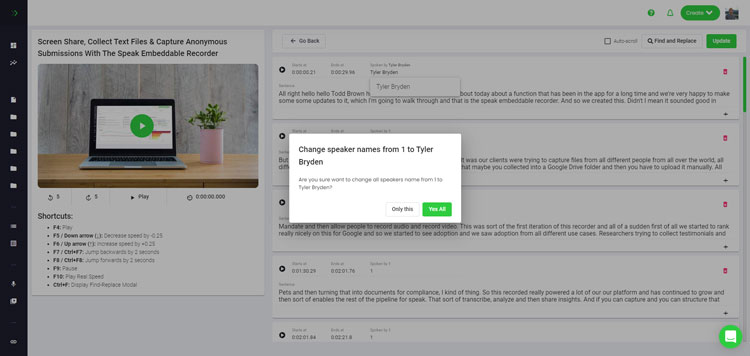
Step 5: View and edit your automated Malayalam subtitles
Wil je de ondertiteling zelf bewerken? Geen probleem! Zodra je je automatische ondertiteling hebt ontvangen, kun je deze op elk gewenst moment bewerken.
Easily update speaker names, find and replace, and get your automatic Malayalam subtitles up to full accuracy with our intuitive subtitles editing system.
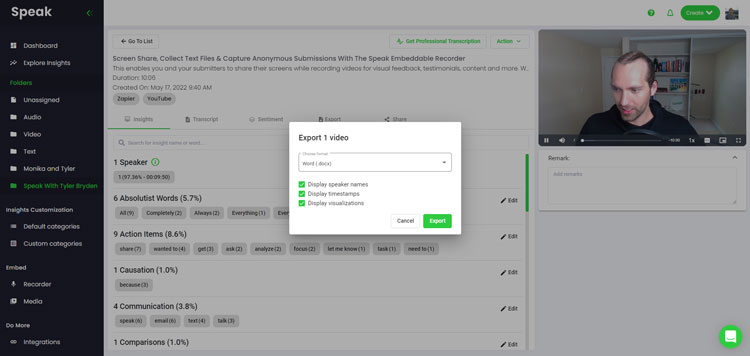
Step 6: Export your Malayalam subtitles and share interactive media players
With Speak, you can easily export Malayalam subtitles to many formats.
Below is a list of options for exporting your Malayalam subtitles in Speak:
- Export Malayalam subtitles to SRTs
- Export Malayalam subtitles to VTTs
Een effectievere manier om ondertitels te delen is via een deelbare mediabibliotheek inclusief het mediabestand, AI-inzichten en interactieve ondertitels.
Met Speak kunt u nog veel meer doen om de waarde van uw media en ondertitels te vergroten.
Aarzel nooit om ons een bericht te sturen via live chat - we staan altijd klaar om te helpen!
We talked about Malayalam subtitling here, but you may be interested in how to subtitle in other languages instantly and easily with Speak’s intuitive subtitling and natural language processing software.
Hieronder vindt u informatie over alle talen die u kunt spreken en die u kunnen helpen met ondertitelen!
Join 300,000+ users finding radical efficiencies with their audio, video and text data to drive value.
How Much Does It Cost To Subtitle Malayalam?
Speak offers highly competitive pricing for Malayalam subtitling compared to other subtitling solutions. For a starting user, Speak offers automated Malayalam subtitling from 2 credits per hour of audio on pay as you go (1 credit = US$1). Pro includes 25 credits per user per month.
We schalen onze prijzen ook op basis van het mediavolume en kunnen zelfs grotere kortingen bieden aan grote klanten.
So, if you have over 100 hours of Malayalam subtitling per month please contact us through live chat and we will set you up with a customized price per minute to make Malayalam subtitling even more affordable!
You can learn more about how to subtitle Malayalam with Speak and the relevant pricing on the Website prijzen pagina en de Prijzenpagina in de app.
What Can You Subtitle In Malayalam?
- Subtitle Malayalam interviews
- Subtitle Malayalam videos
- Subtitle Malayalam audio
- Subtitle Malayalam earnings calls
- Subtitle Malayalam focus groups
- Subtitle Malayalam meetings
- Subtitle Malayalam phone calls
- Subtitle Malayalam YouTube videos
- Subtitle Malayalam Vimeo videos
- Subtitle Malayalam Zoom recordings
- Subtitle Malayalam Google Meet recordings
- Ondertitel Microsoft Teams-opnames
- Subtitle Malayalam podcasts
En nog veel meer!
Welke andere talen kunnen ondertiteling spreken?
Speak heeft al gebruikers uit meer dan 90 landen en we krijgen voortdurend verzoeken om te ondertitelen en analyses uit te voeren in verschillende talen.
Daarom voegen we voortdurend meer talen toe aan Speak! Dit zijn slechts enkele van de groeiende lijst van talen die Speak aanbiedt:
- Hoe maak je Afrikaanse ondertitels?
- Hoe maak je Arabische (Egypte) ondertitels
- Hoe maak je Arabische (Irak) ondertitels
- Hoe maak je Arabische (Israël) ondertitels
- Hoe maak je Arabische (Jordan) ondertitels
- Hoe maak je Arabische (Koeweitse) ondertitels
- Hoe maak je Arabische (Libanon) ondertitels
- Hoe maak je Arabische (Oman) ondertitels
- Hoe maak je Arabische (Palestijnse Autoriteit) ondertitels
- Hoe maak je Arabische (Qatar) ondertitels
- Hoe maak je Arabische (Saoedi-Arabië) ondertitels
- Hoe maak je Arabische ondertitels (Syrische Arabische Republiek)
- Hoe maak je Arabische ondertitels (Verenigde Arabische Emiraten)
- Hoe maak je Arabische moderne standaard (Bahrein) ondertitels
- Hoe maak je Armeense ondertitels
- Hoe maak je Bulgaarse ondertitels?
- Hoe maak je Catalaanse ondertitels?
- Hoe maak je Chinese (Kantonese, traditionele) ondertitels?
- Hoe maak je Chinese (vereenvoudigde) ondertitels
- Hoe maak je Chinese (traditionele) ondertitels
- Hoe maak je Kroatische ondertitels
- Hoe maak je Tsjechische ondertitels
- Hoe maak je Deense ondertitels
- Hoe maak je Nederlandse ondertitels?
- Hoe maak je Engelse ondertitels?
- Hoe maak je Engelse (Australische) ondertitels
- Hoe maak je Engelse (Indiase) ondertitels
- Hoe maak je Engelse (Ierse) ondertitels
- Hoe maak je Engelse (Nieuw-Zeelandse) ondertitels
- Hoe maak je Engelse (Schotse) ondertitels
- Hoe maak je Engelse (Zuid-Afrikaanse) ondertitels
- Hoe maak je Engelse (Verenigd Koninkrijk) ondertitels
- Hoe maak je Engelse (Verenigde Staten) ondertitels
- Hoe maak je Estische ondertitels?
- Hoe maak je Farsi-ondertitels?
- Hoe maak je Finse ondertitels
- Hoe maak je Franse ondertitels?
- Hoe maak je Franse (Canadese) ondertitels
- Hoe maak je Duitse ondertitels?
- Hoe maak je Duitse (Zwitserse) ondertitels
- Hoe maak je Griekse ondertitels
- Hoe maak je Gujarati-ondertitels
- Hoe je Hebreeuwse ondertitels maakt
- Hoe maak je Hindi-ondertitels?
- Hoe maak je Hongaarse ondertitels
- Hoe maak je IJslandse ondertitels?
- Hoe maak je Indonesische ondertitels
- Hoe maak je Ierse ondertitels?
- Hoe maak je Italiaanse ondertitels
- Hoe maak je Japanse ondertitels
- Hoe maak je Kannada-ondertitels?
- Hoe maak je Koreaanse ondertitels
- Hoe maak je Letse ondertitels?
- Hoe maak je Litouwse ondertitels?
- Hoe maak je Maleisische ondertitels
- Hoe maak je Malayalam-ondertitels?
- Hoe maak je Noorse ondertitels
- Hoe maak je Perzische ondertitels
- Hoe maak je Poolse ondertitels
- Hoe maak je Portugese ondertitels
- Hoe maak je Portugese (Braziliaanse) ondertitels
- Hoe maak je Portugese (Portugal) ondertitels
- Hoe maak je Roemeense ondertitels
- Hoe maak je Russische ondertitels
- Hoe maak je Slowaakse ondertitels
- Hoe maak je Sloveense ondertitels
- Hoe maak je Spaanse ondertitels?
- Hoe maak je Spaanse (Mexico) ondertitels
- Hoe maak je Zweedse ondertitels?
- Hoe maak je Tamil-ondertitels?
- Hoe maak je Telugu-ondertitels
- Hoe maak je Thaise ondertitels?
- Hoe maak je Turkse ondertitels
- Hoe maak je Oekraïense ondertitels
- Hoe maak je Vietnamese ondertitels
Er zijn er nu nog veel meer toegevoegd!
Je kunt zien de volledige lijst met talen die Speak ondersteunt via zowel de software als de API's.
Ontdek Speak AI
Speak AI is een platform voor spraaktechnologie en AI-onderzoek. Transcriptie in meer dan 100 talen, NLP-analyse, sentimentanalyse, AI-agenten en consultancy voor bedrijven.
 English
 Español
 Français
 Italiano
 العربية
 Português do Brasil
 Nederlands
 Deutsch
 עִבְרִית
 Русский
 日本語
 Polski
 Čeština
 Українська
 Slovenščina
 Svenska
 Ελληνικά
 Norsk bokmål
 简体中文
 Türkçe
 Català
 Magyar
 한국어
 Slovenčina
 Suomi