
How To Create Kannada Subtitles for Audio and Video
Kannada is an ancient language that is widely spoken in the southern part of India. It is also the official language of the state of Karnataka, India. According to the 2011 census, Kannada is spoken by over 44 million people worldwide, making it one of the most popular languages in India.
Adding subtitles to audio and video content in Kannada is an effective way to make it more accessible to those who don’t speak the language, as well as those who do. Subtitles can also help viewers better understand the content and engage with it more deeply.
Mik azok a feliratok?
Subtitles are text-based versions of the audio and video content that provide a translation of the spoken words. They are usually placed at the bottom of the screen and appear as the speaker speaks. Subtitles are different from captions, which provide a transcription of the audio and video content as well as descriptions of background noise and other sound effects.
Benefits of Transcription and Creating Subtitles in Kannada
One of the main benefits of creating subtitles in Kannada is that it makes audio and video content more accessible to a wider audience. It also allows those who don’t understand the language to better understand the content.
Transcribing audio and video content into Kannada is also beneficial for researchers, marketers, and businesses. For researchers, transcription allows them to quickly and easily analyze large amounts of data from audio and video sources. For marketers, transcription can be used to generate insights into customer conversations and better understand customer needs. For businesses, transcription can be used to create searchable databases that can be used to identify trends and improve customer service.
Tools for Creating Kannada Subtitles
There are a few tools available for creating Kannada subtitles. One of the best tools is Speak AI, which is a speech recognition and natural language platform with over 70,000 users. Speak AI has a powerful transcription feature that can quickly and easily transcribe audio and video content into Kannada subtitles. It also has a wide range of features that make it easier for researchers, marketers, and businesses to analyze and understand customer conversations.
Következtetés
Creating subtitles in Kannada is a great way to make audio and video content more accessible and engaging. Speak AI is one of the best tools available for creating Kannada subtitles, as it has powerful transcription features and a wide range of features for researchers, marketers, and businesses. For those who want to make the most of their audio and video content, Speak AI is the perfect tool for creating Kannada subtitles.
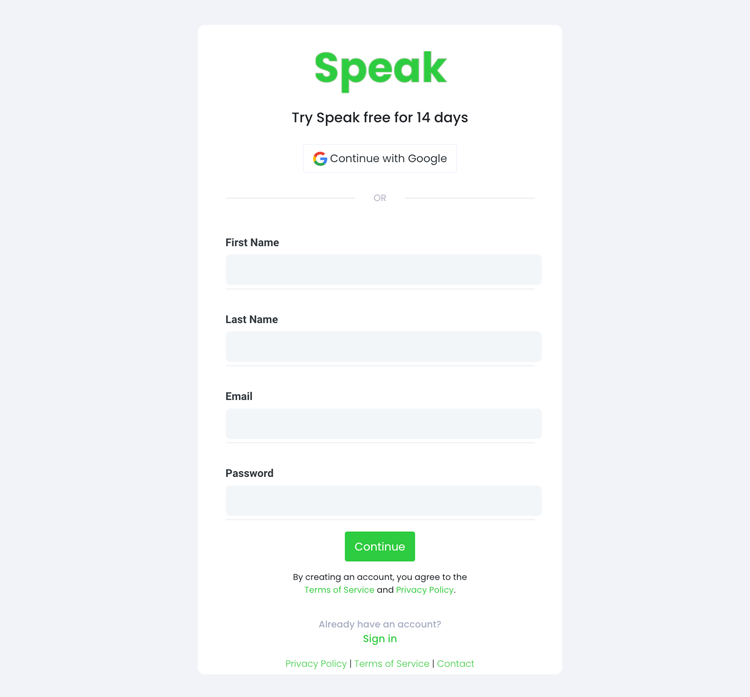
1. lépés: Hozzon létre egy Speak-fiókot
To start your Kannada subtitling, you first need to hozzon létre egy Speak fiókot. Ne aggódj, ez szuper egyszerű!
Our team is happy to give you a 7-day trial with trial credits for Kannada audio and video subtitling included.
To sign up for Speak and start your Kannada subtitling, visit the Speak app register page itt.

Step 2: Upload your Kannada file(s) for subtitling
Videóhoz általában MP4 formátumot, hanghoz pedig MP3 formátumot ajánlunk.
However, we accept a range of audio and video file types. Once you upload your file all you have to do is select “Kannada” from the language dropdown menu to automatically subtitle in Kannada.
You can upload your Kannada file for subtitling in several ways using Speak:
Elfogadott kannada audio fájltípusok
- Kannada MP3
- Kannada M4A
- Kannada WAV
- Kannada OGG
- Kannada WEBM
- Kannada M4P
Elfogadott kannada videó fájltípusok
- Kannada MP4
- Kannada M4V
- Kannada WMV
- Kannada AVI
- Kannada MOV
- Kannada FLV
Nyilvánosan elérhető kannada URL-ek
A Speakre egy nyilvánosan elérhető URL-címen keresztül is feltölthet médiát.
As long as the file type extension is available at the end of the URL you will have no problem importing your recording for automatic Kannada subtitling and analysis.
Kannada YouTube URL-ek
A Speak kompatibilis a YouTube videókkal. Mindössze annyit kell tennie, hogy bemásolja a YouTube-videó URL-címét (pl, https://www.youtube.com/watch?v=qKfcLcHeivc).
A Speak automatikusan megtalálja a fájlt, kiszámítja a hosszát, és importálja a videót.
Kérjük, mindenképpen a teljes linket használja, ne pedig a rövidített YouTube-részletet. Továbbá győződjön meg róla, hogy eltávolította a csatorna nevét az URL-ből.
Speak Integrációk
Mint említettük, a Speak számos integrációt tartalmaz a következőkhöz is Nagyítás, Zapier, a Vimeo és egyebek, amelyek segítenek automatikusan feliratozni a médiatartalmakat.
Ez az integrációs könyvtár folyamatosan bővül! Van egy kérése? Küldjön nekünk üzenetet.

3. lépés: Számítsa ki és fizesse ki a teljes összeget automatikusan
Once you have your Kannada audio or video file ready and load it into Speak, it will automatically calculate the total cost (trial credits are included in the trial – take advantage of it!).
Fizethet úgy is, hogy személyre szabott tervezetre iratkozik fel, a benne foglalt perceket tartalmazó, valós idejű kalkulátorunk segítségével.
Ön is egyenleg hozzáadása vagy fizessen a feltöltésekért terv nélkül a hitelkártya.

Step 4: Wait for Speak to subtitle your Kannada audio or Kannada video
Our automated subtitling software will prepare your Kannada subtitles in as little as a few minutes. Generally, Speak takes about half the audio or video length to produce the subtitles and insights.
Once completed, you will get an email notification that your Kannada subtitles is complete. That email will contain a link back to the file so you can access the interactive media player with the Kannada subtitles, analysis, and export formats ready for you.
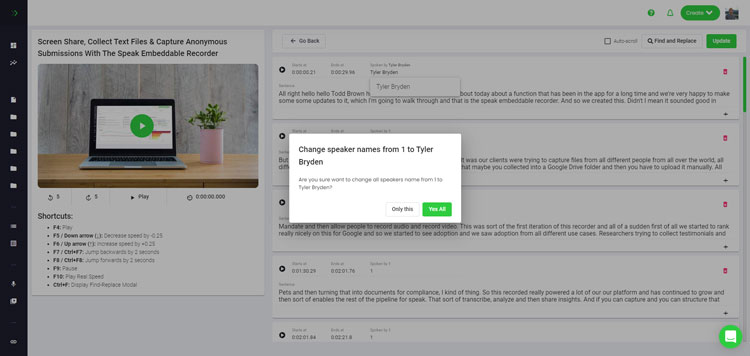
Step 5: View and edit your automated Kannada subtitles
Szeretnéd magad szerkeszteni a feliratokat? Rendben! Miután megkaptad az automatikus feliratokat, bármikor lehetőséged van szerkeszteni azokat.
Easily update speaker names, find and replace, and get your automatic Kannada subtitles up to full accuracy with our intuitive subtitles editing system.
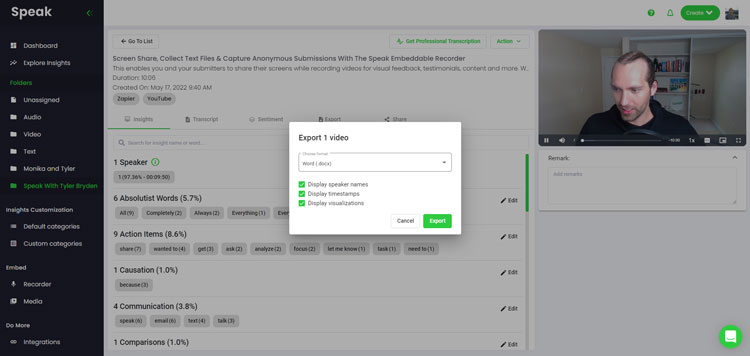
Step 6: Export your Kannada subtitles and share interactive media players
With Speak, you can easily export Kannada subtitles to many formats.
Below is a list of options for exporting your Kannada subtitles in Speak:
- Export Kannada subtitles to SRTs
- Export Kannada subtitles to VTTs
A feliratok megosztásának hatékonyabb módja egy megosztható médiatár amely magában foglalja a médiafájlt, a mesterséges intelligencia elemzéseit és az interaktív feliratokat.
A Speak segítségével sokkal többet tehetsz, hogy gazdagítsd a médiatartalmaid és felirataid értékét.
Soha ne habozzon, küldjön nekünk üzenetet a live chat-en - mindig itt vagyunk, hogy segítsünk!
We talked about Kannada subtitling here, but you may be interested in how to subtitle in other languages instantly and easily with Speak’s intuitive subtitling and natural language processing software.
Az alábbiakban megosztottunk forrásokat az összes nyelvről, amelyekhez a Speak segíthet a feliratozásban!
Join 300,000+ users finding radical efficiencies with their audio, video and text data to drive value.
How Much Does It Cost To Subtitle Kannada?
Speak offers highly competitive pricing for Kannada subtitling compared to other subtitling solutions. For a starting user, Speak offers automated Kannada subtitling from 2 credits per hour of audio on pay as you go (1 credit = US$1). Pro includes 25 credits per user per month.
Az árképzésünket a médiamennyiség alapján is skálázzuk, és még nagyobb kedvezményeket tudunk nyújtani a nagy ügyfelek számára.
So, if you have over 100 hours of Kannada subtitling per month please contact us through live chat and we will set you up with a customized price per minute to make Kannada subtitling even more affordable!
You can learn more about how to subtitle Kannada with Speak and the relevant pricing on the weboldal árazási oldal és a alkalmazáson belüli árképzési oldal.
What Can You Subtitle In Kannada?
- Subtitle Kannada interviews
- Subtitle Kannada videos
- Subtitle Kannada audio
- Subtitle Kannada earnings calls
- Subtitle Kannada focus groups
- Subtitle Kannada meetings
- Subtitle Kannada phone calls
- Subtitle Kannada YouTube videos
- Subtitle Kannada Vimeo videos
- Subtitle Kannada Zoom recordings
- Subtitle Kannada Google Meet recordings
- Microsoft Teams-felvételek feliratozása
- Subtitle Kannada podcasts
És még sok minden más!
Milyen más nyelveken lehet feliratozni?
A Speak már több mint 90 országból rendelkezik felhasználókkal, és folyamatosan kapunk felkéréseket feliratozásra és elemzésre különböző nyelveken.
Így folyamatosan újabb és újabb nyelvekkel bővítjük a Speak! Íme néhány a Speak által kínált nyelvek egyre bővülő listájából:
- Hogyan készítsünk afrikaans feliratokat
- Hogyan készítsünk arab (egyiptomi) feliratokat
- Hogyan készítsünk arab (iraki) feliratokat
- Hogyan készítsünk arab (izraeli) feliratokat
- Hogyan készítsünk arab (jordániai) feliratokat
- Hogyan készítsünk arab (kuvaiti) feliratokat
- Hogyan készítsünk arab (libanoni) feliratokat
- Hogyan készítsünk arab (omán) feliratokat
- Hogyan készítsünk arab (Palesztin Hatóság) feliratokat
- Hogyan készítsünk arab (katari) feliratokat
- Hogyan készítsünk arab (Szaúd-Arábia) feliratokat
- Hogyan készítsünk arab (szíriai arab köztársaságbeli) feliratokat
- Hogyan készítsünk arab (Egyesült Arab Emírségek) feliratokat
- Hogyan készítsünk arab modern szabványú (bahreini) feliratokat
- Hogyan készítsünk örmény feliratokat
- Hogyan készítsünk bolgár feliratokat
- Hogyan készítsünk katalán feliratokat
- Kínai (kantoni, hagyományos) feliratok létrehozása
- Hogyan készítsünk kínai (egyszerűsített) feliratokat
- Hogyan készítsünk kínai (hagyományos) feliratokat
- Hogyan készítsünk horvát feliratokat
- Hogyan készítsünk cseh feliratokat
- Hogyan készítsünk dán feliratokat
- Hogyan készítsünk holland feliratokat
- Hogyan készítsünk angol feliratokat
- Hogyan készítsünk angol (ausztrál) feliratokat
- Hogyan készítsünk angol (indiai) feliratokat
- Hogyan készítsünk angol (ír) feliratokat
- Hogyan készítsünk angol (új-zélandi) feliratokat
- Hogyan készítsünk angol (skót) feliratokat
- Hogyan készítsünk angol (dél-afrikai) feliratokat
- Hogyan készítsünk angol (Egyesült Királyság) feliratokat
- Hogyan készítsünk angol (amerikai) feliratokat
- Hogyan készítsünk észt feliratokat
- Hogyan készítsünk fárszi feliratokat
- Hogyan készítsünk finn feliratokat
- Hogyan készítsünk francia feliratokat
- Francia (kanadai) feliratok létrehozása
- Hogyan készítsünk német feliratokat
- Hogyan készítsünk német (svájci) feliratokat
- Hogyan készítsünk görög feliratokat
- Hogyan készítsünk gudzsaráti feliratokat
- Hogyan készítsünk héber feliratokat
- Hogyan készítsünk hindi feliratokat
- Hogyan készítsünk magyar feliratot
- Izlandi feliratok készítése
- Hogyan készítsünk indonéz feliratokat
- Hogyan készítsünk ír feliratokat
- Hogyan készítsünk olasz feliratokat
- Hogyan készítsünk japán feliratokat
- Hogyan készítsünk kannada feliratokat
- Hogyan készítsünk koreai feliratokat
- Hogyan készítsünk lett feliratokat
- Hogyan készítsünk litván feliratokat
- Hogyan készítsünk maláj feliratokat
- Hogyan készítsünk malajálam feliratokat
- Norvég feliratok létrehozása
- Hogyan készítsünk perzsa feliratokat
- Hogyan készítsünk lengyel feliratokat
- Hogyan készítsünk portugál feliratokat
- Hogyan készítsünk portugál (brazil) feliratokat
- Hogyan készítsünk portugál (portugál) feliratokat
- Hogyan készítsünk román feliratokat
- Orosz feliratok készítése
- Hogyan készítsünk szlovák feliratokat
- Hogyan készítsünk szlovén feliratokat
- Hogyan készítsünk spanyol feliratokat
- Hogyan készítsünk spanyol (mexikói) feliratokat
- Hogyan készítsünk svéd feliratokat
- Hogyan készítsünk tamil feliratokat
- Hogyan készítsünk telugu feliratokat
- Hogyan készítsünk thai feliratokat
- Hogyan készítsünk török feliratokat
- Hogyan készítsünk ukrán feliratokat
- Hogyan készítsünk vietnami feliratokat
Most már sokkal több van hozzáadva!
Láthatja a Speak által támogatott nyelvek teljes listája mind a szoftveren, mind az API-kon keresztül.
Fedezze fel a Speak AI-t
A Speak AI egy hangtechnológiai és mesterséges intelligencia kutatási platform. Átírás több mint 100 nyelven, NLP elemzés, hangulatelemzés, MI-ügynökök és vállalati tanácsadás.
 English
 Español
 Français
 Italiano
 العربية
 Português do Brasil
 Nederlands
 Deutsch
 עִבְרִית
 Русский
 日本語
 Polski
 Čeština
 Українська
 Slovenščina
 Svenska
 Ελληνικά
 Norsk bokmål
 简体中文
 Türkçe
 Català
 Magyar
 한국어
 Slovenčina
 Suomi