
How To Create Hungarian Captions With Speak AI
Introduction to Hungarian Captions
Hungarian is an official language spoken in Hungary and many other countries. It is estimated that over 13 million people speak Hungarian, making it the most widely spoken non-Indo-European language in Europe. It is a Uralic language, related to Finnish and Estonian.
Captions are a type of text that can be used to provide a written representation of audio or video content. Captions are different from subtitles, as they describe all audible information, including dialog, explosions, and music. Captions also provide transcripts for accessibility purposes, making content available to people who are hard of hearing or deaf.
Benefits of Hungarian Captions
Creating captions for audio and video in the Hungarian language has many benefits. Captions can help increase engagement and watch time, as they make videos easier to follow and understand. Captions can also help improve accessibility and make sure that content is available to everyone. Additionally, captions can be used in SEO and content marketing to help drive traffic to websites, as captions make content more searchable.
How To Create Hungarian Captions With Speak AI
Speak AI is a speech recognition and natural language platform with over 50,000 users. Speak AI offers a range of tools to help researchers, marketers, and businesses create Hungarian captions. Here is a step-by-step guide on how to create Hungarian captions with Speak AI:
Step 1: Upload Your Audio or Video
The first step is to upload your audio or video file to the Speak AI platform. Speak AI supports a range of file types, including MP3, MP4, and WAV.
Step 2: Select Hungarian as Your Language
Once your file has been uploaded, you will need to select Hungarian as your language. Speak AI supports a range of languages, including English, Spanish, French, German, and more.
Step 3: Create Your Captions
Once your language has been selected, Speak AI will automatically generate Hungarian captions for your audio or video. Speak AI uses state-of-the-art speech recognition technology to generate accurate and high-quality captions.
Step 4: Download Your Captions
Once your captions have been generated, you can download them in a range of formats. Speak AI supports SRT, VTT, and TXT formats.
خاتمة
Creating captions for audio and video in the Hungarian language has many benefits, including increased engagement and watch time, improved accessibility, and better SEO and content marketing opportunities. Speak AI is a powerful speech recognition and natural language platform that can help you create Hungarian captions quickly and accurately.
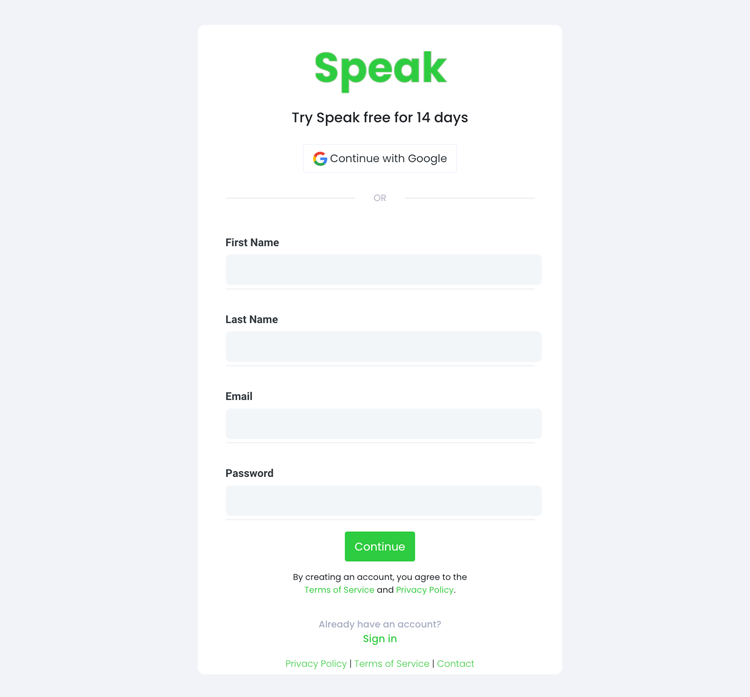
الخطوة 1: إنشاء حساب Speak
To start your Hungarian captioning, you first need to إنشاء حساب Speakلا تقلق، هذا الأمر سهل للغاية!
Our team is happy to give you a 7-day trial with trial credits for Hungarian audio and video captioning included.
To sign up for Speak and start your Hungarian captioning, visit the Speak app register page here.

Step 2: Upload your Hungarian file(s) for Captioning
نحن نوصي عادةً بصيغة MP4 للفيديو أو صيغة MP3 للصوت.
However, we accept a range of audio and video file types. Once you upload your file all you have to do is select “Hungarian” from the language dropdown menu to automatically caption in Hungarian.
You can upload your Hungarian file for captioning in several ways using Speak:
أنواع ملفات الصوت المجرية المقبولة
- MP3 مجري
- M4A المجرية
- WAV المجرية
- OGG المجرية
- شبكة WEBM المجرية
- برنامج M4P المجري
أنواع ملفات الفيديو المجرية المقبولة
- MP4 المجرية
- دبابة M4V المجرية
- WMV المجرية
- AVI المجرية
- MOV المجرية
- FLV المجرية
عناوين URL المجرية المتاحة للجمهور
يمكنك أيضًا تحميل الوسائط إلى Speak من خلال عنوان URL متاح للعامة.
As long as the file type extension is available at the end of the URL you will have no problem importing your recording for automatic Hungarian captioning and analysis.
عناوين URL لموقع YouTube المجري
يتوافق تطبيق Speak مع مقاطع فيديو YouTube. كل ما عليك فعله هو نسخ عنوان URL لمقطع فيديو YouTube (على سبيل المثال، https://www.youtube.com/watch?v=qKfcLcHeivc).
سيعمل البرنامج تلقائيًا على العثور على الملف وحساب طوله واستيراد الفيديو.
يرجى التأكد من استخدام الرابط الكامل وليس مقطع YouTube المختصر. بالإضافة إلى ذلك، تأكد من إزالة اسم القناة من عنوان URL.
تحدث عن التكاملات
كما ذكرنا، يحتوي Speak أيضًا على مجموعة من التكاملات لـ تكبير, زابير، Vimeo والمزيد مما سيساعدك على إضافة ترجمة تلقائية للوسائط الخاصة بك.
تستمر مكتبة التكاملات هذه في النمو! هل لديك طلب؟ لا تتردد في إرسال رسالة إلينا.

الخطوة 3: احسب المبلغ الإجمالي وادفعه تلقائيًا
Once you have your Hungarian audio or video file ready and load it into Speak, it will automatically calculate the total cost (trial credits are included in the trial – take advantage of it!).
يمكنك الدفع عن طريق الاشتراك في خطة مخصصة لك باستخدام حاسبتنا في الوقت الفعلي مع الدقائق المضمنة.
يمكنك أيضا أضف التوازن أو ادفع مقابل التحميلات دون خطة باستخدام بطاقة إئتمان.

Step 4: Wait for Speak to caption your Hungarian audio or Hungarian video
Our automated captioning software will prepare your Hungarian captions in as little as a few minutes. Generally, Speak takes about half the audio or video length to produce the captions and insights.
Once completed, you will get an email notification that your Hungarian captions is complete. That email will contain a link back to the file so you can access the interactive media player with the Hungarian captions, analysis, and export formats ready for you.
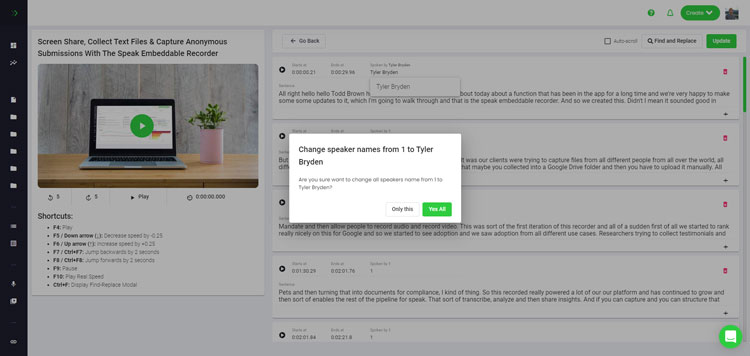
Step 5: View and edit your automated Hungarian captions
هل تريد معالجة تعديلات التعليقات التوضيحية بنفسك؟ كل شيء على ما يرام! بمجرد استلام التعليقات التوضيحية الآلية، سيكون لديك خيار تعديل تعليقاتك التوضيحية في أي وقت.
Easily update speaker names, find and replace, and get your automatic Hungarian captions up to full accuracy with our intuitive captions editing system.
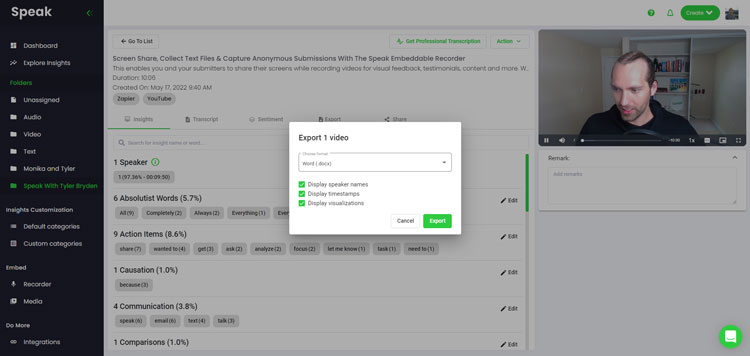
Step 6: Export your Hungarian captions and share interactive media players
With Speak, you can easily export Hungarian captions to many formats.
Below is a list of options for exporting your Hungarian captions in Speak:
- Export Hungarian captions to SRTs
- Export Hungarian captions to VTTs
الطريقة الأكثر فعالية لمشاركة التعليقات التوضيحية هي من خلال مكتبة الوسائط القابلة للمشاركة وهذا يشمل ملف الوسائط ورؤى الذكاء الاصطناعي والتسميات التوضيحية التفاعلية.
هناك الكثير مما يمكنك فعله باستخدام Speak لإثراء قيمة الوسائط والتسميات التوضيحية الخاصة بك.
لا تتردد أبدًا في إرسال رسالة إلينا عبر الدردشة المباشرة - فنحن هنا دائمًا للمساعدة!
We talked about Hungarian captioning here, but you may be interested in how to caption in other languages instantly and easily with Speak’s intuitive captioning and natural language processing software.
لقد شاركنا الموارد أدناه حول جميع اللغات التي يمكن أن تساعدك في الترجمة التوضيحية!
Join 300,000+ users finding radical efficiencies with their audio, video and text data to drive value.
How Much Does It Cost To Caption Hungarian?
Speak offers highly competitive pricing for Hungarian captioning compared to other captioning solutions. For a starting user, Speak offers automated Hungarian captioning from 2 credits per hour of audio on pay as you go (1 credit = US$1). Pro includes 25 credits per user per month.
نقوم أيضًا بتوسيع نطاق التسعير لدينا استنادًا إلى حجم الوسائط ويمكننا تقديم خصومات أكبر للعملاء الكبار.
So, if you have over 100 hours of Hungarian captioning per month please contact us through live chat and we will set you up with a customized price per minute to make Hungarian captioning even more affordable!
You can learn more about how to caption Hungarian with Speak and the relevant pricing on the صفحة تسعير الموقع و ال صفحة التسعير داخل التطبيق.
What Can You Caption In Hungarian?
- Caption Hungarian interviews
- Caption Hungarian videos
- Caption Hungarian audio
- Caption Hungarian earnings calls
- Caption Hungarian focus groups
- Caption Hungarian meetings
- Caption Hungarian phone calls
- Caption Hungarian YouTube videos
- Caption Hungarian Vimeo videos
- Caption Hungarian Zoom recordings
- Caption Hungarian Google Meet recordings
- شرح تسجيلات Microsoft Teams
- Caption Hungarian podcasts
و اكثر من ذلك بكثير!
ما هي اللغات الأخرى التي يمكنها التحدث بالتعليق التوضيحي؟
يضم تطبيق Speak بالفعل مستخدمين من أكثر من 90 دولة، ونتلقى باستمرار طلبات لكتابة التعليقات التوضيحية والتحليل بلغات مختلفة.
لذا، نضيف باستمرار المزيد من اللغات إلى Speak! فيما يلي بعض اللغات من القائمة المتزايدة التي يوفرها Speak:
- كيفية إنشاء ترجمات باللغة الأفريكانية
- كيفية إنشاء ترجمات باللغة العربية (مصرية)
- كيفية إنشاء ترجمات باللغة العربية (العراقية)
- كيفية إنشاء ترجمات باللغة العربية (إسرائيل)
- كيفية إنشاء ترجمات باللغة العربية (الأردن)
- كيفية إنشاء ترجمات عربية (كويتية)
- كيفية إنشاء ترجمات باللغة العربية (لبنان)
- كيفية إنشاء ترجمات باللغة العربية (عُمان)
- كيفية إنشاء ترجمات باللغة العربية (السلطة الفلسطينية)
- كيفية إنشاء ترجمات باللغة العربية (قطر)
- كيفية إنشاء ترجمات باللغة العربية (المملكة العربية السعودية)
- كيفية إنشاء ترجمات باللغة العربية (الجمهورية العربية السورية)
- كيفية إنشاء ترجمات باللغة العربية (الإمارات العربية المتحدة)
- كيفية إنشاء ترجمات عربية حديثة (البحرين)
- كيفية إنشاء ترجمات باللغة الأرمنية
- كيفية إنشاء ترجمات بلغارية
- كيفية إنشاء ترجمات باللغة الكاتالونية
- كيفية إنشاء ترجمات باللغة الصينية (الكانتونية والتقليدية)
- كيفية إنشاء ترجمات باللغة الصينية (المبسطة)
- كيفية إنشاء ترجمات باللغة الصينية (التقليدية)
- كيفية إنشاء ترجمات باللغة الكرواتية
- كيفية إنشاء ترجمات باللغة التشيكية
- كيفية إنشاء ترجمات باللغة الدنماركية
- كيفية إنشاء ترجمات باللغة الهولندية
- كيفية إنشاء ترجمات باللغة الإنجليزية
- كيفية إنشاء ترجمات باللغة الإنجليزية (أستراليا)
- كيفية إنشاء ترجمات باللغة الإنجليزية (الهندية)
- كيفية إنشاء ترجمات باللغة الإنجليزية (الأيرلندية)
- كيفية إنشاء ترجمات باللغة الإنجليزية (نيوزيلندا)
- كيفية إنشاء ترجمات باللغة الإنجليزية (الاسكتلندية)
- كيفية إنشاء ترجمات باللغة الإنجليزية (جنوب أفريقيا)
- كيفية إنشاء ترجمات باللغة الإنجليزية (المملكة المتحدة)
- كيفية إنشاء ترجمات باللغة الإنجليزية (الولايات المتحدة)
- كيفية إنشاء ترجمات باللغة الإستونية
- كيفية إنشاء ترجمات باللغة الفارسية
- كيفية إنشاء ترجمات باللغة الفنلندية
- كيفية إنشاء ترجمات باللغة الفرنسية
- كيفية إنشاء ترجمات باللغة الفرنسية (كندا)
- كيفية إنشاء ترجمات باللغة الألمانية
- كيفية إنشاء ترجمات باللغة الألمانية (السويسرية)
- كيفية إنشاء ترجمات باللغة اليونانية
- كيفية إنشاء ترجمات باللغة الغوجاراتية
- كيفية إنشاء ترجمات باللغة العبرية
- كيفية إنشاء ترجمات باللغة الهندية
- كيفية إنشاء ترجمات باللغة المجرية
- كيفية إنشاء ترجمات باللغة الأيسلندية
- كيفية إنشاء ترجمات باللغة الإندونيسية
- كيفية إنشاء ترجمات باللغة الأيرلندية
- كيفية إنشاء ترجمات باللغة الإيطالية
- كيفية إنشاء ترجمات باللغة اليابانية
- كيفية إنشاء ترجمات باللغة الكانادا
- كيفية إنشاء ترجمات باللغة الكورية
- كيفية إنشاء ترجمات باللغة اللاتفية
- كيفية إنشاء ترجمات باللغة الليتوانية
- كيفية إنشاء ترجمات باللغة الملايوية
- كيفية إنشاء ترجمات باللغة المالايالامية
- كيفية إنشاء ترجمات باللغة النرويجية
- كيفية إنشاء ترجمات باللغة الفارسية
- كيفية إنشاء ترجمات بولندية
- كيفية إنشاء ترجمات باللغة البرتغالية
- كيفية إنشاء ترجمات باللغة البرتغالية (البرازيلية)
- كيفية إنشاء ترجمات باللغة البرتغالية
- كيفية إنشاء ترجمات باللغة الرومانية
- كيفية إنشاء ترجمات باللغة الروسية
- كيفية إنشاء ترجمات باللغة السلوفاكية
- كيفية إنشاء ترجمات باللغة السلوفينية
- كيفية إنشاء ترجمات باللغة الإسبانية
- كيفية إنشاء ترجمات باللغة الإسبانية (المكسيك)
- كيفية إنشاء ترجمات باللغة السويدية
- كيفية إنشاء ترجمات باللغة التاميلية
- كيفية إنشاء ترجمات باللغة التيلجو
- كيفية إنشاء ترجمات باللغة التايلاندية
- كيفية إنشاء ترجمات باللغة التركية
- كيفية إنشاء ترجمات باللغة الأوكرانية
- كيفية إنشاء ترجمات باللغة الفيتنامية
لقد تمت إضافة المزيد الآن!
يمكنك أن ترى القائمة الكاملة للغات التي يدعمها Speak من خلال كل من البرمجيات وواجهات برمجة التطبيقات.
استكشف تقنية الذكاء الاصطناعي الناطق
سبيك إيه آي هي منصة بحثية متخصصة في تقنيات الصوت والذكاء الاصطناعي. تقدم خدمات النسخ الصوتي بأكثر من 100 لغة، وتحليلات معالجة اللغة الطبيعية، وتحليل المشاعر، ووكلاء الذكاء الاصطناعي، والاستشارات المؤسسية.
 English
 Español
 Français
 Italiano
 العربية
 Português do Brasil
 Nederlands
 Deutsch
 עִבְרִית
 Русский
 日本語
 Polski
 Čeština
 Українська
 Slovenščina
 Svenska
 Ελληνικά
 Norsk bokmål
 简体中文
 Türkçe
 Català
 Magyar
 한국어
 Slovenčina
 Suomi