
The Ultimate Guide: How to Transcribe Belarusian
Transcribing Belarusian, a language with rich history and unique characteristics, can present challenges. However, with advancements in technology, particularly in Natural Language Processing (NLP) and Artificial Intelligence (AI), converting Belarusian audio or video to text has never been easier or more accurate. Speak AI is at the forefront, offering innovative solutions for Belarusian transcription needs. This guide will delve into the various aspects of transcribing Belarusian, demonstrating the significance for academic researchers, market researchers, sales teams, quality assurance personnel, marketing professionals, and businesses at large.
Understanding the Belarusian Language: Locations and Popularity
Belarusian is the official language of Belarus, a country with a deep history nestled in Eastern Europe. Beyond its borders, Belarusian speakers can be found in countries such as Russia, Ukraine, Poland, and Lithuania. As of recent statistics, there are over 9 million Belarusian speakers worldwide. The language holds a testament to the resilience of the Belarusian people, preserving their cultural identity across centuries.
Interesting Facts about Belarusian
Belarusian showcases several fascinating aspects that make it unique. It shares some linguistic similarities with Russian and Ukrainian, yet retains its distinct alphabet and phonetics. Historically, Belarusian has undergone various script changes, reflecting the country’s tumultuous past. Another intriguing fact is the existence of Taraškievica, a classical orthography that some purists still use today, showcasing the language’s rich literary tradition.
Why Transcribe Belarusian: Use Cases and Benefits
Transcribing Belarusian content, whether it be academic lectures, market research interviews, sales calls, or marketing materials, offers numerous advantages.
Akademický a trhový výzkum
For researchers delving into Slavic studies, Belarusian history, or regional market analyses, transcribing interviews or historical speeches can uncover invaluable insights. This not only facilitates a deeper understanding of the subject matter but also enhances the accuracy of research findings.
Prodej a zajištění kvality
Sales teams conducting business in Belarus or with Belarusian-speaking clients can greatly benefit from transcribing sales calls. This practice aids in refining sales strategies, understanding client needs better, and ensuring quality assurance through meticulous review and training based on real interactions.
Marketing a podnikání
Marketing content, such as video ads or podcasts, when transcribed, becomes more accessible, improving SEO and reaching a wider audience. For businesses, transcriptions of meetings or conferences can aid in record-keeping, strategy development, and ensuring that no detail is overlooked.
Úspora času a nákladů díky automatickému přepisu
The manual transcription of Belarusian content is not only time-consuming but can also incur significant costs. However, with automatic transcription services like Speak AI, you can convert Belarusian audio to text or Belarusian video to text efficiently and cost-effectively. Our state-of-the-art Belarusian AI to text technology provides fast, accurate transcriptions, allowing you to focus on analysis and action rather than painstaking manual transcription.
How Speak AI Revolutionizes Belarusian Transcription
Speak AI leverages advanced NLP and AI technologies to offer high-quality, accurate transcriptions of Belarusian content. Whether it’s academic lectures, market research interviews, sales calls, or any other audio or video material, Speak AI can handle it. Our platform supports a wide range of file formats, ensuring a seamless transcription process.
Benefits of Speak AI for Belarusian Transcription
- Přesnost: Our AI models are trained on diverse datasets, including Belarusian language specifics, ensuring high accuracy rates.
- Efektivita: Convert your Belarusian audio and video files to text quickly, enabling faster analysis and decision-making.
- Cost-effectiveness: Save on the costs associated with manual transcription services and allocate resources more effectively.
- Škálovatelnost: From single files to large batches, Speak AI can handle varying volumes of content without compromising on quality.
- Integrace: Our AI Meeting Assistant can join platforms like Microsoft Teams, Zoom, Google Meet, and Webex calls, providing automatic, real-time transcription and analysis.
Závěr
Transcribing Belarusian is made effortlessly efficient and accurate with Speak AI’s advanced transcription solutions. By leveraging AI and NLP, we ensure high-quality transcriptions that meet the diverse needs of academic researchers, market researchers, sales teams, quality assurance personnel, marketing professionals, and businesses. Embrace the future of transcription with Speak AI and unlock the potential of your Belarusian audio and video content today.
Join the 150K+ satisfied users experiencing the benefits of Speak AI’s transcription and analysis platform and see why we boast a 4.9 rating on G2. Whether it’s for academic research, business insights, or enhancing communication strategies, Speak AI is your trusted partner in navigating the world of Belarusian transcription.
How To Transcribe Belarusian Using Speak
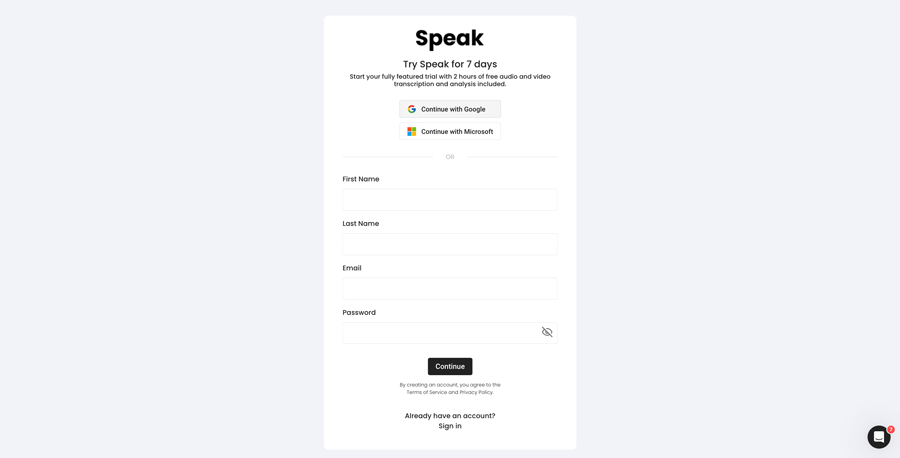
Krok 1: Vytvoření účtu Speak
To start your Belarusian transcription, you first need to vytvořit účet Speak. Žádné obavy, je to velmi snadné!
Our team is happy to give you a 7-day trial with trial credits for Belarusian audio and video transcription included.
To sign up for Speak and start your Belarusian transcription, visit the Speak app register page here.

Step 2: Upload your Belarusian file(s) for Transcription
Obvykle doporučujeme soubory MP4 pro video nebo MP3 pro zvuk.Přijímáme však celou řadu typů zvukových a video souborů.
Once you upload your file all you have to do is select “Belarusian” from the language dropdown menu to automatically transcribe in Belarusian.
You can upload your Belarusian file for transcription in several ways using Speak:
Accepted Belarusian Audio File Types
- Belarusian MP3
- Belarusian M4A
- Belarusian WAV
- Belarusian OGG
- Belarusian WEBM
- Belarusian M4P
Accepted Belarusian Video File Types
- Belarusian MP4
- Belarusian M4V
- Belarusian WMV
- Belarusian AVI
- Belarusian MOV
- Belarusian FLV
Publicly Available Belarusian URLs
Média můžete do služby Speak nahrávat také prostřednictvím veřejně dostupné adresy URL.
Pokud je na konci adresy URL k dispozici přípona typu souboru, nebudete mít problém s importem nahrávky pro automatický přepis a analýzu.
Belarusian YouTube URLs
Funkce Speak je kompatibilní s videi YouTube. Stačí zkopírovat adresu URL videa na YouTube (např., https://www.youtube.com/watch?v=qKfcLcHeivc).
Aplikace Speak automaticky vyhledá soubor, vypočítá jeho délku a importuje video.
Ujistěte se, že používáte celý odkaz, a ne zkrácený úryvek z YouTube. Dále se ujistěte, že jste z adresy URL odstranili název kanálu.
Integrace řeči
Jak již bylo zmíněno, Speak obsahuje také řadu integrací pro Zoom, Zapier, Vimeo a další, které vám pomohou automaticky přepisovat média.
Tato knihovna integrací se stále rozrůstá! Máte požadavek? Neváhejte nám poslat zprávu.
Krok 3: Automatický výpočet a úhrada celkové částky
Once you have your Belarusian audio or video file ready and have loaded it into Speak, it will automatically calculate the total cost (trial credits are included in the trial – take advantage of it!).
Můžete si předplatit individuální tarif pomocí naší kalkulačky v reálném čase se zahrnutými minutami.
Můžete také přidat zůstatek nebo platit za nahrávání bez plánu pomocí svého kreditní karta.
Step 4: Wait for Speak to transcribe your Belarusian audio or Belarusian video
Náš automatický přepisovací software vám připraví přepis během několika minut. Obecně platí, že Speak potřebuje k vytvoření přepisu a postřehů přibližně polovinu délky audio nebo video záznamu.
Po dokončení obdržíte e-mailem oznámení, že váš výpis je kompletní. Tento e-mail bude obsahovat odkaz zpět na soubor, abyste měli přístup k interaktivnímu přehrávači médií s připraveným přepisem, analýzou a exportními formáty.

Krok 5: Zobrazení a úprava automatického přepisu
Chcete se pustit do úprav přepisu sami? Vše v pořádku! Po obdržení automatického přepisu máte možnost kdykoli přepis upravit.
Snadno aktualizujte jména mluvčích, vyhledávejte a nahrazujte a zvyšujte přesnost automatického přepisu pomocí našeho intuitivního systému pro úpravu přepisů.
Krok 6: Export přepisu a sdílení interaktivních přehrávačů médií
V závislosti na plánu můžete exportovat přepis do PDF, Wordu, TXT, HTML a dokonce i do pokročilejších formátů, jako je CSV nebo JSON.
Efektivnější způsob sdílení přepisů je prostřednictvím sdílená knihovna médií který obsahuje mediální soubor, poznatky o umělé inteligenci a interaktivní přepis.
S aplikací Speak můžete udělat mnohem více, abyste obohatili hodnotu svých médií a přepisů.
Nikdy neváhejte a pošlete nám zprávu na živém chatu - jsme tu vždy pro vás!
We talked about Belarusian transcription here, but you may be interested in how to transcribe in other languages instantly and easily with Speak’s intuitive transcription and natural language processing software. We’ve shared resources below on all the languages Speak can help you transcribe!
Join 300,000+ users finding radical efficiencies with their audio, video and text data to drive value.

How Much Does It Cost To Transcribe Belarusian?
Speak offers highly competitive pricing for Belarusian transcription compared to other transcription solutions. For a starting user, Speak offers automated Belarusian transcription from 2 credits per hour of audio on pay as you go (1 credit = US$1). Pro includes 25 credits per user per month.
Máme také speciální nabídky za ceny, které zahrnují přepis, členy analytického týmu, překlad a další služby s neuvěřitelnou slevou!
We also scale our pricing based on media volume and can offer even bigger discounts to large customers. So, if you have over 100 hours of Belarusian transcription per month, please contact us through live chat, and we will set you up with a customized price per minute to make Belarusian transcription even more affordable!
You can learn more about how to transcribe Belarusian with Speak and the relevant pricing on the webové stránky s cenami a stránka s cenami v aplikaci.
What Can You Transcribe In Belarusian?
- Transcribe Belarusian interviews
- Transcribe Belarusian videos
- Transcribe Belarusian audio
- Transcribe Belarusian earnings calls
- Transcribe Belarusian focus groups
- Transcribe Belarusian meetings
- Transcribe Belarusian phone calls
- Transcribe Belarusian YouTube videos
- Transcribe Belarusian Vimeo videos
- Transcribe Belarusian Zoom recordings
- Transcribe Belarusian Google Meet recordings
- Přepisování nahrávek Microsoft Teams
- Transcribe Belarusian podcasts
A mnohem více!
How To Export Belarusian Transcripts
With Speak, you can easily export Belarusian transcriptions to many formats.
Below is a list of options for exporting your Belarusian transcripts in Speak:
- Export Belarusian transcripts to Word Docs
- Export Belarusian transcripts to PDFs
- Export Belarusian transcripts to CSVs
- Export Belarusian transcripts to TXT files
- Export Belarusian transcripts to HTML
- Export Belarusian transcripts to SRTs
- Export Belarusian transcripts to VTTs
- Export Belarusian transcripts to JSON
How To Generate Belarusian Captions
If you are looking to subtitle in Belarusian or caption in Belarusian, Speak is a powerful solution. Speak’s automatic transcription software automatically generated Belarusian transcripts with timestamps that enable Speak to quickly create SRT and VTT files necessary for Belarusian captions and Belarusian subtitles.
Jaké další jazyky umí Speak Transcribe?
Speak má již uživatele z více než 90 zemí a neustále dostáváme žádosti o přepis a analýzu v různých jazycích.
Do aplikace Speak! tak průběžně přidáváme další jazyky. Zde jsou jen některé z rostoucího seznamu jazyků, které Speak nabízí:
- Jak přepsat abcházštinu
- Jak přepsat albánštinu
- Jak přepsat amharštinu
- Jak přepsat arabštinu (Egypt)
- Jak přepsat arabštinu (Irák)
- Jak přepsat arabštinu (Izrael)
- Jak přepsat arabštinu (Jordánsko)
- Jak přepsat arabštinu (Kuvajt)
- Jak přepsat arabštinu (Libanon)
- Jak přepsat moderní standardní arabštinu (Bahrajn)
- Jak přepsat arabštinu (Omán)
- Jak přepsat arabštinu (Palestinská samospráva)
- Jak přepsat arabštinu (Katar)
- Jak přepsat arabštinu (Saúdská Arábie)
- Jak přepsat arabštinu (Syrská arabská republika)
- Jak přepsat arabštinu (SAE)
- Jak přepisovat arménštinu
- Jak přepsat ásámštinu
- Jak přepsat asturštinu
- Jak přepsat ázerbájdžánštinu
- Jak přepsat baškirštinu
- Jak přepsat baskičtinu
- Jak přepsat běloruštinu
- Jak přepsat bengálštinu
- Jak přepsat bosenštinu
- Jak přepisovat bulharštinu
- Jak přepsat barmštinu
- Jak přepisovat katalánštinu
- Jak přepisovat čínštinu (kantonská, tradiční)
- Jak přepisovat čínštinu (zjednodušeně)
- Jak přepisovat chorvatštinu
- Jak přepisovat češtinu
- Jak přepisovat dánštinu
- Jak přepisovat nizozemštinu
- Jak přepsat angličtinu (Austrálie)
- Jak přepsat angličtinu (britštinu)
- Jak přepsat angličtinu (Spojené království)
- Jak přepsat angličtinu (Spojené státy)
- Jak přepisovat estonštinu
- Jak přepisovat perštinu
- Jak přepisovat finštinu
- Jak přepsat filipínštinu
- Jak přepsat vlámštinu
- Jak přepisovat francouzštinu
- Jak přepsat francouzštinu (Kanada)
- Jak přepsat galicijštinu
- Jak přepsat gruzínštinu
- Jak přepsat němčinu
- Jak přepsat němčinu (švýcarskou)
- Jak přepisovat řečtinu
- Jak přepisovat gudžarátštinu
- Jak přepsat hauštinu
- Jak přepisovat hebrejštinu
- Jak přepisovat hindštinu
- Jak přepisovat maďarštinu
- Jak přepisovat islandštinu
- Jak přepisovat indonéštinu
- Jak přepisovat irštinu
- Jak přepisovat italštinu
- Jak přepisovat japonštinu
- Jak přepsat jávštinu
- Jak přepsat kabylštinu
- Jak přepisovat kannadštinu
- Jak přepsat kazaštinu
- Jak přepsat khmérštinu
- Jak přepsat kinyarwandu
- Jak přepsat svahilštinu
- Jak přepisovat korejštinu
- Jak přepsat kurdštinu
- Jak přepsat kyrgyzštinu
- Jak přepsat laoštinu
- Jak přepisovat lotyštinu
- Jak přepisovat litevštinu
- Jak přepsat lugandu
- Jak přepsat makedonštinu
- Jak přepisovat malajštinu
- Jak přepsat malajalamštinu
- Jak přepsat maltštinu
- Jak přepsat maráthštinu
- Jak přepsat luční mari
- Jak přepsat mongolštinu
- Jak přepsat nepálštinu
- Jak přepisovat norštinu
- Jak přepsat odijštinu
- Jak přepsat urijštinu
- Jak přepsat paštštinu
- Jak přepisovat perštinu
- Jak přepisovat polštinu
- Jak přepisovat portugalštinu
- Jak přepsat portugalštinu (brazilskou)
- Jak přepsat portugalštinu (Portugalsko)
- Jak přepsat pandžábštinu
- Jak přepisovat rumunštinu
- Jak přepisovat ruštinu
- Jak přepsat srbštinu
- Jak přepsat sinhálštinu
- Jak přepisovat slovenštinu
- Jak přepisovat slovinštinu
- Jak přepsat somálštinu
- Jak přepisovat španělštinu
- Jak přepsat španělštinu (Mexiko)
- Jak přepisovat sundánštinu
- Jak přepisovat svahilštinu
- Jak přepisovat švédštinu
- Jak přepsat tagalogštinu
- Jak přepisovat tamilštinu
- Jak přepisovat tatarštinu
- Jak přepisovat telugštinu
- Jak přepisovat thajštinu
- Jak přepisovat turečtinu
- Jak přepisovat ukrajinštinu
- Jak přepisovat vietnamštinu
- Jak přepsat urdštinu
- Jak přepisovat ujgurštinu
- Jak přepisovat uzbečtinu
- Jak přepisovat velštinu
- Jak přepisovat wolofštinu
- Jak přepisovat zuluštinu
Nyní jich přibylo mnohem více!
Můžete si prohlédnout celý seznam jazyků, které Speak podporuje prostřednictvím softwaru i rozhraní API.
Přepisujte pomocí Speak AI – podporováno více než 100 jazyků
Speak AI supports transcription in 100+ languages including Belarusian. Upload your audio or video files and get accurate, AI-powered transcriptions with built-in NLP analytics, sentiment analysis, and keyword extraction. Available for individuals, researchers, and enterprise teams.
 English
 Español
 Français
 Italiano
 العربية
 Português do Brasil
 Nederlands
 Deutsch
 עִבְרִית
 Русский
 日本語
 Polski
 Čeština
 Українська
 Slovenščina
 Svenska
 Ελληνικά
 Norsk bokmål
 简体中文
 Türkçe
 Català
 Magyar
 한국어
 Slovenčina
 Suomi