
How to Create Icelandic Subtitles for Audio and Video
The Icelandic language is spoken by over 360,000 people, mainly in Iceland, but also in parts of Canada, Norway, Sweden, and the United States. It is a North Germanic language, related to other Scandinavian languages, such as Norwegian and Swedish. Icelandic is one of the oldest languages in Europe, with original texts dating as far back as the 9th century.
Subtitles are becoming increasingly important for audio and video content, as more and more businesses and content creators are recognizing the benefits of making their content accessible to a wider, global audience. Creating subtitles in the Icelandic language can help to boost engagement, increase viewership, and improve the overall quality of the content.
Co jsou titulky?
Subtitles are the written words that accompany spoken dialogue in films, television shows, and other audio and video content. They are typically used to provide translation of foreign-language dialogue, or to transcribe speech for deaf and hard-of-hearing viewers. Subtitles are different from captions, which also include descriptions of sound effects and other non-verbal audio.
The Benefits of Adding Subtitles in the Icelandic Language
Adding subtitles in the Icelandic language to audio and video content can provide numerous benefits. It can help to expand the reach of the content, allowing it to be enjoyed by a much larger audience, both in Iceland and around the world. Subtitles can also help to improve the overall quality and accuracy of the content, providing a more accurate translation of the spoken dialogue.
Subtitles can also be beneficial for businesses and content creators. They can help to increase engagement and viewership, as subtitles make it easier for viewers to follow and understand the content. They can also help to increase search engine rankings, as search engines are more likely to rank content that is properly subtitled.
Creating Icelandic Subtitles with Speak AI
Speak AI is an innovative speech recognition and natural language processing platform that makes it easy to create Icelandic subtitles for audio and video content. With over 70,000 users, it is one of the most popular and reliable transcription services available.
The platform is designed to make it easy to create Icelandic subtitles for audio and video content. With its automated transcription technology, it is able to accurately transcribe spoken dialogue in the Icelandic language, and then convert it into subtitles. It also offers a range of other features, such as automatic translation, text to speech, and language identification.
Speak AI is the perfect solution for businesses, marketers, and researchers who want to create Icelandic subtitles for their audio and video content. It is a powerful, reliable, and easy-to-use platform that provides a range of features to help make the process easier.
Závěr
Creating subtitles in the Icelandic language can provide numerous benefits, both for content creators and viewers. Speak AI is an innovative platform that makes it easy to create accurate Icelandic subtitles for audio and video content. With its powerful transcription technology and range of other features, it is the perfect solution for businesses, marketers, and researchers who want to make their content more accessible to a wider global audience.
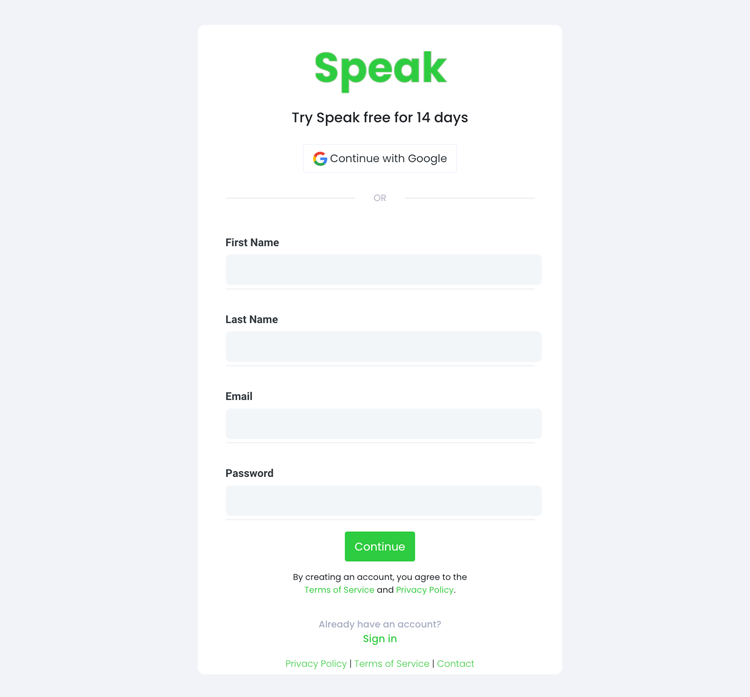
Krok 1: Vytvoření účtu Speak
To start your Icelandic subtitling, you first need to vytvořit účet Speak. Žádné obavy, je to velmi snadné!
Our team is happy to give you a 7-day trial with trial credits for Icelandic audio and video subtitling included.
To sign up for Speak and start your Icelandic subtitling, visit the Speak app register page zde.

Step 2: Upload your Icelandic file(s) for subtitling
Obvykle doporučujeme soubory MP4 pro video nebo MP3 pro zvuk.
However, we accept a range of audio and video file types. Once you upload your file all you have to do is select “Icelandic” from the language dropdown menu to automatically subtitle in Icelandic.
You can upload your Icelandic file for subtitling in several ways using Speak:
Přijaté typy islandských zvukových souborů
- Islandské MP3
- Islandština M4A
- Islandský WAV
- Islandský OGG
- Islandský WEBM
- Islandština M4P
Přijímané typy islandských video souborů
- Islandský MP4
- Islandština M4V
- Islandské WMV
- Islandské AVI
- Islandský MOV
- Islandština FLV
Veřejně dostupné islandské adresy URL
Média můžete do služby Speak nahrávat také prostřednictvím veřejně dostupné adresy URL.
As long as the file type extension is available at the end of the URL you will have no problem importing your recording for automatic Icelandic subtitling and analysis.
Islandské adresy URL YouTube
Funkce Speak je kompatibilní s videi YouTube. Stačí zkopírovat adresu URL videa na YouTube (např., https://www.youtube.com/watch?v=qKfcLcHeivc).
Aplikace Speak automaticky vyhledá soubor, vypočítá jeho délku a importuje video.
Ujistěte se, že používáte celý odkaz, a ne zkrácený úryvek z YouTube. Dále se ujistěte, že jste z adresy URL odstranili název kanálu.
Integrace řeči
Jak již bylo zmíněno, Speak obsahuje také řadu integrací pro Zoom, Zapier, Vimeo a další, které vám pomohou automaticky titulkovat vaše média.
Tato knihovna integrací se stále rozrůstá! Máte požadavek? Neváhejte nám poslat zprávu.

Krok 3: Automatický výpočet a úhrada celkové částky
Once you have your Icelandic audio or video file ready and load it into Speak, it will automatically calculate the total cost (trial credits are included in the trial – take advantage of it!).
Můžete si předplatit individuální tarif pomocí naší kalkulačky v reálném čase se zahrnutými minutami.
Můžete také přidat zůstatek nebo platit za nahrávání bez plánu pomocí svého kreditní karta.

Step 4: Wait for Speak to subtitle your Icelandic audio or Icelandic video
Our automated subtitling software will prepare your Icelandic subtitles in as little as a few minutes. Generally, Speak takes about half the audio or video length to produce the subtitles and insights.
Once completed, you will get an email notification that your Icelandic subtitles is complete. That email will contain a link back to the file so you can access the interactive media player with the Icelandic subtitles, analysis, and export formats ready for you.
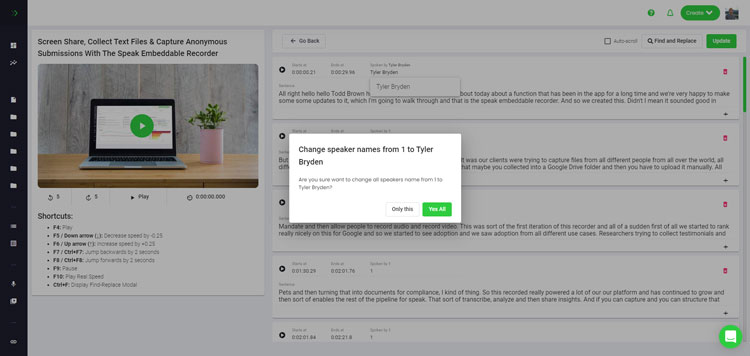
Step 5: View and edit your automated Icelandic subtitles
Chcete se pustit do úprav titulků sami? Všechno v pořádku! Jakmile obdržíte automatické titulky, máte možnost je kdykoli upravit.
Easily update speaker names, find and replace, and get your automatic Icelandic subtitles up to full accuracy with our intuitive subtitles editing system.
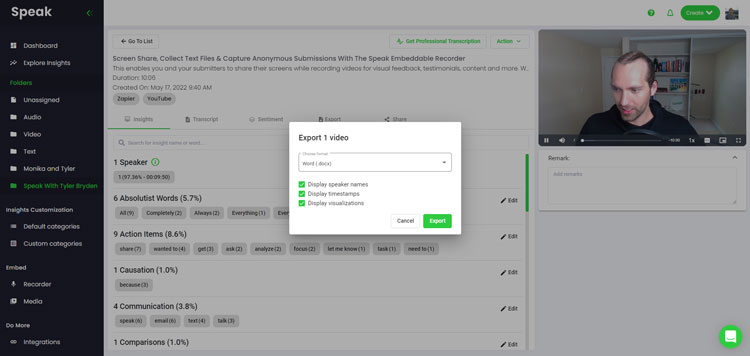
Step 6: Export your Icelandic subtitles and share interactive media players
With Speak, you can easily export Icelandic subtitles to many formats.
Below is a list of options for exporting your Icelandic subtitles in Speak:
- Export Icelandic subtitles to SRTs
- Export Icelandic subtitles to VTTs
Efektivnější způsob sdílení titulků je prostřednictvím sdílená knihovna médií to zahrnuje mediální soubor, informace z umělé inteligence a interaktivní titulky.
S programem Speak můžete dělat mnohem více pro obohacení hodnoty svých médií a titulků.
Nikdy neváhejte a pošlete nám zprávu na živém chatu - jsme tu vždy pro vás!
We talked about Icelandic subtitling here, but you may be interested in how to subtitle in other languages instantly and easily with Speak’s intuitive subtitling and natural language processing software.
Níže jsme sdíleli zdroje o všech jazycích, ve kterých vám Speak může pomoci s titulky!
Join 300,000+ users finding radical efficiencies with their audio, video and text data to drive value.
How Much Does It Cost To Subtitle Icelandic?
Speak offers highly competitive pricing for Icelandic subtitling compared to other subtitling solutions. For a starting user, Speak offers automated Icelandic subtitling from 2 credits per hour of audio on pay as you go (1 credit = US$1). Pro includes 25 credits per user per month.
Naše ceny se také odvíjejí od objemu médií a velkým zákazníkům můžeme nabídnout ještě větší slevy.
So, if you have over 100 hours of Icelandic subtitling per month please contact us through live chat and we will set you up with a customized price per minute to make Icelandic subtitling even more affordable!
You can learn more about how to subtitle Icelandic with Speak and the relevant pricing on the webové stránky s cenami a stránka s cenami v aplikaci.
What Can You Subtitle In Icelandic?
- Subtitle Icelandic interviews
- Subtitle Icelandic videos
- Subtitle Icelandic audio
- Subtitle Icelandic earnings calls
- Subtitle Icelandic focus groups
- Subtitle Icelandic meetings
- Subtitle Icelandic phone calls
- Subtitle Icelandic YouTube videos
- Subtitle Icelandic Vimeo videos
- Subtitle Icelandic Zoom recordings
- Subtitle Icelandic Google Meet recordings
- Titulky k nahrávkám v Microsoft Teams
- Subtitle Icelandic podcasts
A mnohem více!
Jaké další jazyky umí titulky?
Speak má již uživatele z více než 90 zemí a neustále dostáváme žádosti o titulkování a analýzu v různých jazycích.
Do aplikace Speak! tak průběžně přidáváme další jazyky. Zde jsou jen některé z rostoucího seznamu jazyků, které Speak nabízí:
- Jak vytvořit afrikánské titulky
- Jak vytvořit arabské (egyptské) titulky
- Jak vytvořit arabské (irácké) titulky
- Jak vytvořit arabské (izraelské) titulky
- Jak vytvořit arabské (jordánské) titulky
- Jak vytvořit arabské (kuvajtské) titulky
- Jak vytvořit arabské (libanonské) titulky
- Jak vytvořit arabské (ománské) titulky
- Jak vytvořit arabské titulky (Palestinská samospráva)
- Jak vytvořit arabské (katarské) titulky
- Jak vytvořit arabské (Saúdská Arábie) titulky
- Jak vytvořit arabské titulky (Syrská arabská republika)
- Jak vytvořit arabské titulky (Spojené arabské emiráty)
- Jak vytvořit moderní standardní arabské titulky (Bahrajn)
- Jak vytvořit arménské titulky
- Jak vytvořit bulharské titulky
- Jak vytvořit katalánské titulky
- Jak vytvořit čínské (kantonské, tradiční) titulky
- Jak vytvořit čínské (zjednodušené) titulky
- Jak vytvořit čínské (tradiční) titulky
- Jak vytvořit chorvatské titulky
- Jak vytvořit české titulky
- Jak vytvořit dánské titulky
- Jak vytvořit holandské titulky
- Jak vytvořit anglické titulky
- Jak vytvořit anglické (australské) titulky
- Jak vytvořit anglické (indické) titulky
- Jak vytvořit anglické (irské) titulky
- Jak vytvořit anglické (novozélandské) titulky
- Jak vytvořit anglické (skotské) titulky
- Jak vytvořit anglické (jihoafrické) titulky
- Jak vytvořit anglické (Spojené království) titulky
- Jak vytvořit anglické (Spojené státy) titulky
- Jak vytvořit estonské titulky
- Jak vytvořit titulky v perštině
- Jak vytvořit finské titulky
- Jak vytvořit francouzské titulky
- Jak vytvořit francouzské (kanadské) titulky
- Jak vytvořit německé titulky
- Jak vytvořit německé (švýcarské) titulky
- Jak vytvořit řecké titulky
- Jak vytvořit titulky v gudžarátštině
- Jak vytvořit hebrejské titulky
- Jak vytvořit hindské titulky
- Jak vytvořit maďarské titulky
- Jak vytvořit islandské titulky
- Jak vytvořit indonéské titulky
- Jak vytvořit irské titulky
- Jak vytvořit italské titulky
- Jak vytvořit japonské titulky
- Jak vytvořit titulky v kannadštině
- Jak vytvořit korejské titulky
- Jak vytvořit lotyšské titulky
- Jak vytvořit litevské titulky
- Jak vytvořit malajské titulky
- Jak vytvořit malajálamské titulky
- Jak vytvořit norské titulky
- Jak vytvořit perské titulky
- Jak vytvořit polské titulky
- Jak vytvořit portugalské titulky
- Jak vytvořit portugalské (brazilské) titulky
- Jak vytvořit portugalské (portugalské) titulky
- Jak vytvořit rumunské titulky
- Jak vytvořit ruské titulky
- Jak vytvořit slovenské titulky
- Jak vytvořit slovinské titulky
- Jak vytvořit španělské titulky
- Jak vytvořit španělské (mexické) titulky
- Jak vytvořit švédské titulky
- Jak vytvořit tamilské titulky
- Jak vytvořit telugské titulky
- Jak vytvořit thajské titulky
- Jak vytvořit turecké titulky
- Jak vytvořit ukrajinské titulky
- Jak vytvořit vietnamské titulky
Nyní jich přibylo mnohem více!
Můžete si prohlédnout celý seznam jazyků, které Speak podporuje prostřednictvím softwaru i rozhraní API.
Prozkoumejte Speak AI
Speak AI je platforma pro výzkum hlasových technologií a umělé inteligence. Přepis ve více než 100 jazycích, NLP analytika, analýza sentimentu, AI agenti a podnikové poradenství.
 English
 Español
 Français
 Italiano
 العربية
 Português do Brasil
 Nederlands
 Deutsch
 עִבְרִית
 Русский
 日本語
 Polski
 Čeština
 Українська
 Slovenščina
 Svenska
 Ελληνικά
 Norsk bokmål
 简体中文
 Türkçe
 Català
 Magyar
 한국어
 Slovenčina
 Suomi