
How to Create Japanese Captions
If you’re looking for a way to get your audio and video content in front of a broader audience, creating Japanese captions is a great way to go. Japanese is a language that is widely used in many countries, including Japan, China, Taiwan, and Korea. With over 125 million native speakers, Japanese is the ninth most spoken language in the world. It is also the second most used language on the internet, making it a valuable tool for businesses who want to reach a global audience.
Vad är bildtexter?
Captions are an important tool for making audio and video content accessible to everyone, including people who are deaf or hard of hearing. They’re also useful for people who don’t speak the language of the video, as they provide a written version of the audio. Captions are different from subtitles, which provide a translation of the audio into another language.
Benefits of Transcribing and Creating Captions in Japanese
Creating Japanese captions offers a variety of benefits, from expanding your audience reach to making your content more accessible.
Broaden Your Audience Reach
Adding Japanese captions to your content is a great way to reach a wider audience. With the rise of streaming services, more and more people are watching videos in languages other than their own. By creating captions in multiple languages, you can make sure that everyone has access to your content, regardless of their language.
Make Content Accessible to Everyone
Adding captions to your content is essential for making it accessible to people who are deaf or hard of hearing. By creating Japanese captions, you can ensure that your content is accessible to people who are deaf or hard of hearing and can’t access the audio of your content.
Öka engagemanget
Captions can also help to increase engagement with your content. Studies have shown that captions can improve comprehension, retention, and engagement with content. Additionally, captions can help to make your content more engaging for viewers who don’t speak the language of the video, as they can follow along with the written version of the audio.
The Benefits of Speak AI’s Speech Recognition and Natural Language Platform
Speak AI’s speech recognition and natural language platform is the perfect solution for creating Japanese captions. The platform’s advanced speech recognition technology can quickly and accurately transcribe audio and video in multiple languages, including Japanese. Additionally, Speak AI’s natural language processing capabilities can help to quickly and accurately generate captions in multiple languages.
Speak AI’s platform is the perfect solution for researchers, marketers, and businesses who want to quickly and accurately create captions for their audio and video content. With over 50,000 users, Speak AI is the perfect platform for anyone who wants to quickly and easily create Japanese captions for their content.
Slutsats
Creating Japanese captions is a great way to make your content more accessible and reach a wider audience. Speak AI’s speech recognition and natural language platform makes it easy to quickly and accurately transcribe and generate captions in multiple languages, including Japanese. With over 50,000 users, Speak AI is the perfect platform for anyone who wants to quickly and easily create captions for their audio and video content.
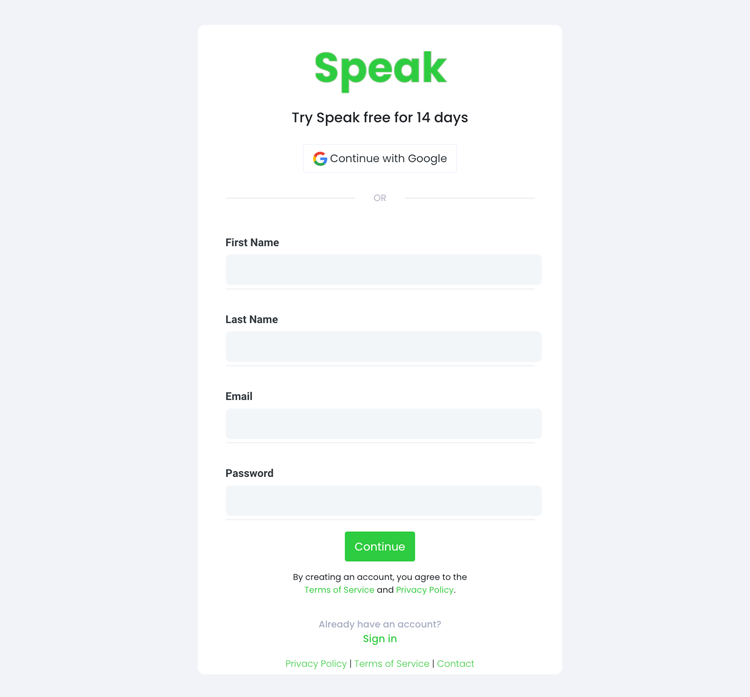
Steg 1: Skapa ett Speak-konto
To start your Japanese captioning, you first need to skapa ett Speak-konto. Inga problem, det här är superenkelt att göra!
Our team is happy to give you a 7-day trial with trial credits for Japanese audio and video captioning included.
To sign up for Speak and start your Japanese captioning, visit the Speak app register page here.

Step 2: Upload your Japanese file(s) for Captioning
Vi rekommenderar vanligtvis MP4-filer för video eller MP3-filer för ljud.
However, we accept a range of audio and video file types. Once you upload your file all you have to do is select “Japanese” from the language dropdown menu to automatically caption in Japanese.
You can upload your Japanese file for captioning in several ways using Speak:
Accepterade japanska ljudfilstyper
- Japanska MP3
- Japanska M4A
- Japanska WAV
- Japansk OGG
- Japansk WEBM
- Japanska M4P
Accepterade japanska videofiltyper
- Japanska MP4
- Japanska M4V
- Japansk WMV
- Japansk AVI
- Japansk MOV
- Japansk FLV
Offentligt tillgängliga japanska webbadresser
Du kan också ladda upp media till Speak via en allmänt tillgänglig webbadress.
As long as the file type extension is available at the end of the URL you will have no problem importing your recording for automatic Japanese captioning and analysis.
Japanska webbadresser till YouTube
Speak är kompatibelt med YouTube-videor. Allt du behöver göra är att kopiera webbadressen till YouTube-videon (t.ex, https://www.youtube.com/watch?v=qKfcLcHeivc).
Speak hittar automatiskt filen, beräknar längden och importerar videon.
Se till att du använder den fullständiga länken och inte det förkortade YouTube-snippet. Se dessutom till att du tar bort kanalnamnet från webbadressen.
Speak-integrationer
Som nämnts innehåller Speak också en rad integrationer för Zoom, Zapier, Vimeo och mer som hjälper dig att automatiskt texta din media.
Detta bibliotek av integrationer fortsätter att växa! Har du en förfrågan? Känn dig uppmuntrad att skicka ett meddelande till oss.

Steg 3: Beräkna och betala totalsumman automatiskt
Once you have your Japanese audio or video file ready and load it into Speak, it will automatically calculate the total cost (trial credits are included in the trial – take advantage of it!).
Du kan betala genom att teckna en personlig plan med hjälp av vår realtidskalkylator med inkluderade minuter.
Du kan också lägg till en balans eller betala för uppladdningar utan abonnemang med din Kreditkort.

Step 4: Wait for Speak to caption your Japanese audio or Japanese video
Our automated captioning software will prepare your Japanese captions in as little as a few minutes. Generally, Speak takes about half the audio or video length to produce the captions and insights.
Once completed, you will get an email notification that your Japanese captions is complete. That email will contain a link back to the file so you can access the interactive media player with the Japanese captions, analysis, and export formats ready for you.
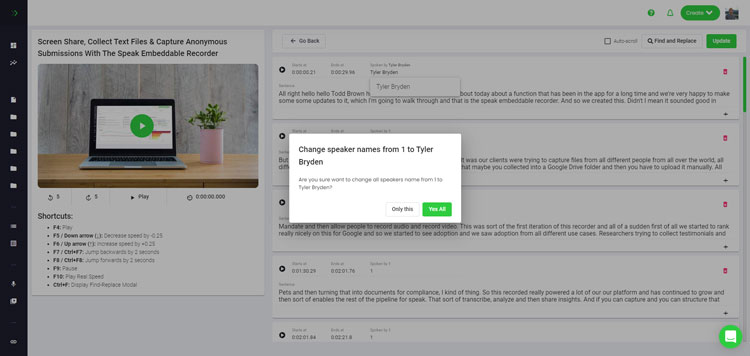
Step 5: View and edit your automated Japanese captions
Vill du redigera textningen själv? Allt är bra! När du har fått dina automatiska textningar kan du redigera dem när som helst.
Easily update speaker names, find and replace, and get your automatic Japanese captions up to full accuracy with our intuitive captions editing system.
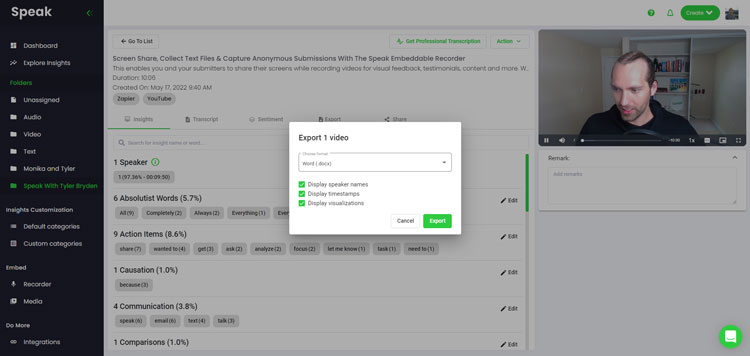
Step 6: Export your Japanese captions and share interactive media players
With Speak, you can easily export Japanese captions to many formats.
Below is a list of options for exporting your Japanese captions in Speak:
- Export Japanese captions to SRTs
- Export Japanese captions to VTTs
Ett mer effektivt sätt att dela textning är genom en delbart mediabibliotek som inkluderar mediefilen, AI-insikter och interaktiva textningar.
Det finns så mycket mer du kan göra med Speak för att berika värdet på dina medier och textningar.
Tveka aldrig att skicka ett meddelande till oss på livechatten - vi finns alltid här för att hjälpa till!
We talked about Japanese captioning here, but you may be interested in how to caption in other languages instantly and easily with Speak’s intuitive captioning and natural language processing software.
Vi har delat resurser nedan om alla språk som Speak kan hjälpa dig med textning!
Join 300,000+ users finding radical efficiencies with their audio, video and text data to drive value.
How Much Does It Cost To Caption Japanese?
Speak offers highly competitive pricing for Japanese captioning compared to other captioning solutions. For a starting user, Speak offers automated Japanese captioning from 2 credits per hour of audio on pay as you go (1 credit = US$1). Pro includes 25 credits per user per month.
Vi anpassar också vår prissättning efter medievolym och kan erbjuda ännu större rabatter till stora kunder.
So, if you have over 100 hours of Japanese captioning per month please contact us through live chat and we will set you up with a customized price per minute to make Japanese captioning even more affordable!
You can learn more about how to caption Japanese with Speak and the relevant pricing on the webbplats prissättning sida och prissättningssida i appen.
What Can You Caption In Japanese?
- Caption Japanese interviews
- Caption Japanese videos
- Caption Japanese audio
- Caption Japanese earnings calls
- Caption Japanese focus groups
- Caption Japanese meetings
- Caption Japanese phone calls
- Caption Japanese YouTube videos
- Caption Japanese Vimeo videos
- Caption Japanese Zoom recordings
- Caption Japanese Google Meet recordings
- Textning av Microsoft Teams-inspelningar
- Caption Japanese podcasts
Och så mycket mer!
Vilka andra språk kan textning användas?
Speak har redan användare från över 90 länder och vi får kontinuerligt förfrågningar om att texta och analysera på olika språk.
Därför lägger vi kontinuerligt till fler språk i Speak! Här är bara några av de allt fler språk som Speak erbjuder:
- Hur man skapar texter på afrikaans
- Hur man skapar arabiska (Egyptiska) bildtexter
- Hur man skapar arabiska (Irak) texter
- Hur man skapar arabiska (Israeliska) bildtexter
- Hur man skapar arabiska (Jordanien) texter
- Hur man skapar arabiska (Kuwait) texter
- Hur man skapar arabiska (Libanon) texter
- Hur man skapar arabiska (Oman) bildtexter
- Hur man skapar arabiska (palestinska myndighets) bildtexter
- Hur man skapar arabiska (Qatariska) texter
- Hur man skapar arabiska (Saudiarabien) texter
- Hur man skapar arabiska (Syriska Arabrepubliken) texter
- Hur man skapar arabiska (Förenade Arabemiraten) bildtexter
- Hur man skapar moderna arabiska bildtexter (Bahrain)
- Hur man skapar armeniska bildtexter
- Hur man skapar bulgariska texter
- Hur man skapar katalanska texter
- Hur man skapar kinesiska (kantonesiska, traditionella) texter
- Hur man skapar kinesiska (förenklade) texter
- Hur man skapar kinesiska (traditionella) texter
- Hur man skapar kroatiska texter
- Hur man skapar tjeckiska texter
- Hur man skapar danska texter
- Hur man skapar nederländska texter
- Hur man skapar engelska texter
- Hur man skapar engelska (Australien) texter
- Hur man skapar engelska (indiska) texter
- Hur man skapar engelska (irländska) texter
- Hur man skapar engelska (Nya Zeeland) texter
- Hur man skapar engelska (skotska) texter
- Hur man skapar engelska (sydafrikanska) texter
- Hur man skapar engelska (Storbritannien) texter
- Hur man skapar engelska (USA) texter
- Hur man skapar estniska texter
- Hur man skapar farsi-texter
- Hur man skapar finska texter
- Hur man skapar franska texter
- Hur man skapar franska (Kanada) texter
- Hur man skapar tyska bildtexter
- Hur man skapar tyska (schweiziska) texter
- Hur man skapar grekiska bildtexter
- Hur man skapar gujarati-texter
- Hur man skapar hebreiska bildtexter
- Hur man skapar textning på hindi
- Hur man skapar ungerska texter
- Hur man skapar isländska texter
- Hur man skapar indonesiska texter
- Hur man skapar irländska texter
- Hur man skapar italienska texter
- Hur man skapar japanska texter
- Hur man skapar textning på kannada
- Hur man skapar koreanska texter
- Hur man skapar lettiska texter
- Hur man skapar litauiska texter
- Hur man skapar malaysiska texter
- Hur man skapar textning på malayalam
- Hur man skapar norska texter
- Hur man skapar persiska bildtexter
- Hur man skapar polska texter
- Hur man skapar portugisiska texter
- Hur man skapar portugisiska (brasilianska) texter
- Hur man skapar portugisiska (Portugal) bildtexter
- Hur man skapar rumänska texter
- Hur man skapar ryska texter
- Hur man skapar slovakiska texter
- Hur man skapar slovenska texter
- Hur man skapar spanska texter
- Hur man skapar spanska (mexikanska) texter
- Hur man skapar svensk textning
- Hur man skapar tamilska texter
- Hur man skapar telugu-texter
- Hur man skapar thailändska texter
- Hur man skapar turkiska texter
- Hur man skapar ukrainska texter
- Hur man skapar vietnamesiska texter
Det finns nu många fler tillagda!
Du kan se hela listan över språk som Speak stöder genom både programvaran och API:erna.
Utforska Speak AI
Speak AI är en plattform för röstteknik och AI-forskning. Transkription på över 100 språk, NLP-analys, sentimentanalys, AI-agenter och företagsrådgivning.
 English
 Español
 Français
 Italiano
 العربية
 Português do Brasil
 Nederlands
 Deutsch
 עִבְרִית
 Русский
 日本語
 Polski
 Čeština
 Українська
 Slovenščina
 Svenska
 Ελληνικά
 Norsk bokmål
 简体中文
 Türkçe
 Català
 Magyar
 한국어
 Slovenčina
 Suomi