
Jak tworzyć rosyjskie napisy
Speak AI is a speech recognition and natural language platform with over 70,000 users. Our software provides powerful transcription and subtitling capabilities, allowing you to add subtitles to audio and video content in any language you need, including Russian. In this article, we will explain the importance of Russian subtitling, discuss the benefits of adding subtitles to your audio and video content, and provide a step-by-step guide on how to create Russian subtitles.
Why Subtitle in Russian?
Russian is a widely spoken language, used in many countries across the world including Russia, Kazakhstan, Belarus, Kyrgyzstan, Tajikistan, Ukraine, and Moldova. According to Ethnologue, there are over 265 million people who speak Russian as their mother tongue.
Adding Russian subtitles to your audio and video content can open up a whole new audience of potential viewers. Subtitles also provide other benefits. For example, they can help make your content more accessible to those with hearing impairments or for those who are watching your videos in a noisy environment.
Czym są napisy?
Subtitles are captions or text versions of the spoken words in a video or audio file. They are usually displayed at the bottom of the screen and are used to translate the dialogue or provide additional information about the content. Subtitles are different from captions, which are more descriptive and provide additional contextual information about the video.
Benefits of Subtitling in Russian
Adding subtitles to audio and video content in Russian can be beneficial for researchers, marketers, and businesses. Here are some of the key benefits:
1. Dotrzyj do szerszej publiczności
By adding Russian subtitles to your audio and video content, you can reach a larger audience of Russian speakers and those who are learning the language. This can help you grow your viewership and increase engagement.
2. Increased Accessibility
Adding subtitles to your content can make it more accessible to those with hearing impairments or those who are watching your videos in a noisy environment. This can help you reach a wider audience and ensure that your content is available to everyone.
3. More Engaging Content
Subtitles can make your content more engaging by providing useful information about the content or context. This can help viewers get more out of your content and can keep them watching for longer.
Jak tworzyć rosyjskie napisy
Creating Russian subtitles is a relatively simple process. Here is a step-by-step guide:
1. Upload Your Video
The first step is to upload your video file to Speak AI. Simply select the “Upload” button and select your file.
2. Select Language
Once the file has been uploaded, select the language you want the subtitles to be created in. In this case, select “Russian”.
3. Transcribe and Create Subtitles
Speak AI will automatically transcribe the audio and create subtitles in Russian. You can then review and edit the subtitles if needed.
4. Publish
Once you are happy with the subtitles, you can publish them directly to YouTube or other video streaming platforms.
Wnioski
Adding subtitles to audio and video content in Russian can help you reach a larger audience, make your content more accessible, and create more engaging content. With Speak AI, it is easy to create subtitles in any language, including Russian. Our software provides powerful transcription and subtitling capabilities, allowing you to quickly and easily add subtitles to audio and video content.
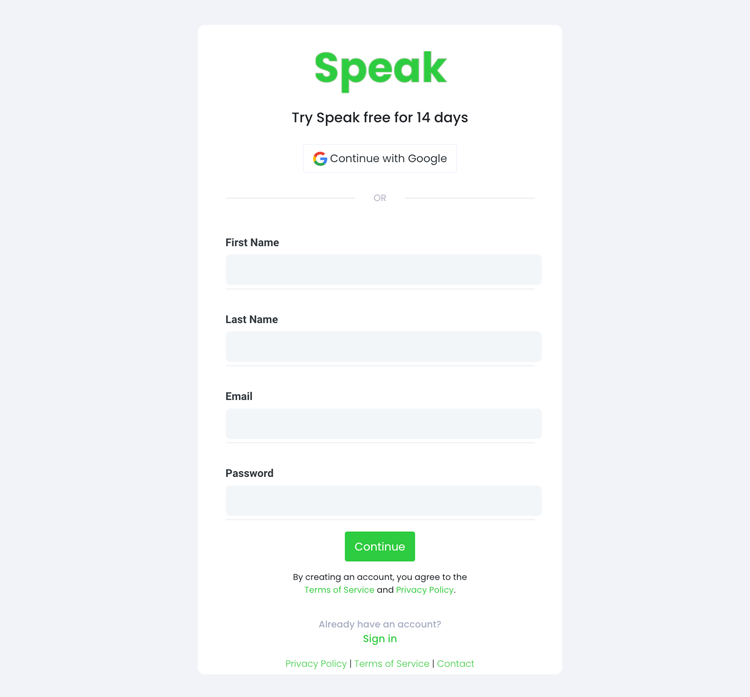
Krok 1: Utwórz konto Speak
To start your Russian subtitling, you first need to Utwórz konto Speak. Bez obaw, jest to bardzo łatwe do zrobienia!
Our team is happy to give you a 7-day trial with trial credits for Russian audio and video subtitling included.
To sign up for Speak and start your Russian subtitling, visit the Speak app register page tutaj.

Step 2: Upload your Russian file(s) for subtitling
Zazwyczaj zalecamy pliki MP4 dla wideo lub MP3 dla audio.
However, we accept a range of audio and video file types. Once you upload your file all you have to do is select “Russian” from the language dropdown menu to automatically subtitle in Russian.
You can upload your Russian file for subtitling in several ways using Speak:
Akceptowane typy plików audio w języku rosyjskim
- Rosyjski MP3
- Rosyjski M4A
- Rosyjski WAV
- Rosyjski OGG
- Rosyjski WEBM
- Rosyjski M4P
Akceptowane rosyjskie typy plików wideo
- Rosyjski MP4
- Rosyjski M4V
- Rosyjski WMV
- Rosyjski AVI
- Rosyjski MOV
- Rosyjski FLV
Publicznie dostępne rosyjskie adresy URL
Możesz także przesyłać multimedia do Speak za pośrednictwem publicznie dostępnego adresu URL.
As long as the file type extension is available at the end of the URL you will have no problem importing your recording for automatic Russian subtitling and analysis.
Rosyjskie adresy URL YouTube
Speak jest kompatybilny z filmami z YouTube. Wszystko, co musisz zrobić, to skopiować adres URL filmu z YouTube (na przykład, https://www.youtube.com/watch?v=qKfcLcHeivc).
Speak automatycznie znajdzie plik, obliczy jego długość i zaimportuje wideo.
Upewnij się, że używasz pełnego linku, a nie skróconego fragmentu YouTube. Ponadto należy usunąć nazwę kanału z adresu URL.
Integracje Speak
Jak wspomniano, Speak zawiera również szereg integracji dla Zoom, Zapier, Vimeo i inne, które pomogą Ci automatycznie utworzyć napisy do Twoich multimediów.
Ta biblioteka integracji wciąż rośnie! Masz jakieś życzenie? Zachęcamy do wysłania nam wiadomości.

Krok 3: Automatycznie oblicz i zapłać łączną kwotę
Once you have your Russian audio or video file ready and load it into Speak, it will automatically calculate the total cost (trial credits are included in the trial – take advantage of it!).
Możesz zapłacić, subskrybując spersonalizowany plan za pomocą naszego kalkulatora czasu rzeczywistego z wliczonymi minutami.
Można również dodać saldo lub płacić za przesyłanie bez planu, korzystając ze swojego karta kredytowa.

Step 4: Wait for Speak to subtitle your Russian audio or Russian video
Our automated subtitling software will prepare your Russian subtitles in as little as a few minutes. Generally, Speak takes about half the audio or video length to produce the subtitles and insights.
Once completed, you will get an email notification that your Russian subtitles is complete. That email will contain a link back to the file so you can access the interactive media player with the Russian subtitles, analysis, and export formats ready for you.
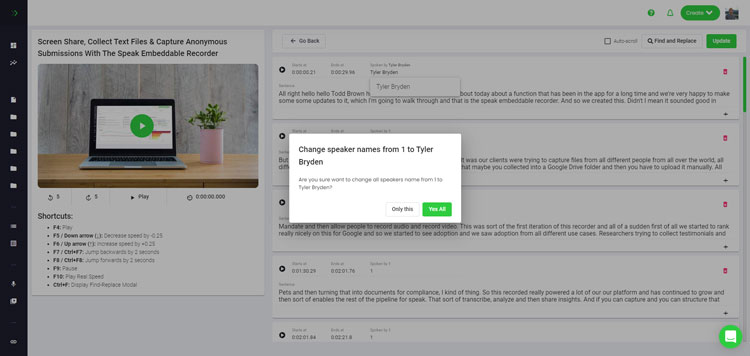
Step 5: View and edit your automated Russian subtitles
Chcesz samodzielnie zająć się edycją napisów? W porządku! Po otrzymaniu automatycznych napisów możesz je edytować w dowolnym momencie.
Easily update speaker names, find and replace, and get your automatic Russian subtitles up to full accuracy with our intuitive subtitles editing system.
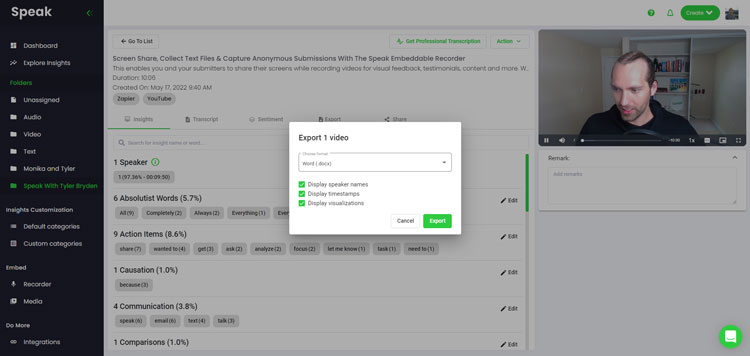
Step 6: Export your Russian subtitles and share interactive media players
With Speak, you can easily export Russian subtitles to many formats.
Below is a list of options for exporting your Russian subtitles in Speak:
- Export Russian subtitles to SRTs
- Export Russian subtitles to VTTs
Bardziej efektywnym sposobem udostępniania napisów jest Biblioteka multimediów z możliwością udostępniania w tym plik multimedialny, spostrzeżenia sztucznej inteligencji i interaktywne napisy.
Dzięki Speak możesz zrobić o wiele więcej, aby zwiększyć wartość swoich multimediów i napisów.
Nigdy nie wahaj się wysłać nam wiadomości na czacie na żywo - zawsze służymy pomocą!
We talked about Russian subtitling here, but you may be interested in how to subtitle in other languages instantly and easily with Speak’s intuitive subtitling and natural language processing software.
Poniżej udostępniamy materiały dotyczące wszystkich języków, w których Speak może pomóc Ci utworzyć napisy!
Join 300,000+ users finding radical efficiencies with their audio, video and text data to drive value.
How Much Does It Cost To Subtitle Russian?
Speak offers highly competitive pricing for Russian subtitling compared to other subtitling solutions. For a starting user, Speak offers automated Russian subtitling from 2 credits per hour of audio on pay as you go (1 credit = US$1). Pro includes 25 credits per user per month.
Skalujemy również nasze ceny w oparciu o ilość mediów i możemy zaoferować jeszcze większe rabaty dla dużych klientów.
So, if you have over 100 hours of Russian subtitling per month please contact us through live chat and we will set you up with a customized price per minute to make Russian subtitling even more affordable!
You can learn more about how to subtitle Russian with Speak and the relevant pricing on the strona z cennikiem witryny i strona z cenami w aplikacji.
What Can You Subtitle In Russian?
- Subtitle Russian interviews
- Subtitle Russian videos
- Subtitle Russian audio
- Subtitle Russian earnings calls
- Subtitle Russian focus groups
- Subtitle Russian meetings
- Subtitle Russian phone calls
- Subtitle Russian YouTube videos
- Subtitle Russian Vimeo videos
- Subtitle Russian Zoom recordings
- Subtitle Russian Google Meet recordings
- Napisy do nagrań Microsoft Teams
- Subtitle Russian podcasts
I wiele więcej!
W jakich innych językach można używać napisów?
Speak ma już użytkowników z ponad 90 krajów, a my ciągle otrzymujemy prośby o dodanie napisów i analiz w różnych językach.
Dlatego stale dodajemy więcej języków do Speak! Oto tylko niektóre z rosnącej listy języków, które oferuje Speak:
- Jak tworzyć napisy w języku afrikaans
- Jak tworzyć napisy w języku arabskim (Egipt)
- Jak tworzyć napisy w języku arabskim (Irak)
- Jak tworzyć napisy w języku arabskim (Izrael)
- Jak tworzyć napisy w języku arabskim (Jordania)
- Jak tworzyć napisy w języku arabskim (Kuwejt)
- Jak tworzyć napisy w języku arabskim (Liban)
- Jak tworzyć napisy w języku arabskim (Oman)
- Jak tworzyć napisy w języku arabskim (Autonomia Palestyńska)
- Jak tworzyć napisy w języku arabskim (Katar)
- Jak tworzyć napisy w języku arabskim (Arabia Saudyjska)
- Jak tworzyć napisy w języku arabskim (Syryjska Republika Arabska)
- Jak tworzyć napisy w języku arabskim (Zjednoczone Emiraty Arabskie)
- Jak tworzyć nowoczesne napisy w języku arabskim (Bahrajn)
- Jak tworzyć napisy w języku ormiańskim
- Jak tworzyć napisy w języku bułgarskim
- Jak tworzyć napisy w języku katalońskim
- Jak tworzyć napisy w języku chińskim (kantońskim, tradycyjnym)
- Jak tworzyć napisy w języku chińskim (uproszczonym)
- Jak tworzyć chińskie (tradycyjne) napisy
- Jak tworzyć napisy w języku chorwackim
- Jak tworzyć czeskie napisy
- Jak tworzyć napisy w języku duńskim
- Jak tworzyć napisy w języku holenderskim
- Jak tworzyć napisy w języku angielskim
- Jak tworzyć napisy w języku angielskim (Australia)
- Jak tworzyć napisy w języku angielskim (indyjskim)
- Jak tworzyć napisy w języku angielskim (irlandzkim)
- Jak tworzyć napisy w języku angielskim (Nowa Zelandia)
- Jak tworzyć napisy w języku angielskim (szkockim)
- Jak tworzyć napisy w języku angielskim (południowoafrykańskim)
- Jak tworzyć napisy w języku angielskim (Wielka Brytania)
- Jak tworzyć napisy w języku angielskim (Stany Zjednoczone)
- Jak tworzyć napisy w języku estońskim
- Jak tworzyć napisy w języku perskim
- Jak tworzyć fińskie napisy
- Jak tworzyć napisy w języku francuskim
- Jak tworzyć napisy w języku francuskim (Kanada)
- Jak tworzyć napisy w języku niemieckim
- Jak tworzyć napisy w języku niemieckim (szwajcarskim)
- Jak tworzyć greckie napisy
- Jak tworzyć napisy w języku gudżarati
- Jak tworzyć napisy w języku hebrajskim
- Jak tworzyć napisy w języku hindi
- Jak tworzyć napisy w języku węgierskim
- Jak tworzyć napisy w języku islandzkim
- Jak tworzyć napisy w języku indonezyjskim
- Jak tworzyć irlandzkie napisy
- Jak tworzyć włoskie napisy
- Jak tworzyć japońskie napisy
- Jak tworzyć napisy w języku kannada
- Jak tworzyć napisy w języku koreańskim
- Jak tworzyć napisy w języku łotewskim
- Jak tworzyć napisy w języku litewskim
- Jak tworzyć napisy w języku malajskim
- Jak tworzyć napisy w języku malajalam
- Jak tworzyć napisy w języku norweskim
- Jak tworzyć napisy w języku perskim
- Jak stworzyć polskie napisy
- Jak tworzyć napisy w języku portugalskim
- Jak tworzyć napisy w języku portugalskim (brazylijskim)
- Jak tworzyć napisy w języku portugalskim (Portugalia)
- Jak tworzyć napisy w języku rumuńskim
- Jak tworzyć rosyjskie napisy
- Jak tworzyć napisy w języku słowackim
- Jak tworzyć napisy w języku słoweńskim
- Jak tworzyć napisy w języku hiszpańskim
- Jak tworzyć napisy w języku hiszpańskim (Meksyk)
- Jak tworzyć napisy w języku szwedzkim
- Jak tworzyć napisy w języku tamilskim
- Jak tworzyć napisy w języku telugu
- Jak tworzyć napisy w języku tajskim
- Jak tworzyć napisy w języku tureckim
- Jak tworzyć ukraińskie napisy
- Jak tworzyć napisy w języku wietnamskim
Teraz jest ich znacznie więcej!
Można zobaczyć cała lista języków obsługiwanych przez Speak zarówno za pośrednictwem oprogramowania, jak i interfejsów API.
Poznaj Speak AI
Speak AI to platforma badawcza poświęcona technologii głosowej i sztucznej inteligencji. Transkrypcja w ponad 100 językach, analiza języka naturalnego (NLP), analiza sentymentu, agenci AI i doradztwo biznesowe.
 English
 Español
 Français
 Italiano
 العربية
 Português do Brasil
 Nederlands
 Deutsch
 עִבְרִית
 Русский
 日本語
 Polski
 Čeština
 Українська
 Slovenščina
 Svenska
 Ελληνικά
 Norsk bokmål
 简体中文
 Türkçe
 Català
 Magyar
 한국어
 Slovenčina
 Suomi