
Introduction to Transcribing Asturian
Asturian, a cherished Romance language spoken primarily in the Asturias region of Spain, holds a special place in the hearts of its speakers. Despite not being officially recognized by the Spanish government, Asturian has a thriving linguistic community with efforts towards preservation and revival. In this digital age, transcribing Asturian content—whether it’s for academic research, market analysis, or cultural preservation—can be challenging yet profoundly rewarding. Understanding how to effectively convert Asturian to text is essential for professionals across various fields.
Asturian: Location, Popularity, and Interesting Stats
Asturian is predominantly spoken in the Asturias principality in Spain, but its influence extends beyond, with speakers in Castile and León, León, and Zamora provinces. The latest surveys estimate that around 100,000 to 450,000 people speak Asturian, with varying degrees of fluency. It’s a language with deep historical roots, tracing back to the post-Roman period. Despite its regional focus, Asturian’s unique charm and cultural significance spark interest globally, especially among linguists and cultural researchers.
Fun Facts about Asturian
Asturian boasts several intriguing aspects that enrich its appeal:
– Legal Protection: While not officially recognized by Spain’s government, Asturian enjoys protection under the autonomous statutes of Asturias, which promote its use and teaching.
– Literary Tradition: Asturian has a vibrant literary tradition dating back to the Middle Ages, showcasing its historical significance and cultural richness.
– Nyelvi sokszínűség: Asturian itself has several dialects, reflecting the region’s geographical and cultural diversity.
Why Transcribe Asturian?
Transcribing Asturian content can vastly benefit various sectors, including academic research, market research, sales, quality assurance, marketing, and businesses aiming to connect deeply with the Asturian-speaking population.
Folytassa a teljes útmutató olvasását (kattintson a kibontáshoz)
For academia, converting Asturian audio or video lectures, historical speeches, or literary readings into text can enrich research materials and facilitate deeper analysis. In market research, understanding customer feedback, interviews, or focus groups in Asturian can provide invaluable insights into consumer behavior and preferences. Sales teams can refine strategies based on accurately transcribed customer interactions, while quality assurance departments can ensure compliance and service excellence through meticulous transcription of communications. Similarly, marketing professionals can harness transcribed content for targeted advertising, SEO, and content strategy, engaging the Asturian-speaking audience more effectively.
Benefits of Automatic Transcription for Asturian
The advent of automatic transcription services like Speak Ai revolutionizes how we approach Asturian audio and video content. Here are several compelling advantages:
– Idő- és költségmegtakarítás: Manual transcription is time-consuming and costly. Automatic transcription significantly reduces turnaround times and expenses, making it accessible to more users.
– Accuracy and Consistency: Advanced NLP and AI technologies ensure high accuracy levels, even with specialized terminology or dialectal variations in Asturian.
– Searchability and Accessibility: Converting Asturian content to text enhances searchability and accessibility, making information more readily available to a broader audience.
Use Cases Across Industries
Akadémiai kutatás:
Scholars researching Asturian language, culture, or history can use transcription services to digitize oral histories, interviews, or lectures, facilitating archival and analysis.
Piackutatás:
Asturian audio to text converter tools enable analysts to dissect customer feedback and discussions, tailoring products and services to meet local needs.
Értékesítés és minőségbiztosítás:
Sales recordings and customer service calls transcribed into text can help teams improve communication strategies and ensure high-quality service delivery.
Marketing és vállalkozások:
Leveraging Asturian video to text converter tools, marketing teams can create SEO-rich content that resonates with the Asturian-speaking market, enhancing engagement and brand loyalty.
Következtetés
Understanding and preserving the Asturian language is more than a cultural endeavor; it’s a gateway to engaging with a vibrant community in meaningful ways. Speak Ai harnesses the power of NLP, AI, and large language models to offer high-quality, efficient Asturian AI to text conversion, empowering users to bridge language barriers and unlock the full potential of their Asturian content. With Speak Ai’s technology and a 4.9 rating on G2, over 150,000 users have discovered the unparalleled benefits of automatic transcription services. Whether for academic, research, or business purposes, transforming Asturian audiovisual content into accurate, searchable text is now effortlessly within reach.
How To Transcribe Asturian Using Speak
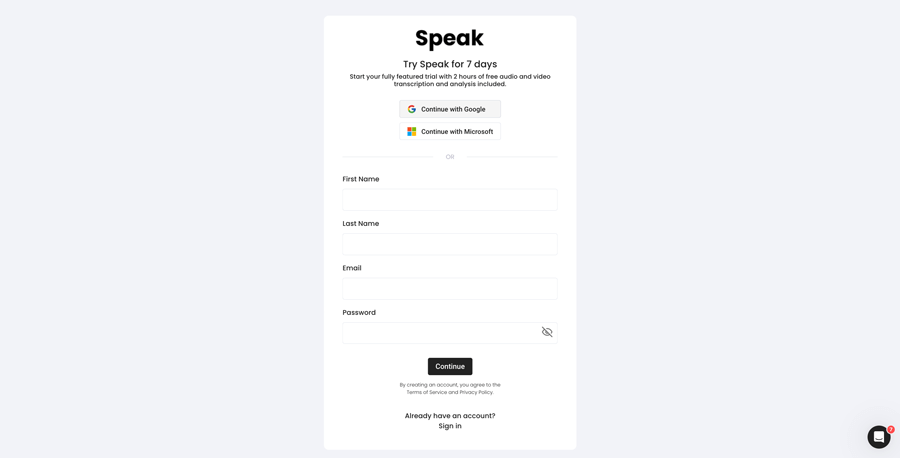
1. lépés: Hozzon létre egy Speak-fiókot
To start your Asturian transcription, you first need to hozzon létre egy Speak fiókot. Ne aggódj, ez szuper egyszerű!
Our team is happy to give you a 7-day trial with 30 minutes of free Asturian audio and video transcription included.
To sign up for Speak and start your Asturian transcription, visit the Speak app register page here.

Step 2: Upload your Asturian file(s) for Transcription
Általában MP4 formátumú videókat és MP3 formátumú hangfájlokat ajánlunk, de számos audio- és videofájltípust elfogadunk.
Once you upload your file all you have to do is select “Asturian” from the language dropdown menu to automatically transcribe in Asturian.
You can upload your Asturian file for transcription in several ways using Speak:
Accepted Asturian Audio File Types
- Asturian MP3
- Asturian M4A
- Asturian WAV
- Asturian OGG
- Asturian WEBM
- Asturian M4P
Accepted Asturian Video File Types
- Asturian MP4
- Asturian M4V
- Asturian WMV
- Asturian AVI
- Asturian MOV
- Asturian FLV
Publicly Available Asturian URLs
A Speakre egy nyilvánosan elérhető URL-címen keresztül is feltölthet médiát.
Amennyiben a fájltípus kiterjesztése megtalálható az URL-cím végén, nem okozhat gondot a felvétel automatikus átírása és elemzése céljából történő importálása.
Asturian YouTube URLs
A Speak kompatibilis a YouTube videókkal. Mindössze annyit kell tennie, hogy bemásolja a YouTube-videó URL-címét (pl, https://www.youtube.com/watch?v=qKfcLcHeivc).
A Speak automatikusan megtalálja a fájlt, kiszámítja a hosszát, és importálja a videót.
Kérjük, mindenképpen a teljes linket használja, ne pedig a rövidített YouTube-részletet. Továbbá győződjön meg róla, hogy eltávolította a csatorna nevét az URL-ből.
Speak Integrációk
Mint említettük, a Speak számos integrációt tartalmaz a következőkhöz is Nagyítás, Zapier, Vimeo és több más, amelyek segítenek automatikusan átírni a médiát.
Ez az integrációs könyvtár folyamatosan bővül! Van egy kérése? Küldjön nekünk üzenetet.
3. lépés: Számítsa ki és fizesse ki a teljes összeget automatikusan
Once you have your Asturian audio or video file ready and have loaded it into Speak, it will automatically calculate the total cost (you get 30 minutes free in the trial – take advantage of it!).
Fizethet úgy is, hogy személyre szabott tervezetre iratkozik fel, a benne foglalt perceket tartalmazó, valós idejű kalkulátorunk segítségével.
Ön is egyenleg hozzáadása vagy fizessen a feltöltésekért terv nélkül a hitelkártya.
Step 4: Wait for Speak to transcribe your Asturian audio or Asturian video
Automatizált átíró szoftverünk mindössze néhány perc alatt elkészíti az átiratot. Általában a Speak a hang vagy videó hosszának körülbelül a felét veszi igénybe az átirat és a betekintés elkészítéséhez.
Ha elkészült, kap egy e-mail értesítést arról, hogy az átirat elkészült. Ez az e-mail tartalmazni fog egy linket a fájlhoz, így elérheti az interaktív médialejátszót, amely tartalmazza az átiratot, az elemzést és az export formátumokat.

5. lépés: Automatizált átirat megtekintése és szerkesztése
Szeretné saját maga elvégezni az átirat szerkesztését? Minden rendben! Miután megkapta az automatikus átiratát, bármikor lehetősége van az átirat szerkesztésére.
Intuitív átiratszerkesztő rendszerünkkel könnyedén frissítheti a beszélők neveit, kereshet és helyettesíthet, és teljes pontosságúvá teheti az automatikus átiratot.
6. lépés: Exportálja az átiratot és ossza meg az interaktív médialejátszókkal
Az átiratot PDF, Word, TXT, HTML és még fejlettebb formátumokban, például CSV vagy JSON formátumban is exportálhatja, a tervtől függően.
Az átiratok megosztásának hatékonyabb módja a megosztható médiatár amely tartalmazza a médiafájlt, a mesterséges intelligenciát és egy interaktív átiratot.
A Speakkel még sok mindent tehet, hogy gazdagítsa a média és az átiratok értékét.
Soha ne habozzon, küldjön nekünk üzenetet a live chat-en - mindig itt vagyunk, hogy segítsünk!
We talked about Asturian transcription here, but you may be interested in how to transcribe in other languages instantly and easily with Speak’s intuitive transcription and natural language processing software. We’ve shared resources below on all the languages Speak can help you transcribe!
Csatlakozzon a több mint 200 000 felhasználóhoz, akik radikális hatékonyságot érnek el az audio-, video- és szöveges adatokkal az értéknövelés érdekében.

How Much Does It Cost To Transcribe Asturian?
Speak offers highly competitive pricing for Asturian transcription compared to other transcription solutions. For a starting user, Speak offers automated Asturian transcription for only $0.025 USD per minute. That is only $1.50 USD per hour!
Nekünk is van különleges ajánlatok az átírást, elemző csapattagokat, fordítást és egyebeket hihetetlen kedvezménnyel csomagoló árazásért!
We also scale our pricing based on media volume and can offer even bigger discounts to large customers. So, if you have over 100 hours of Asturian transcription per month, please contact us through live chat, and we will set you up with a customized price per minute to make Asturian transcription even more affordable!
You can learn more about how to transcribe Asturian with Speak and the relevant pricing on the weboldal árazási oldal és a alkalmazáson belüli árképzési oldal.
What Can You Transcribe In Asturian?
- Transcribe Asturian interviews
- Transcribe Asturian videos
- Transcribe Asturian audio
- Transcribe Asturian earnings calls
- Transcribe Asturian focus groups
- Transcribe Asturian meetings
- Transcribe Asturian phone calls
- Transcribe Asturian YouTube videos
- Transcribe Asturian Vimeo videos
- Transcribe Asturian Zoom recordings
- Transcribe Asturian Google Meet recordings
- Microsoft Teams felvételek átírása
- Transcribe Asturian podcasts
És még sok minden más!
How To Export Asturian Transcripts
With Speak, you can easily export Asturian transcriptions to many formats.
Below is a list of options for exporting your Asturian transcripts in Speak:
- Export Asturian transcripts to Word Docs
- Export Asturian transcripts to PDFs
- Export Asturian transcripts to CSVs
- Export Asturian transcripts to TXT files
- Export Asturian transcripts to HTML
- Export Asturian transcripts to SRTs
- Export Asturian transcripts to VTTs
- Export Asturian transcripts to JSON
How To Generate Asturian Captions
If you are looking to subtitle in Asturian or caption in Asturian, Speak is a powerful solution. Speak’s automatic transcription software automatically generated Asturian transcripts with timestamps that enable Speak to quickly create SRT and VTT files necessary for Asturian captions and Asturian subtitles.
Milyen más nyelveket tud Speak Transcribe?
A Speaknek már több mint 90 országból vannak felhasználói, és folyamatosan érkeznek hozzánk megkeresések különböző nyelveken történő átírásra és elemzésre.
Így folyamatosan újabb és újabb nyelvekkel bővítjük a Speak! Íme néhány a Speak által kínált nyelvek egyre bővülő listájából:
- Hogyan kell átírni az abház nyelvet
- Hogyan kell átírni albánul
- Hogyan kell amhara nyelvet átírni
- Hogyan kell arabul (Egyiptom) átírni
- Hogyan kell átírni arabul (Irak)
- Hogyan kell arabul (izraeliül) átírni
- Hogyan kell arabul (Jordánia) átírni
- Hogyan kell arabul (Kuvait) átírni
- Hogyan kell átírni arabul (libanoni)
- Hogyan kell átírni az arab modern szabványt (Bahrein)
- Hogyan kell átírni arabul (omán)
- Hogyan kell átírni az arab nyelvet (Palesztin Hatóság)
- Hogyan kell arabul (Katar) átírni
- Hogyan kell átírni arabul (Szaúd-Arábia)
- Hogyan kell átírni arabul (Szíriai Arab Köztársaság)
- Hogyan kell arabul (Egyesült Arab Emírségek) átírni
- Hogyan kell átírni örmény
- Hogyan kell átírni az asszámit
- Hogyan kell átírni az asztúriai nyelvet
- Hogyan kell azerbajdzsániul átírni
- Hogyan kell átírni baskírul
- Hogyan kell átírni baszkul
- Hogyan kell átírni fehéroruszt
- Hogyan kell átírni bengáliul
- Hogyan kell átírni bosnyák nyelven
- Hogyan kell átírni bolgár
- Hogyan kell átírni burmai nyelvet
- Hogyan kell átírni katalán
- Hogyan kell átírni kínai (kantoni, hagyományos)
- Hogyan kell átírni kínai (egyszerűsített)
- Hogyan kell átírni horvát
- Hogyan kell átírni csehül
- Hogyan kell dánul átírni
- Hogyan kell átírni holland
- Hogyan kell átírni angolul (Ausztrália)
- Hogyan kell átírni angolul (brit)
- Hogyan kell angolul (Egyesült Királyság) átírni
- Hogyan kell angolul átírni (Egyesült Államok)
- Hogyan kell észtül átírni
- Hogyan kell átírni perzsa
- Hogyan kell átírni a finn nyelvet
- Hogyan kell filippínóul átírni
- Hogyan kell flamandul átírni
- Hogyan kell átírni francia
- Hogyan kell átírni franciát (Kanada)
- Hogyan kell galíciaiul átírni
- Hogyan kell átírni grúzul
- Hogyan kell németül átírni
- Hogyan kell átírni németül (svájciul)
- Hogyan kell átírni a görög
- Hogyan kell átírni Gujarati
- Hogyan kell átírni a hausza nyelvet
- Hogyan kell átírni héberül
- Hogyan kell átírni hindi
- Hogyan kell átírni a magyar nyelvet
- Hogyan kell átírni izlandi
- Hogyan kell átírni indonéz
- Hogyan kell átírni ír
- Hogyan kell olaszul átírni
- Hogyan kell japánul átírni
- Hogyan kell átírni jávai nyelvet
- Hogyan kell átírni a kabilt
- Hogyan kell átírni kannada
- Hogyan kell kazahul átírni
- Hogyan kell átírni a khmert
- Hogyan kell átírni kinyarvandát
- Hogyan kell átírni a kiswahili nyelvet
- Hogyan kell átírni koreai
- Hogyan kell kurdul átírni
- Hogyan kell átírni kirgizül
- Hogyan kell átírni lao nyelvet
- Hogyan kell átírni a lett nyelvre
- Hogyan kell átírni litván
- Hogyan kell átírni a Lugandát
- Hogyan kell macedónul átírni
- Hogyan kell átírni maláj
- Hogyan kell átírni Malayalam
- Hogyan kell máltaiul átírni
- Hogyan kell átírni maráthiul
- Hogyan kell átírni a Meadow Marit?
- Hogyan kell átírni mongolul
- Hogyan kell átírni nepáliul
- Hogyan kell átírni a norvég nyelvet
- Hogyan kell átírni az odiát
- Hogyan kell átírni az oriját
- Hogyan kell átírni pastu nyelven
- Hogyan kell átírni perzsa
- Hogyan kell átírni lengyel
- Hogyan kell átírni a portugál nyelvet
- Hogyan kell átírni portugálul (brazil)?
- Hogyan kell portugálul átírni (Portugália)
- Hogyan kell átírni Punjabi
- Hogyan kell átírni román
- Hogyan kell átírni orosz
- Hogyan kell átírni szerbül
- Hogyan kell átírni szingaléz nyelven
- Hogyan kell szlovákul átírni
- Hogyan kell szlovénul átírni
- Hogyan kell átírni szomáliaiul
- Hogyan kell átírni a spanyol
- Hogyan kell átírni spanyolul (Mexikó)
- Hogyan kell átírni Sundanese
- Hogyan kell szuahéliül átírni
- Hogyan kell átírni svédül
- Hogyan kell átírni Tagalog
- Hogyan kell átírni tamil
- Hogyan kell átírni tatár
- Hogyan kell átírni Telugu
- Hogyan kell átírni thai
- Hogyan kell átírni a török
- Hogyan kell átírni ukrán
- Hogyan kell átírni vietnami
- Hogyan kell átírni Urdu
- Hogyan kell átírni ujgur
- Hogyan kell átírni üzbég
- Hogyan kell walesiül átírni
- Hogyan kell átírni Wolof
- Hogyan kell átírni zulu
Most már sokkal több van hozzáadva!
Láthatja a Speak által támogatott nyelvek teljes listája mind a szoftveren, mind az API-kon keresztül.
Írj át a Speak AI-val — 100+ nyelv támogatott
Speak AI supports transcription in 100+ languages including Asturian. Upload your audio or video files and get accurate, AI-powered transcriptions with built-in NLP analytics, sentiment analysis, and keyword extraction. Available for individuals, researchers, and enterprise teams.
Automatizált átíró szoftver
AI Meeting Assistant
AI hangalapú ügynökök
AI tanácsadás és megvalósítás
Audio to Text konverter
Transzkript elemző
 English
  Español
  Français
  Italiano
  العربية
  Português do Brasil
  Nederlands
  Deutsch
  עִבְרִית
  Русский
  日本語
日本語  Polski
  Čeština
  Українська
  Slovenščina
  Svenska
  Ελληνικά
  Norsk bokmål
  简体中文
简体中文  Türkçe
  Català
  Magyar
  한국어
한국어  Slovenčina
  Suomi
Suomi