
How to Create Norwegian Captions
Norwegian is a North Germanic language spoken by about 5 million people, primarily in Norway, where it is the official language. It is also used in parts of Sweden, Denmark, and Finland, as well as in some communities in the United States.
Adding captions to audio and video is an important and effective way to make content more accessible and engaging. Norwegian captions provide valuable information to viewers, and they can also help businesses reach more customers, including Norwegian-speaking audiences. In this article, we’ll discuss the benefits of creating Norwegian captions and the best methods for doing so.
Τι είναι οι υπότιτλοι;
Captions are text versions of spoken audio that appear at the bottom of the video or audio file. Unlike subtitles, captions provide a full transcription of the audio, including dialogue, sound effects, and descriptions of non-verbal elements such as music. Captions also provide information about speakers, such as their names and roles.
The Benefits of Norwegian Captions
Creating captions for Norwegian audio and video is beneficial for a variety of reasons. Captions make content accessible to people who are Deaf or hard of hearing, and they can also help viewers who don’t understand the language. Captions also make content more engaging and easier to understand, and they can help boost search engine rankings.
Captions can also help businesses reach new audiences. According to a recent survey, 74% of people said they are more likely to watch a video if it has captions. By providing captions in Norwegian, businesses can reach Norwegian-speaking audiences and expand their customer base.
How to Create Norwegian Captions
Creating captions for audio and video in Norwegian can be a time-consuming and tedious process. Fortunately, there are a few tools that can help. One of the most popular is Speak AI, a speech recognition and natural language platform with over 50,000 users. Speak AI helps businesses create captions quickly and accurately by using speech-to-text technology.
Speak AI’s platform is easy to use and provides a variety of features and tools, including a transcription editor, automated captions, and audio and video search. It also integrates with a variety of third-party apps, such as YouTube and Vimeo, so businesses can easily add captions to their content.
Συμπέρασμα
Creating captions for Norwegian audio and video is a great way to make content more accessible and engaging. Captions can help businesses reach new audiences, including Norwegian-speaking viewers, and they can also help boost search engine rankings. Speak AI is an excellent tool for creating captions quickly and accurately. With its user-friendly platform and powerful features, businesses can easily add captions to their content and reach new customers.
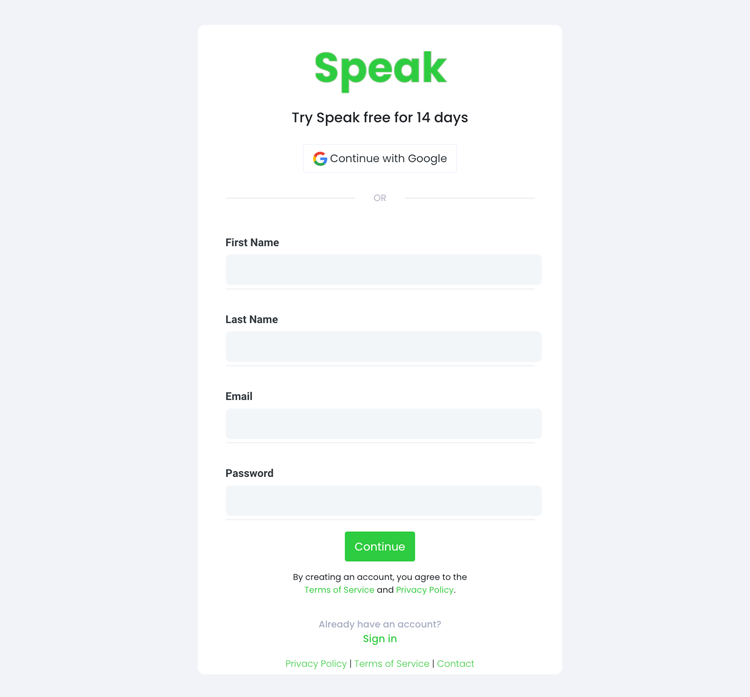
Βήμα 1: Δημιουργήστε ένα λογαριασμό Speak
To start your Norwegian captioning, you first need to Δημιουργήστε ένα λογαριασμό Speak. Μην ανησυχείτε, αυτό είναι πολύ εύκολο να γίνει!
Our team is happy to give you a 7-day trial with trial credits for Norwegian audio and video captioning included.
To sign up for Speak and start your Norwegian captioning, visit the Speak app register page here.

Step 2: Upload your Norwegian file(s) for Captioning
Συνήθως συνιστούμε MP4 για βίντεο ή MP3 για ήχο.
However, we accept a range of audio and video file types. Once you upload your file all you have to do is select “Norwegian” from the language dropdown menu to automatically caption in Norwegian.
You can upload your Norwegian file for captioning in several ways using Speak:
Αποδεκτοί τύποι αρχείων νορβηγικού ήχου
- Νορβηγικά MP3
- Νορβηγικά M4A
- Νορβηγικό WAV
- Νορβηγικό OGG
- Νορβηγική WEBM
- Νορβηγική M4P
Αποδεκτοί τύποι αρχείων νορβηγικού βίντεο
- Νορβηγικό MP4
- Νορβηγικά M4V
- Νορβηγικό WMV
- Νορβηγικό AVI
- Νορβηγικό MOV
- Νορβηγικό FLV
Δημόσια διαθέσιμες νορβηγικές διευθύνσεις URL
Μπορείτε επίσης να μεταφορτώσετε μέσα στο Speak μέσω μιας δημοσίως διαθέσιμης διεύθυνσης URL.
As long as the file type extension is available at the end of the URL you will have no problem importing your recording for automatic Norwegian captioning and analysis.
Νορβηγικές διευθύνσεις URL στο YouTube
Το Speak είναι συμβατό με βίντεο του YouTube. Το μόνο που έχετε να κάνετε είναι να αντιγράψετε τη διεύθυνση URL του βίντεο του YouTube (π.χ, https://www.youtube.com/watch?v=qKfcLcHeivc).
Το Speak θα βρει αυτόματα το αρχείο, θα υπολογίσει το μήκος και θα εισάγει το βίντεο.
Βεβαιωθείτε ότι χρησιμοποιείτε τον πλήρη σύνδεσμο και όχι το συντομευμένο απόσπασμα του YouTube. Επιπλέον, βεβαιωθείτε ότι έχετε αφαιρέσει το όνομα του καναλιού από τη διεύθυνση URL.
Ολοκλήρωση Speak
Όπως αναφέρθηκε, το Speak περιέχει επίσης μια σειρά από ενσωματώσεις για Ζουμ, Zapier, Vimeo και άλλα που θα σας βοηθήσουν να προσθέσετε αυτόματα υπότιτλους στα πολυμέσα σας.
Αυτή η βιβλιοθήκη ενσωματώσεων συνεχίζει να μεγαλώνει! Έχετε κάποιο αίτημα; Μπορείτε να μας στείλετε ένα μήνυμα.

Βήμα 3: Υπολογίστε και πληρώστε το συνολικό ποσό αυτόματα
Once you have your Norwegian audio or video file ready and load it into Speak, it will automatically calculate the total cost (trial credits are included in the trial – take advantage of it!).
Μπορείτε να πληρώσετε με την εγγραφή σας σε ένα εξατομικευμένο πρόγραμμα χρησιμοποιώντας τον υπολογιστή μας σε πραγματικό χρόνο με ενσωματωμένα λεπτά.
Μπορείτε επίσης να προσθέστε ένα υπόλοιπο ή να πληρώνετε για μεταφορτώσεις χωρίς πρόγραμμα χρησιμοποιώντας το πιστωτική κάρτα.

Step 4: Wait for Speak to caption your Norwegian audio or Norwegian video
Our automated captioning software will prepare your Norwegian captions in as little as a few minutes. Generally, Speak takes about half the audio or video length to produce the captions and insights.
Once completed, you will get an email notification that your Norwegian captions is complete. That email will contain a link back to the file so you can access the interactive media player with the Norwegian captions, analysis, and export formats ready for you.
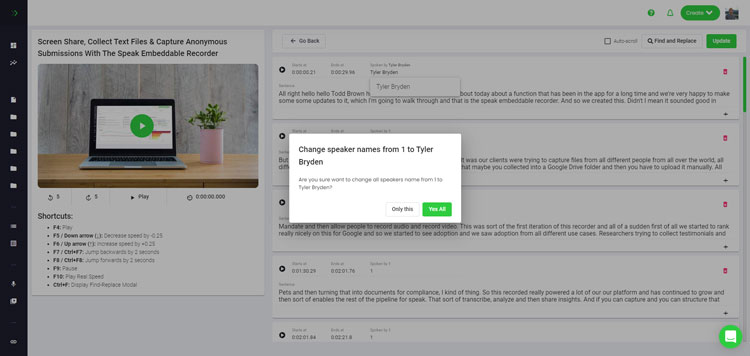
Step 5: View and edit your automated Norwegian captions
Θέλετε να κάνετε μόνοι σας τις επεξεργασίες των υπότιτλων; Όλα εντάξει! Μόλις λάβετε τους αυτόματους υπότιτλους, έχετε την επιλογή να τους επεξεργαστείτε ανά πάσα στιγμή.
Easily update speaker names, find and replace, and get your automatic Norwegian captions up to full accuracy with our intuitive captions editing system.
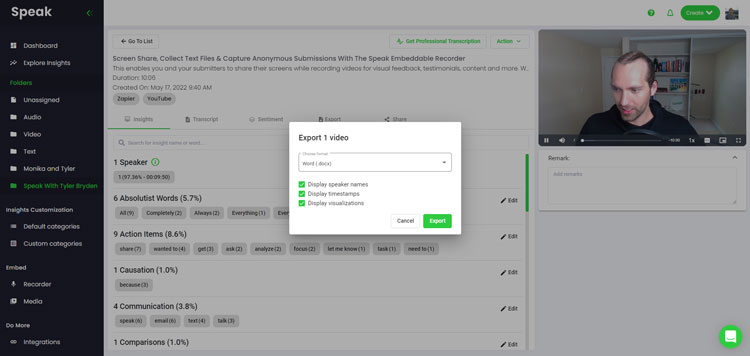
Step 6: Export your Norwegian captions and share interactive media players
With Speak, you can easily export Norwegian captions to many formats.
Below is a list of options for exporting your Norwegian captions in Speak:
- Export Norwegian captions to SRTs
- Export Norwegian captions to VTTs
Ένας πιο αποτελεσματικός τρόπος κοινής χρήσης λεζάντων είναι μέσω ενός βιβλιοθήκη πολυμέσων με δυνατότητα κοινής χρήσης που περιλαμβάνει το αρχείο πολυμέσων, πληροφορίες τεχνητής νοημοσύνης και διαδραστικές λεζάντες.
Υπάρχουν πολλά περισσότερα που μπορείτε να κάνετε με το Speak για να εμπλουτίσετε την αξία των μέσων και των λεζάντων σας.
Μη διστάσετε ποτέ να μας στείλετε ένα μήνυμα στη ζωντανή συνομιλία - είμαστε πάντα εδώ για να σας βοηθήσουμε!
We talked about Norwegian captioning here, but you may be interested in how to caption in other languages instantly and easily with Speak’s intuitive captioning and natural language processing software.
Παρακάτω έχουμε μοιραστεί πόρους για όλες τις γλώσσες. Το Speak μπορεί να σας βοηθήσει με τους υπότιτλους!
Join 300,000+ users finding radical efficiencies with their audio, video and text data to drive value.
How Much Does It Cost To Caption Norwegian?
Speak offers highly competitive pricing for Norwegian captioning compared to other captioning solutions. For a starting user, Speak offers automated Norwegian captioning from 2 credits per hour of audio on pay as you go (1 credit = US$1). Pro includes 25 credits per user per month.
Κλιμακώνουμε επίσης την τιμολόγησή μας με βάση τον όγκο των μέσων ενημέρωσης και μπορούμε να προσφέρουμε ακόμη μεγαλύτερες εκπτώσεις σε μεγάλους πελάτες.
So, if you have over 100 hours of Norwegian captioning per month please contact us through live chat and we will set you up with a customized price per minute to make Norwegian captioning even more affordable!
You can learn more about how to caption Norwegian with Speak and the relevant pricing on the σελίδα τιμολόγησης ιστότοπου και το σελίδα τιμολόγησης εντός της εφαρμογής.
What Can You Caption In Norwegian?
- Caption Norwegian interviews
- Caption Norwegian videos
- Caption Norwegian audio
- Caption Norwegian earnings calls
- Caption Norwegian focus groups
- Caption Norwegian meetings
- Caption Norwegian phone calls
- Caption Norwegian YouTube videos
- Caption Norwegian Vimeo videos
- Caption Norwegian Zoom recordings
- Caption Norwegian Google Meet recordings
- Υπότιτλοι στις ηχογραφήσεις του Microsoft Teams
- Caption Norwegian podcasts
Και πολλά άλλα!
Ποιες άλλες γλώσσες μπορούν να μιλήσουν με υπότιτλους;
Το Speak έχει ήδη χρήστες από πάνω από 90 χώρες και λαμβάνουμε συνεχώς αιτήματα για υπότιτλους και ανάλυση σε διαφορετικές γλώσσες.
Έτσι, προσθέτουμε συνεχώς περισσότερες γλώσσες στο Speak! Ακολουθούν μερικές μόνο από τον αυξανόμενο κατάλογο των γλωσσών που προσφέρει το Speak:
- Πώς να δημιουργήσετε υπότιτλους στα Αφρικάανς
- Πώς να δημιουργήσετε αραβικούς (Αιγύπτιους) υπότιτλους
- Πώς να δημιουργήσετε αραβικούς (Ιράκ) υπότιτλους
- Πώς να δημιουργήσετε αραβικούς (Ισραηλινούς) υπότιτλους
- Πώς να δημιουργήσετε αραβικούς (Ιορδανικούς) υπότιτλους
- Πώς να δημιουργήσετε αραβικούς (κουβεϊτικούς) υπότιτλους
- Πώς να δημιουργήσετε αραβικούς (Λίβανους) υπότιτλους
- Πώς να δημιουργήσετε αραβικούς (Ομάν) υπότιτλους
- Πώς να δημιουργήσετε αραβικούς υπότιτλους (Παλαιστινιακή Αρχή)
- Πώς να δημιουργήσετε αραβικούς (Κατάρ) υπότιτλους
- Πώς να δημιουργήσετε αραβικούς υπότιτλους (Σαουδική Αραβία)
- Πώς να δημιουργήσετε αραβικούς υπότιτλους (Συριακή Αραβική Δημοκρατία)
- Πώς να δημιουργήσετε αραβικούς υπότιτλους (Ηνωμένα Αραβικά Εμιράτα)
- Πώς να δημιουργήσετε υπότιτλους στα σύγχρονα αραβικά (Μπαχρέιν)
- Πώς να δημιουργήσετε αρμενικούς υπότιτλους
- Πώς να δημιουργήσετε βουλγαρικούς υπότιτλους
- Πώς να δημιουργήσετε καταλανικούς υπότιτλους
- Πώς να δημιουργήσετε υπότιτλους στα Κινέζικα (Καντονέζικα, Παραδοσιακά)
- Πώς να δημιουργήσετε λεζάντες στα κινέζικα (απλοποιημένα)
- Πώς να δημιουργήσετε κινεζικούς (παραδοσιακούς) υπότιτλους
- Πώς να δημιουργήσετε υπότιτλους στα Κροατικά
- Πώς να δημιουργήσετε υπότιτλους στα τσεχικά
- Πώς να δημιουργήσετε υπότιτλους στα Δανέζικα
- Πώς να δημιουργήσετε ολλανδικούς υπότιτλους
- Πώς να δημιουργήσετε αγγλικούς υπότιτλους
- Πώς να δημιουργήσετε αγγλικούς (Αυστραλιανούς) υπότιτλους
- Πώς να δημιουργήσετε αγγλικούς (ινδικούς) υπότιτλους
- Πώς να δημιουργήσετε αγγλικούς (ιρλανδικούς) υπότιτλους
- Πώς να δημιουργήσετε αγγλικούς (Νέα Ζηλανδία) υπότιτλους
- Πώς να δημιουργήσετε αγγλικούς (σκωτσέζους) υπότιτλους
- Πώς να δημιουργήσετε αγγλικούς (νοτιοαφρικανικούς) υπότιτλους
- Πώς να δημιουργήσετε αγγλικούς (Ηνωμένο Βασίλειο) υπότιτλους
- Πώς να δημιουργήσετε αγγλικούς (Ηνωμένες Πολιτείες) υπότιτλους
- Πώς να δημιουργήσετε εσθονικούς υπότιτλους
- Πώς να δημιουργήσετε υπότιτλους στα Φαρσί
- Πώς να δημιουργήσετε φινλανδικούς υπότιτλους
- Πώς να δημιουργήσετε γαλλικούς υπότιτλους
- Πώς να δημιουργήσετε υπότιτλους στα Γαλλικά (Καναδά)
- Πώς να δημιουργήσετε γερμανικούς υπότιτλους
- Πώς να δημιουργήσετε γερμανικούς (ελβετικούς) υπότιτλους
- Πώς να δημιουργήσετε ελληνικούς υπότιτλους
- Πώς να δημιουργήσετε υπότιτλους στα Γκουτζαράτι
- Πώς να δημιουργήσετε εβραϊκούς υπότιτλους
- Πώς να δημιουργήσετε υπότιτλους στα Χίντι
- Πώς να δημιουργήσετε ουγγρικούς υπότιτλους
- Πώς να δημιουργήσετε ισλανδικούς υπότιτλους
- Πώς να δημιουργήσετε ινδονησιακούς υπότιτλους
- Πώς να δημιουργήσετε ιρλανδικούς υπότιτλους
- Πώς να δημιουργήσετε ιταλικούς υπότιτλους
- Πώς να δημιουργήσετε ιαπωνικούς υπότιτλους
- Πώς να δημιουργήσετε υπότιτλους στα Κανάντα
- Πώς να δημιουργήσετε κορεάτικους υπότιτλους
- Πώς να δημιουργήσετε λετονικούς υπότιτλους
- Πώς να δημιουργήσετε λιθουανικούς υπότιτλους
- Πώς να δημιουργήσετε υπότιτλους στα Μαλαισιανά
- Πώς να δημιουργήσετε υπότιτλους στα Μαλαγιαλάμ
- Πώς να δημιουργήσετε νορβηγικούς υπότιτλους
- Πώς να δημιουργήσετε περσικούς υπότιτλους
- Πώς να δημιουργήσετε Πολωνικές Λεζάντες
- Πώς να δημιουργήσετε πορτογαλικούς υπότιτλους
- Πώς να δημιουργήσετε πορτογαλικούς (βραζιλιάνικους) υπότιτλους
- Πώς να δημιουργήσετε υπότιτλους στα Πορτογαλικά (Πορτογαλία)
- Πώς να δημιουργήσετε ρουμανικούς υπότιτλους
- Πώς να δημιουργήσετε υπότιτλους στα ρωσικά
- Πώς να δημιουργήσετε υπότιτλους στα Σλοβακικά
- Πώς να δημιουργήσετε υπότιτλους στα Σλοβενικά
- Πώς να δημιουργήσετε ισπανικούς υπότιτλους
- Πώς να δημιουργήσετε υπότιτλους στα Ισπανικά (Μεξικό)
- Πώς να δημιουργήσετε σουηδικούς υπότιτλους
- Πώς να δημιουργήσετε υπότιτλους στα Ταμίλ
- Πώς να δημιουργήσετε υπότιτλους στα Τελούγκου
- Πώς να δημιουργήσετε υπότιτλους στα Ταϊλανδέζικα
- Πώς να δημιουργήσετε τουρκικούς υπότιτλους
- Πώς να δημιουργήσετε ουκρανικούς υπότιτλους
- Πώς να δημιουργήσετε βιετναμέζικες λεζάντες
Τώρα έχουν προστεθεί πολλά περισσότερα!
Μπορείτε να δείτε ολόκληρη τη λίστα των γλωσσών που υποστηρίζει το Speak τόσο μέσω του λογισμικού όσο και μέσω των API.
Εξερευνήστε το Speak AI
Το Speak AI είναι μια πλατφόρμα φωνητικής τεχνολογίας και έρευνας για την Τεχνητή Νοημοσύνη. Μεταγραφή σε περισσότερες από 100 γλώσσες, ανάλυση NLP, ανάλυση συναισθήματος, πράκτορες Τεχνητής Νοημοσύνης και συμβουλευτική επιχειρήσεων.
 English
 Español
 Français
 Italiano
 العربية
 Português do Brasil
 Nederlands
 Deutsch
 עִבְרִית
 Русский
 日本語
 Polski
 Čeština
 Українська
 Slovenščina
 Svenska
 Ελληνικά
 Norsk bokmål
 简体中文
 Türkçe
 Català
 Magyar
 한국어
 Slovenčina
 Suomi